
Skip to content
KitploitKITPLOIT
StrumentiBlog
Invia
StrumentiBlog
Invia

Strumenti di Hacking, PenTest e Cybersecurity per il tuo Arsenale di Sicurezza!

Kitploit è una directory di strumenti di hacking, cybersecurity e pentesting. Scopri gli ultimi aggiornamenti dei progetti per trovare vulnerabilità, analizzare sistemi, automatizzare i test e rafforzare la tua sicurezza.

··Feed·Contatto·Privacy·© 2026 Kitploit

Directory degli strumenti

Categorie

Vedi tutte le categorie
Loading categories
awsEnum — Enumerare le risorse cloud AWS in base alle credenziali fornite | Kitploit
Strumenti/GitHubGitHub/bassammaged/awsenum
Analisi delle VulnerabilitàRaccolta InformazioniPenetration TestingSicurezza Cloud
GitHubbassammaged/awsenum

awsEnum

Enumerare le risorse cloud AWS in base alle credenziali fornite

Vedi Repository
5274 anni faRevisionato da Kitploit

Più Popolari

Vedi tutti →

Scopri gli strumenti più utilizzati dalla nostra community.

Esplora tutti gli strumenti

Sfoglia la nostra collezione di strumenti

Vedi tutti gli strumenti →
Condividi

awsEnum

Enumera i servizi AWS! senza rumore

awsEnum è uno script python che enumera i servizi AWS tramite le credenziali fornite.
:book: Indice

Indice
  1. Schermata
  2. Disclaimer
  3. Funzionalità
  4. Prerequisiti
  5. Come installare
  6. Risultati e FAQ
  7. Da fare

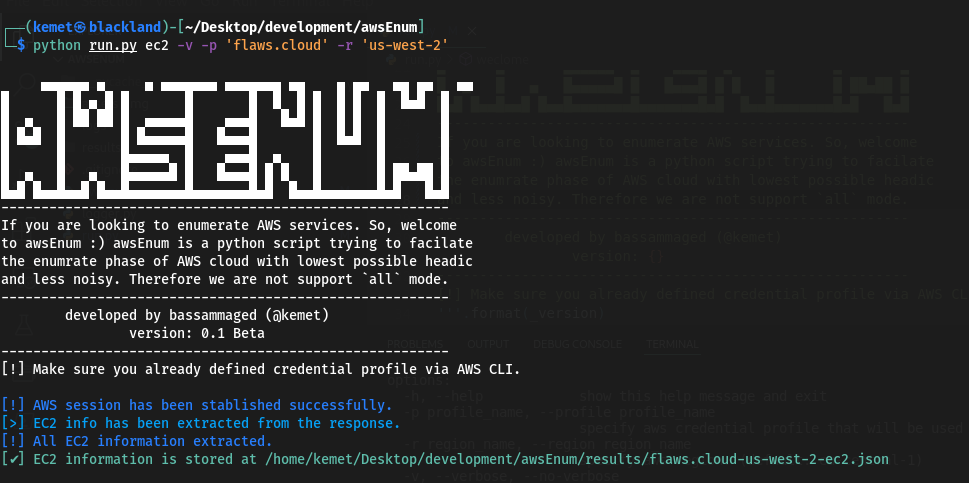
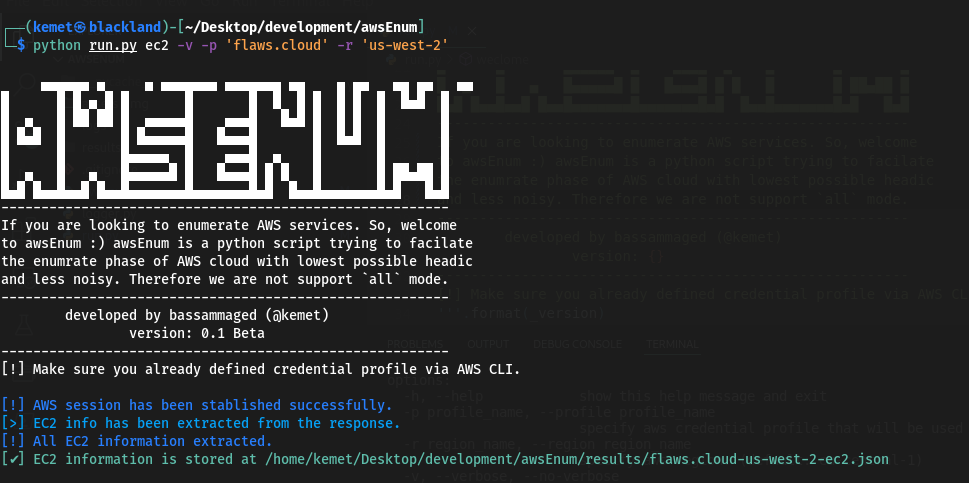
:clapper: Schermata

root@kitploit:~
     ▄▄▄▄▄▄ ▄     ▄ ▄▄▄▄▄▄▄ ▄▄▄▄▄▄▄ ▄▄    ▄ ▄▄   ▄▄ ▄▄   ▄▄ 
█      █ █ ▄ █ █       █       █  █  █ █  █ █  █  █▄█  █
█  ▄   █ ██ ██ █  ▄▄▄▄▄█    ▄▄▄█   █▄█ █  █ █  █       █
█ █▄█  █       █ █▄▄▄▄▄█   █▄▄▄█       █  █▄█  █       █
█      █       █▄▄▄▄▄  █    ▄▄▄█  ▄    █       █       █
█  ▄   █   ▄   █▄▄▄▄▄█ █   █▄▄▄█ █ █   █       █ ██▄██ █
█▄█ █▄▄█▄▄█ █▄▄█▄▄▄▄▄▄▄█▄▄▄▄▄▄▄█▄█  █▄▄█▄▄▄▄▄▄▄█▄█   █▄█
--------------------------------------------------------
If you are looking to enumerate AWS services. So, welcome
to awsEnum, awsEnum is a python script trying to facilitate 
the enumerate phase of AWS cloud with the lowest possible
headache and less noise. Therefore we are not supporting 
the `all` mode. ----------------------------------------
--------------------------------------------------------
        developed by bassammaged (@kemet)
                version: 0.1 Beta
--------------------------------------------------------
[!] Make sure you already defined credential profile via AWS CLI.

usage: run.py [-h] [-p profile_name] [-r region_name] [-v | --verbose | --no-verbose] [-t TRIES] aws_service_name

positional arguments:
  aws_service_name      Specify the aws service for enumration. Supported services are: ['ec2', 'iam', 's3'] (default: all)

options:
  -h, --help            show this help message and exit
  -p profile_name, --profile profile_name
                        specify aws credential profile that will be used through the enumeration. (default: default)
  -r region_name, --region region_name
                        specify aws region. (default: eu-central-1)
  -v, --verbose, --no-verbose
                        Allows the script to print out the message level start with debug. (default: False)
  -t TRIES, --tries TRIES
                        set maximum tries. (default: 1000)

:pencil: Disclaimer

awsEnum è in versione beta e si presume sia privo di problemi, ma se si incontrano problemi, si prega di inviare un ticket, awsEnum è codificato e pubblicato per essere utilizzato in circostanze particolari:

  1. Partecipazione ad attività di penetration testing.
  2. Svolgimento di attività di bug hunting.
  3. Audit di sicurezza del cloud AWS.
  4. Qualsiasi altra attività legale già approvata dal proprietario del bene.

awsEnum è stato creato per funzionare sotto il cofano, il che significa che non c'è intenzione di supportare la modalità all.

:fuelpump: Funzionalità

  • Connessione al servizio AWS tramite boto3, in altre parole! firma della richiesta.
  • awsEnum consente all'utente di impostare il numero di richieste [Per impostazione predefinita: 1000].
  • awsEnum salva il risultato in un file json.
  • Mantieni le credenziali AWS nella configurazione di awscli e passa semplicemente il profile_name a awsEnum.
  • Servizi supportati: ec2, iam, s3.

:cd: Prerequisiti

  1. Python3
  2. Gestore di pacchetti pip
  3. python3 -m pip install requirements.txt
  4. Sentiti libero di usare awsEnum tramite lo script run.py

:paperclip: Risultati e FAQ

root@kitploit:~
[
    {
        "AmiLaunchIndex": 0,
        "ImageId": "ami-7c803d1c",
        "InstanceId": "i-05bef8a081f307783",
        "InstanceType": "t2.micro",
        "KeyName": "Default",
        "LaunchTime": "2017-02-12 22:29:24+00:00",
        "Monitoring": {
            "State": "disabled"
        },
        "Placement": {
            "AvailabilityZone": "us-west-2a",
            "GroupName": "",
            "Tenancy": "default"
        },
        "PrivateDnsName": "ip-172-31-41-84.us-west-2.compute.internal",
        "PrivateIpAddress": "172.31.41.84",
        "ProductCodes": [],
        "PublicDnsName": "ec2-35-165-182-7.us-west-2.compute.amazonaws.com",
        "PublicIpAddress": "35.165.182.7",
        "State": {
            "Code": 16,
            "Name": "running"
        },
        "StateTransitionReason": "",
        "SubnetId": "subnet-d962aa90",
        "VpcId": "vpc-1052ce77",
        "Architecture": "x86_64",
        "BlockDeviceMappings": [
            {
                "DeviceName": "/dev/sda1",
                "Ebs": {
                    "AttachTime": "2017-02-12 22:29:25+00:00",
                    "DeleteOnTermination": true,
                    "Status": "attached",
                    "VolumeId": "vol-04f1c039bc13ea950"
                }
            }
        ],
        "ClientToken": "kTOiC1486938563883",
        "EbsOptimized": false,
        "Hypervisor": "xen",
        "IamInstanceProfile": {
            "Arn": "arn:aws:iam::975426262029:instance-profile/flaws",
            "Id": "AIPAIK7LV6U6UXJXQQR3Q"
        },
        "NetworkInterfaces": [
            {
                "Association": {
                    "IpOwnerId": "amazon",
                    "PublicDnsName": "ec2-35-165-182-7.us-west-2.compute.amazonaws.com",
                    "PublicIp": "35.165.182.7"
                },
                "Attachment": {
                    "AttachTime": "2017-02-12 22:29:24+00:00",
                    "AttachmentId": "eni-attach-a4901fc2",
                    "DeleteOnTermination": true,
                    "DeviceIndex": 0,
                    "Status": "attached",
                    "NetworkCardIndex": 0
                },
                "Description": "",
                "Groups": [
                    {
                        "GroupName": "launch-wizard-1",
                        "GroupId": "sg-490f6631"
                    }
                ],
                "Ipv6Addresses": [],
                "MacAddress": "06:b0:7a:92:21:cf",
                "NetworkInterfaceId": "eni-c26ed780",
                "OwnerId": "975426262029",
                "PrivateDnsName": "ip-172-31-41-84.us-west-2.compute.internal",
                "PrivateIpAddress": "172.31.41.84",
                "PrivateIpAddresses": [
                    {
                        "Association": {
                            "IpOwnerId": "amazon",
                            "PublicDnsName": "ec2-35-165-182-7.us-west-2.compute.amazonaws.com",
                            "PublicIp": "35.165.182.7"
                        },
                        "Primary": true,
                        "PrivateDnsName": "ip-172-31-41-84.us-west-2.compute.internal",
                        "PrivateIpAddress": "172.31.41.84"
                    }
                ],
                "SourceDestCheck": true,
                "Status": "in-use",
                "SubnetId": "subnet-d962aa90",
                "VpcId": "vpc-1052ce77",
                "InterfaceType": "interface"
            }
        ],
        "RootDeviceName": "/dev/sda1",
        "RootDeviceType": "ebs",
        "SecurityGroups": [
            {
                "GroupName": "launch-wizard-1",
                "GroupId": "sg-490f6631"
            }
        ],
        "SourceDestCheck": true,
        "VirtualizationType": "hvm",
        "CpuOptions": {
            "CoreCount": 1,
            "ThreadsPerCore": 1
        },
        "CapacityReservationSpecification": {
            "CapacityReservationPreference": "open"
        },
        "HibernationOptions": {
            "Configured": false
        },
        "MetadataOptions": {
            "State": "applied",
            "HttpTokens": "optional",
            "HttpPutResponseHopLimit": 1,
            "HttpEndpoint": "enabled",
            "HttpProtocolIpv6": "disabled",
            "InstanceMetadataTags": "disabled"
        },
        "EnclaveOptions": {
            "Enabled": false
        },
        "PlatformDetails": "Linux/UNIX",
        "UsageOperation": "RunInstances",
        "UsageOperationUpdateTime": "2017-02-12 22:29:24+00:00",
        "PrivateDnsNameOptions": {},
        "MaintenanceOptions": {
            "AutoRecovery": "default"
        }
    }
]

:paperclip: Da fare

  • Supporto per i servizi s3.
  • Supporto per i servizi iam.
Scarica lo strumento