
Skip to content
KitploitKITPLOIT
StrumentiBlog
Log in
Invia
StrumentiBlog
Invia

Strumenti di Hacking, PenTest e Cybersecurity per il tuo Arsenale di Sicurezza!

Kitploit è una directory di strumenti di hacking, cybersecurity e pentesting. Scopri gli ultimi aggiornamenti dei progetti per trovare vulnerabilità, analizzare sistemi, automatizzare i test e rafforzare la tua sicurezza.

··Feed·Contatto·Privacy·© 2026 Kitploit

Directory degli strumenti

Categorie

Vedi tutte le categorie
Loading categories
al-khaser — Tecniche malware pubbliche utilizzate in natura: Virtual Machine, Emulation, Debuggers, Sandbox detection. | Kitploit
Strumenti/GitHubGitHub/ayoubfaouzi/al-khaser
Evasione IDS/IPSAnalisi MalwarePenetration TestingApprendimento e FormazioneRed TeamingLab e Pratica
GitHubayoubfaouzi/al-khaser

al-khaser

Tecniche malware pubbliche utilizzate in natura: Virtual Machine, Emulation, Debuggers, Sandbox detection.


Vedi Repository
7.1k1.3k263 mesi faRevisionato da Kitploit

Più Popolari

Vedi tutti →

Scopri gli strumenti più utilizzati dalla nostra community.

Esplora tutti gli strumenti

Sfoglia la nostra collezione di strumenti

Vedi tutti gli strumenti →
Condividi

Al-Khaser v0.81

Logo

Contenuti

  • Introduzione
  • Possibili usi
  • Funzionalità
  • Attacchi anti-debug
  • Anti-Dumping
  • Attacchi temporali
  • Interazione umana
  • Anti-VM
  • Anti-Disassemblaggio
  • Requisiti
  • Licenza

Introduzione

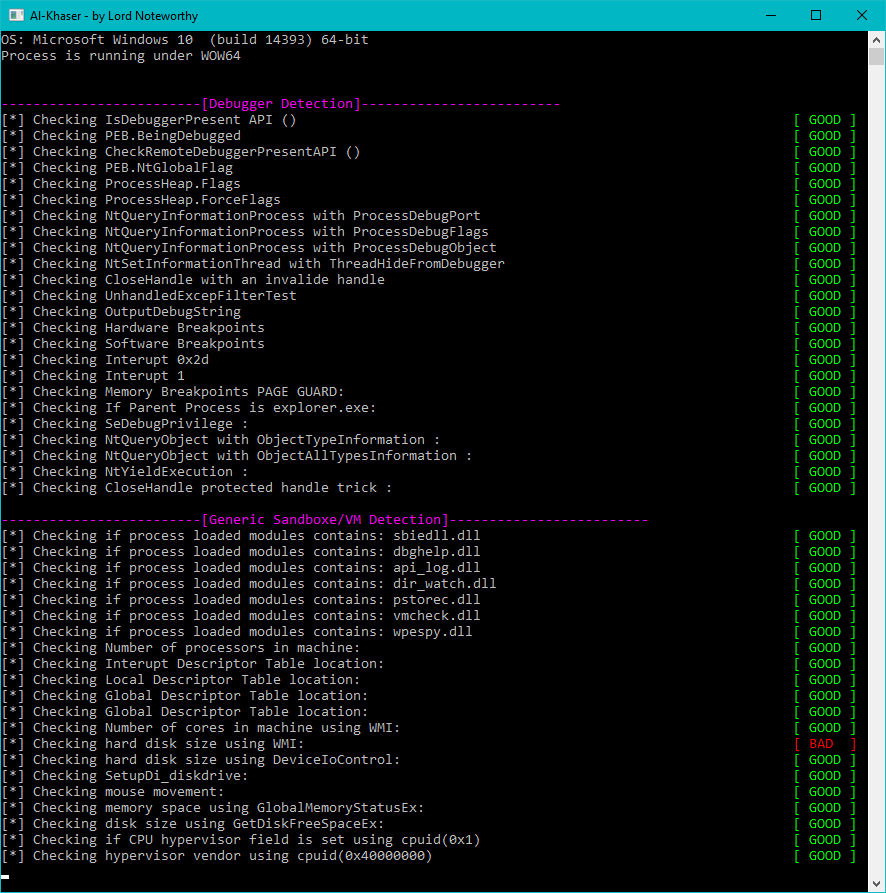
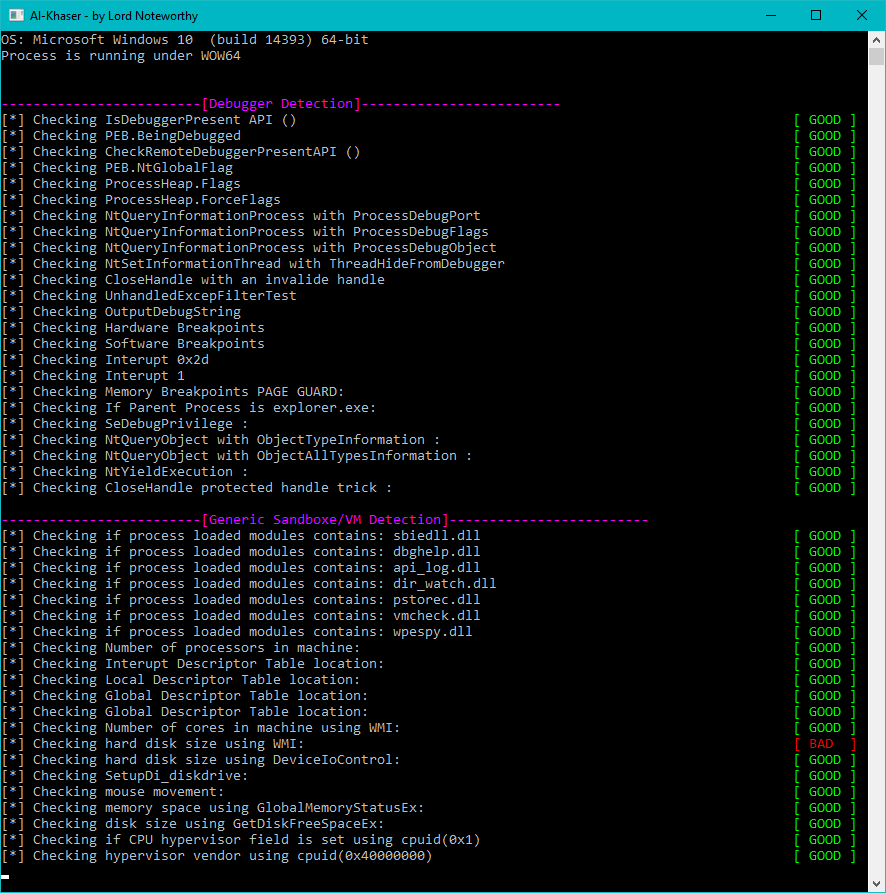
al-khaser è un'applicazione PoC "malware" con buone intenzioni che mira a stressare il tuo sistema anti-malware. Esegue una serie di trucchi comuni dei malware con l'obiettivo di vedere se rimani sotto il radar.
Logo

Utilizzo

$ ./al-khaser.exe -h
Usage: al-khaser.exe [OPTIONS]
Options:
  --check <type>      Enable specific check(s). Can be used multiple times. Valid types are:
                        TLS              (Thread Local Storage callback checks)
                        DEBUG            (Anti-debugging checks)
                        INJECTION        (Code injection checks)
                        GEN_SANDBOX      (Generic sandbox checks)
                        VBOX             (VirtualBox detection)
                        VMWARE           (VMware detection)
                        VPC              (Virtual PC detection)
                        QEMU             (QEMU detection)
                        KVM              (KVM detection)
                        XEN              (Xen detection)
                        WINE             (Wine detection)
                        PARALLELS        (Parallels detection)
                        HYPERV           (Hyper-V detection)
                        CODE_INJECTIONS  (Additional code injection techniques)
                        TIMING_ATTACKS   (Timing/sleep-based sandbox evasion)
                        DUMPING_CHECK    (Dumping memory/process checks)
                        ANALYSIS_TOOLS   (Analysis tools detection)
                        ANTI_DISASSM     (Anti-disassembly checks)
  --sleep <seconds>   Set sleep/delay duration in seconds (default: 600).
  --delay <seconds>   Alias for --sleep.
  -h, --help          Show this help message and exit.

Esempi:
  al-khaser.exe --check DEBUG --check TIMING_ATTACKS --sleep 30
  al-khaser.exe --check VMWARE --check QEMU
  al-khaser.exe --sleep 30

Download

Puoi scaricare i binari precompilati (x86, x64) dalla pagina delle release di questo progetto. La password per i file 7z si trova qui.

Possibili usi

  • Stai sviluppando un plugin anti-debug e vuoi verificarne l'efficacia.
  • Vuoi assicurarti che la tua soluzione sandbox sia abbastanza nascosta.
  • Oppure vuoi assicurarti che il tuo ambiente di analisi malware sia ben nascosto.

Per favore, se incontri uno dei trucchi anti-analisi che hai visto in un malware, non esitare a contribuire.

Funzionalità

Attacchi anti-debug

  • IsDebuggerPresent
  • CheckRemoteDebuggerPresent
  • Process Environment Block (BeingDebugged)
  • Process Environment Block (NtGlobalFlag)
  • ProcessHeap (Flags)
  • ProcessHeap (ForceFlags)
  • Low Fragmentation Heap (LFH)
  • NtQueryInformationProcess (ProcessDebugPort)
  • NtQueryInformationProcess (ProcessDebugFlags)
  • NtQueryInformationProcess (ProcessDebugObject)
  • WudfIsAnyDebuggerPresent
  • WudfIsKernelDebuggerPresent
  • WudfIsUserDebuggerPresent
  • NtSetInformationThread (HideThreadFromDebugger)
  • NtQueryObject (ObjectTypeInformation)
  • NtQueryObject (ObjectAllTypesInformation)
  • CloseHanlde (NtClose) Invalide Handle
  • SetHandleInformation (Protected Handle)
  • UnhandledExceptionFilter
  • OutputDebugString (GetLastError())
  • Hardware Breakpoints (SEH / GetThreadContext)
  • Software Breakpoints (INT3 / 0xCC)
  • Memory Breakpoints (PAGE_GUARD)
  • Interrupt 0x2d
  • Interrupt 1
  • Trap Flag
  • Parent Process (Explorer.exe)
  • SeDebugPrivilege (Csrss.exe)
  • NtYieldExecution / SwitchToThread
  • TLS callbacks
  • Process jobs
  • Memory write watching
  • Page exception breakpoint detection
  • API hook detection (module bounds based)

Anti-injection

  • Enumerate modules with EnumProcessModulesEx (32-bit, 64-bit, and all options)
  • Enumerate modules with ToolHelp32
  • Enumerate the process LDR structures with LdrEnumerateLoadedModules
  • Enumerate the process LDR structures directly
  • Walk memory with GetModuleInformation
  • Walk memory for hidden modules

Anti-Dumping

  • Erase PE header from memory
  • SizeOfImage

Attacchi temporali [Anti-Sandbox]

  • RDTSC (with CPUID to force a VM Exit)
  • RDTSC (Locky version with GetProcessHeap & CloseHandle)
  • Sleep -> SleepEx -> NtDelayExecution
  • Sleep (in a loop a small delay)
  • Sleep and check if time was accelerated (GetTickCount)
  • SetTimer (Standard Windows Timers)
  • timeSetEvent (Multimedia Timers)
  • WaitForSingleObject -> WaitForSingleObjectEx -> NtWaitForSingleObject
  • WaitForMultipleObjects -> WaitForMultipleObjectsEx -> NtWaitForMultipleObjects
  • IcmpSendEcho (CCleaner Malware)
  • CreateWaitableTimer
  • CreateTimerQueueTimer
  • Big crypto loops (todo)

Interazione umana / Generico [Anti-Sandbox]

  • Mouse movement
  • File names like sample.exe or sandbox.exe.
  • Total Physical memory (GlobalMemoryStatusEx)
  • Disk size using DeviceIoControl (IOCTL_DISK_GET_LENGTH_INFO)
  • Disk size using GetDiskFreeSpaceEx (TotalNumberOfBytes)
  • Mouse (Single click / Double click) (todo)
  • DialogBox (todo)
  • Scrolling (todo)
  • Execution after reboot (todo)
  • Count of processors (Win32/Tinba - Win32/Dyre)
  • Sandbox known product IDs (todo)
  • Color of background pixel (todo)
  • Keyboard layout (Win32/Banload) (todo)
  • Genuine Windows installation.
  • Known Sandbox hostnames and usernames
Scarica lo strumento