
Skip to content
KitploitKITPLOIT
उपकरणब्लॉग
जमा करें
उपकरणब्लॉग
जमा करें

हैकिंग, पेनटेस्ट और साइबर सुरक्षा उपकरण आपके सुरक्षा शस्त्रागार के लिए!

Kitploit हैकिंग, साइबर सुरक्षा और पेंटेस्टिंग टूल्स की एक निर्देशिका है। कमजोरियों को खोजने, सिस्टम का विश्लेषण करने, परीक्षण को स्वचालित करने और अपनी सुरक्षा को मजबूत करने के लिए नवीनतम प्रोजेक्ट अपडेट खोजें।

··फ़ीड·संपर्क·गोपनीयता·© 2026 Kitploit

टूल निर्देशिका

श्रेणियाँ

सभी श्रेणियाँ देखें
Loading categories
chisel — HTTP पर SSH एन्क्रिप्शन के साथ तेज़ TCP/UDP टनल, जो रिवर्स पोर्ट फ़ॉरवर्डिंग, SOCKS5 प्रॉक्सी और क्लाइंट प्रमाणीकरण का समर्थन करता है, सुरक्षित नेटवर्क ट्रैवर्सल और फ़ायरवॉल से बचने के लिए। | Kitploit
उपकरण/GitHubGitHub/jpillora/chisel
आईडीएस/आईपीएस से बचनानेटवर्क सुरक्षापेनिट्रेशन टेस्टिंगउपयोगिताएँ और फ्रेमवर्करेड टीमिंग
GitHubjpillora/chisel

chisel

HTTP पर SSH एन्क्रिप्शन के साथ तेज़ TCP/UDP टनल, जो रिवर्स पोर्ट फ़ॉरवर्डिंग, SOCKS5 प्रॉक्सी और क्लाइंट प्रमाणीकरण का समर्थन करता है, सुरक्षित नेटवर्क ट्रैवर्सल और फ़ायरवॉल से बचने के लिए।

रिपॉजिटरी देखें
16.4k1.6k11 दिन पहलेKitploit द्वारा समीक्षित

सबसे लोकप्रिय

सभी देखें →

हमारे समुदाय द्वारा सबसे अधिक उपयोग किए जाने वाले उपकरण खोजें।

सभी उपकरण खोजें

हमारे उपकरणों का संग्रह ब्राउज़ करें

सभी उपकरण देखें →
साझा करें

Chisel

GoDoc CI

Chisel एक तेज़ TCP/UDP टनल है, जो HTTP के ऊपर परिवहनित होती है और SSH के माध्यम से सुरक्षित होती है। क्लाइंट और सर्वर दोनों को शामिल करने वाला एकल निष्पादन योग्य (executable)। Go (golang) में लिखा गया। Chisel मुख्य रूप से फ़ायरवॉल से गुज़रने के लिए उपयोगी है, हालाँकि इसका उपयोग आपके नेटवर्क में एक सुरक्षित एंडपॉइंट प्रदान करने के लिए भी किया जा सकता है।
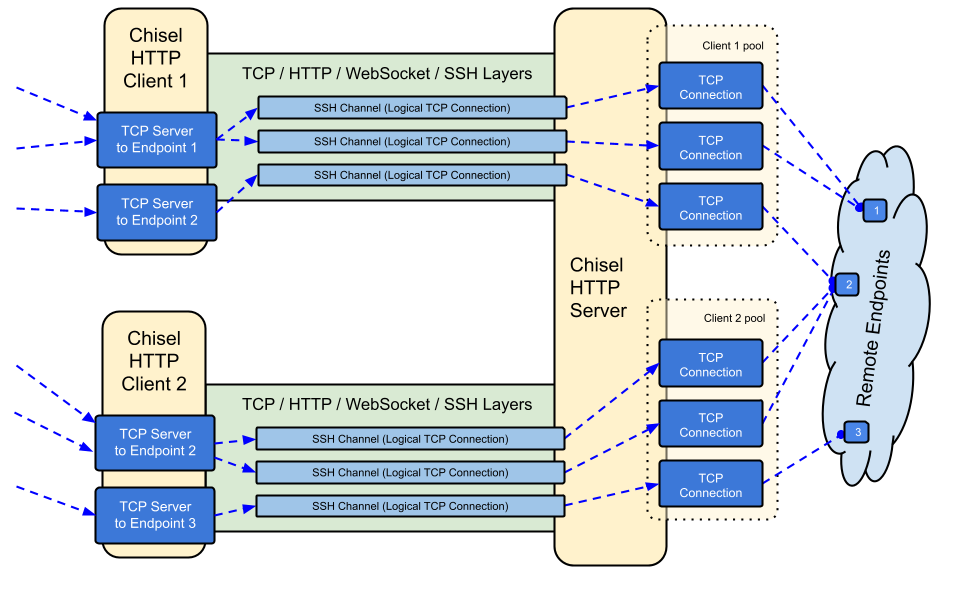
overview

विषय-सूची

  • Features
  • Install
  • Demo
  • Usage
  • Contributing
  • Changelog
  • License

विशेषताएँ

  • उपयोग में आसान
  • प्रदर्शनकारी*
  • SSH प्रोटोकॉल का उपयोग करने वाले एन्क्रिप्टेड कनेक्शन (crypto/ssh के माध्यम से)
  • प्रमाणित कनेक्शन; उपयोगकर्ता कॉन्फ़िग फ़ाइल के साथ प्रमाणित क्लाइंट कनेक्शन, फिंगरप्रिंट मिलान के साथ प्रमाणित सर्वर कनेक्शन।
  • क्लाइंट एक्सपोनेंशियल बैकऑफ़ के साथ स्वतः पुनः कनेक्ट होता है (--min/max-retry-interval के माध्यम से ट्यून करने योग्य); कीपअलाइव पिंग्स टाइम आउट हो जाते हैं, इसलिए चुपचाप मृत कनेक्शन (स्लीप/वेक, NAT टाइमआउट, सर्वर रीस्टार्ट) का पता लगाकर पुनः स्थापित किया जाता है
  • क्लाइंट एक TCP कनेक्शन पर कई टनल एंडपॉइंट बना सकते हैं
  • क्लाइंट वैकल्पिक रूप से SOCKS या HTTP CONNECT प्रॉक्सी से गुज़र सकते हैं
  • रिवर्स पोर्ट फ़ॉरवर्डिंग (कनेक्शन सर्वर से होकर क्लाइंट से बाहर जाते हैं)
  • सर्वर वैकल्पिक रूप से रिवर्स प्रॉक्सी के रूप में भी कार्य करता है
  • सर्वर वैकल्पिक रूप से SOCKS5 कनेक्शन की अनुमति देता है (नीचे गाइड देखें)
  • क्लाइंट वैकल्पिक रूप से रिवर्स पोर्ट फ़ॉरवर्ड से SOCKS5 कनेक्शन की अनुमति दे सकते हैं
  • stdio पर क्लाइंट कनेक्शन जो ssh -o ProxyCommand का समर्थन करता है, HTTP पर SSH प्रदान करता है

स्थापना

बाइनरी

Releases Releases

नवीनतम रिलीज़ देखें या curl https://i.jpillora.com/chisel! | bash के साथ अभी डाउनलोड और इंस्टॉल करें

बाइनरी नवीनतम Go रिलीज़ के साथ बनाई गई हैं, जो न्यूनतम OS संस्करण निर्धारित करती है: Windows 10 / Server 2016, macOS 12, Linux कर्नेल 3.2, FreeBSD 12.2। पुराने सिस्टम (जैसे Windows 7) के लिए, release v1.8.1 या उससे पहले का उपयोग करें।

Docker

Docker Pulls Image Size```sh docker run --rm -it jpillora/chisel --help

root@kitploit:~
इमेजेस मल्टी-आर्क हैं और दोनों Docker Hub (`jpillora/chisel`) और GitHub Container Registry (`ghcr.io/jpillora/chisel`) पर प्रकाशित होती हैं।

### Fedora

पैकेज को Fedora समुदाय द्वारा अनुरक्षित किया जाता है। यदि आप RPM के उपयोग से संबंधित समस्याओं का सामना करते हैं, तो कृपया इस [इश्यू ट्रैकर](https://bugzilla.redhat.com/buglist.cgi?bug_status=NEW&bug_status=ASSIGNED&classification=Fedora&component=chisel&list_id=11614537&product=Fedora&product=Fedora%20EPEL) का उपयोग करें।```sh
sudo dnf -y install chisel

स्रोत```sh

$ go install github.com/jpillora/chisel@latest

root@kitploit:~
## डेमो

आप मिनटों में अपना खुद का डेमो सर्वर चला सकते हैं (पुराना Heroku डेमो Heroku के मुफ्त टियर के साथ समाप्त हो गया)। [`example/fly.toml`](https://github.com/jpillora/chisel/blob/HEAD/example/fly.toml) इस `chisel server` को [fly.io](https://fly.io) के मुफ्त कोटे पर तैनात करता है:```sh
$ chisel server --port $PORT --backend http://example.com
# listens on $PORT, proxies normal web requests to http://example.com

इसे example/ निर्देशिका से fly launch --copy-config के साथ तैनात करें, फिर सर्वर के साथ चल रही किसी भी सेवा के लिए टनल बनाएँ, उदा.:```sh $ chisel client https://.fly.dev 3000

connects to your chisel server,

tunnels your localhost:3000 to the server's localhost:3000

root@kitploit:~
अपने ऐप का URL ब्राउज़र में खोलने पर अनुरोध सर्वर के डिफ़ॉल्ट बैकएंड प्रॉक्सी तक पहुँचता है और [example.com](http://example.com) की एक प्रति दिखाता है।

## उपयोग

<!-- render these help texts by hand,
  or use https://github.com/jpillora/md-tmpl
    with $ md-tmpl -w README.md -->

<!--tmpl,code=plain:echo "$ chisel --help" && go run main.go --help | sed 's#0.0.0-src (go1\..*)#X.Y.Z#' -->``` plain 
$ chisel --help

  Usage: chisel [command] [--help]

  Version: X.Y.Z

  Commands:
    server - runs chisel in server mode
    client - runs chisel in client mode

  Read more:
    https://github.com/jpillora/chisel

``` plain

$ chisel server --help

Usage: chisel server [options]

Options:

root@kitploit:~
--host, Defines the HTTP listening host – the network interface
(defaults the environment variable HOST and falls back to 0.0.0.0).

--port, -p, Defines the HTTP listening port (defaults to the environment
variable PORT and falls back to port 8080).

--key, (deprecated use --keygen and --keyfile instead)
An optional string to seed the generation of a ECDSA public
and private key pair. All communications will be secured using this
key pair. Share the subsequent fingerprint with clients to enable detection
of man-in-the-middle attacks (defaults to the CHISEL_KEY environment
variable, otherwise a new key is generate each run).

--keygen, A path to write a newly generated PEM-encoded SSH private key file.
If users depend on your --key fingerprint, you may also include your --key to
output your existing key. Use - (dash) to output the generated key to stdout.

--keyfile, An optional path to a PEM-encoded SSH private key. When
this flag is set, the --key option is ignored, and the provided private key
is used to secure all communications. (defaults to the CHISEL_KEY_FILE
environment variable). Since ECDSA keys are short, you may also set keyfile
to the inline key string itself, exactly as printed by --keygen (a base64
string with a "ck-" prefix); no extra base64 encoding is needed.

--authfile, An optional path to a users.json file. This file should
be an object with users defined like:
  {
    "<user:pass>": ["<addr-regex>","<addr-regex>"]
  }
when <user> connects, their <pass> will be verified and then
each of the remote addresses will be compared against the list
of address regular expressions for a match. Patterns are NOT
anchored by default: "10.0.0.1:80" also matches
"210.0.0.1:8080", and "." matches any character. Anchor your
patterns, e.g. "^10\.0\.0\.1:80$". The empty string ""
matches every address. Addresses will
always come in the form "<remote-host>:<remote-port>" for normal remotes,
"R:<local-interface>:<local-port>" for reverse port forwarding
remotes, and "socks" for SOCKS5 proxy access. Note that SOCKS5
access previously bypassed this list; existing authfiles which
should allow SOCKS5 must add an entry matching "socks" (the
empty wildcard "" matches everything, including "socks"). This
file will be automatically reloaded on change. Reloads apply
to new connections and to new tunnels of connected clients;
established tunnels are not interrupted.

--auth, An optional string representing a single user with full
access, in the form of <user:pass>. It is equivalent to creating an
authfile with {"<user:pass>": [""]}. If unset, it will use the
environment variable AUTH.

--keepalive, An optional keepalive interval. Since the underlying
transport is HTTP, in many instances we'll be traversing through
proxies, often these proxies will close idle connections. You must
specify a time with a unit, for example '5s' or '2m'. Defaults
to '25s' (set to 0s to disable).

--backend, Specifies another HTTP server to proxy requests to when
chisel receives a normal HTTP request. Useful for hiding chisel in
plain sight. --proxy is accepted as an alias for this flag.

--socks5, Allow clients to access the internal SOCKS5 proxy. See
chisel client --help for more information.

--reverse, Allow clients to specify reverse port forwarding remotes
in addition to normal remotes.

--tls-key, Enables TLS and provides optional path to a PEM-encoded
TLS private key. When this flag is set, you must also set --tls-cert,
and you cannot set --tls-domain.

--tls-cert, Enables TLS and provides optional path to a PEM-encoded
TLS certificate. When this flag is set, you must also set --tls-key,
and you cannot set --tls-domain.

--tls-domain, Enables TLS and automatically acquires a TLS key and
certificate using LetsEncrypt. Setting --tls-domain requires port 443.
You may specify multiple --tls-domain flags to serve multiple domains.
The resulting files are cached in the "$HOME/.cache/chisel" directory.
You can modify this path by setting the CHISEL_LE_CACHE variable,
or disable caching by setting this variable to "-". You can optionally
provide a certificate notification email by setting CHISEL_LE_EMAIL.

--tls-ca, a path to a PEM encoded CA certificate bundle or a directory
holding multiple PEM encode CA certificate bundle files, which is used to 
validate client connections. The provided CA certificates will be used 
instead of the system roots. This is commonly used to implement mutual-TLS. 

--pid Generate pid file in current working directory

-v, Enable verbose logging

--help, This help text

Signals: The chisel process is listening for: a SIGINT or SIGTERM to begin a graceful shutdown (a second signal forces an immediate exit), a SIGUSR2 to print process stats, and a SIGHUP to short-circuit the client reconnect timer

Version: X.Y.Z

Read more: https://github.com/jpillora/chisel

root@kitploit:~
<!--/tmpl-->


<!--tmpl,code=plain:echo "$ chisel client --help" && go run main.go client --help | sed 's#0.0.0-src (go1\..*)#X.Y.Z#' -->``` plain 
$ chisel client --help

  Usage: chisel client [options] <server> <remote> [remote] [remote] ...

  <server> is the URL to the chisel server.

  <remote>s are remote connections tunneled through the server, each of
  which come in the form:

    <local-host>:<local-port>:<remote-host>:<remote-port>/<protocol>

    ■ local-host defaults to 0.0.0.0 (all interfaces).
    ■ local-port defaults to remote-port.
    ■ remote-port is required*.
    ■ remote-host defaults to 127.0.0.1 (server localhost).
    ■ protocol defaults to tcp.

  which shares <remote-host>:<remote-port> from the server to the client
  as <local-host>:<local-port>, or:

    R:<local-interface>:<local-port>:<remote-host>:<remote-port>/<protocol>

  which does reverse port forwarding, sharing <remote-host>:<remote-port>
  from the client to the server's <local-interface>:<local-port>.

    example remotes

      3000
      example.com:3000
      3000:google.com:80
      192.168.0.5:3000:google.com:80
      socks
      5000:socks
      R:2222:localhost:22
      R:socks
      R:5000:socks
      stdio:example.com:22
      1.1.1.1:53/udp

    When the chisel server has --socks5 enabled, remotes can
    specify "socks" in place of remote-host and remote-port.
    The default local host and port for a "socks" remote is
    127.0.0.1:1080. Connections to this remote will terminate
    at the server's internal SOCKS5 proxy. When the server also
    has --authfile set, SOCKS5 access requires an entry matching
    the token "socks" in the user's address list.

    When the chisel server has --reverse enabled, remotes can
    be prefixed with R to denote that they are reversed. That
    is, the server will listen and accept connections, and they
    will be proxied through the client which specified the remote.
    Reverse remotes specifying "R:socks" will listen on the server's
    default socks port (1080) and terminate the connection at the
    client's internal SOCKS5 proxy.

    When stdio is used as local-host, the tunnel will connect standard
    input/output of this program with the remote. This is useful when 
    combined with ssh ProxyCommand. You can use
      ssh -o ProxyCommand='chisel client chiselserver stdio:%h:%p' \
          [email protected]
    to connect to an SSH server through the tunnel.

  Options:

    --fingerprint, A *strongly recommended* fingerprint string
    to perform host-key validation against the server's public key.
    Fingerprint mismatches will close the connection.
    Fingerprints are generated by hashing the ECDSA public key using
    SHA256 and encoding the result in base64.
    Fingerprints must be 44 characters containing a trailing equals (=).
    Legacy MD5 colon fingerprints (deprecated) are still accepted,
    but only in their full 16-octet form; truncated prefixes are
    rejected.

    --auth, An optional username and password (client authentication)
    in the form: "<user>:<pass>". These credentials are compared to
    the credentials inside the server's --authfile. defaults to the
    AUTH environment variable.

    --keepalive, An optional keepalive interval. Since the underlying
    transport is HTTP, in many instances we'll be traversing through
    proxies, often these proxies will close idle connections. You must
    specify a time with a unit, for example '5s' or '2m'. Defaults
    to '25s' (set to 0s to disable).

    --max-retry-count, Maximum number of times to retry before exiting.
    Defaults to unlimited.

    --min-retry-interval, Minimum wait time before retrying after a
    disconnection. Defaults to 1 second.

    --max-retry-interval, Maximum wait time before retrying after a
    disconnection. Defaults to 5 minutes.

    --proxy, An optional HTTP CONNECT or SOCKS5 proxy which will be
    used to reach the chisel server. Authentication can be specified
    inside the URL. Credentials must be URL-encoded; for example a
    "#" in the password must be written as "%23".
    For example, http://admin:[email protected]:8081
            or: socks://admin:[email protected]:1080
    The socks://, socks5:// and socks5h:// schemes are equivalent:
    DNS is always resolved by the proxy.

    --header, Set a custom header in the form "HeaderName: HeaderContent".
    Can be used multiple times. (e.g --header "Foo: Bar" --header "Hello: World")

    --hostname, Optionally set the 'Host' header (defaults to the host
    found in the server url).

    --sni, Override the ServerName when using TLS (defaults to the 
    hostname).

    --tls-ca, An optional root certificate bundle used to verify the
    chisel server. Only valid when connecting to the server with
    "https" or "wss". By default, the operating system CAs will be used.

    --tls-skip-verify, Skip server TLS certificate verification of
    chain and host name (if TLS is used for transport connections to
    server). If set, client accepts any TLS certificate presented by
    the server and any host name in that certificate. This only affects
    transport https (wss) connection. Chisel server's public key
    may be still verified (see --fingerprint) after inner connection
    is established.

    --tls-key, a path to a PEM encoded private key used for client 
    authentication (mutual-TLS).

    --tls-cert, a path to a PEM encoded certificate matching the provided 
    private key. The certificate must have client authentication 
    enabled (mutual-TLS).

    --pid Generate pid file in current working directory

    -v, Enable verbose logging

    --help, This help text

  Signals:
    The chisel process is listening for:
      a SIGINT or SIGTERM to begin a graceful shutdown
        (a second signal forces an immediate exit),
      a SIGUSR2 to print process stats, and
      a SIGHUP to short-circuit the client reconnect timer

  Version:
    X.Y.Z

  Read more:
    https://github.com/jpillora/chisel

सुरक्षा

एन्क्रिप्शन हमेशा सक्षम रहता है। जब आप chisel सर्वर शुरू करते हैं, यह एक इन-मेमोरी ECDSA सार्वजनिक/निजी कुंजी जोड़ी उत्पन्न करेगा। सार्वजनिक कुंजी फ़िंगरप्रिंट (base64-encoded SHA256) सर्वर शुरू होते ही प्रदर्शित होगा। बेतरतीब कुंजी उत्पन्न करने के बजाय, सर्वर वैकल्पिक रूप से --keyfile विकल्प का उपयोग करके एक कुंजी फ़ाइल निर्दिष्ट कर सकता है। जब क्लाइंट कनेक्ट होते हैं, वे भी सर्वर का सार्वजनिक कुंजी फ़िंगरप्रिंट प्रदर्शित करेंगे। क्लाइंट --fingerprint विकल्प का उपयोग करके किसी विशेष फ़िंगरप्रिंट को बाध्य कर सकता है। लीगेसी MD5 फ़िंगरप्रिंट अभी भी स्वीकार किए जाते हैं लेकिन पूर्ण 16-ऑक्टेट कोलन रूप में होने चाहिए — छोटे किए गए प्रीफ़िक्स अस्वीकार कर दिए जाते हैं। अधिक जानकारी के लिए ऊपर --help देखें।

सर्वर प्रमाणीकरण से पहले इनबाउंड websocket संदेश आकारों को भी सीमित करता है (CHISEL_WS_READ_LIMIT, डिफ़ॉल्ट 512 KiB), ताकि अनप्रमाणित पीयर बड़े आकार के संदेशों से मेमोरी समाप्त न कर सकें। डिफ़ॉल्ट x/crypto/ssh के 256 KiB अधिकतम ट्रांसपोर्ट पैकेट से आराम से ऊपर बैठता है, इसलिए कोई भी वैध SSH पैकेट कभी अस्वीकार नहीं किया जाता। केवल 0 सीमा को अक्षम करता है; नकारात्मक मान सुरक्षित डिफ़ॉल्ट पर वापस आ जाते हैं।

प्रमाणीकरण

--authfile विकल्प का उपयोग करके, सर्वर वैकल्पिक रूप से स्वीकृत उपयोगकर्ताओं की सूची बनाने के लिए एक user.json कॉन्फ़िगरेशन फ़ाइल प्रदान कर सकता है। फिर क्लाइंट --auth विकल्प का उपयोग करके प्रमाणित करता है। उदाहरण प्रमाणीकरण कॉन्फ़िगरेशन फ़ाइल के लिए users.json देखें। अधिक जानकारी के लिए ऊपर --help देखें।

authfile व्यवहार पर नोट्स:

  • फ़ाइल पर नज़र रखी जाती है और लाइव पुनः लोड होती है — जिसमें रीनम के माध्यम से एडिटर सेव (vim) और kubernetes configmap अपडेट शामिल हैं। पुनः लोड नए कनेक्शनों और पहले से कनेक्टेड क्लाइंट्स के नए टनलों पर लागू होते हैं; हटाए गए उपयोगकर्ता तुरंत नए टनलों तक पहुंच खो देते हैं, हालांकि स्थापित टनल बाधित नहीं होते।
  • एड्रेस पैटर्न नियमित अभिव्यक्तियाँ हैं और एंकर नहीं हैं — उन्हें ^ और $ के साथ एंकर करें (सर्वर लोड के समय बिना एंकर वाले पैटर्न के बारे में चेतावनी देता है)। खाली स्ट्रिंग "" सब कुछ मेल खाती है।
  • SOCKS5 पहुंच socks टोकन से मेल खाने वाली प्रविष्टि द्वारा नियंत्रित होती है। ब्रेकिंग: SOCKS5 पहले authfile को पूरी तरह से बायपास कर देता था; --authfile के साथ --socks5 चलाने वाले सर्वरों को उन उपयोगकर्ताओं को socks देना होगा जो प्रॉक्सी एक्सेस रखना चाहते हैं (वाइल्डकार्ड "" प्रविष्टियाँ काम करती रहती हैं)।
  • कोलन के बिना Auth स्ट्रिंग्स (user:pass) अब सर्वर और क्लाइंट दोनों पर घातक स्टार्टअप त्रुटि हैं — पहले वे चुपचाप प्रमाणीकरण अक्षम कर देती थीं।
  • --auth उपयोगकर्ता authfile पुनः लोड से बच जाता है और फ़ाइल उपयोगकर्ताओं के साथ नाम टकराव में जीत जाता है।

आंतरिक रूप से, यह SSH द्वारा प्रदान की गई पासवर्ड प्रमाणीकरण विधि का उपयोग करके किया जाता है। crypto/ssh के बारे में यहाँ अधिक जानें http://blog.gopheracademy.com/go-and-ssh/। सत्र खुलना/बंद होना (उपयोगकर्ता, स्रोत पते और रिमोट के साथ) और विफल लॉगिन प्रयास info स्तर पर लॉग किए जाते हैं।

TLS गाइड

सबसे सरल सुरक्षित सेटअप --tls-domain है, जो स्वचालित रूप से LetsEncrypt प्रमाणपत्र प्रदान करता है (पोर्ट 443 और सर्वर की ओर इशारा करने वाले DNS रिकॉर्ड की आवश्यकता होती है):```sh chisel server --port 443 --tls-domain chisel.example.com --auth user:pass chisel client --auth user:pass https://chisel.example.com R:2222:localhost:22

root@kitploit:~
अपना स्वयं का प्रमाणपत्र (self-signed या internal CA) उपयोग करने के लिए, एक key/cert जोड़ी उत्पन्न करें और दोनों पक्षों को सही फ़ाइलों की ओर इंगित करें:```sh
chisel server --port 443 --tls-key key.pem --tls-cert cert.pem
chisel client --tls-ca ca.pem https://chisel.example.com 3000

For mutual TLS, also pass --tls-ca to the server and --tls-cert/--tls-key to each client. Note that TLS wraps chisel's transport from the outside; the inner SSH layer still encrypts and authenticates, so --fingerprint validation works with or without TLS.

Docker के साथ SOCKS5 गाइड

  1. टर्मिनल पर एक नई निजी कुंजी प्रिंट करें

    root@kitploit:~
    chisel server --keygen -
    # or save it to disk --keygen /path/to/mykey
    
  2. अपना chisel सर्वर शुरू करें

    root@kitploit:~
    jpillora/chisel server --keyfile '<ck-base64 string or file path>' -p 9312 --socks5
    
  3. अपने chisel क्लाइंट को कनेक्ट करें (सर्वर के फ़िंगरप्रिंट का उपयोग करके)

    root@kitploit:~
    chisel client --fingerprint '<see server output>' <server-address>:9312 socks
    
  4. अपने SOCKS5 क्लाइंट (जैसे OS/ब्राउज़र) को इसमें पॉइंट करें:

    root@kitploit:~
    <client-address>:1080
    
  5. अब आपके पास HTTP पर एक एन्क्रिप्टेड, प्रमाणित SOCKS5 कनेक्शन है

Note: if the server also uses --authfile, users need an entry matching the token socks to use the proxy (see प्रमाणीकरण).

Authfile के साथ रिवर्स SOCKS

किसी विशिष्ट क्लाइंट को SOCKS एग्ज़िट नोड के रूप में कार्य करने देने के लिए, उसे रिवर्स-सॉक्स लिसनर पता दें (R:socks सर्वर के 127.0.0.1:1080 पर सुनता है):```json { "exituser:password": ["^R:127\.0\.0\.1:1080$"] }

root@kitploit:~
(No content provided to translate.)```sh
chisel server --reverse --authfile users.json
chisel client --auth exituser:password <server-address> R:socks
# server-side consumers point SOCKS5 clients at 127.0.0.1:1080,
# and their traffic exits via the chisel client's network

See also the step-by-step reverse tunneling example.

CDN (Cloudflare) के पीछे चलाना

chisel उन CDN के माध्यम से काम करता है जो WebSockets का समर्थन करते हैं। Cloudflare के लिए: WebSockets सक्षम करें, DNS रिकॉर्ड को प्रॉक्सी (orange-cloud) करें, और क्लाइंट को https:// से कनेक्ट करें। CDN TLS को समाप्त करता है, लेकिन आंतरिक SSH परत का अर्थ है कि --fingerprint सत्यापन आपके chisel सर्वर को एंड-टू-एंड प्रमाणित करता रहता है — CDN टनल किए गए ट्रैफ़िक को पढ़ या संशोधित नहीं कर सकता। --keepalive को उसके 25s डिफ़ॉल्ट पर रखें ताकि CDN निष्क्रियता टाइमआउट से नीचे बने रहें, और ध्यान दें कि जो प्रॉक्सी Upgrade हेडर हटाते हैं वे chisel को बिल्कुल नहीं ले जा सकते।

पर्यावरण चरों के साथ ट्यूनिंग

कम सामान्य समायोजन विकल्प पर्यावरण चर हैं, जिन्हें सभी CHISEL_ उपसर्ग के साथ पढ़ा जाता है (जैसे CHISEL_WS_TIMEOUT=10s):

HOST, PORT, AUTH, और CHISEL_KEY/CHISEL_KEY_FILE ऊपर दिए गए --help टेक्स्ट में प्रलेखित हैं।

चेतावनियाँ

चूँकि WebSockets समर्थन आवश्यक है:

  • सभी IaaS प्रदाता WebSockets का समर्थन करेंगे (जब तक कि आपके सामने कोई ऐसा HTTP प्रॉक्सी जबरन न लगा दिया गया हो जो WebSockets का समर्थन नहीं करता, ऐसी स्थिति में मैं तर्क दूँगा कि आपको PaaS पर डाउनग्रेड कर दिया गया है)
  • PaaS प्रदाताओं का WebSockets के समर्थन में अंतर होता है
    • Heroku का पूर्ण समर्थन है
    • Openshift का पूर्ण समर्थन है, हालाँकि कनेक्शन केवल पोर्ट 8443 और 8080 पर स्वीकार किए जाते हैं
    • Google App Engine standard का कोई समर्थन नहीं है (flexible वातावरण में समर्थन है)

योगदान

  • http://golang.org/doc/code.html
  • http://golang.org/doc/effective_go.html
  • github.com/jpillora/chisel/share में साझा पैकेज है
  • github.com/jpillora/chisel/server में सर्वर पैकेज है
  • github.com/jpillora/chisel/client में क्लाइंट पैकेज है

चेंजलॉग

  • 1.0 - प्रारंभिक रिलीज़
  • 1.1 - साधारण सममित एन्क्रिप्शन को ECDSA SSH से बदला गया
  • 1.2 - SOCKS5 (सर्वर) और HTTP CONNECT (क्लाइंट) समर्थन जोड़ा गया
  • 1.3 - रिवर्स टनलिंग समर्थन जोड़ा गया
  • 1.4 - मनमाने HTTP हेडर समर्थन जोड़ा गया
  • 1.5 - रिवर्स SOCKS समर्थन जोड़ा गया (@aus द्वारा)
  • 1.6 - क्लाइंट stdio समर्थन जोड़ा गया (@BoleynSu द्वारा)
  • 1.7 - UDP समर्थन जोड़ा गया
  • 1.8 - scratchDocker इमेज पर स्विच करें
  • 1.9 - Go 1.21 पर अपग्रेड करें। --key सीड से हटकर --key{gen,file} के साथ P256 कुंजी स्ट्रिंग पर स्विच करें (@cmenginnz द्वारा)

1.12 में अपग्रेड करना

1.11.x या उससे पहले से अपग्रेड करते समय चार बदलावों पर कार्रवाई की आवश्यकता हो सकती है:

  1. SOCKS5 + --authfile (v1.11.7 से लागू): जिन उपयोगकर्ताओं को प्रॉक्सी एक्सेस बनाए रखना है, उन्हें socks टोकन से मेल खाती authfile प्रविष्टि की आवश्यकता है (वाइल्डकार्ड "" काम करता रहता है)। प्रमाणीकरण देखें। अस्वीकृत अनुरोध सर्वर-साइड पर Denied connection to socks (ACL) के रूप में लॉग किए जाते हैं।
  2. --fingerprint: छोटे किए गए लेगेसी MD5 फिंगरप्रिंट अस्वीकार कर दिए जाते हैं। सर्वर और क्लाइंट द्वारा मुद्रित पूर्ण SHA256 फिंगरप्रिंट का उपयोग करें (पूर्ण 16-ऑक्टेट MD5 कोलन रूप अभी भी स्वीकार किया जाता है, परंतु यह deprecated है)।
  3. --auth मान <user>:<pass> होने चाहिए — कोलन रहित स्ट्रिंग अब मौन रूप से प्रमाणीकरण अक्षम करने के बजाय स्टार्टअप पर विफल हो जाती हैं।
  4. एग्ज़िट कोड: --max-retry-count के साथ chisel client अब कनेक्शन प्रयास समाप्त होने पर गैर-शून्य कोड के साथ बाहर निकलता है; $? जाँचने वाली स्क्रिप्ट और systemd Restart=on-failure इकाइयाँ इसे नोटिस करेंगी।

लाइसेंस

MIT © Jaime Pillora

टूल डाउनलोड करें
चरपक्षडिफ़ॉल्टउद्देश्य
WS_TIMEOUTक्लाइंट45sवेबसॉकेट हैंडशेक टाइमआउट
SSH_TIMEOUTक्लाइंट30sssh हैंडशेक टाइमआउट
CONFIG_TIMEOUTसर्वर10sक्लाइंट के कॉन्फ़िग अनुरोध की प्रतीक्षा करें
SSH_WAITदोनों35sनए टनल एक सक्रिय कनेक्शन के लिए कितनी देर प्रतीक्षा करते हैं
PING_TIMEOUTदोनोंkeepalive अंतरालkeepalive पिंग उत्तर टाइमआउट (--keepalive 0 होने पर कोई पिंग नहीं)
DIAL_TIMEOUTएग्ज़िट नोड30sटनल लक्ष्यों के लिए tcp डायल टाइमआउट
WS_READ_LIMITदोनों524288अधिकतम इनबाउंड वेबसॉकेट संदेश बाइट्स (0 = कोई सीमा नहीं; ऋणात्मक = डिफ़ॉल्ट)
WS_BUFF_SIZEदोनोंgo डिफ़ॉल्टवेबसॉकेट रीड/राइट बफ़र आकार
UDP_MAX_SIZEदोनों9012अधिकतम udp पैकेट बाइट्स
UDP_DEADLINEएग्ज़िट नोड15sudp फ्लो रीड डेडलाइन और निष्क्रिय-स्वीप आयु
UDP_MAX_CONNSएग्ज़िट नोड100प्रति टनल अधिकतम समवर्ती udp फ्लो
SHUTDOWN_GRACEसर्वर5sशटडाउन पर http अनुरोध ड्रेन समय
  • 1.10 - Go 1.22 पर अपग्रेड करें। रिलीज़ में .rpm .deb और .apk जोड़ें। गलत संस्करण तुलना ठीक करें।
  • 1.11 - Go 1.25.1 पर अपग्रेड करें। सभी निर्भरताएँ अपडेट करें।
  • 1.12 - (अप्रकाशित) विश्वसनीयता और सुरक्षा सुधार:
    • keepalive पिंग अब टाइमआउट होते हैं (CHISEL_PING_TIMEOUT), जिससे मृत कनेक्शन स्लीप/वेक, NAT टाइमआउट और सर्वर रीस्टार्ट के बाद तुरंत पुनः कनेक्ट हो जाते हैं
    • authfile रीलोड एडिटर रीनाम और kubernetes configmap स्वैप के बाद भी बने रहते हैं, और कनेक्टेड क्लाइंट पर लाइव लागू होते हैं (नए टनल; स्थापित टनल बाधित नहीं होते)
    • ब्रेकिंग: --socks5 + --authfile के साथ, SOCKS5 एक्सेस के लिए अब socks से मेल खाने वाली authfile प्रविष्टि आवश्यक है (वाइल्डकार्ड "" प्रविष्टियाँ काम करती रहती हैं)
    • ब्रेकिंग: छोटे किए गए लेगेसी MD5 फिंगरप्रिंट अस्वीकार कर दिए जाते हैं — --fingerprint पूर्ण SHA256 रूप (या पूर्ण 16-ऑक्टेट MD5 कोलन रूप) होना चाहिए
    • ब्रेकिंग: कोलन रहित auth स्ट्रिंग (जैसे --auth user) मौन रूप से प्रमाणीकरण अक्षम करने के बजाय एक घातक स्टार्टअप त्रुटि हैं
    • TCP हाफ-क्लोज़ टनलों के माध्यम से प्रचारित होता है, और अगम्य लक्ष्य एक मृत कनेक्शन प्रस्तुत करने के बजाय टनल को अस्वीकार कर देते हैं (CHISEL_DIAL_TIMEOUT, डिफ़ॉल्ट 30s)
    • SIGTERM पर HTTP अनुरोध ड्रेनिंग के साथ सुचारू शटडाउन (CHISEL_SHUTDOWN_GRACE); दूसरा सिग्नल बलपूर्वक बाहर निकालता है
    • UDP एग्ज़िट नोड अब 100 समवर्ती फ्लो से अधिक पर टूटते या लीक नहीं होते (CHISEL_UDP_MAX_CONNS)
    • इनबाउंड वेबसॉकेट संदेश प्रमाणीकरण से पहले आकार-सीमित होते हैं (CHISEL_WS_READ_LIMIT)
    • सर्वर अब पैनिक नहीं करता जब कोई क्लाइंट SSH हैंडशेक और उसके कॉन्फ़िग अनुरोध के बीच डिस्कनेक्ट हो जाता है (#608)
    • --max-retry-count समाप्त होने पर क्लाइंट गैर-शून्य कोड के साथ बाहर निकलता है; नया --min-retry-interval (डिफ़ॉल्ट 1s); --proxy के लिए socks5:// स्वीकार किया जाता है
    • go install बिल्ड अपना वास्तविक संस्करण बताते हैं; सत्र और असफल लॉगिन info स्तर पर लॉग किए जाते हैं
    • रिलीज़ अब goreleaser-निर्मित मल्टी-आर्क Docker इमेज को सही ढंग से अंकित संस्करणों के साथ GHCR और Docker Hub पर भेजती हैं; रिलीज़ करना दो-चरणीय है — टैगिंग एक ड्राफ्ट GitHub रिलीज़ और संस्करण-टैग वाली इमेज बनाती है, और ड्राफ्ट प्रकाशित करने से Docker latest / X / X.Y टैग प्रचारित होते हैं



