
Skip to content
KitploitKITPLOIT
उपकरणब्लॉग
जमा करें
उपकरणब्लॉग
जमा करें

हैकिंग, पेनटेस्ट और साइबर सुरक्षा उपकरण आपके सुरक्षा शस्त्रागार के लिए!

Kitploit हैकिंग, साइबर सुरक्षा और पेंटेस्टिंग टूल्स की एक निर्देशिका है। कमजोरियों को खोजने, सिस्टम का विश्लेषण करने, परीक्षण को स्वचालित करने और अपनी सुरक्षा को मजबूत करने के लिए नवीनतम प्रोजेक्ट अपडेट खोजें।

··फ़ीड·संपर्क·गोपनीयता·© 2026 Kitploit

टूल निर्देशिका

श्रेणियाँ

सभी श्रेणियाँ देखें
Loading categories
Evilginx-Phishing-Infra-Setup — Evilginx फिशिंग बुनियादी ढांचा सेटअप गाइड - Evilginx और Gophish बुनियादी ढांचे को सुरक्षित करना, IOCs हटाना, फिशिंग TTPs | Kitploit
उपकरण/GitHubGitHub/an0nud4y/evilginx-phishing-infra-setup
फ़िशिंग उपकरणआईडीएस/आईपीएस से बचनाफिशिंगकमांड एंड कंट्रोलसामाजिक इंजीनियरिंगलर्निंग और शिक्षारेड टीमिंगचयनित संसाधनईमेल सुरक्षा

सबसे लोकप्रिय

सभी देखें →

हमारे समुदाय द्वारा सबसे अधिक उपयोग किए जाने वाले उपकरण खोजें।

सभी उपकरण खोजें

हमारे उपकरणों का संग्रह ब्राउज़ करें

सभी उपकरण देखें →
साझा करें
GitHuban0nud4y/evilginx-phishing-infra-setup

Evilginx-Phishing-Infra-Setup

Evilginx फिशिंग बुनियादी ढांचा सेटअप गाइड - Evilginx और Gophish बुनियादी ढांचे को सुरक्षित करना, IOCs हटाना, फिशिंग TTPs

रिपॉजिटरी देखें
5981151 साल पहलेKitploit द्वारा समीक्षित

फ़िशिंग एंगेजमेंट इंफ्रास्ट्रक्चर सेटअप गाइड

नोट: ये मेरे व्यक्तिगत नोट्स की प्रतियां हैं। कृपया पूरी तरह से इन पर निर्भर न रहें।

विषय सूची

  • ब्लॉग/वार्ताएँ
  • रेड टीम/फ़िशिंग इंफ्रा ऑटोमेशन
  • डोमेन खरीद और वर्गीकरण तकनीकें
  • टूल्स का उपयोग करके फ़िशिंग ईमेल लेखन में सुधार
  • ईमेल स्पैमनेस की जाँच करें
  • फ़िशिंग ईमेल अनुकरण / पर्पल टीम फ़िशिंग
  • बेहतरीन एंटरप्राइज़ ईमेल सुरक्षा
  • ईमेल को इनबॉक्स में पहुँचाना
  • Evilginx के साथ फ़िशिंग एंगेजमेंट्स
    • Evilginx Phishlets बनाना
    • Evilginx इंस्टालेशन स्क्रिप्ट्स
    • Evilginx Infra को सुरक्षित करने के टिप्स
    • Evilginx रिसर्च ब्लॉग/वार्ताएँ
    • Evilginx के विरुद्ध रक्षा रणनीतियाँ
  • GoPhish Infra को सुरक्षित करना
    • GoPhish रिसर्च ब्लॉग/वार्ताएँ
    • Gophish विकल्प
  • AiTM पोस्ट-एक्सप्लॉइटेशन / फ़िशिंग रिसर्च ब्लॉग/वार्ताएँ
  • अन्य तकनीकें/ब्लॉग/रिसर्च
  • फ़िशिंग रिसर्च वार्ताएँ

ब्लॉग/वार्ताएँ

  • BHIS | How to Build a Phishing Engagement - Coding TTP's : https://m.youtube.com/watch?si=YTjMa8XBusj_tPdc&v=VglCgoIjztE&feature=youtu.be

रेड टीम/फ़िशिंग इंफ्रा ऑटोमेशन

  • https://github.com/dazzyddos/HSC24RedTeamInfra/blob/main/RedTeamInfraAutomation.pdf
  • OFFENSIVEX 2024 - Vincent Yiu - Red Team Tips in 2024 : https://youtu.be/ECIBCbMfeo4?feature=shared
  • https://github.com/bluscreenofjeff/Red-Team-Infrastructure-Wiki
  • फ्लाई पर एक फ़िशिंग इंफ्रास्ट्रक्चर तैनात करें : https://github.com/VirtualSamuraii/flyphish
  • https://labs.jumpsec.com/putting-the-c2-in-c2loudflare/

डोमेन खरीद और वर्गीकरण तकनीकें

  • समाप्त हो चुके डोमेन की जाँच करें और संभवतः अच्छे डोमेन खरीदें

    • https://expireddomains.net/
  • डोमेन वर्गीकरण

    • Bluecoat/Symantec - https://sitereview.bluecoat.com/#/
    • McAfee - https://www.trustedsource.org
    • Palo Alto Wildfire - https://urlfiltering.paloaltonetworks.com
    • Websense - https://csi.forcepoint.com & https://www.websense.com/content/SiteLookup.aspx (पंजीकरण आवश्यक)
    • FortiGuard - https://www.fortiguard.com/webfilter
    • IBM X-force - https://exchange.xforce.ibmcloud.com
    • Cyren - https://www.cyren.com/security-center/url-category-check-gate
    • Checkpoint - https://www.checkpoint.com/urlcat/main.htm (पंजीकरण आवश्यक)
    • Trend Micro - https://global.sitesafety.trendmicro.com/
    • Sophos - https://secure2.sophos.com/en-us/support/contact-support.aspx (केवल सबमिशन; कोई जाँच नहीं) (Submit a Sample -> Web Address पर क्लिक करें)
    • BrightCloud - http://www.brightcloud.com/tools/url-ip-lookup.php
    • LightSpeed Systems - https://archive.lightspeedsystems.com/
  • डोमेन प्रतिष्ठा जाँच/सबमिशन स्वचालित करना

    • Domainhunter: https://github.com/threatexpress/domainhunter
    • Chameleon : https://github.com/mdsecactivebreach/Chameleon

टूल्स का उपयोग करके फ़िशिंग ईमेल लेखन में सुधार

  • mgeeky : https://github.com/mgeeky/Penetration-Testing-Tools/tree/master/phishing
  • HTML-Linter (सामान्य फ़िशिंग ईमेल शब्दों से बचें) : https://github.com/mgeeky/Penetration-Testing-Tools/blob/master/phishing/phishing-HTML-linter.py
  • Decode-Spam-Headers : https://github.com/mgeeky/decode-spam-headers

ईमेल स्पैमनेस की जाँच करें

  • https://www.mail-tester.com/

फ़िशिंग ईमेल अनुकरण / पर्पल टीम फ़िशिंग

  • https://delivr.to/

बेहतरीन एंटरप्राइज़ ईमेल सुरक्षा

  • https://github.com/0xAnalyst/awesome-email-security
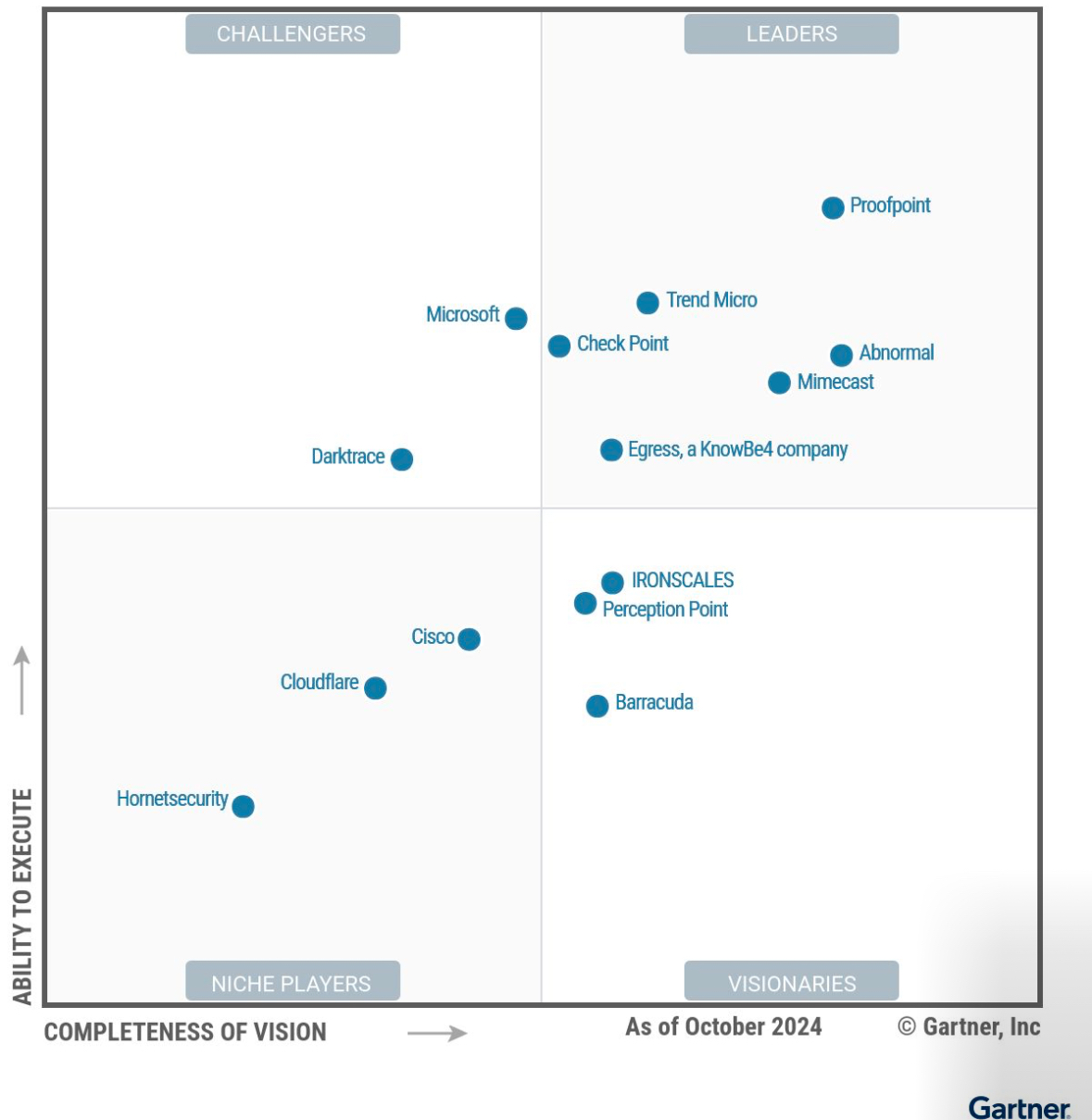
  • Gartner मैजिक क्वाड्रेंट फॉर ईमेल सिक्योरिटी प्लेटफॉर्म्स email-security-providers

ईमेल को इनबॉक्स में पहुँचाना

  • विधि -1 : ईमेल सेवा प्रदाताओं का उपयोग करना

    • SendGrid का उपयोग करें - http://sendgrid.com/
      • उपयोगी सेवा है, लेकिन ईमानदारी से कहूँ तो, स्पैमलिस्ट में न आने के लिए आपको Pro Pain प्लान की आवश्यकता है।
    • MailGun - https://app.mailgun.com/
      • अब तक कोई समस्या नहीं हुई
    • Amazon AWS SES
    • Brevo : https://www.brevo.com/free-smtp-server/
    • Outlook
    • Gmail
    • एक Azure टेनेंट सेटअप करें ताकि onmicrosoft.com डोमेन मिले जैसे attackdomain.onmicrosoft.com जिसका उपयोग ईमेल भेजने और फ़िशिंग डोमेन दोनों के लिए किया जा सके
    • LarkSuite (कस्टम डोमेन की अनुमति देता है) : https://www.larksuite.com/
    • Zoho (Zoho "Free for Life" ईमेल विकल्प का उपयोग करें) : https://www.zoho.com/mail/custom-domain-email.html
    • Yandex : https://360.yandex.com/business/domain-mail/
  • विधि - 2 : यादृच्छिक तकनीकें

    • तकनीक 1 : Andre Rosario द्वारा - BreakDev Red Discord से

      • यदि आपको ईमेल फ़िल्टरिंग के कारण ईमेल वितरित करने में समस्या हो रही है, तो Microsoft 365 और Azure IPP का उपयोग करके अपने लक्ष्यों को एन्क्रिप्टेड ईमेल भेजने पर विचार करें!
        • ईमेल वैध Microsoft SMTP सर्वर से उत्पन्न होते हैं, इसलिए वे इसे ब्लॉक नहीं कर सकते।
        • जिन लक्ष्यों को एन्क्रिप्टेड ईमेल मिलता है, केवल वे ही इसे खोल सकते हैं; यदि वे इसे अपने DFIR को अग्रेषित करते हैं, तो उन्हें आपका संदेश देखने के लिए उस उपयोगकर्ता के रूप में लॉगिन करना होगा।
        • Microsoft Admin पोर्टल में कस्टम डोमेन, बहुत सारे नकली खाते बनाने की आसान ऑर्केस्ट्रेशन।
        • M365 आपको मनमाने प्रदर्शन नाम सेट करने की अनुमति देता है। इसलिए किसी लक्ष्य के Outlook में ईमेल [email protected] से आया हुआ दिख सकता है, लेकिन वास्तव में यह से है (हालांकि तकनीकी लोग इसे आसानी से समझ सकते हैं)

Evilginx के साथ फ़िशिंग एंगेजमेंट्स

  • Evilginx Phishlets बनाना

    • Evilginx Mastery Course : https://academy.breakdev.org/evilginx-mastery
    • Evilginx Docs : https://help.evilginx.com/
    • Evilginx Phishlets Collections : https://github.com/An0nUD4Y/Evilginx2-Phishlets
    • Evilginx Less Known Techniques : https://github.com/An0nUD4Y/Evilginx2-Phishlets?tab=readme-ov-file#some-less-known-techniques
  • Evilginx इंस्टालेशन स्क्रिप्ट्स

    • https://gist.github.com/dunderhay/d5fcded54cc88a1b7e12599839b6badb
  • Evilginx Infra को सुरक्षित करने के टिप्स -

    • https://github.com/An0nUD4Y/Evilginx2-Phishlets#securing-evilginx-infra-tips

      root@kitploit:~
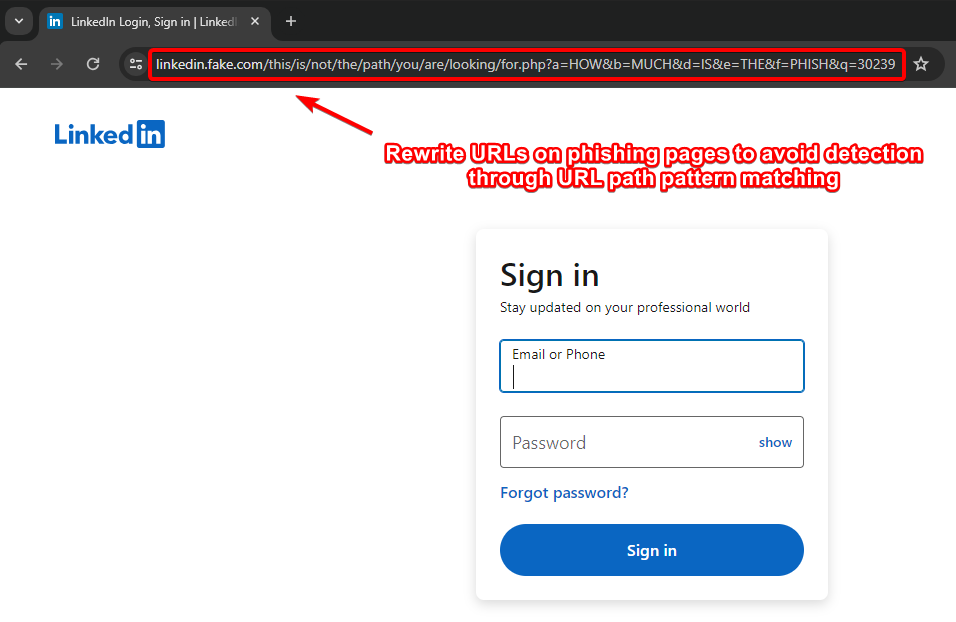
      - फ़िशिंग पृष्ठों पर URL को फिर से लिखें ताकि URL पथ पैटर्न मिलान के माध्यम से पहचान से बचा जा सके (कुबा द्वारा)।
      - IOCs हटाएं (X-Evilginx हेडर और डिफ़ॉल्ट प्रमाणपत्र विवरण)
      - अनधिकृत रीडायरेक्ट स्थैतिक सामग्री को संशोधित करें
      - Let'sEncrypt से रूट डोमेन के लिए वाइल्डकार्ड प्रमाणपत्र का अनुरोध करने के लिए कोड संशोधित करें, प्रत्येक उपडोमेन के लिए अनुरोध करने के बजाय (जैसा कि कुबा के ब्लॉग में उल्लेखित है) - इस रेपो को देखें https://github.com/ss23/evilginx2
      - TLS फिंगरप्रिंटिंग (JA3 और JA3S) से बचने के लिए Evilginx को प्रॉक्सी के पीछे रखें
      - यदि संभव/व्यवहार्य हो तो बीच में cloudflare का उपयोग करें (SSL सेटिंग्स को सही ढंग से कॉन्फ़िगर करना होगा, इसे cloudflare सेटिंग्स में Full में बदलें)
      - पहचान से बचने के लिए कुछ ज्ञात ASN ब्लैकलिस्ट का उपयोग करें जैसे (https://github.com/aalex954/evilginx2-TTPs#ip-blacklist)
      - सामग्री लोडिंग समय कम करने के लिए यदि संभव हो तो phishlet में proxyhosts की संख्या कम करें।
      - Azure पर Evilginx होस्ट करें और उनके डोमेन का उपयोग करें (phishlet में प्रॉक्सी होस्ट को 1 तक सीमित करें या कोई रास्ता खोजें, हो सकता है कई Azure उपडोमेन बनाएं और उसके साथ प्रयास करें)
      - सामग्री-आधारित पहचान से बचने के लिए पृष्ठों की सामग्री को संशोधित करने के लिए कुछ sub_filters जोड़ें, जैसे (Favicon, फॉर्म टाइटल फ़ॉन्ट या शैली, या कोई भी चीज़ जो प्रासंगिक लगे)
      - phishlet sub_filters का उपयोग करके feedback/telemetry/logs/analytics उपडोमेन को ब्लॉक करें जो डोमेन को लॉग कर सकते हैं या बाद में विश्लेषण में मदद कर सकते हैं।
      - देखें कि js-injected स्थैतिक है या गतिशील, यदि स्थैतिक है तो प्रत्येक उपयोगकर्ता/लक्ष्य के लिए अपने js का गतिशील/अस्पष्ट संस्करण बनाने के लिए evilginx js-inject कोड को संशोधित करें।
      - सुनिश्चित करें कि आप अपना Evilginx infra IP लीक न करें, DNS इतिहास जांचें ताकि यह सुनिश्चित हो सके कि यह कहीं संग्रहीत नहीं है (विश्लेषक डोमेन के पुराने DNS रिकॉर्ड देख सकते हैं)
      - इस शोध से अवगत रहें : https://catching-transparent-phish.github.io/catching_transparent_phish.pdf , repo - https://catching-transparent-phish.github.io/
      
root@kitploit:~
            orig_sub: ''
            domain: 'okta.com'
            search: 'X-Frame-Options: DENY'
            replace: 'Test: test'
            mimes: ['text/html', 'charset=utf-8']
          ```
            - Frame Busting Techniques Generally used
              - https://en.wikipedia.org/wiki/Framekiller
              - https://seclab.stanford.edu/websec/framebusting/framebust.pdf
                - Common Techniques to Detect Presence of iframe
                  ```
                    if (top != self)
                    if (top.location != self.location)
                    if (top.location != location)
                    if (parent.frames.length > 0)
                    if (window != top)
                    if (window.top !== window.self)
                    if (window.self != window.top)
                    if (parent && parent != window)
                    if (parent && parent.frames && parent.frames.length>0)
                    if((self.parent&&!(self.parent===self))&&(self.parent.frames.length!=0))
                  ```
                - Websites may use following method once iframe detected to perform redirection
                   ```
                   top.location.replace(self.location)
                    top.location.href = window.location.href
                    top.location.replace(document.location)
                    top.location.href = window.location.href
                    top.location.href = "URL"
                    document.write(’’)
                    top.location = location
                    top.location.replace(document.location)
                    top.location.replace(’URL’)
                    top.location.href = document.location
                    top.location.replace(window.location.href)
                    top.location.href = location.href
                    self.parent.location = document.location
                    parent.location.href = self.document.location
                    top.location.href = self.location
                    top.location = window.location
                    top.location.replace(window.location.pathname)
                    window.top.location = window.self.location
                    setTimeout(function(){document.body.innerHTML=’’;},1);
                    window.self.onload = function(evt){document.body.innerHTML=’’;}
                    var url = window.location.href; top.location.replace(url)
                   ```
                
### Evilginx अनुसंधान ब्लॉग/वार्ताएँ :
- A smooth sea never made a skilled phisherman - Kuba Gretzky (x33fc0n 2024) :
    - Talk : [https://youtu.be/Nh99d3YnpI4?si=Ltwus2PS0z97gf2R](https://youtu.be/Nh99d3YnpI4?si=Ltwus2PS0z97gf2R)
    - Slides : [https://github.com/kgretzky/talks/blob/main/2024/x33fcon/a-smooth-sea-never-made-a-skilled-phisherman.pdf](https://github.com/kgretzky/talks/blob/main/2024/x33fcon/a-smooth-sea-never-made-a-skilled-phisherman.pdf)
- The triforce of initial Access : [https://trustedsec.com/blog/the-triforce-of-initial-access](https://trustedsec.com/blog/the-triforce-of-initial-access)
    - Bobber : [https://github.com/Flangvik/Bobber](https://github.com/Flangvik/Bobber)
- Bypassing Canary AiTM Detection : [https://insights.spotit.be/2024/06/03/clipping-the-canarys-wings-bypassing-aitm-phishing-detections/](https://insights.spotit.be/2024/06/03/clipping-the-canarys-wings-bypassing-aitm-phishing-detections/)
- Protect Evilginx using cloudflare and HTML obf : [https://www.jackphilipbutton.com/post/how-to-protect-evilginx-using-cloudflare-and-html-obfuscation](https://www.jackphilipbutton.com/post/how-to-protect-evilginx-using-cloudflare-and-html-obfuscation)
- (Improve Evilginx email delivery trust) Adding SPF, DMARC, DKIM, MX records : [https://fortbridge.co.uk/research/add-spf-dmarc-dkim-mx-records-evilginx/](https://fortbridge.co.uk/research/add-spf-dmarc-dkim-mx-records-evilginx/)
    - [https://m3rcer.netlify.app/redteaming/spamfilterbypass/](https://m3rcer.netlify.app/redteaming/spamfilterbypass/)
- Phishing Tactics and OPSEC : [https://mgeeky.tech/uploads/WarCon22 - Modern Initial Access and Evasion Tactics.pdf](https://mgeeky.tech/uploads/WarCon22%20-%20Modern%20Initial%20Access%20and%20Evasion%20Tactics.pdf)
- Evilginx + BITB + Evasion Tactics : [https://youtu.be/p1opa2wnRvg](https://youtu.be/p1opa2wnRvg)
- Hook, Line and Phishlet - Conquering AD FS With Evilginx : [https://research.aurainfosec.io/pentest/hook-line-and-phishlet/](https://research.aurainfosec.io/pentest/hook-line-and-phishlet/)
- O365 Phishing Infrastructure - [https://badoption.eu/blog/2023/12/03/PhishingInfra.html](https://badoption.eu/blog/2023/12/03/PhishingInfra.html)
- You Can’t See Me – Protecting Your Phishing Infrastructure : [https://redsiege.com/blog/2024/01/you-cant-see-me-protecting-your-phishing-infrastructure/](https://redsiege.com/blog/2024/01/you-cant-see-me-protecting-your-phishing-infrastructure/)
- [https://janbakker.tech/evilginx-resources-for-microsoft-365/](https://janbakker.tech/evilginx-resources-for-microsoft-365/)
- Evilginx + BITB - [https://www.youtube.com/watch?v=luJjxpEwVHI&feature=youtu.be](https://www.youtube.com/watch?v=luJjxpEwVHI&feature=youtu.be)
- Hook, Line and Sinker: Phishing Windows Hello for Business using Evilginx : [https://medium.com/@yudasm/bypassing-windows-hello-for-business-for-phishing-181f2271dc02](https://medium.com/@yudasm/bypassing-windows-hello-for-business-for-phishing-181f2271dc02)
- Phishing the resistant - Phishing for primary Refresh token in Microsoft Entra by Dirk Jan  : [https://youtu.be/tNh_sYkmurI?si=qcb917IB5zHU1fQk](https://youtu.be/tNh_sYkmurI?si=qcb917IB5zHU1fQk)
- X33fcon 2024 - [https://youtu.be/Nh99d3YnpI4?si=Ltwus2PS0z97gf2R](https://youtu.be/Nh99d3YnpI4?si=Ltwus2PS0z97gf2R)
- Like Shooting Phish in a Barrel - Bypassing Link Crawlers : ****https://posts.specterops.io/like-shooting-phish-in-a-barrel-926c1905bb4b
- Drink Like a Phish - How to Make Your Phishing Sites Blend In ****: [https://posts.specterops.io/drink-like-a-phish-b9e91d0b5677](https://posts.specterops.io/drink-like-a-phish-b9e91d0b5677?source=collection_home---6------0-----------------------)
- Feeding the Phishes : ****https://posts.specterops.io/feeding-the-phishes-276c3579bba7
- https://posts.specterops.io/phish-out-of-water-aaeb677a5af3
- https://youtu.be/6jYZQKDlKco?si=cpfd4tWQ4V8ZAZaI
- https://posts.specterops.io/one-phish-two-phish-red-teams-spew-phish-1a2f02010ed7
- Push Security Phishing Tools Detection : https://gist.github.com/rad9800/bb73de360fc07ac544f0bc9faac9082d
    - Push Security का chrome एक्सटेंशन कुछ कमजोर नियमों के साथ evilginx का पता लगाता है
        - नियम 1: Cookie name=XXXX-XXXX & value=64_hex_chars
        - नियम 2: Script path=/s/64_hex_chars.js with content-length=0
        - नियम 3: दोनों नियम 1 और नियम 2 मौजूद हैं
        - पूरा snippet js blob logic यहाँ है https://gist.github.com/rad9800/bb73de360fc07ac544f0bc9faac9082d
- https://janbakker.tech/evilginx-loves-temporary-access-passes-too/
          
### Evilginx के विरुद्ध रक्षा रणनीतियाँ
- Unravelling and Countering Adversary in the middle Phishing - X33fcon 2024 - [https://youtu.be/-W-LxcbUxI4](https://youtu.be/-W-LxcbUxI4?feature=shared)
- Using HoneyTokens to detect AiTM : [https://zolder.io/using-honeytokens-to-detect-aitm-phishing-attacks-on-your-microsoft-365-tenant/](https://zolder.io/using-honeytokens-to-detect-aitm-phishing-attacks-on-your-microsoft-365-tenant/)
- Protect Against Modern Phishing : [https://bleekseeks.com/blog/how-to-protect-against-modern-phishing-attacks](https://bleekseeks.com/blog/how-to-protect-against-modern-phishing-attacks)
- [https://www.youtube.com/watch?v=wTLB0Yh70_0](https://www.youtube.com/watch?v=wTLB0Yh70_0)
- JA3, JA3S, JA4 फिंगरप्रिंटिंग का उपयोग करके evilginx का पता लगाना
    - JA4 Database : [https://ja4db.com/](https://ja4db.com/)


## GoPhish Infra को सुरक्षित करना

> ये संशोधन नवीनतम evilginx + gophish संस्करण यानी evilginx3.3 में भी काम करेंगे
> 
- सुझाव : evilginx के साथ उपयोग करते समय फ़िशिंग टेम्पलेट में {{.URL}} पैरामीटर का उपयोग करें ( [https://github.com/kgretzky/evilginx2/issues/1042#issuecomment-2052073864](https://github.com/kgretzky/evilginx2/issues/1042#issuecomment-2052073864))
- GoPhish Infra को सुरक्षित करने के लिए gophish स्रोत कोड और फ़ाइल संरचना में संशोधन
    - `X-Gophish` इंस्टेंस हटाएँ ( `X-Gophish-Contact` , `X-Gophish-Signature`)
    - `const ServerName= "gophish"` हटाएँ और इसे `const ServerName= "IGNORE"` में बदलें फ़ाइल `config/config.go` में
    - `config.json` फ़ाइल में डिफ़ॉल्ट Admin सर्वर पोर्ट बदलें।
    - SMTP परीक्षण के दौरान पहचान से बचने के लिए परीक्षण ईमेल संदेश हस्ताक्षर संशोधित करें। `Controllers > api > util.go`
        
        ```yaml
        Controllers > api > util.go
        models > testdata > email_request.go
        models > testdata > email_request_test.go
        models > testdata > maillog.go
        models > testdata > maillog_test.go
        models > testdata > smtp_test.go
        ```
        
    - 404 प्रतिक्रिया बदलें
        - नीचे दिए गए कस्टम फंक्शन को `controllers/phish.go` फ़ाइल में जोड़ें
            
            ```go
            func customNotFound(w http.ResponseWriter, r *http.Request) {
            	http.Error(w, "Try again!", http.StatusNotFound)
            }
            ```
            
        - अब `http.NotFound(w, r)` के सभी उदाहरणों को `customNotFound(w, r)` से बदलें
    - robots.txt हार्डकोडेड प्रतिक्रिया हटाएँ और इसे `controllers/phish.go` फ़ाइल में संशोधित करें
        - phish.go फ़ाइल में संबंधित कोड को नीचे दिए गए कोड में बदलें।
            
            ```go
            //Modified Response
            // RobotsHandler prevents search engines, etc. from indexing phishing materials
            func (ps *PhishingServer) RobotsHandler(w http.ResponseWriter, r *http.Request) {
            	fmt.Fprintln(w, "User-agent: *\nDisallow: /*/*\nDisallow: /.git/*")
            }
            ```
            
    - अनुरोधों में `"rid"` GET पैरामीटर संशोधित करें
        - सुनिश्चित करें कि `"rid"` के सभी उदाहरणों को किसी और चीज़ में बदल दिया गया है।
        - ये evilginx3.3 स्रोत कोड में भी मौजूद हैं, इसलिए वहाँ भी संशोधित करना सुनिश्चित करें।
    - उन्नत रोकथाम के लिए, आप स्टैटिक फ़ोल्डर को भी संशोधित कर सकते हैं और इसे किसी और चीज़ का नाम दे सकते हैं, साथ ही पथ-आधारित पहचान से बचने के लिए इसके अंदर की फ़ाइलों का नाम बदल सकते हैं। बस प्रासंगिक स्रोत कोड को भी संशोधित करना न भूलें।
        - जैसे images name, उदाहरण : pixel.png, इसे किसी और चीज़ में बदलें।
    - `util/util.go` फ़ाइल में प्रमाणपत्र गुण बदलें
        
        ```go
        	template := x509.Certificate{
        		SerialNumber: serialNumber,
        		Subject: pkix.Name{
        			//Organization: []string{"Gophish"},
        			Organization: []string{"Microsoft Corporation"},
        		},
        ```
        
    - किसी भी Golang सर्वर फिंगरप्रिंट से बचने के लिए Nginx का उपयोग करके ट्रैफ़िक को प्रॉक्सी करें
        - `service nginx start`
        - आपको gophish `config.json` को बदलने की आवश्यकता है ताकि http के लिए पोर्ट 80 से 8080 और https के लिए डिफ़ॉल्ट से 60002 में बदल जाए, जैसा कि नीचे दिखाया गया है
            
            ```yaml
            {
            	"admin_server": {
            		"listen_url": "127.0.0.1:60002",
            		"use_tls": true,
            		"cert_path": "gophish_admin.crt",
            		"key_path": "gophish_admin.key",
            		"trusted_origins": []
            	},
            	"phish_server": {
            		"listen_url": "127.0.0.1:8080",
            		"use_tls": false,
            		"cert_path": "example.crt",
            		"key_path": "example.key"
            	},
            	"db_name": "sqlite3",
            	"db_path": "gophish.db",
            	"migrations_prefix": "db/db_",
            	"contact_address": "",
            	"logging": {
            		"filename": "",
            		"level": ""
            	}
            }
            ```
            
        - नीचे दिया गया कॉन्फ़िगरेशन "Bot" या "bot" वाले user agent वाले सभी अनुरोधों को ब्लॉक करेगा
            
            ```yaml
            # /etc/nginx/nginx.conf
            
            events {
                # Define event processing parameters here
                worker_connections 1024; # Adjust according to your requirements
            }
            
            http {
            
                upstream backend {
                    server localhost:8080;
                }
                # HTTP server
                server {
                    listen 80 default_server;
                    
            
                    # Reject requests with "bot" or "Bot" in User-Agent
                    if ($http_user_agent ~* (bot|Bot)) {
                        return 403;
                    }
            
                    location / {
                        proxy_pass http://backend;
                        proxy_set_header Host $host;
                        proxy_set_header X-Real-IP $remote_addr;
                        proxy_set_header X-Forwarded-For $proxy_add_x_forwarded_for;
                        proxy_set_header X-Forwarded-Proto $scheme;
                    }
                }
            
                upstream backend_https {
                    server localhost:60002;
                }
                # HTTPS server
                server {
                    listen 60001 ssl default_server;
            
                    ssl_certificate /root/Phishing/gophish-mod/gophish_admin.crt;
                    ssl_certificate_key /root/Phishing/gophish-mod/gophish_admin.key;
            
                    # Reject requests with "bot" or "Bot" in User-Agent
                    if ($http_user_agent ~* (bot|Bot)) {
                        return 403;
                    }
            
                    location / {
                        proxy_pass https://backend_https;
                        proxy_set_header Host $host;
                        proxy_set_header X-Real-IP $remote_addr;
                        proxy_set_header X-Forwarded-For $proxy_add_x_forwarded_for;
                        proxy_set_header X-Forwarded-Proto $scheme;
                    }
                }
            }
            
            ```
            
        - केवल विशिष्ट user agent की अनुमति देने के लिए, नीचे दिए गए कॉन्फ़िगरेशन का उपयोग करें। यह सभी अनुरोधों को ब्लॉक करेगा और केवल उन अनुरोधों की अनुमति देगा जिनमें user agent "`iamdevil`" है।
            
            ```yaml
            # /etc/nginx/nginx.conf
            
            events {
                # Define event processing parameters here
                worker_connections 1024; # Adjust according to your requirements
            }
            
            http {
            
                upstream backend {
                    server localhost:8080;
                }
            
                # HTTP server
                server {
                    listen 80 default_server;
            
                    # Reject requests with user agent other than "iamdevil"
                    if ($http_user_agent != "iamdevil") {
                        return 403;
                    }
            
                    location / {
                        proxy_pass http://backend;
                        proxy_set_header Host $host;
                        proxy_set_header X-Real-IP $remote_addr;
                        proxy_set_header X-Forwarded-For $proxy_add_x_forwarded_for;
                        proxy_set_header X-Forwarded-Proto $scheme;
                    }
                }
            
                upstream backend_https {
                    server localhost:60002;
                }
            
                # HTTPS server
                server {
                    listen 60001 ssl default_server;
            
                    ssl_certificate /root/Phishing/gophish-mod/gophish_admin.crt;
                    ssl_certificate_key /root/Phishing/gophish-mod/gophish_admin.key;
            
                    # Reject requests with user agent other than "iamdevil"
                    if ($http_user_agent != "iamdevil") {
                        return 403;
                    }
            
                    location / {
                        proxy_pass https://backend_https;
                        proxy_set_header Host $host;
                        proxy_set_header X-Real-IP $remote_addr;
                        proxy_set_header X-Forwarded-For $proxy_add_x_forwarded_for;
                        proxy_set_header X-Forwarded-Proto $scheme;
                    }
                }
            }
            ```
            
    - हस्ताक्षरित ट्रैकिंग पिक्सेल के आधार पर पहचान से बचने के लिए Gophish ट्रैकिंग पिक्सेल हस्ताक्षर संशोधित करें।
    - Gophish ईमेल हेडर अनुक्रम पैटर्न बदलें। इसका उपयोग gophish का पता लगाने के लिए किया जा सकता है (BreakDev Red Community से)।
    - IOCs और ईमेल की अन्य पहचान और स्पैमनेस को हटाने के लिए gophish के सामने PostFix सेट अप करें और हेडर को भी हटाएँ और ठीक करें।

- **GoPhish अनुसंधान ब्लॉग/वार्ताएँ :**
    - [https://edermi.github.io/post/2021/modding_gophish/](https://edermi.github.io/post/2021/modding_gophish/)
    - [https://www.sprocketsecurity.com/resources/never-had-a-bad-day-phishing-how-to-set-up-gophish-to-evade-security-controls](https://www.sprocketsecurity.com/resources/never-had-a-bad-day-phishing-how-to-set-up-gophish-to-evade-security-controls)
    - [https://cyberwarfare.live/wp-content/uploads/2023/08/OPSEC-on-the-High-Seas_-A-Gophish-Adventure.pdf](https://cyberwarfare.live/wp-content/uploads/2023/08/OPSEC-on-the-High-Seas_-A-Gophish-Adventure.pdf)
    - [https://www.sprocketsecurity.com/resources/never-had-a-bad-day-phishing-how-to-set-up-gophish-to-evade-security-controls](https://www.sprocketsecurity.com/resources/never-had-a-bad-day-phishing-how-to-set-up-gophish-to-evade-security-controls)
    - [https://github.com/puzzlepeaches/sneaky_gophish](https://github.com/puzzlepeaches/sneaky_gophish)
    - [https://cybercx.co.nz/blog/identifying-gophish-servers/](https://cybercx.co.nz/blog/identifying-gophish-servers/)
    - [https://github.com/gophish/gophish/issues/1553#issuecomment-523969887](https://github.com/gophish/gophish/issues/1553#issuecomment-523969887)

- **GoPhish के विकल्प :**
    - SniperPhish : https://github.com/GemGeorge/SniperPhish
    - Mailcow : https://github.com/mailcow/mailcow-dockerized


## AiTM पोस्ट एक्सप्लॉइटेशन / फ़िशिंग अनुसंधान ब्लॉग/वार्ताएँ

- AiTm (Post Exploitation) : https://www.youtube.com/live/WY4mH-8TbWY?si=LkZ1LuduDln1vRuj
    - https://youtu.be/py68OE4tQ4Q?si=n6QlNuro88c1PRzn
- https://trustedsec.com/blog/the-triforce-of-initial-access
- https://www.youtube.com/live/tOzURCc-qUc?si=DMkLwXHVQomRMEJD## अन्य तकनीकें/ब्लॉग/शोध
- फिशिंग के लिए वैध साइटों का दुरुपयोग : https://lots-project.com/
- Muraena : https://github.com/muraenateam/muraena
- NecroBrowser : https://github.com/muraenateam/necrobrowser
- BITB : https://mrd0x.com/browser-in-the-browser-phishing-attack/
    - Frameless-bitb : https://github.com/waelmas/frameless-bitb
        - https://youtu.be/luJjxpEwVHI?si=sk8kMfdfhZbTz8qR
    - CuddlePhish : https://github.com/fkasler/cuddlephish
    - https://pushsecurity.com/blog/phishing-2-0-how-phishing-toolkits-are-evolving-with-aitm/
    - Okta Chained with Azure with auto MFA Subscription for Okta and Frame Buster Bypass to perform BITB : https://x.com/otterhacker/status/1929487165458641045?s=46&t=mlJvZy0Zrkrxzuvtt7m2cQ
        - https://github.com/OtterHacker/OktaGinx/
- प्रोग्रेसिव वेब ऐप्स (PWA) फिशिंग : https://mrd0x.com/progressive-web-apps-pwa-phishing/
- noVNC फिशिंग : https://adepts.of0x.cc/novnc-phishing/
    - EvilnoVNC : https://github.com/JoelGMSec/EvilnoVNC
    - MultiEvilnoVNC : https://blog.wanetty.com/blog/tools/multievilnovnc
    - https://fhlipzero.io/blogs/6_noVNC/noVNC.html
    - Delusion (NoVNC पर आधारित टूलकिट) : https://cloud.google.com/blog/topics/threat-intelligence/session-stealing-browser-in-the-middle
    - NoVNC का पता लगाना : https://gist.github.com/rad9800/bb73de360fc07ac544f0bc9faac9082d
- noVNC और Docker : https://powerseb.github.io/posts/Another-phishing-tool/
    - https://github.com/powerseb/NoPhish
    - https://fhlipzero.io/blogs/6_noVNC/noVNC.html
    - https://github.com/Macmod/YesPhish/tree/patchright-chrome
- EvilQR - QR फिशिंग
    - QR जनरेट करें : https://github.com/Flangvik/QRucible
    - https://badoption.eu/blog/2024/01/08/mobilephish.html
    - QR2Ascii : https://github.com/Jojodicus/qr2eascii
    - https://github.com/kgretzky/evilqr , https://breakdev.org/evilqr-phishing/
    - https://github.com/swagkarna/EvilJack
    - https://techcommunity.microsoft.com/t5/microsoft-security-experts-blog/hunting-for-qr-code-aitm-phishing-and-user-compromise/bc-p/4054850
- NoPhish (docker और noVNC) : https://github.com/powerseb/NoPhish और https://badoption.eu/blog/2023/07/12/entra_phish.html
- EvilGoPhish : https://github.com/fin3ss3g0d/evilgophish
- स्मिशिंग : https://blog.shared-video.mov/systematic-destruction-hacking-the-scammers-pt.-2
- CloudFlare Workers के साथ फिशिंग
    - TryCloudflare : https://developers.cloudflare.com/cloudflare-one/connections/connect-networks/do-more-with-tunnels/trycloudflare/
    - https://github.com/zolderio/AITMWorker
    - https://gist.github.com/RedTeamOperations/33f245a777c9b322b0466b59d6687f15
    - https://cyberwarfare.live/wp-content/uploads/2023/08/Certified-Red-Team-CredOps-Infiltrator-CRT-COI-1.pdf
- Cloudflare पब्लिक बकेट के साथ फिशिंग : https://developers.cloudflare.com/r2/buckets/public-buckets/
    - https://medium.com/trac-labs/aitm-phishing-hold-the-gabagool-analyzing-the-gabagool-phishing-kit-531f5bbaf0e4
- फिशिंग के लिए Google ओपन रीडायरेक्शन
    - https://untrustednetwork.net/en/2024/02/26/google-open-redirect/
    - ओपन रीडायरेक्ट (काम नहीं कर रहा) : https://googleweblight.com/i?u=m4lici0u5.com
    - ओपन रीडायरेक्ट : https://www.google.com/url?q=https://m4lici0u5.com
    - ओपन रीडायरेक्ट : https://business.google.com/website_shared/launch_bw.html?f=https://m4lici0u5.com
    - अधिक यहां पाया जा सकता है : https://lots-project.com/
- https://blog.delivr.to/delivr-tos-top-10-payloads-dec-24-pastejacking-image-less-qr-codes-and-concatenated-zip-a32e668106dd#878d
- Azure Information Protection का उपयोग करके मेल सुरक्षा नियंत्रणों को पार कर फिशिंग
    - https://youtu.be/tHNi5BzScVo?si=H2czog19AmTp_O26
    - https://youtu.be/EYUp_MNtJIk?si=sg_9RQggDvqOSLNL
    - https://youtu.be/KhdzIPPW4W0?si=E4CmWx0iO8EaR6JF
- https://nicolasuter.medium.com/aitm-phishing-with-azure-functions-a1530b52df05
- https://pushsecurity.com/blog/a-new-class-of-phishing-verification-phishing-and-cross-idp-impersonation/
- https://blog.delivr.to/delivr-tos-top-10-payloads-dec-24-pastejacking-image-less-qr-codes-and-concatenated-zip-a32e668106dd#878d
- https://trustedsec.com/blog/oops-i-udld-it-again
- Docusign दुरुपयोग द्वारा क्रेडेंशियल फिशिंग : https://sublime.security/blog/living-off-the-land-credential-phishing-via-docusign-abuse/
- EML अटैचमेंट के साथ छिपी क्रेडेंशियल फिशिंग : https://sublime.security/blog/hidden-credential-phishing-within-eml-attachments/
- https://sublime.security/blog/talking-year-end-credential-phishing-scams-over-turkey/
- फिशिंग के लिए Microsoft Customer Voice का उपयोग : https://cofense.com/blog/microsoft-customer-voice-urls-used-in-latest-phishing-campaign
- https://www.youtube.com/live/tOzURCc-qUc?si=DMkLwXHVQomRMEJD
- DoubleClickJacking : https://www.paulosyibelo.com/2024/12/doubleclickjacking-what.html
    - https://safetyscience.info/labs/doubleclickjacking/
- विभिन्न तकनीकों की तुलना : https://blog.quarkslab.com/technical-dive-into-modern-phishing.html
- https://cloud.google.com/blog/topics/threat-intelligence/session-stealing-browser-in-the-middle
- फिशिंग के लिए इनकमिंग Microsoft Teams वेबहुक का दुरुपयोग : https://www.blackhillsinfosec.com/wishing-webhook-phishing-in-teams/
    - https://www.youtube.com/live/kMMZrd9intI?si=rd_EKWmXeKbbGAEI
- फिशिंग के लिए Rogue RDP या RDP (.rdp) : https://github.com/GoSecure/pyrdp
    - https://cloud.google.com/blog/topics/threat-intelligence/windows-rogue-remote-desktop-protocol
    - https://www.blackhillsinfosec.com/rogue-rdp-revisiting-initial-access-methods/
- https://easydmarc.com/blog/google-spoofed-via-dkim-replay-attack-a-technical-breakdown/
- फिशिंग के लिए SVG : https://www.trustwave.com/en-us/resources/blogs/spiderlabs-blog/pixel-perfect-trap-the-surge-of-svg-borne-phishing-attacks/
- प्रारंभिक पहुंच के लिए फिशिंग के साथ ClickOnce का उपयोग : https://www.netspi.com/blog/technical-blog/adversary-simulation/all-you-need-is-one-a-clickonce-love-story/
- https://denniskniep.github.io/posts/09-device-code-phishing/
- https://badoption.eu/blog/2025/04/25/github.html
- https://atticsecurity.com/blog/aitm-for-whfb-persistence/
- [अवश्य देखें] Evilworker : https://github.com/Ahaz1701/EvilWorker
    - https://medium.com/@ahaz1701/evilworker-da94ae171249

## फिशिंग शोध वार्ताएं
- https://youtu.be/zmo_tPbCXtA?si=4imjZtwQ6I9iu_tP
टूल डाउनलोड करें

ब्लॉग

  • https://medium.com/@frsfaisall/mastering-modern-red-teaming-infrastructure-leveraging-old-domains-for-reputation-based-bypasses-1fd8cc1768f7
[email protected]
  • ईमेल वैध Microsoft IP और डोमेन से आते हैं, इसलिए आपको डोमेन वर्गीकरण या जीवनकाल के बारे में चिंता करने की ज़रूरत नहीं है क्योंकि यह Microsoft है।
  • तकनीक 2 : Azure बाहरी आमंत्रण कार्यक्षमता का उपयोग करना - BreakDev Red Discord से

    • Azure External Invite का उपयोग फ़िशिंग URL पर रीडायरेक्ट लिंक वाला ईमेल भेजने के लिए किया जा सकता है
    • बल्क ईमेल भी भेजे जा सकते हैं, संदर्भ के लिए देखें : https://learn.microsoft.com/en-us/entra/external-id/tutorial-bulk-invite
  • ईमेल को इनबॉक्स में पहुँचाने में मदद के लिए यादृच्छिक सुझाव

    • अच्छी प्रतिष्ठा वाला डोमेन रखें, डोमेन वर्गीकरण जांचें
    • 1 वर्ष से पुराना डोमेन रखें या expireddomain का उपयोग करें
    • वैध DKIM, DMARC और SPF रखें।
      • Mailgoose (जांचें कि उनका SPF, DMARC और DKIM कॉन्फ़िगरेशन सही है या नहीं) : https://github.com/CERT-Polska/mailgoose
    • ईमेल में अनसब्सक्राइब लिंक जोड़ें
    • पहले हानिरहित ईमेल भेजें (प्रतिष्ठा में मदद कर सकता है)
    • ईमेल में उसी डोमेन का लिंक रखें जिसका उपयोग ईमेल भेजने के लिए किया जा रहा है।
  • ब्लॉग/वार्ताएँ/संदर्भ

    • Outlook_Email_Auth_Bypass : https://gitlab.com/hxxpxxp/outlook_email_auth_bypass (Outlook डेस्कटॉप और वेब ऐप में, ईमेल के "From" हेडर का "display name" उपयोगकर्ता को दिखाए जाने वाले from ईमेल को हेरफेर कर सकता है, जिसके परिणामस्वरूप अधिक विश्वसनीय फ़िश ईमेल हो सकते हैं)
    • Spy Pixel - ईमेल ट्रैक करने के लिए इमेज पिक्सेल : https://github.com/collinsmc23/spy-pixel
    • EchoSpoofing : https://labs.guard.io/echospoofing-a-massive-phishing-campaign-exploiting-proofpoints-email-protection-to-dispatch-3dd6b5417db6
    • Blackhat USA 2024 - Novel Email Spoofing Attack Patterns : https://github.com/onhexgroup/Conferences/blob/main/Black Hat USA 2024 slides/Hao Wang %26 Caleb Sargent %26 Harrison Pomeroy %26 Renana Friedlich_Into the Inbox Novel Email Spoofing Attack Patterns.pdf
  • X-Evilginx हेडर हटाएं (सभी कोड लाइनों की जाँच करें जहाँ req.Header.Set है और core/http_proxy.go फ़ाइल में प्रासंगिक फ़ंक्शन पर टिप्पणी करें)

    root@kitploit:~
      // पंक्ति 469 पर टिप्पणी करें
      req.Header.Set(p.getHomeDir(), o_host)
      
      //पंक्ति 659 पर टिप्पणी करें
      req.Header.Set(p.getHomeDir(), o_host)
      
      // 1791-1793 पंक्तियों पर फ़ंक्शन पर टिप्पणी करें
      func (p *HttpProxy) getHomeDir() string {
      	return strings.Replace(HOME_DIR, ".e", "X-E", 1)
      }
      
      // 52-54 पंक्तियों पर टिप्पणी करें
      const (
      	HOME_DIR = ".evilginx"
      )
    
  • अनधिकृत रीडायरेक्ट स्थैतिक सामग्री को संशोधित करने के लिए, core/http_proxy.go फ़ाइल में <html> खोजें और किसी भी स्थैतिक हस्ताक्षर को हटाने के लिए html कोड को संशोधित करें।

  • इसके अलावा, स्थैतिक इंजेक्टेड js कोड हस्ताक्षर पहचान से बचने के लिए, आप कोड को नीचे बताए अनुसार संशोधित कर सकते हैं

    • इम्पोर्ट्स में "github.com/tdewolff/minify/js" जोड़ना सुनिश्चित करें

      root@kitploit:~
      	re := regexp.MustCompile(`(?i)(<\s*/body\s*>)`)
      	var d_inject string
      
      	if script != "" {
      		minifier := minify.New() // "github.com/tdewolff/minify/js"
      		minifier.AddFunc("text/javascript", js.Minify)
      		obfuscatedScript, err := minifier.String("text/javascript", script)
      		if err != nil {
      			// Handle error - Obfuscation failed
      			d_inject = "<script" + js_nonce + ">" + "function doNothing() {var x =0};" + script + "</script>\n${1}"
      		}
      		d_inject = "<script" + js_nonce + ">" + "function doNothing() {var x =0};" + obfuscatedScript + "</script>\n${1}"
      		//d_inject = "<script" + js_nonce + ">" + "function doNothing() {var x =0};" + script + "</script>\n${1}"
      
      	} else if src_url != "" {
      		d_inject = "<script" + js_nonce + " type=\"application/javascript\" src=\"" + src_url + "\"></script>\n${1}"
      	} else {
      		return body
      	} 
      
  • core/cert.db फ़ाइल को भी संशोधित करें

  • gophish के लिए “rid” बदलें।

  • evilginx के सामने nginx, caddy या अन्य प्रॉक्सी का उपयोग करें।

  • Redirectors का उपयोग करें

    • cloudflare turnstile को evilginx रीडायरेक्टर के रूप में उपयोग करें और बॉट्स को ब्लॉक करें।
      • https://github.com/kgretzky/evilginx2/blob/master/redirectors/turnstile/index.html
    • html/js आधारित रीडायरेक्टर को अस्पष्ट करें
      • संदिग्ध HTTP User agents सूची : https://github.com/mthcht/awesome-lists/blob/main/Lists/suspicious_http_user_agents_list.csv
      • https://github.com/DosX-dev/WebSafeCompiler
    • gabagool फ़िशिंग किट द्वारा उपयोग की जाने वाली बॉट पहचान विधियाँ : https://medium.com/@traclabs_/aitm-phishing-hold-the-gabagool-analyzing-the-gabagool-phishing-kit-531f5bbaf0e4
    • रीडायरेक्शन के लिए मेटा html टैग
      • <meta http-equiv="refresh" content="5;url=https://example.com">
  • डिफ़ॉल्ट lure url पैटर्न बदलें जो लंबाई 8 का रैंडम स्ट्रिंग है।

    root@kitploit:~
       // core/terminal.go फ़ाइल की पंक्ति 728 में
      		l := &Lure{
      			Path:     "/" + GenRandomString(8),
      			Phishlet: args[1],
      		}
    
  • फ़िशिंग पृष्ठों पर URL को फिर से लिखें ताकि URL पथ पैटर्न मिलान के माध्यम से पहचान से बचा जा सके (कुबा द्वारा)। [यह सुविधा Evilginx के सार्वजनिक संस्करण में उपलब्ध नहीं है, आपको इसे स्वयं लागू करना होगा।]

    root@kitploit:~
    # केवल Evilginx Pro Version में काम करता है
    # सार्वजनिक संस्करण में भी समान कार्यक्षमता लागू की जा सकती है।
    rewrite_urls:
    
    trigger:
    domains: ['www.linkedin.com']
    paths: ['^/login$']
    rewrite:
    path: '/this/is/not/the/path/you/are/looking/for.php'
    query:
    
        {key:'a', value: 'HOW'}
        {key:'b', value: 'MUCH'}
        {key:'d', value: 'IS'}
        {key:'e', value: 'THE'}
        {key:'f', value: 'PHISH'}
        {key:'q', value: '{id}'}


    Untitled

  • lure/session पहचानकर्ता कुकीज़ के हस्ताक्षरित पैटर्न और मान को संशोधित करें (@rad9800 द्वारा)

    • नियम 1: कुकी का नाम=XXXX-XXXX और मान=64_hex_chars - https://gist.github.com/rad9800/bb73de360fc07ac544f0bc9faac9082d#file-index-js-L130
      • जिम्मेदार evilginx कोड कार्यक्षमता (कुकी-नाम के लिए) : https://github.com/kgretzky/evilginx2/blob/9e32484719681892945130187ea52737b3d72051/core/http_proxy.go#L1984
      • जिम्मेदार evilginx कोड कार्यक्षमता (कुकी-मान के लिए) : https://github.com/kgretzky/evilginx2/blob/9e32484719681892945130187ea52737b3d72051/core/http_proxy.go#L895
    • नियम 2: स्क्रिप्ट पथ=/s/64_hex_chars.js और content-length=0
    • नियम 3: नियम 1 और नियम 2 दोनों मौजूद हैं
      • पूर्ण स्निपेट js ब्लॉब लॉजिक यहाँ है https://gist.github.com/rad9800/bb73de360fc07ac544f0bc9faac9082d
  • अपने फ़िशिंग डोमेन नाम को लीक होने से रोकने के लिए Referrer हेडर को ब्लॉक करें - संदर्भ के लिए यह शोध ब्लॉग देखें :

    • http_proxy.go फ़ाइल में यहाँ नीचे दी गई पंक्ति जोड़ें (Chrome इसका सम्मान नहीं करता है और जब अनुरोध url() CSS फ़ंक्शन द्वारा शुरू किया जाता है - अधिक जानकारी के लिए ब्लॉग देखें)
      • resp.Header.Set("Referrer-Policy", "no-referrer")
      • phishlet से स्वचालित करने के लिए इस PR को देखें : https://github.com/kgretzky/evilginx2/pull/1006
  • टेलीमेट्री/कैनरी/फ़िशिंग डोमेन लीक करके पहचान से बचने के लिए अपना स्वयं का CSP (सामग्री सुरक्षा नीति) परिभाषित करें।

    • अधिक जानकारी के लिए यह पढ़ें : https://insights.spotit.be/2024/06/03/clipping-the-canarys-wings-bypassing-aitm-phishing-detections/
  • जाँचें कि क्या लक्ष्य साइट किसी प्रकार के कैनरी टोकन (CSS, JS) का उपयोग कर रही है और उनसे बचें

    • (CSS,JS) Canary AiTM Detection को बायपास करना : https://insights.spotit.be/2024/06/03/clipping-the-canarys-wings-bypassing-aitm-phishing-detections/
    • https://blog.thinkst.com/2024/01/defending-against-the-attack-of-the-cloned-websites.html
  • JA4 फिंगरप्रिंट से बचाव

    • https://github.com/refraction-networking/utls
    • https://github.com/juzeon/spoofed-round-tripper
  • BITB + evilginx + Frame Busting Bypass

    • https://x.com/otterhacker/status/1929487165458641045?s=46&t=mlJvZy0Zrkrxzuvtt7m2cQ
      • OktaGinx : https://github.com/OtterHacker/OktaGinx/blob/main/okta.yaml#L17
    • https://github.com/waelmas/frameless-bitb
    • Frame Busting Bypass उदाहरण Subfilter : https://github.com/OtterHacker/OktaGinx/blob/44fed02954b6cd65e17ab581209a4d0f3b734c24/okta.yaml#L124 और https://github.com/OtterHacker/OktaGinx/blob/44fed02954b6cd65e17ab581209a4d0f3b734c24/okta.yaml#L82
      root@kitploit:~
      - triggers_on: 'login.microsoftonline.com'
      orig_sub: ''
      domain: 'okta.com'
      search: 'if\(e.self===e.top\){'
      replace: 'if(true){window.oldself=e.self;e.self=e.top;'
      mimes: ['text/html', 'charset=utf-8']