
Skip to content
KitploitKITPLOIT
उपकरणएक्सप्लॉइटब्लॉग
Log in
जमा करें
उपकरणएक्सप्लॉइटब्लॉग
जमा करें

हैकिंग, पेनटेस्ट और साइबर सुरक्षा उपकरण आपके सुरक्षा शस्त्रागार के लिए!

Kitploit हैकिंग, साइबर सुरक्षा और पेंटेस्टिंग टूल्स की एक निर्देशिका है। कमजोरियों को खोजने, सिस्टम का विश्लेषण करने, परीक्षण को स्वचालित करने और अपनी सुरक्षा को मजबूत करने के लिए नवीनतम प्रोजेक्ट अपडेट खोजें।

फ़ीडसंपर्कगोपनीयता© 2026 Kitploit

टूल निर्देशिका

श्रेणियाँ

सभी श्रेणियाँ देखें
Loading categories
0 — Open-source cybersecurity harness to build and deploy sovereign, persistent AI security agents (sentinels) that continuously find, prove and fix security risks. Web UI, CLI, CI and MCP. | Kitploit
उपकरण/GitHubGitHub/0sec-labs/0
Static AnalysisVulnerability ScannersVulnerability AnalysisFuzzingPenetration TestingDevSecOpsBinary AnalysisRed TeamingAI Security
GitHub0sec-labs/0

0

Open-source cybersecurity harness to build and deploy sovereign, persistent AI security agents (sentinels) that continuously find, prove and fix security risks. Web UI, CLI, CI and MCP.


1.5k2011941घं 38मि पहलेKitploit द्वारा समीक्षित
रिपॉजिटरी देखेंवेबसाइट
साझा करें
अनुरोधित भाषा में सामग्री उपलब्ध नहीं है। अंग्रेज़ी संस्करण दिखाया जा रहा है।

0security

Sovereign AI security agents

By the Swiss Applied AI & Cybersecurity Research Lab

Backed by Y Combinator

Latest release MIT or Apache-2.0 license GitHub stars

0security is software infrastructure to deploy sovereign, persistent AI security agents that find and fix security risks across any tech stack, work with any model, and run anywhere.


Documentation Security research Install locally Enterprise

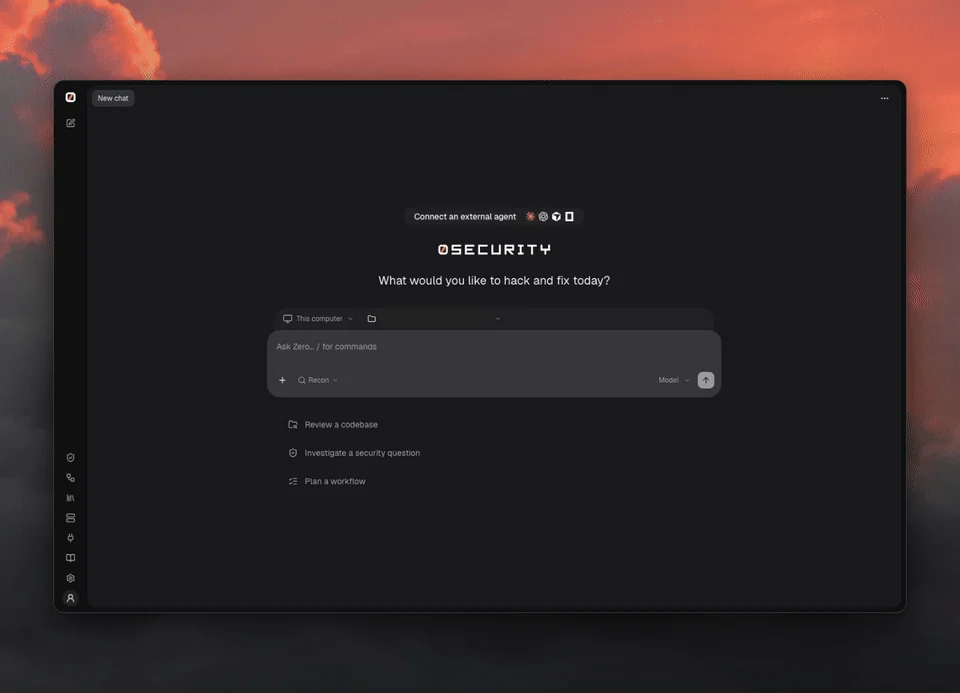
0 web UI: review a demo API, watch the investigation, then open findings with suggested fixes and verification

Quick start

curl -fsSL https://raw.githubusercontent.com/0sec-labs/0security/main/install.sh | bash
0

Prefer the terminal?

export OPENAI_API_KEY="your-api-key"
0 threads send new "Review ./your-repo for security problems"
0 findings list

Any supported provider works: set its key instead (Anthropic, OpenRouter, DeepSeek and more, see Models), or connect one in the browser with 0.

Windows, Docker and source installs
  • Windows (experimental): download 0-windows-x64.exe from Releases.
  • Docker: docker run --rm ghcr.io/0sec-labs/0security:latest --help. See the Docker guide.
  • Source: Node.js 24+ and pnpm, then pnpm install --frozen-lockfile && pnpm build.
  • install.sh supports Apple Silicon macOS and x64/ARM64 Linux. Set INSTALL_DIR to change the location.

Only point 0 at systems you own or are authorized to test.
What can you do with 0?

  • Talk to a security agent about a folder on your computer or a remote Computer, in a Thread
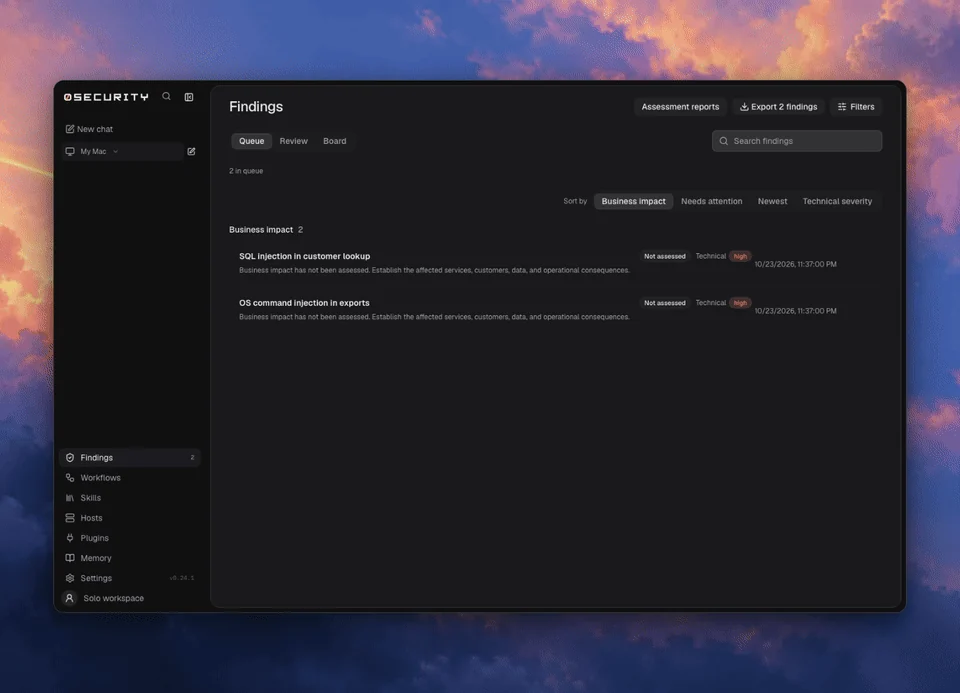
  • Review findings on a board, with source evidence, and export them
  • Verify fixes: a finding is marked Verified by or Not verified
  • Build persistent security agents: Sentinels are standing threads that wake on a schedule or on every pull request, with skills, memory and automations written as prompts
  • Keep memory as plain notes that every thread can read
  • Extend it with extensions and skills

0 findings: review the queue, organize the board, and inspect source evidence

Why 0?

  • Open source: MIT or Apache-2.0, built in the open
  • Private: runs on your computer, in your CI or in a container, and only the context you send to your chosen model leaves it
  • Flexible: any provider key or local OpenAI-compatible server, from the CLI, CI or a coding agent
  • Evidence first: every finding links to its source evidence
  • Verified: a finding says whether it was verified, and by what
  • Proven in public: disclosed vulnerabilities and upstream fixes, including in the Linux kernel

Coding agents

0 sentinels run <id> --task "Review this pull request" --yes

See the command reference.

Learn more

  • Documentation
  • Models and providers
  • Extensions and MCP
  • Command reference
  • Security research
  • Enterprise

Contributing

0 is built in the open. Huge thanks to everyone who has filed a bug, fixed a doc or sent a patch.

  • Report bugs in issues
  • Improve the docs
  • Write an extension or a skill
  • Found a vulnerability in 0? See SECURITY.md

Start with the contributing guide. Run pnpm install and pnpm dev to work on the engine. Open an issue before large changes.


Contributors to 0sec-labs/0security

License

MIT OR Apache-2.0. Public disclosures and upstream fixes.

टूल डाउनलोड करें

सबसे लोकप्रिय

सभी देखें →

हमारे समुदाय द्वारा सबसे अधिक उपयोग किए जाने वाले उपकरण खोजें।

  • 1

    OsintHunter

    letox4/osinthunter

    🎯 अंतिम OSINT टूलकिट: जाँच ग्राफ़, विश्वास स्कोरिंग, उपनाम परिवार, मानचित्र, टाइमलाइन और रिपोर्ट। 49 मॉड्यूल, 400+ साइटें, किसी API कुंजी की आवश्यकता नहीं।

    708
  • 2

    ghostlock-app

    yukonga/ghostlock-app

    # घोस्टलॉक वन-टैप निष्पादन ऐप (CVE-2026-43499)

    500
  • 3

    ARTEX

    baarai/artex

    प्लानर/वर्कर एजेंट, एसेट और एक्सप्लोरेशन ग्राफ़, MITM ट्रैफ़िक रिकॉर्डिंग, और भेद्यता पुनःपरीक्षण के साथ LLM मल्टी-एजेंट स्वायत्त पेनेट्रेशन टेस्टिंग प्लेटफ़ॉर्म।

    398
  • 4

    redforge

    cybersecurity91/redforge

    ब्राउज़र-साइड रेड टीम टूलकिट, जिसमें रेकॉन, पेलोड जनरेशन, क्रेडेंशियल हमलों, क्रिप्टो, एन्कोडिंग और एंगेजमेंट रिपोर्टिंग के लिए 102 ऑफ़लाइन टूल्स हैं।

    341
  • 5

    CyberStrikeAI

    ed1s0nz/cyberstrikeai

    AI-मूल साइबरसुरक्षा के लिए कार्रवाई की प्रणाली—जहाँ इरादा नियंत्रित निष्पादन बन जाता है, साक्ष्य परिचालन स्मृति बन जाता है, और हर ऑपरेशन अगले को बेहतर बनाता है।

    259
  • 6

    antifox

    antifox-ai/antifox

    AI मल्टी-एजेंट स्वायत्त पेनेट्रेशन टेस्टिंग प्लेटफ़ॉर्म जो रेकॉन, अटैक-सरफ़ेस डिस्कवरी, एक्सप्लॉइटेशन वैलिडेशन और साक्ष्य-आधारित रिपोर्ट डिलीवरी संचालित करता है।

    257

सभी उपकरण खोजें

हमारे उपकरणों का संग्रह ब्राउज़ करें

सभी उपकरण देखें →