अपडेट पर वापस जाएँ
New releaseSep 19, 2026

vigolium v0.4.8

Vigolium - उच्च-निष्ठा भेद्यता स्कैनर जो एजेंटिक एआई को नेटिव गति, मॉड्यूलरिटी और सटीकता के साथ जोड़ता है

साझा करें

Vigolium
Vigolium - उच्च-निष्ठा वाला भेद्यता स्कैनर जो एजेंटिक AI को मूल गति, मॉड्यूलरिटी और सटीकता के साथ जोड़ता है


Vigolium दो पूरक स्कैनिंग मोड प्रदान करता है:

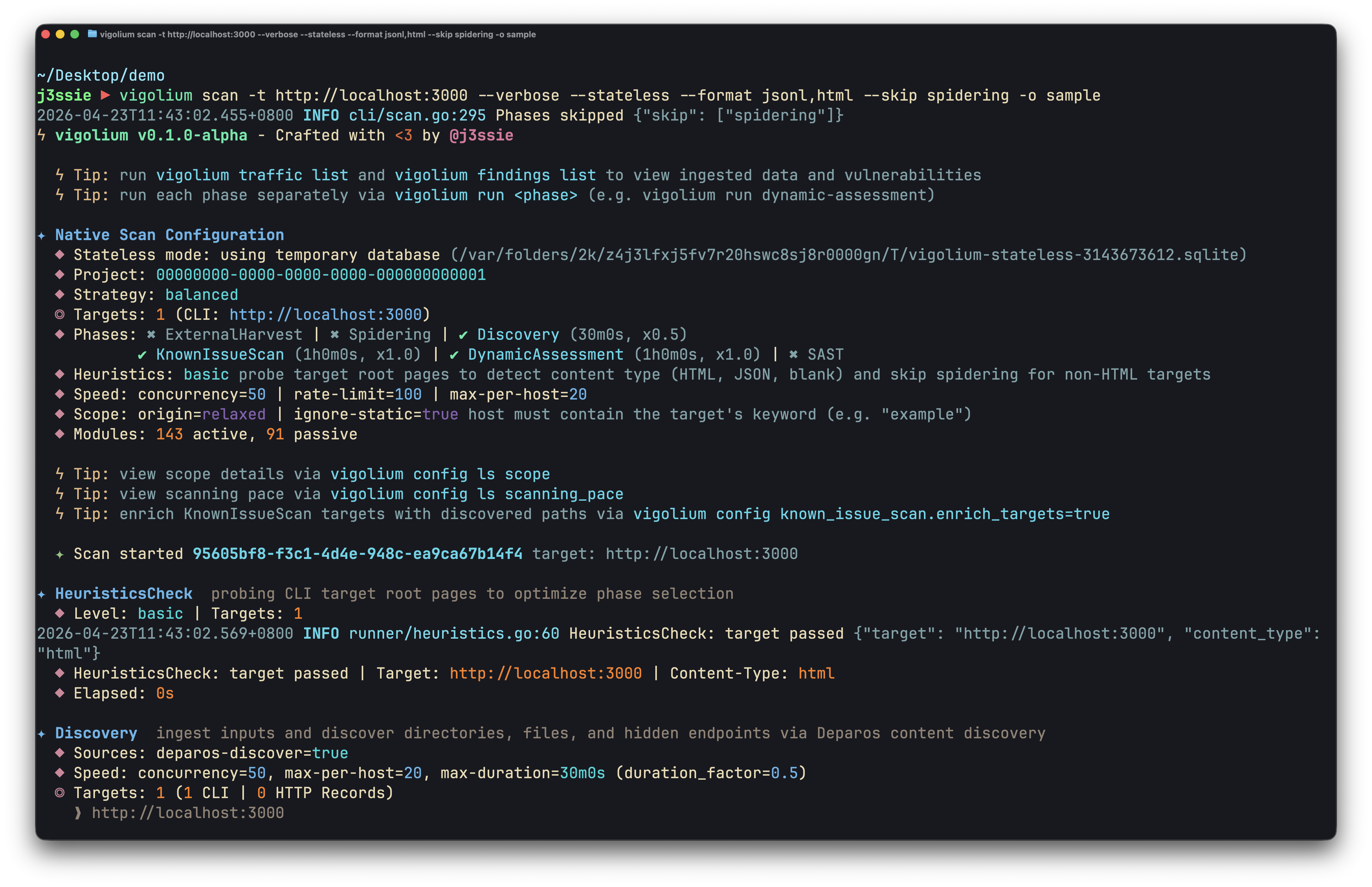
  • Native Scan (vigolium scan): तेज़, शक्तिशाली और लचीला। नियतात्मक, बहु-चरणीय स्कैनिंग जिसमें सामग्री खोज, ब्राउज़र/SPA स्पाइडरिंग, और सक्रिय/निष्क्रिय ऑडिट में 317 मॉड्यूल शामिल हैं, जो इंजेक्शन, एक्सेस कंट्रोल, फ़ाइल/पथ, API/प्रोटोकॉल, फ्रेमवर्क-विशिष्ट, क्लाउड/इन्फ्रा, और आउट-ऑफ-बैंड (OAST) भेद्यता वर्गों को कवर करते हैं।

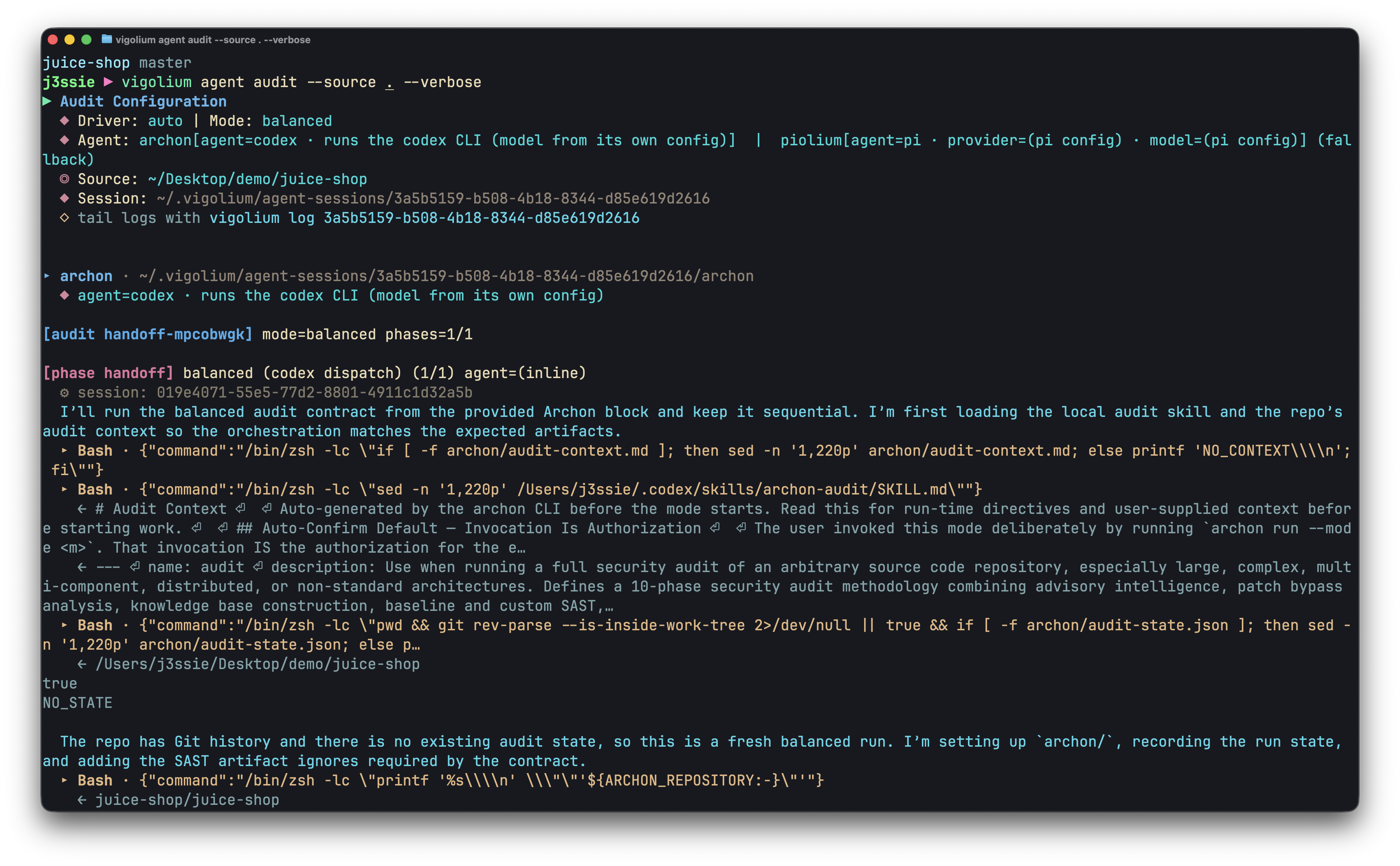
  • Agentic Scan (vigolium agent): आपके कोडबेस का गहन ऑडिट। AI-संचालित स्कैनिंग जो स्वायत्त रूप से हमलों की योजना बनाती है, मॉड्यूल चुनती है, कस्टम एक्सटेंशन उत्पन्न करती है, और परिणामों की ट्राइएज करती है, गहरे स्रोत-कोड ऑडिट को स्वायत्त और लक्षित भेद्यता स्कैनिंग के साथ जोड़ती है।

Installation

Quick Install (Recommended)```bash

curl -fsSL https://vigolium.com/install.sh | bash

### [npm](https://www.npmjs.com/package/@vigolium/vigolium)```bash
npm install -g @vigolium/vigolium

Windows

ऊपर दिया गया npm install Windows पर काम करता है। वैकल्पिक रूप से, releases page से vigolium_<version>_windows_amd64.zip डाउनलोड करें, इसे एक्सट्रैक्ट करें, और vigolium.exe को अपने PATH में कहीं रखें।

Windows केवल x64 के रूप में उपलब्ध है; Windows ARM पर यह एमुलेशन के अंतर्गत चलता है। ऊपर दिया गया shell installer केवल POSIX के लिए है, इसलिए Windows पर vigolium update उपलब्ध नहीं है — अपग्रेड करने के लिए npm install दोबारा चलाएँ या नया zip डाउनलोड करें।

Docker या सोर्स से बिल्ड जैसी अन्य विधि

Docker```bash

docker pull j3ssie/vigolium:latest docker run --rm j3ssie/vigolium:latest scan -h

### स्रोत से बिल्ड करें```bash
git clone https://github.com/vigolium/vigolium.git
cd vigolium
make build         # build and install to $GOPATH/bin

इसके लिए Go 1.27+ और bun 1.3.11+ आवश्यक हैं। पूर्वापेक्षाओं और बिल्ड विवरण के लिए HACKING.md देखें।

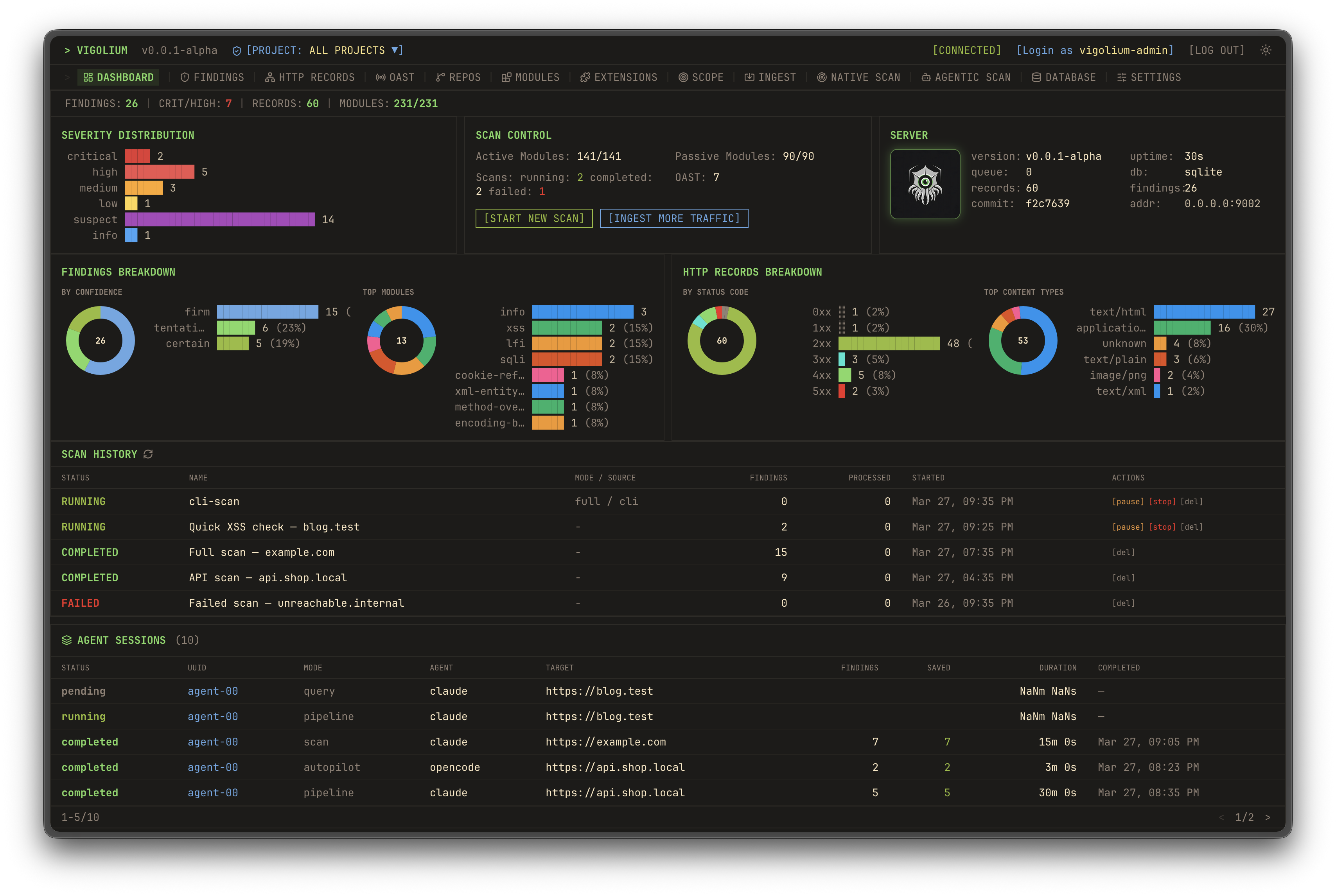
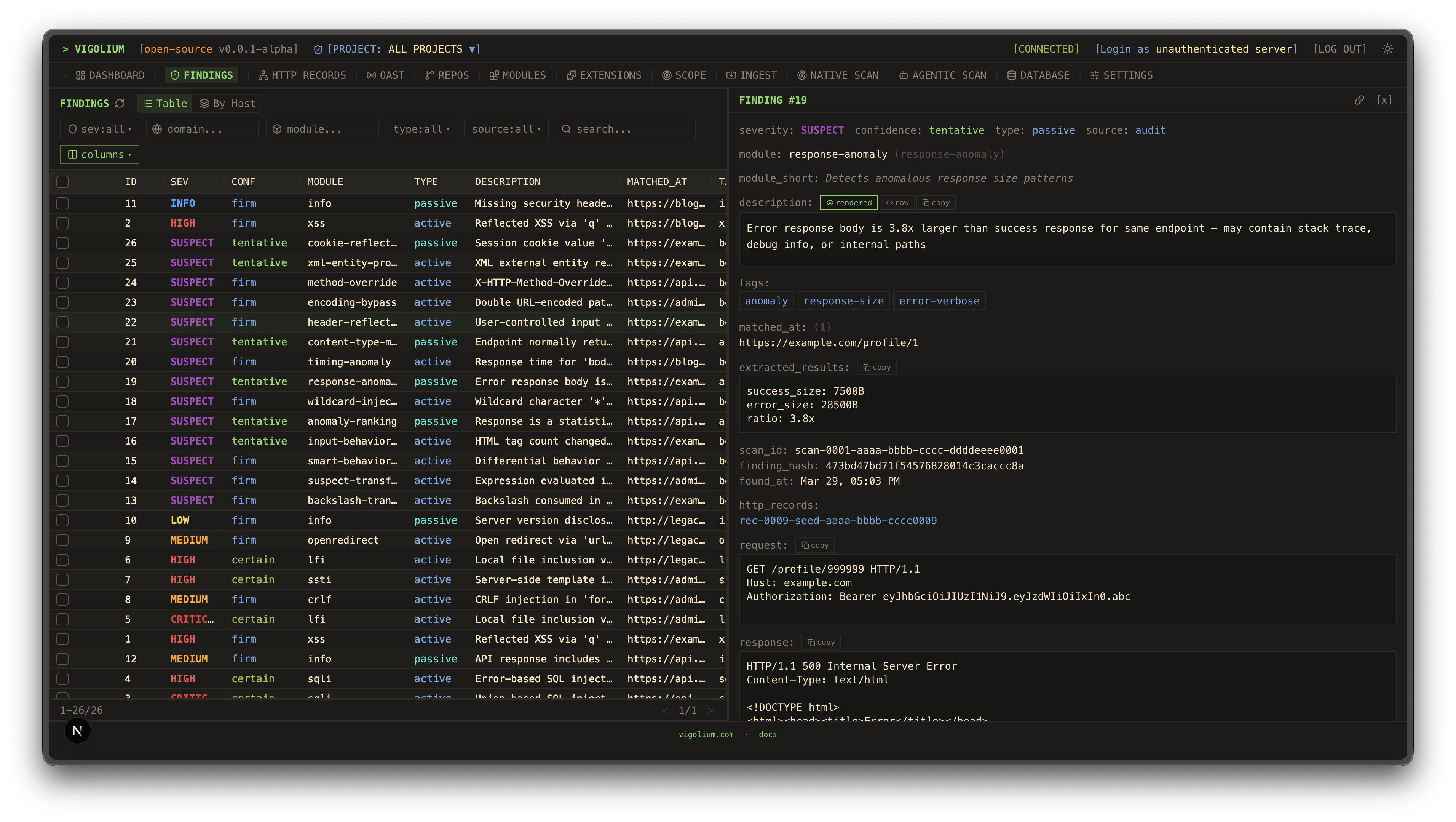
UI डैशबोर्डट्रैफ़िक डैशबोर्ड
Dashboard 1Dashboard 2
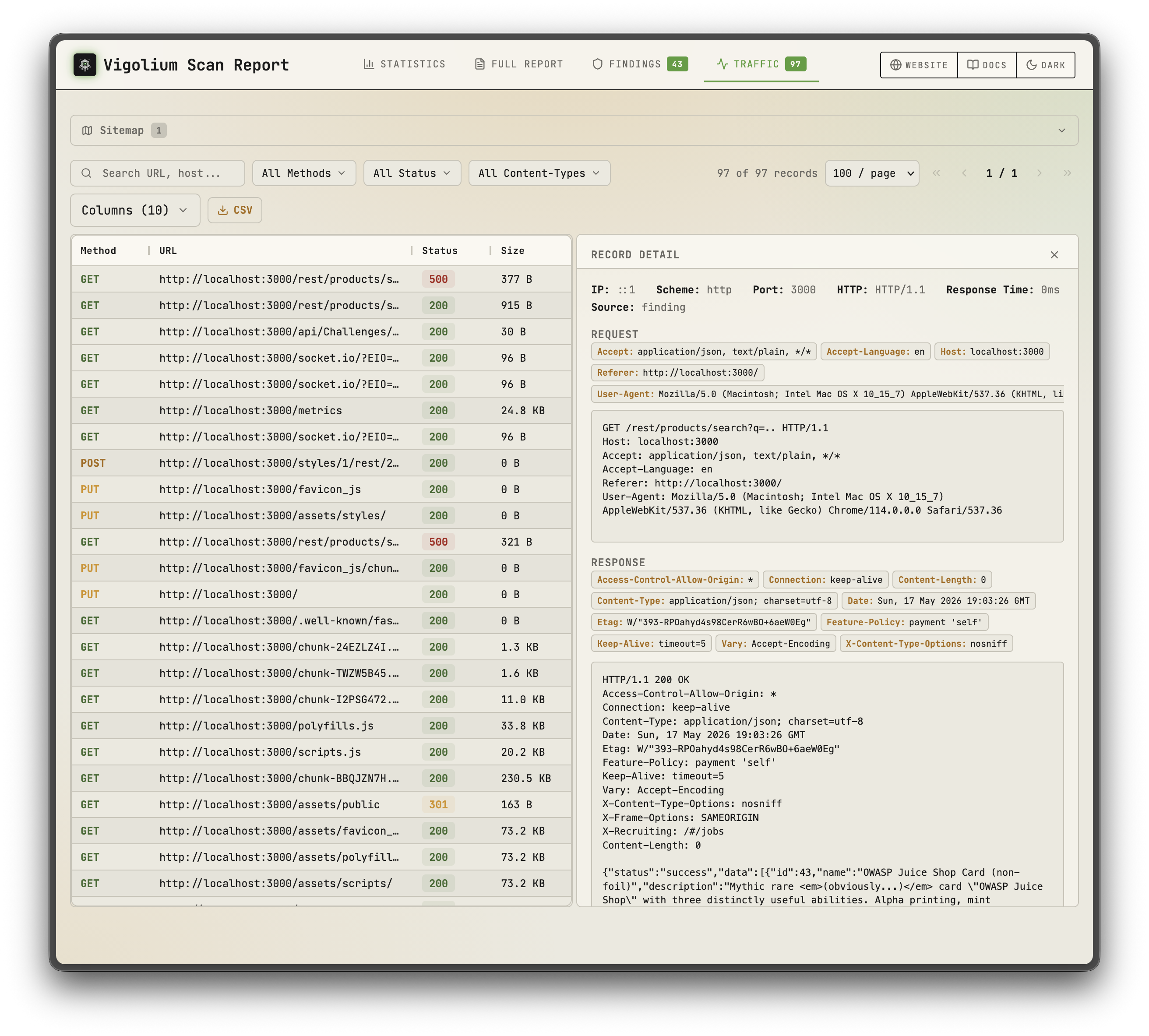
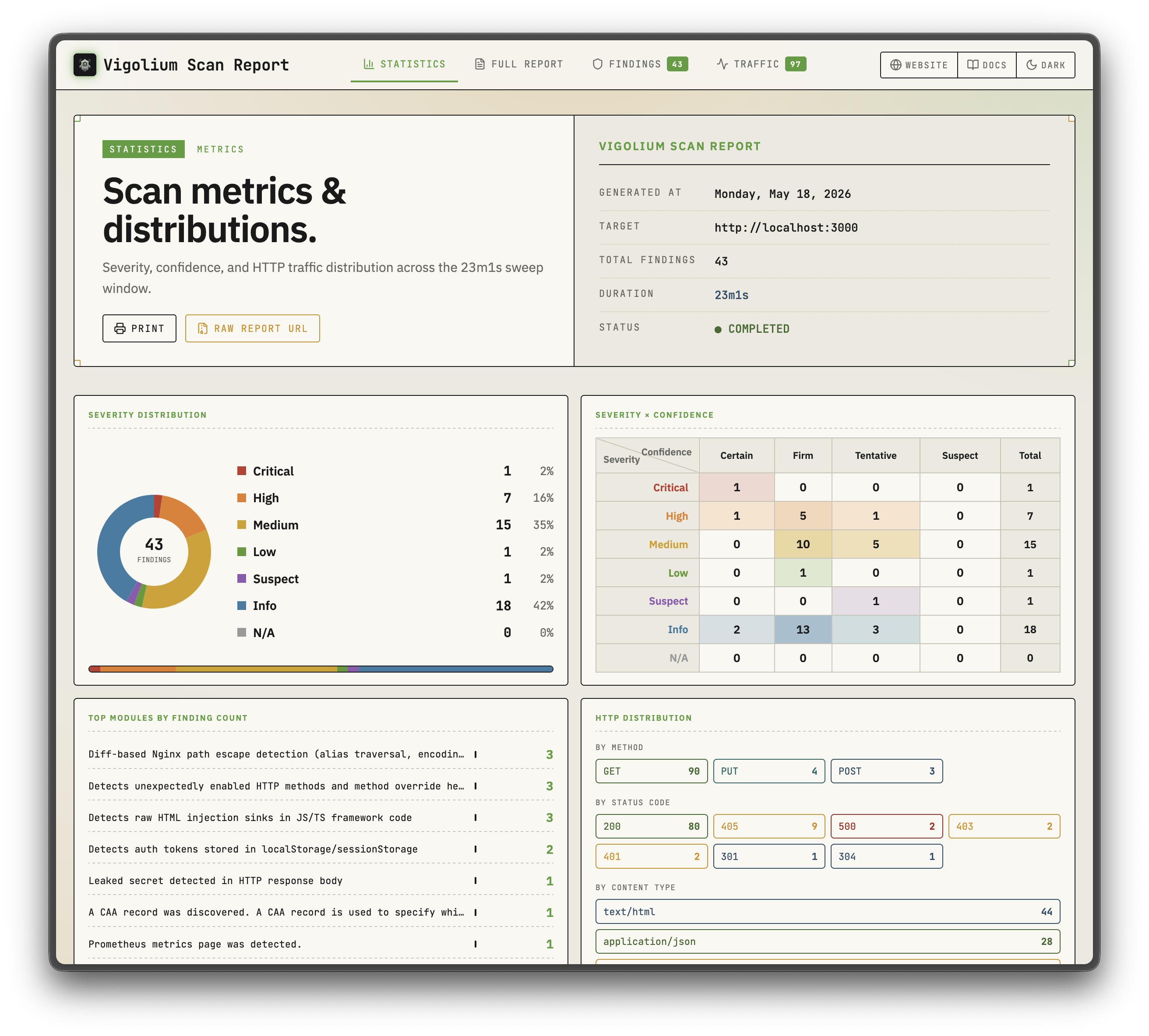
स्टैटिक रिपोर्टस्टैटिक रिपोर्ट
Static Report 1Static Report 2
नेटिव स्कैनएजेंटिक स्कैन
Native scanAgentic Scan

प्रायोजक

Daytona
सैंडबॉक्स इंफ्रास्ट्रक्चर को प्रायोजित करने के लिए Daytona का धन्यवाद

मुख्य विशेषताएँ

नेटिव स्कैन

  • 324 स्कैनर मॉड्यूल: 207 सक्रिय (फ़ज़िंग) + 117 निष्क्रिय (पैटर्न मिलान), OWASP Top 10 और उससे आगे को कवर करते हुए
  • आउट-ऑफ-बैंड परीक्षण (OAST): स्वचालित पेलोड सहसंबंध के साथ interactsh कॉलबैक के माध्यम से ब्लाइंड XSS/SSRF/कमांड इंजेक्शन
  • वैल्यू-अवेयर म्यूटेशन: पैरामीटर को सिमेंटिक प्रकार (integer, UUID, JWT, email) के अनुसार वर्गीकृत करता है और प्रत्येक इरादे के अनुसार म्यूटेट करता है
  • मल्टी-फेज़ पाइपलाइन: बाहरी हार्वेस्टिंग, कंटेंट डिस्कवरी (Deparos), ब्राउज़र/SPA स्पाइडरिंग (Spitolas), और ऑडिट, जो स्ट्रैटेजी प्रीसेट और स्कैनिंग प्रोफ़ाइल द्वारा नियंत्रित होते हैं
  • लचीले इनपुट: URLs, OpenAPI/Swagger, Postman, Burp Suite, cURL, Nuclei JSONL
  • मल्टी-सेशन प्रमाणीकरण: इनलाइन सेशन, सेशन फ़ाइलें, या लॉगिन फ़्लो, टोकन निष्कर्षण, और IDOR/BOLA परीक्षण के साथ पूर्ण ऑथ कॉन्फ़िग
  • JavaScript एक्सटेंशन: एम्बेडेड JS इंजन के माध्यम से कस्टम मॉड्यूल और हुक, सेशन-अवेयर HTTP APIs के साथ
  • स्केलेबल और रिपोर्टेबल: प्रति-होस्ट रेट लिमिटिंग के साथ कंकरेंट वर्कर पूल, हाइब्रिड इन-मेमोरी/डिस्क/Redis क्यू, और स्व-निहित HTML रिपोर्ट

एजेंटिक स्कैन

  • इन-प्रोसेस olium रनटाइम: प्रत्येक एजेंट मोड नेटिव Go pkg/olium इंजन पर चलता है: टर्न-बेस्ड लूप, बिल्ट-इन टूल रजिस्ट्री, स्किल्स सपोर्ट, और प्लगेबल प्रोवाइडर ड्राइवर (कोई सबप्रोसेस SDK पूल नहीं)
  • ऑटोपायलट: एजेंट स्वायत्त रूप से एंडपॉइंट खोजता है, स्कैन चलाता है, और निष्कर्षों की ट्राइएज करता है, वैकल्पिक मल्टी-स्पेशलिस्ट पाइपलाइन और सेशन रिज़्यूम के साथ
  • स्वार्म: मास्टर एजेंट मॉड्यूल चुनता है, कस्टम JS अटैक एक्सटेंशन जनरेट करता है, कोड ऑडिट + SAST चलाता है, स्कैन निष्पादित करता है, और परिणामों की ट्राइएज करता है; लक्षित या पूर्ण-स्कोप (--discover), परिवर्तन-केंद्रित रन के लिए --diff/--last-commits के साथ
  • सोर्स-ऑडिट ड्राइवर: audit, piolium, और एकीकृत audit डिस्पैचर फोरग्राउंड सोर्स-कोड ऑडिट चलाते हैं जो एक ही फाइंडिंग स्कीमा और DB टैगिंग साझा करते हैं
  • क्वेरी मोड: कोड रिव्यू, एंडपॉइंट डिस्कवरी, और सीक्रेट डिटेक्शन के लिए सिंगल-शॉट प्रॉम्प्ट
  • प्लगेबल प्रोवाइडर: openai-compatible (डिफ़ॉल्ट), openai-codex-oauth, openai-api-key, openai-responses, anthropic-api-key, anthropic-oauth, anthropic-cli, anthropic-compatible, anthropic-vertex, google-vertex. REST API पर SSE स्ट्रीमिंग और OpenAI-संगत चैट एंडपॉइंट के साथ समान मोड उपलब्ध

क्विक स्टार्ट: नेटिव स्कैन```bash

Scan a single target (default: balanced strategy)

vigolium scan -t https://example.com

Scan with a strategy preset

vigolium scan -t https://example.com --strategy deep

Scan specific modules only

vigolium scan -t https://example.com -m xss-reflected,sqli-error

Scan from an OpenAPI spec

vigolium scan -T openapi.yaml -I openapi

Pipe URLs from stdin

cat urls.txt | vigolium scan

Run a single phase directly

vigolium run discovery -t https://example.com

Generate an HTML report

vigolium scan -t https://example.com --only discovery --format html -o report.html

पूर्ण पाइपलाइन के लिए [आर्किटेक्चर अवलोकन](https://docs.vigolium.com/architecture/overview) देखें और रणनीतियों, प्रोफ़ाइलों, और पेस कॉन्फ़िगरेशन के लिए [रणनीतियाँ गाइड](https://docs.vigolium.com/native-scan/strategies) देखें। त्वरित कमांड संदर्भ के लिए, [docs.vigolium.com/getting-started/cheat-sheet](https://docs.vigolium.com/getting-started/cheat-sheet) देखें।

## सर्वर मोड```bash
# Start API server with authentication
vigolium server -k my-secret-key

# Enable transparent HTTP proxy for traffic recording
vigolium server -k my-key --ingest-proxy-port 9003

# Auto-scan ingested traffic
vigolium server -k my-key --scan-on-receive

| -s | --server | Server URL (default: http://localhost:8080) | | -t | --token | API token for authentication | | -o | --output | Output file path | | -f | --format | Output format: json, yaml, table | | -v | --verbose | Enable verbose output | | -q | --quiet | Suppress non-essential output | | -h | --help | Show help message | | -V | --version | Show version information |

उदाहरण

# सर्वर से सभी स्कैन की सूची बनाएं
scanner-cli scans list --server http://localhost:8080

# एक विशिष्ट स्कैन का विवरण प्राप्त करें
scanner-cli scans get <scan-id>

# JSON प्रारूप में परिणाम निर्यात करें
scanner-cli scans export <scan-id> --format json --output results.json

# टोकन के साथ प्रमाणित करें
scanner-cli --token <your-api-token> scans list

कॉन्फ़िगरेशन

CLI निम्नलिखित स्थानों पर कॉन्फ़िगरेशन फ़ाइल की तलाश करता है:

  1. ./.scanner-cli.yaml
  2. ~/.config/scanner-cli/config.yaml
  3. /etc/scanner-cli/config.yaml

कॉन्फ़िगरेशन फ़ाइल उदाहरण:

server: http://localhost:8080
token: your-api-token
output: json
verbose: false

पर्यावरण चर

चरविवरण
SCANNER_SERVERसर्वर URL
SCANNER_TOKENAPI टोकन
SCANNER_OUTPUTडिफ़ॉल्ट आउटपुट प्रारूप
SCANNER_VERBOSEविस्तृत आउटपुट सक्षम करें

API संदर्भ

प्रमाणीकरण

सभी API अनुरोधों के लिए Authorization हेडर में API टोकन की आवश्यकता होती है:

Authorization: Bearer <your-api-token>

एंडपॉइंट

GET /api/v1/scans

सभी स्कैन की सूची बनाएं।

प्रतिक्रिया:

{
  "scans": [
    {
      "id": "scan-123",
      "target": "example.com",
      "status": "completed",
      "created_at": "2024-01-15T10:30:00Z"
    }
  ]
}

POST /api/v1/scans

एक नया स्कैन शुरू करें।

अनुरोध निकाय:

{
  "target": "example.com",
  "scan_type": "full",
  "options": {
    "depth": 3,
    "timeout": 300
  }
}

GET /api/v1/scans/{id}

किसी विशिष्ट स्कैन का विवरण प्राप्त करें।

DELETE /api/v1/scans/{id}

किसी स्कैन को हटाएं।

GET /api/v1/scans/{id}/results

किसी स्कैन के परिणाम प्राप्त करें।

प्रतिक्रिया:

{
  "scan_id": "scan-123",
  "results": [
    {
      "type": "vulnerability",
      "severity": "high",
      "title": "SQL Injection",
      "description": "Potential SQL injection vulnerability detected",
      "location": "https://example.com/login"
    }
  ]
}
``````bash
# Ingest traffic to a running server
cat urls.txt | vigolium ingest -s http://localhost:9002

# Ingest an OpenAPI spec
vigolium ingest -s http://localhost:9002 -i api.yaml -I openapi

सर्वर सेटअप के लिए सर्वर चलाना देखें, ingestion वर्कफ़्लो के लिए ingestion देखें, और पूर्ण REST API संदर्भ के लिए API अवलोकन देखें।

प्रॉक्सी एकीकरण: Burp Suite के लिए burp-vigolium एक्सटेंशन या Caido के लिए caido-vigolium प्लगइन के साथ लाइव प्रॉक्सी ट्रैफ़िक को चल रहे Vigolium सर्वर पर अग्रेषित करें। दोनों एक ही ब्रिज प्रोटोकॉल (-B/--burp-bridge-url, उपनाम --caido-bridge-url) परोसते हैं, और ingested ट्रैफ़िक को उस प्रॉक्सी के लेबल के साथ चिह्नित किया जाता है जहाँ से वह आया है।

प्रमाणित स्कैनिंग

Vigolium IDOR/BOLA परीक्षण और विशेषाधिकार वृद्धि जाँचों के लिए मल्टी-सेशन प्रमाणित स्कैनिंग का समर्थन करता है:```bash

Inline session via CLI flag (name:Header:value)

vigolium scan -t https://example.com
--auth "admin:Cookie:session_id=abc123"
--auth "user:Cookie:session_id=xyz789"

Load session(s) from a YAML/JSON file

vigolium scan -t https://example.com --auth-file ./admin-session.yaml

Auth file with an automated login flow (token extraction, etc.)

vigolium scan -t https://example.com --auth-file ./login-flow.yaml

Add custom headers (works with sessions)

vigolium scan -t https://example.com -H "Authorization: Bearer token123"

Auth फ़ाइलें स्थिर हेडर, bearer टोकन, और कुकीज़, JSON प्रतिक्रियाओं, या हेडर से टोकन निष्कर्षण के साथ स्वचालित लॉगिन प्रवाह का समर्थन करती हैं। प्रीसेट उदाहरण `public/presets/sessions/` में उपलब्ध हैं। पूर्ण गाइड के लिए [प्रमाणीकरण गाइड](https://docs.vigolium.com/native-scan/authentication) देखें।

> `--auth` / `--auth-file` फ़्लैग्स का पहले नाम `--session` / `--session-file` था। पुराने नाम अभी भी अप्रचलित उपनाम के रूप में काम करते हैं।

## Agentic Scan

AI-संचालित स्कैनिंग जहाँ एजेंट स्वायत्त रूप से योजना बनाते हैं, निष्पादित करते हैं, और अंतर्निहित स्कैन इंजन के साथ भेद्यता आकलन का निपटान करते हैं:```bash
# Autopilot: autonomous AI-driven scanning (in-process olium engine)
vigolium agent autopilot -t https://example.com
vigolium agent autopilot -t https://example.com --source ./src --prompt "focus on auth bypass"
vigolium agent autopilot -t https://example.com --diff main...feature/auth   # diff-focused
vigolium agent autopilot -t https://example.com --intensity deep             # preset bundle

# Swarm: AI-guided targeted or full-scope vulnerability scanning
vigolium agent swarm -t https://example.com/api/users --vuln-type sqli
vigolium agent swarm -t https://example.com --discover                       # full-scope
vigolium agent swarm -t https://example.com --source ./src --discover        # source-aware full-scope
vigolium agent swarm --input "curl -X POST https://example.com/api/login -d '{\"user\":\"admin\"}'"

# Source-audit drivers (separate harness, do not route through olium)
vigolium agent audit --source ./src                                  # default: auto (audit, fall back to piolium)
vigolium agent audit --source ./src --driver audit --mode deep       # vigolium-audit only (claude/codex)
vigolium agent audit --source ./src --driver piolium --mode balanced # Pi-native (pi extension) only
vigolium agent audit --source ./src --driver both                    # audit then piolium, back-to-back
vigolium agent audit --source ./src --modes deep,confirm             # chain modes (same as --intensity deep)
vigolium agent audit --source ./src -S --output-dir ./audit-out      # throwaway DB + bundled HTML report
vigolium audit --source ./src                                        # top-level alias

# Direct olium access (TUI or headless)
vigolium ol                             # launch the olium TUI
vigolium ol --prompt "..."              # one-shot prompt (-p implies headless)

Agentic स्कैन मोड:

  • Autopilot: स्वायत्त स्कैनिंग। CLI सीधे pkg/olium/autopilot.Run को कॉल करता है; सर्वर उसी लूप के चारों ओर vigolium-audit prep, auth setup, और एक frozen context bundle जोड़ता है
  • Swarm: AI-guided vulnerability scanning जो targeted single-request और full-scope (--discover) का समर्थन करता है। Master agent inputs का विश्लेषण करता है, modules चुनता है, custom JS extensions generate करता है, code audit और SAST चलाता है, scans execute करता है, और results की triage करता है
  • Audit: vigolium agent audit के माध्यम से source-code audit — एक unified dispatcher जो embedded vigolium-audit (claude/codex) और/या piolium (Pi-native) harnesses चलाता है, जिन्हें --driver {auto|both|audit|piolium} से चुना जाता है (default auto: audit leg का preflight करें और इसे तब चलाएँ जब resolved claude/codex CLI PATH पर हो, binary embedded हो, और chain में audit-supported mode हो; अन्यथा audit launch किए बिना piolium पर fall back करें। mid-run audit failure drivers बदलने के बजाय surface होती है)। अलग harnesses; olium के माध्यम से route न करें। एक parent AgenticScan के अंतर्गत per-driver child rows, post-pass findings dedup के साथ। कोई standalone agent piolium subcommand नहीं है — piolium --driver=piolium के माध्यम से चलता है

Standalone audit CLIs: agentic security audit standalone CLIs के रूप में भी उपलब्ध है जिन्हें आप Vigolium से स्वतंत्र रूप से चला सकते हैं: vigolium-audit (vigolium agent audit के पीछे का harness) और piolium (vigolium agent audit --driver=piolium के पीछे का Pi-native driver)।

पूरी गाइड के लिए agent mode guide देखें।

⚡ Vigolium Cloud Console

उन teams के लिए एक cloud-based solution जो infrastructure manage किए बिना Vigolium की शक्ति चाहते हैं। Console, Vigolium का upgraded, fully-featured version है, जिसे एक advanced autonomous agent lead करता है जो पूरे engagement को drive करता है — target के बारे में reasoning करता है, अपने स्वयं के attack paths चुनता है, और जो पाता है उसकी पुष्टि करता है — open-source core के ऊपर hosted scanning और shared results के साथ, ताकि आप tooling maintain करने के बजाय vulnerabilities fix करने पर ध्यान केंद्रित कर सकें।

रुचि है? डेमो के लिए संपर्क करें

Native Scan Layers

Native scan pipeline modular layers से बना है, प्रत्येक का अलग से दस्तावेज़ीकरण किया गया है:

LayerDescriptionDocs
Content Discovery (Deparos)fingerprint-based soft-404 detection के साथ adaptive directory/file enumerationdocs.vigolium.com/native-scan/phases/discovery
Browser Spider (Spitolas)CDP traffic capture के साथ Chromium-driven state-machine crawlerdocs.vigolium.com/native-scan/phases/spidering
Auditinsertion point extraction और DiffScan framework के साथ active/passive vulnerability scanningdocs.vigolium.com/native-scan/phases/audit
Scanner ModulesOWASP Top 10 और उससे आगे को cover करने वाले 207 active और 117 passive modulesdocs.vigolium.com/native-scan/modules-reference

Documentation

पूरा दस्तावेज़ीकरण docs.vigolium.com पर उपलब्ध है। Release notes और version history CHANGELOG में हैं। Quick links:

JavaScript Engine

JavaScript/TypeScript code को सीधे चलाएँ या recompile किए बिना custom scan modules और hooks लिखें:```bash

Execute inline JavaScript

vigolium js --code 'let r = vigolium.http.get(TARGET); console.log(r.status)' -t https://example.com

Run a JS file with timeout

vigolium js --code-file ./my-script.js -t https://example.com --timeout 60s

Manage extensions

vigolium ext ls # list loaded extensions vigolium ext docs --example # browse API with code examples vigolium ext preset # install starter scripts

JS इंजन प्रमाणित परीक्षण के लिए सत्र-जागरूक HTTP API प्रदान करता है:```javascript
// Create a persistent session with shared cookie jar.
// post() takes a string body — serialize objects yourself.
let session = vigolium.http.session();
session.post(
  "https://app.example.com/login",
  JSON.stringify({ user: "admin", pass: "secret" }),
  { headers: { "Content-Type": "application/json" } }
);
session.get("https://app.example.com/dashboard"); // cookies auto-sent

// Automated login flow with token extraction
let authed = vigolium.http.login({
  url: "https://app.example.com/api/auth",
  method: "POST",
  body: JSON.stringify({ username: "admin", password: "pass" }),
  extract: [{ source: "json", path: "$.token", apply_as: "Authorization: Bearer {value}" }]
});

// IDOR/BOLA testing across multiple sessions
let results = vigolium.http.authTest({
  sessions: { admin: adminSession, user: userSession },
  requests: [{ method: "GET", url: "https://app.example.com/api/users/1" }]
});

// Multi-step authentication sequences
let result = vigolium.http.sequence([
  { url: "/csrf", extract: [{ source: "cookie", name: "csrf_token", as: "token" }] },
  { url: "/login", method: "POST", body: "csrf={token}&user=admin" }
]);

// Parallel request batching (race conditions, IDOR)
let responses = vigolium.http.batch([req1, req2, req3], { concurrency: 10 });

// CSRF token extraction
let csrf = vigolium.http.csrf("https://app.example.com/form");

// HTTP request replay with variations
let varied = vigolium.http.replay(rawRequest, [
  { headers: { "Authorization": "Bearer admin_token" } },
  { headers: { "Authorization": "Bearer user_token" } }
]);

See writing extensions for the extension authoring guide और pkg/jsext/vigolium.d.ts for the full TypeScript API definitions.

CLI Reference

Expand the full commands & flags reference

Commands```

Scanning: vigolium scan Run a native scan (deterministic multi-phase vulnerability scanning) vigolium run Run a single native scan phase (alias for scan --only ) vigolium scan-url Quick native scan of a single URL vigolium scan-request Native scan from a raw HTTP request

Agentic scan (in-process olium engine): vigolium agent autopilot Autonomous AI-driven vulnerability scanning vigolium agent swarm AI-guided targeted or full-scope vulnerability scanning vigolium agent query Single-shot prompt (code review, endpoint discovery) vigolium agent olium Direct olium TUI (or one-shot non-interactive via -p) vigolium agent audit Unified driver dispatcher (vigolium-audit and/or piolium, --driver=auto|both|audit|piolium) vigolium agent session Browse/replay agent session artifacts vigolium olium | vigolium ol Top-level alias for vigolium agent olium

Server & ingestion: vigolium server Start the API server with traffic ingestion vigolium ingest Ingest traffic to a running server vigolium storage Interact with cloud object storage (uploads, downloads)

Data & projects: vigolium db Database operations (list, stats, export, clean, seed) vigolium finding Browse and manage findings (load, tui) vigolium traffic Browse and replay HTTP records (tui, replay) vigolium replay Mutate a stored/supplied HTTP request and diff baseline vs replay vigolium project Manage projects (create, list, use, config) vigolium scope Manage scope rules vigolium import Import findings/data from external sources vigolium export Export scan results

Extensions & auth: vigolium js Execute JavaScript/TypeScript code vigolium ext Manage JavaScript extensions (eval, lint) vigolium auth Manage authentication sessions (list, load, lint, totp)

Setup & introspection: vigolium init Initialize a Vigolium workspace vigolium config Manage configuration (ls, set, path, clean) vigolium strategy Inspect scanning strategies and phases vigolium module Inspect/enable scanner modules vigolium doctor Diagnose environment & dependencies vigolium version Show version info

### फ़्लैग्स```
Native Scan (vigolium scan / run):
  -t, --target           Target URL
  -T, --target-file      File containing target URLs
  -i, --input            Input file path (- for stdin)
  -I, --input-mode       Input format: urls, openapi, swagger, burp, curl, nuclei, har
  -m, --modules          Modules to run (comma-separated or 'all')
      --strategy         Strategy preset: lite, balanced, deep
      --scanning-profile Scanning profile name or YAML path
      --only             Phases to run (comma-separated): ingestion, discovery (deparos),
                         external-harvest, spidering (spitolas), known-issue-scan,
                         dynamic-assessment, extension
      --skip             Phases to skip (repeatable, same names as --only)
  -S, --stateless        Use a throwaway temp database, discarded after the scan
      --fail-on          Exit non-zero when a finding at/above this severity is present

Authentication:
      --auth              Inline session definition (name:Header:value, repeatable)
      --auth-file         Session YAML/JSON file path, supports login flows (repeatable)
  -H, --header           Custom HTTP header (repeatable)

Performance:
  -c, --concurrency      Concurrent workers (default: 25)
  -r, --rate-limit       Max requests/sec (default: 0 = unlimited)
      --max-per-host     Per-host concurrency cap (default: 2)
      --proxy            HTTP/SOCKS5 proxy URL
      --timeout          HTTP request timeout (default: 15s)

Agentic Scan (vigolium agent autopilot / swarm / query):
      --source             Path to source code for source-aware scanning
      --files              Specific files to include relative to --source
      --source-label       Label for source code ingestion
      --provider           Olium provider: openai-compatible (default), openai-codex-oauth,
                           openai-api-key, openai-responses, anthropic-api-key,
                           anthropic-oauth, anthropic-cli, anthropic-compatible,
                           anthropic-claude-sdk-bridge, anthropic-vertex, google-vertex
      --model              Model ID override
      --oauth-token        OAuth bearer token (anthropic-oauth)
      --oauth-cred         OAuth/SA file path (openai-codex-oauth, anthropic-vertex,
                           google-vertex)
      --llm-api-key        API key (anthropic-api-key, openai-api-key)
      --vuln-type          Vulnerability type focus (sqli, xss, ssrf, ...)
      --prompt             Free-text task guidance (same as the positional [prompt])
      --plan-file          Plan file mixing guidance + raw seed HTTP request(s)
      --knowledge-base     File/dir describing the app; prose is distilled, traffic
                           exports (HAR/Burp/curl/OpenAPI/Postman) are ingested
      --prior-context      Front-load existing project traffic/findings: auto, summary, off
      --intensity          Preset bundle: quick, balanced, deep
      --diff               Diff range / PR URL / HEAD~N for change-focused scans
      --last-commits       Shorthand for --diff HEAD~N
      --code-audit         Enable AI code audit (default: on with --source)
      --discover           Run discovery+spidering before planning (swarm)
      --audit              vigolium-audit mode: lite, balanced, deep, mock, off
      --piolium            Piolium audit mode (empty = auto-pick)
      --resume             Resume a durable-autopilot run by agentic-scan UUID
      --session-dir        Pin the session dir for this run's debug artifacts
      --transcript         Copy transcript.jsonl out after the run
      --max-iterations     Max triage-rescan iterations
      --max-commands       Cap on agent tool calls
      --token-budget       Cap on aggregate tokens
      --max-duration       Max agent wall-clock time (0 = no limit)
      --only / --skip / --start-from   Phase control (swarm)

Source audit (vigolium agent audit / vigolium audit):
      --driver             auto (default), both, audit, piolium
      --intensity          Preset: quick, balanced, deep (deep = modes deep,confirm)
      --mode               Mode override: lite, balanced, deep, revisit, confirm, merge, ...
      --modes              Chain modes back-to-back (e.g. deep,confirm)
      --list-modes         Print the audit mode graph and exit
      --agent              Coding agent for the audit leg: claude or codex
      --keep-raw           Keep raw output under <source>/vigolium-results/ (on by default)
      --clean-raw          Remove the source-tree raw copy after the run
  -S, --stateless          Run into a throwaway DB and auto-render an HTML report
      --output-dir         Bundle the HTML report + raw results into one folder (needs -S)
      --no-dedup           Skip the post-pass project-wide findings dedup
      --no-preflight       Skip the pre-audit auth/model roundtrip checks
  -i, --interactive        Drive the audit yourself in the coding agent (audit driver only)

JavaScript:
      --code             Inline JavaScript to execute
      --code-file        Path to JS/TS file to execute
      --timeout          Execution timeout (default: 30s)

Output:
  -j, --json             Compact, token-aware JSON output (read/query commands)
      --format           Output format (comma-separated for multiple): console, jsonl,
                         html, sqlite (needs -S), fs (flat traffic/finding tree)
  -o, --output           Output file path
      --silent           Suppress all output except findings
  -v, --verbose          Verbose logging

रिपॉज़िटरी लेआउट

platform/ निर्देशिका में बाहरी टूलिंग, UI डैशबोर्ड शामिल है और यह कोर स्कैनर का हिस्सा नहीं है। इसमें कोई बदलाव नहीं किया जाना चाहिए।

बेंचमार्क

Vigolium को लगातार जानबूझकर कमजोर बनाए गए एप्लिकेशनों के विरुद्ध बेंचमार्क किया जाता है और बग बाउंटी तथा जिम्मेदार प्रकटीकरण कार्यक्रमों के माध्यम से वास्तविक दुनिया के लक्ष्यों के विरुद्ध भी इसका गहन परीक्षण किया जाता है।

बेंचमार्क को make test-canary (Docker ऐप्स) या make test-integration (XSS) के साथ चलाएँ।

विकास```bash

make build # build and install make test # run all tests (auto-installs gotestsum) make test-unit # fast unit tests (-short, no external deps) make test-e2e # E2E tests (requires Docker) make lint # run linter make fmt # format code

पूर्ण बिल्ड गाइड, कोडबेस मैप, और मॉड्यूल डेवलपमेंट गाइड के लिए [HACKING.md](https://github.com/vigolium/vigolium/blob/main/HACKING.md) देखें।

## सुरक्षा

Vigolium एक आक्रामक सुरक्षा उपकरण है, और इसके दो हिस्से जानबूझकर अनुमतिपूर्ण हैं: **एजेंट मोड बिना किसी सैंडबॉक्स के चलता है** (LLM के पास होस्ट पर पूर्ण शेल, फ़ाइल, और नेटवर्क एक्सेस होता है) और **एक्सटेंशन मनमाने कमांड चला सकते हैं**। एजेंट मोड को एंगेजमेंट तक सीमित एक डिस्पोज़ेबल कंटेनर/VM में चलाएं, और अविश्वसनीय एक्सटेंशन को अविश्वसनीय कोड की तरह मानें। शुरू करने से पहले [SECURITY.md](https://github.com/vigolium/vigolium/blob/main/SECURITY.md) देखें, और Vigolium में ही कमज़ोरियों की निजी तौर पर [[email protected]](mailto:[email protected]) पर रिपोर्ट करें।

## लाइसेंस

Vigolium को [MIT License](https://github.com/vigolium/vigolium/blob/main/LICENSE) के अंतर्गत रिलीज़ किया गया है।

[@j3ssie](https://x.com/j3ssie) द्वारा ♥ के साथ बनाया गया, जिसमें [@theblackturtle](https://github.com/theblackturtle) मुख्य प्रारंभिक योगदानकर्ता हैं।

श्रेणियाँ