अपडेट पर वापस जाएँ
New releaseJul 20, 2026

jadx v1.5.6

Android Dex और APK फ़ाइलों को पढ़ने योग्य Java स्रोत कोड में डिकम्पाइल करने, संसाधन डिकोडिंग, डीऑबफस्केशन और Smali डिबगिंग क्षमताओं के साथ कमांड-लाइन और GUI टूल।

साझा करें

JADX

Build status GitHub contributors GitHub all releases GitHub release (latest by SemVer) Latest release Maven Central Java 11+ License

jadx - Dex से Java डिकम्पाइलर

Android Dex और Apk फ़ाइलों से Java स्रोत कोड उत्पन्न करने के लिए कमांड लाइन और GUI उपकरण

[!WARNING] कृपया ध्यान दें कि ज़्यादातर मामलों में jadx 100% कोड को डिकम्पाइल नहीं कर सकता, इसलिए त्रुटियाँ होंगी।
समाधान के लिए समस्या निवारण गाइड देखें।

मुख्य विशेषताएँ:

  • APK, dex, aar, aab और zip फ़ाइलों से Dalvik बाइटकोड को Java कोड में डिकम्पाइल करें
  • AndroidManifest.xml और resources.arsc से अन्य संसाधनों को डीकोड करें
  • डिऑबफस्केटर शामिल

jadx-gui सुविधाएँ:

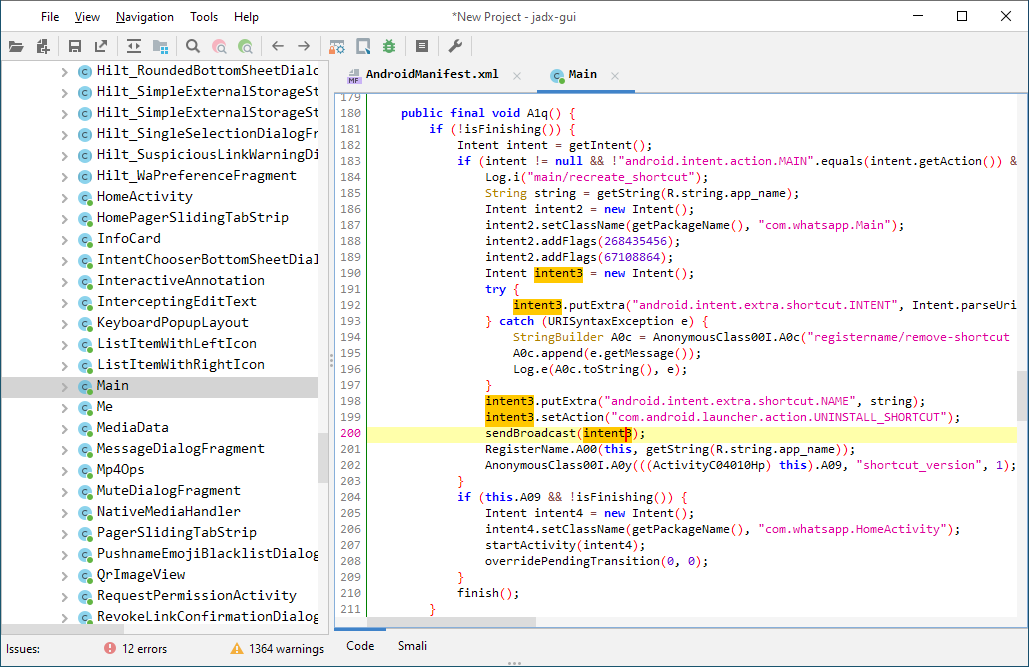
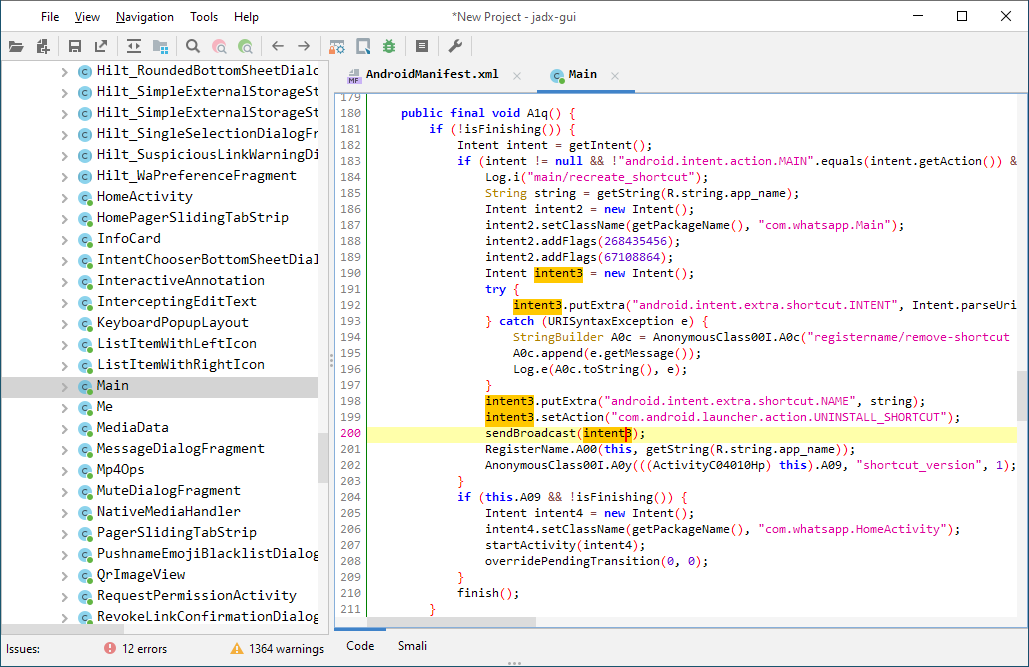
  • हाइलाइट किए गए सिंटैक्स के साथ डिकम्पाइल कोड देखें
  • घोषणा पर जाएँ
  • उपयोग खोजें
  • पूर्ण पाठ खोज
  • Smali डीबगर, सेटअप और उपयोग के लिए विकी पृष्ठ देखें

Jadx-gui कीबाइंडिंग यहाँ पाई जा सकती है

इन सुविधाओं को क्रियान्वित देखें: jadx-gui सुविधाओं का अवलोकन

डाउनलोड

डाउनलोड करने के बाद zip फ़ाइल को अनज़िप करें, bin निर्देशिका पर जाएँ और चलाएँ:

  • jadx - कमांड लाइन संस्करण
  • jadx-gui - UI संस्करण

Windows पर .bat फ़ाइलों को डबल-क्लिक करके चलाएँ
ध्यान दें: सुनिश्चित करें कि आपने Java 11 या उसके बाद का 64-bit संस्करण स्थापित किया है। Windows के लिए, आप इसे oracle.com से डाउनलोड कर सकते हैं (x64 इंस्टॉलर चुनें)।

इंस्टॉल

  • आर्क लिनक्स Arch Linux package AUR Version
    sudo pacman -S jadx
    
  • मैकओएस homebrew version
    brew install jadx
    
  • फ्लैटहब Flathub Version
    flatpak install flathub com.github.skylot.jadx

    

jadx को लाइब्रेरी के रूप में उपयोग करें

आप jadx का उपयोग अपने Java प्रोजेक्ट्स में कर सकते हैं, विवरण विकी पृष्ठ पर देखें

स्रोत से बनाएँ

JDK 17 या उच्चतर स्थापित होना चाहिए:

git clone https://github.com/skylot/jadx.git
cd jadx
./gradlew dist

(Windows पर, ./gradlew के बजाय gradlew.bat का उपयोग करें)

jadx चलाने के लिए स्क्रिप्ट build/jadx/bin में रखी जाएँगी और build/jadx-<version>.zip में भी पैक की जाएँगी

उपयोग

jadx[-gui] [command] [options] <input files> (.apk, .dex, .jar, .class, .smali, .zip, .aar, .arsc, .aab, .xapk, .apkm, .jadx.kts)
commands (use '<command> --help' for command options):
  plugins	  - manage jadx plugins

options:
  -d, --output-dir                              - output directory
  -ds, --output-dir-src                         - output directory for sources
  -dr, --output-dir-res                         - output directory for resources
  -r, --no-res                                  - do not decode resources
  -s, --no-src                                  - do not decompile source code
  -j, --threads-count                           - processing threads count, default: 16
  --single-class                                - decompile a single class, full name, raw or alias
  --single-class-output                         - file or dir for write if decompile a single class
  --output-format                               - can be 'java' or 'json', default: java
  -e, --export-gradle                           - save as gradle project (set '--export-gradle-type' to 'auto')
  --export-gradle-type                          - Gradle project template for export:
                                                   'auto' - detect automatically
                                                   'android-app' - Android Application (apk)
                                                   'android-library' - Android Library (aar)
                                                   'simple-java' - simple Java
  -m, --decompilation-mode                      - code output mode:
                                                   'auto' - trying best options (default)
                                                   'restructure' - restore code structure (normal java code)
                                                   'simple' - simplified instructions (linear, with goto's)
                                                   'fallback' - raw instructions without modifications
  --show-bad-code                               - show inconsistent code (incorrectly decompiled)
  --no-xml-pretty-print                         - do not prettify XML
  --no-imports                                  - disable use of imports, always write entire package name
  --no-debug-info                               - disable debug info parsing and processing
  --add-debug-lines                             - add comments with debug line numbers if available
  --no-inline-anonymous                         - disable anonymous classes inline
  --no-inline-methods                           - disable methods inline
  --no-move-inner-classes                       - disable move inner classes into parent
  --no-inline-kotlin-lambda                     - disable inline for Kotlin lambdas
  --no-finally                                  - don't extract finally block
  --no-restore-switch-over-string               - don't restore switch over string
  --no-replace-consts                           - don't replace constant value with matching constant field
  --escape-unicode                              - escape non latin characters in strings (with \u)
  --respect-bytecode-access-modifiers           - don't change original access modifiers
  --mappings-path                               - deobfuscation mappings file or directory. Allowed formats: Tiny and Tiny v2 (both '.tiny'), Enigma (.mapping) or Enigma directory
  --mappings-mode                               - set mode for handling the deobfuscation mapping file:
                                                   'read' - just read, user can always save manually (default)
                                                   'read-and-autosave-every-change' - read and autosave after every change
                                                   'read-and-autosave-before-closing' - read and autosave before exiting the app or closing the project
                                                   'ignore' - don't read or save (can be used to skip loading mapping files referenced in the project file)
  --deobf                                       - activate deobfuscation
  --deobf-min                                   - min length of name, renamed if shorter, default: 3
  --deobf-max                                   - max length of name, renamed if longer, default: 64
  --deobf-whitelist                             - space separated list of classes (full name) and packages (ends with '.*') to exclude from deobfuscation, default: android.support.v4.* android.support.v7.* android.support.v4.os.* android.support.annotation.Px androidx.core.os.* androidx.annotation.Px
  --deobf-cfg-file                              - deobfuscation mappings file used for JADX auto-generated names (in the JOBF file format), default: same dir and name as input file with '.jobf' extension
  --deobf-cfg-file-mode                         - set mode for handling the JADX auto-generated names' deobfuscation map file:
                                                   'read' - read if found, don't save (default)
                                                   'read-or-save' - read if found, save otherwise (don't overwrite)
                                                   'overwrite' - don't read, always save
                                                   'ignore' - don't read and don't save
  --deobf-res-name-source                       - better name source for resources:
                                                   'auto' - automatically select best name (default)
                                                   'resources' - use resources names
                                                   'code' - use R class fields names
  --use-source-name-as-class-name-alias         - use source name as class name alias:
                                                   'always' - always use source name if it's available
                                                   'if-better' - use source name if it seems better than the current one
                                                   'never' - never use source name, even if it's available
  --source-name-repeat-limit                    - allow using source name if it appears less than a limit number, default: 10
  --use-kotlin-methods-for-var-names            - use kotlin intrinsic methods to rename variables, values: disable, apply, apply-and-hide, default: apply
  --use-headers-for-detect-resource-extensions  - Use headers for detect resource extensions if resource obfuscated
  --rename-flags                                - fix options (comma-separated list of):
                                                   'case' - fix case sensitivity issues (according to --fs-case-sensitive option),
                                                   'valid' - rename java identifiers to make them valid,
                                                   'printable' - remove non-printable chars from identifiers,
                                                  or single 'none' - to disable all renames
                                                  or single 'all' - to enable all (default)
  --integer-format                              - how integers are displayed:
                                                   'auto' - automatically select (default)
                                                   'decimal' - use decimal
                                                   'hexadecimal' - use hexadecimal
  --type-update-limit                           - type update limit count (per one instruction), default: 10
  --fs-case-sensitive                           - treat filesystem as case sensitive, false by default
  --cfg                                         - save methods control flow graph to dot file
  --raw-cfg                                     - save methods control flow graph (use raw instructions)
  --call-graph                                  - save app call graph in format: 'dot' or 'json', default: none
  -f, --fallback                                - set '--decompilation-mode' to 'fallback' (deprecated)
  --use-dx                                      - use dx/d8 to convert java bytecode
  --comments-level                              - set code comments level, values: error, warn, info, debug, user-only, none, default: info
  --log-level                                   - set log level, values: quiet, progress, error, warn, info, debug, default: progress
  -v, --verbose                                 - verbose output (set --log-level to DEBUG)
  -q, --quiet                                   - turn off output (set --log-level to QUIET)
  --disable-plugins                             - comma separated list of plugin ids to disable
  --config <config-ref>                         - load configuration from file, <config-ref> can be:
                                                   path to '.json' file
                                                   short name - uses file with this name from config directory
                                                   'none' - to disable config loading
  --save-config <config-ref>                    - save current options into configuration file and exit, <config-ref> can be:
                                                   empty - for default config
                                                   path to '.json' file
                                                   short name - file will be saved in config directory
  --print-files                                 - print files and directories used by jadx (config, cache, temp)
  --version                                     - print jadx version
  -h, --help                                    - print this help

Plugin options (-P<name>=<value>):
  dex-input: Load .dex and .apk files
    - dex-input.verify-checksum                 - verify dex file checksum before load, values: [yes, no], default: yes
  java-convert: Convert .class, .jar and .aar files to dex
    - java-convert.mode                         - convert mode, values: [dx, d8, both], default: both
    - java-convert.d8-desugar                   - use desugar in d8, values: [yes, no], default: no
  kotlin-metadata: Use kotlin.Metadata annotation for code generation
    - kotlin-metadata.class-alias               - rename class alias, values: [yes, no], default: yes
    - kotlin-metadata.method-args               - rename function arguments, values: [yes, no], default: yes
    - kotlin-metadata.fields                    - rename fields, values: [yes, no], default: yes
    - kotlin-metadata.companion                 - rename companion object, values: [yes, no], default: yes
    - kotlin-metadata.data-class                - add data class modifier, values: [yes, no], default: yes
    - kotlin-metadata.to-string                 - rename fields using toString, values: [yes, no], default: yes
    - kotlin-metadata.getters                   - rename simple getters to field names, values: [yes, no], default: yes
  kotlin-smap: Use kotlin.SourceDebugExtension annotation for rename class alias
    - kotlin-smap.class-alias-source-dbg        - rename class alias from SourceDebugExtension, values: [yes, no], default: no
  rename-mappings: various mappings support
    - rename-mappings.format                    - mapping format, values: [AUTO, TINY_FILE, TINY_2_FILE, ENIGMA_FILE, ENIGMA_DIR, PROGUARD_FILE, SRG_FILE, XSRG_FILE, JAM_FILE, CSRG_FILE, TSRG_FILE, TSRG_2_FILE, INTELLIJ_MIGRATION_MAP_FILE, RECAF_SIMPLE_FILE, JOBF_FILE], default: AUTO
    - rename-mappings.invert                    - invert mapping on load, values: [yes, no], default: no
  smali-input: Load .smali files
    - smali-input.api-level                     - Android API level, default: 27

Environment variables:
  JADX_DISABLE_XML_SECURITY - set to 'true' to disable all security checks for XML files
  JADX_DISABLE_ZIP_SECURITY - set to 'true' to disable all security checks for zip files
  JADX_ZIP_MAX_ENTRIES_COUNT - maximum allowed number of entries in zip files (default: 100 000)
  JADX_CONFIG_DIR - custom config directory, using system by default
  JADX_CACHE_DIR - custom cache directory, using system by default
  JADX_TMP_DIR - custom temp directory, using system by default

Examples:
  jadx -d out classes.dex
  jadx --rename-flags "none" classes.dex
  jadx --rename-flags "valid, printable" classes.dex
  jadx --log-level ERROR app.apk
  jadx -Pdex-input.verify-checksum=no app.apk

ये विकल्प jadx-gui में कमांड लाइन से चलाने पर भी काम करते हैं और प्राथमिकता संवाद के विकल्पों को ओवरराइड करते हैं

plugins कमांड का उपयोग

usage: plugins [options]
options:
  -i, --install <locationId>      - install plugin with locationId
  -j, --install-jar <path-to.jar> - install plugin from jar file
  -l, --list                      - list installed plugins
  -a, --available                 - list available plugins from jadx-plugins-list (aka marketplace)
  -u, --update                    - update installed plugins
  --uninstall <pluginId>          - uninstall plugin with pluginId
  --disable <pluginId>            - disable plugin with pluginId
  --enable <pluginId>             - enable plugin with pluginId
  --list-all                      - list all plugins including bundled and dropins
  --list-versions <locationId>    - fetch latest versions of plugin from locationId (will download all artefacts, limited to 10)
  -h, --help                      - print this help

समस्या निवारण

कृपया विकी पृष्ठ समस्या निवारण Q&A देखें

योगदान

इस परियोजना का समर्थन करने के लिए आप यह कर सकते हैं:

  • नई सुविधाओं/अनुकूलन के बारे में विचार पोस्ट करें जो आपके लिए महत्वपूर्ण हैं
  • डिकम्पाइलेशन समस्याएँ सबमिट करें, कृपया आगे बढ़ने से पहले पढ़ें: मुद्दा खोलें
  • पुल अनुरोध खोलें, कृपया इन नियमों का पालन करें: पुल अनुरोध प्रक्रिया

Apache 2.0 लाइसेंस के अंतर्गत लाइसेंस प्राप्त

श्रेणियाँ