
अपडेट पर वापस जाएँ
New releaseAug 14, 2026

cottage v0.6.7

टीमों के लिए एक आधुनिक git-आधारित age-एन्क्रिप्टेड सीक्रेट्स मैनेजर।

साझा करें

The cottage logo

Cottage Verify Crates.io Version PyPI Version NPM Version Docker Image Version

cottage टीमों के लिए एक GitOps टूल है जो git रिपॉज़िटरी में age-encrypted secrets को प्रबंधित करता है।

यह secrets को encrypt/decrypt करने, recipients को प्रबंधित करने, और secrets को रेपो से बाहर रखने के लिए एक सरल workflow प्रदान करता है, साथ ही VCS के माध्यम से आसान शेयरिंग की सुविधा देता है। cottage एन्क्रिप्टेड secrets के redacted previews भी जनरेट करता है ताकि बेहतर visibility मिल सके, और persistent तथा temporary decryption workflows दोनों का समर्थन करता है, जबकि यह सुनिश्चित करता है कि secrets कभी भी plaintext में commit न हों।

Intro Demo

  1. Features
  2. Installation
  3. Editor Integrations
    1. VS Code Extension
    2. Cursor and Eclipse Extension
    3. Vim Plugin
  4. AI Agent Integrations
    1. Claude Code Integration
    2. GitHub Copilot Integration
    3. Codex Integration
    4. Antigravity (agy) Integration
    5. Cursor Integration
  5. Quick Start
  6. GitOps
  7. Git Hooks
  8. Access Control
    1. Rules
    2. Verification
  9. Any Provider as Upstream
    1. Example plugins
  10. Sync with any device
  11. Learn More
  12. Troubleshooting
  13. Comparison
    1. age vs Other Encryption
    2. cottage vs SOPS
    3. cottage vs dotenvx
    4. cottage vs agebox

Features

  • Exposure-safe: Rust के type system का उपयोग करके यह सुनिश्चित करता है कि bugs कभी भी गलती से secrets को expose न कर दें।
  • Team-friendly: रेपो में public keys (recipients) शेयर करें, private keys (identities) को local रखें।
  • Access Control: सरल allow/deny नियमों से नियंत्रित करें कि कौन से secrets किन recipients के लिए encrypt किए जाएँ।
  • Manages .gitignore: unencrypted secrets को रेपो से बाहर रखने के लिए स्वचालित रूप से .gitignore को अपडेट करता है।
  • Previews: बेहतर visibility के लिए एन्क्रिप्टेड secrets के timestamped redacted previews जनरेट करता है।
  • Rich diffs: git diff को साफ़ और reviewable रखता है, जबकि ctg diff locally modified secrets का tracked encrypted counterparts के साथ diff दिखाता है।
  • Checksum verification: यह सत्यापित करके tampering रोकता है कि encrypted secrets और recipient lists metadata से मेल खाते हैं।
  • Git hooks: commit से पहले secrets को स्वचालित रूप से check/encrypt करने और checkout के बाद decrypt करने के लिए आसानी से git hooks सेट करें।
  • Persistent secrets workflow: ctg decrypt/sync decrypted secrets को disk पर रखता है।
  • Smart cleanup lifecycle: ctg run (shortcut ctgx) और ctg edit ऑपरेशन से पहले secrets को decrypt करते हैं, और यदि वे पहले से disk पर मौजूद थे तो उन्हें रखते हैं, अन्यथा बाद में स्वचालित रूप से साफ़ कर देते हैं।
  • Clean on completion: ctg encrypt --clean, ctg run --clean, और ctg edit --clean यह सुनिश्चित करते हैं कि decrypted files disk से साफ़ हो जाएँ, भले ही वे पहले मौजूद थे।
  • Environment injection workflow: ctg env decrypted secrets को environment variables के रूप में inject करके command चलाता है, बिना उन्हें disk पर लिखे।
  • Secure secret piping: ctg cat PATH memory में decrypt करके stdout पर print करता है ताकि सीधे अन्य tools को stdin पर pipe किया जा सके।
  • Clean up: ctg clean local repo से सभी decrypted secrets हटा देता है ताकि आप अपने AI agents को थोड़ी कम चिंता के साथ चला सकें।
  • Supports jj and non-git directories: ctg init किसी भी directory को secret store में बदल देता है।
  • Sync with any provider: किसी भी API वाले provider को upstream के रूप में configure करें, और git pull/diff/push की तरह ctg pull/diff/push का उपयोग शुरू करें।
  • Sync with any device: cottage से encrypt किए गए और git repo में प्रबंधित secrets को Cottage Sync के साथ विभिन्न devices पर sync किया जा सकता है।

Installation

# rust: cargo-binstall/cargo
cargo binstall --locked cottage
cargo install --locked cottage

# python: pip/uv/uvx
pip install cottage
uv pip install cottage
uvx --from cottage ctg --version

# node: yarn/pnpm/npx
yarn global add @sayanarijit/cottage
pnpm add -g @sayanarijit/cottage
npx -p @sayanarijit/cottage ctg --version

Docker images के रूप में भी उपलब्ध है:

# Docker
docker run --rm -v $PWD:/app sayanarijit/cottage --version

# Podman
podman run --rm -v $PWD:/app quay.io/sayanarijit/cottage --version

या GitHub से नवीनतम release डाउनलोड करें।

Editor Integrations

VS Code Extension

ctg install करने, Copilot safety hooks जोड़ने, Explorer से files encrypt करने, और editor workflow के माध्यम से .cott.age files खोलने के लिए Cottage VS Code extension का उपयोग करें।
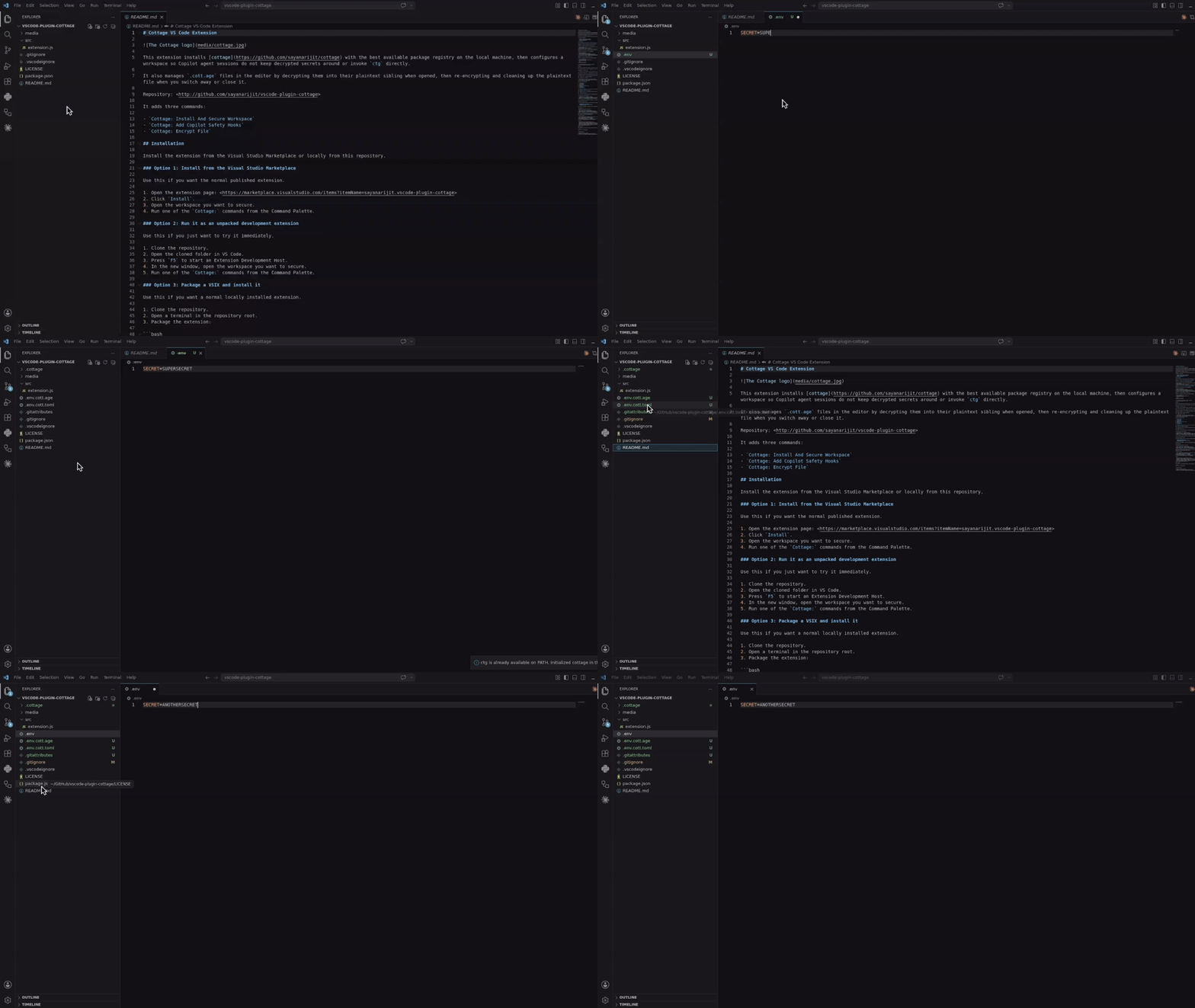
Cottage VS Code Extension Demo

इसे Visual Studio Marketplace से install करें, या vscode-plugin-cottage से locally build और install करें।

Cursor and Eclipse Extension

VSX file डाउनलोड करें और इसे अपने Cursor या Eclipse IDE में install करें। यह VS Code extension की तरह ही काम करता है।

Vim Plugin

Vim या Neovim से secrets को encrypt/decrypt करने के लिए cottage.vim plugin का उपयोग करें।
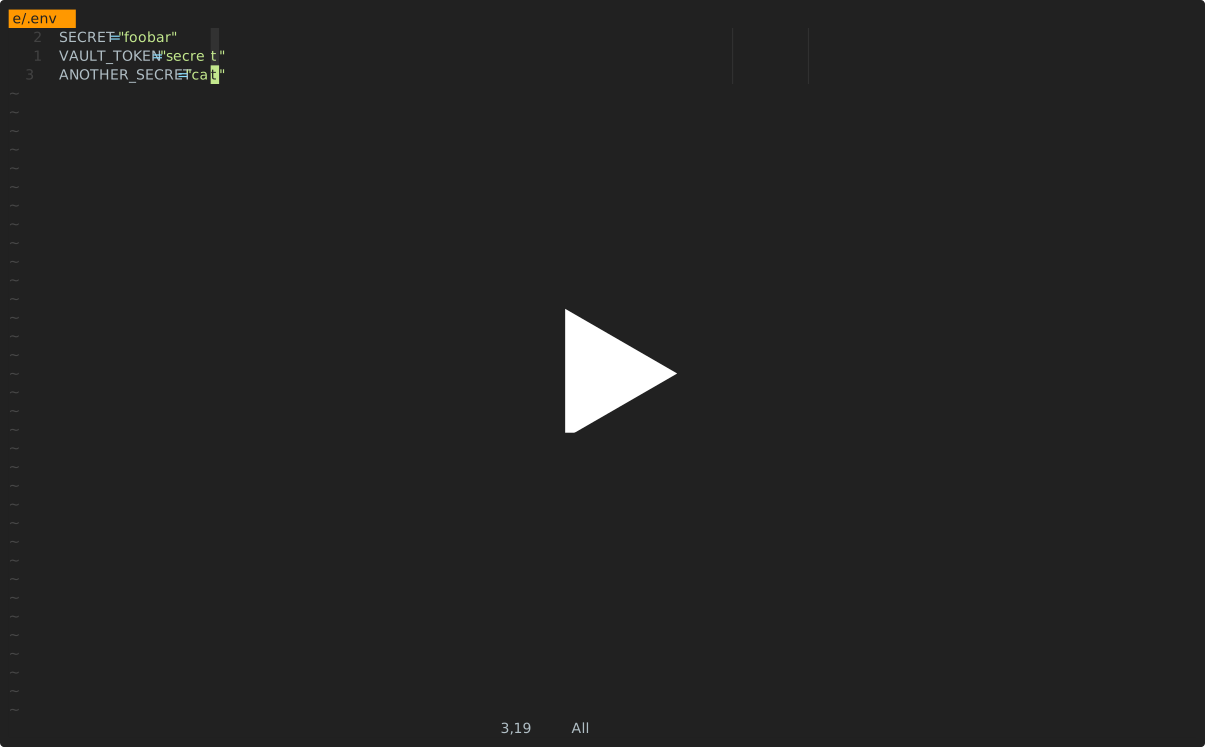
Cottage Neovim Demo

AI Agent Integrations

नीचे दिए गए सभी integrations AI agents को सीधे ctg/ctgx चलाने और secret files को देखने या संपादित करने से रोकते हैं: .cottage/ के अंदर कुछ भी, कोई भी *.cott.* file (encrypted *.cott.age blobs और redacted *.cott.toml previews), और कोई भी decrypted file जिसका disk पर अभी भी *.cott.age counterpart मौजूद है।

Claude Code Integration

यदि आप Claude Code का उपयोग कर रहे हैं, तो secrets वाले अपने repos में .claude/settings.json और .claude/hooks/deny-secrets.py जोड़ें ताकि Claude Code sessions secrets को सुरक्षित रूप से संभालें, या claude-plugin-cottage plugin install करें।

GitHub Copilot Integration

यदि आप VS Code में GitHub Copilot का उपयोग कर रहे हैं, तो secrets वाले अपने repos में .github/hooks/ctg-policy.json और .github/hooks/scripts/deny_ctg_command.py जोड़ें ताकि Copilot sessions decrypted files को साफ़ करें, सीधे ctg shell commands को block करें, और secret files तक पहुँच को block करें, या इसे VS Code से सेट करने के लिए vscode-plugin-cottage extension install करें।

VS Code .claude/settings.json hook definitions को भी load करता है। यदि आप एक ही repo में Claude और Copilot दोनों hook files रखते हैं, तो सुनिश्चित करें कि आप गलती से एक ही cleanup hook दो बार न चलाएँ।

Codex Integration

यदि आप Codex का उपयोग कर रहे हैं, तो secrets वाले अपने repos में .codex/hooks.json और .codex/hooks/deny-ctg.py जोड़ें ताकि Codex sessions secrets को सुरक्षित रूप से संभालें, या codex-plugin-cottage plugin install करें।

Codex को चलने से पहले local hooks की समीक्षा आवश्यक है। files जोड़ने के बाद, repo में Codex शुरू करें और project hooks की समीक्षा और trust करने के लिए /hooks का उपयोग करें।

Antigravity (agy) Integration

यदि आप Antigravity (agy) का उपयोग कर रहे हैं, तो secrets वाले अपने repos में .agents/hooks.json और .agents/scripts/deny-ctg.py जोड़ें ताकि Antigravity sessions secrets को सुरक्षित रूप से संभालें, या agy-plugin-cottage plugin install करें।

Cursor Integration

यदि आप Cursor का उपयोग कर रहे हैं, तो secrets वाले अपने repos में .cursor/hooks.json, .cursor/hooks/deny-ctg.py, .cursor/hooks/deny-read-secrets.py, .cursor/rules/deny-ctg.mdc, और .cursorignore जोड़ें ताकि Cursor sessions secrets को सुरक्षित रूप से संभालें।

Cursor में hooks को पहले enable करना आवश्यक है। Cursor Settings > Hooks खोलें और hooks enable करें, फिर agent session को restart करें ताकि project hooks प्रभावी हों। .cursorignore इसके अतिरिक्त secret files को Cursor की indexing और Agent के context से बाहर रखता है।

Quick Start

Project init करें:

mkdir project && cd project

git init  # Optional, cottage works better with git but it's not required
ctg init  # Sets up the .cottage directory and necessary files

tree -a
# .
# ├ .cottage/           <- Auto-generated by `ctg init`
# │ ├ identity        <- Your private key, keep it safe. Move it to `~/.config/cottage/identity` to use it globally, or replace it with a soft link to one of your existing private keys.
# │ └ recipients/     <- This is where your team keeps the public keys of all the recipients.
# │     └ sayanarijit <- Your public key. Commit it. To use an existing public key, just copy (don't softlink) that key here.
# ├ .git/...
# ├ .gitattributes      <- Added `*.cott.age binary linguist-generated filter=cottage-encrypted -diff` to avoid polluting git diff
# └ .gitignore          <- Added `/.cottage/identity` for obvious reasons

# You can run `ctg clean --all` anytime to clean up everything cottage ever did.

एक secret बनाएँ या संपादित करें:

# `ctg edit` decrypts the file before opening in $EDITOR and re-encrypts upon save.
# If the decrypted file was not present on disk before running `ctg edit`, it is cleaned up afterwards.
# If it was already present, it is kept on disk.
ctg edit secret.yml

# Use `--clean` with `ctg edit` or `ctg encrypt` to ensure decrypted files are deleted even if present before
ctg edit secret.yml --clean    # Opens in $EDITOR, encrypts on save, and cleans up
ctg encrypt secret.yml --clean # Encrypts secret.yml and cleans up
# encrypt secret.yml
#    into secret.yml.cott.age
#    edit secret.yml.cott.toml
#    edit .gitignore
# delete secret.yml

Decrypted secrets के साथ एक command चलाएँ:

cat secret.yml
# cat: secret.yml: No such file or directory

# `ctg run` (or shortcut `ctgx`) decrypts secrets before running the command.
# If the decrypted files were not present on disk beforehand, they are automatically cleaned up after the command finishes.
# If they were already present beforehand, they are kept on disk.
ctg run -- kubectl apply -f secret.yml          # decrypts secret.yml.cott.age to secret.yml and runs the command
ctg run -- kubectl apply -f secret.yml.cott.age # also replaces the path argument with the decrypted file path
ctg run -- kubectl apply -f .                   # decrypts all .cott.age files in . and runs the command
ctg run -- ./deploy.sh                          # decrypts all .cott.age files in repo and runs the command

cat secret.yml
# cat: secret.yml: No such file or directory

# Use `--clean` to ensure decrypted files are cleaned up even if they were present before
ctg run --clean ./deploy.sh

या shortcut का उपयोग करें:

ctgx -- ./deploy.sh
ctgx --clean -- ./deploy.sh

Decrypted secret को disk पर लिखे बिना पढ़ें और pipe करें:

ctg cat secret.yml.cott.age
ctg cat secret.yml | kubectl apply -f -
ctg cat .env.prod | docker run --rm --env-file /dev/stdin my-image:latest

Secrets को environment variables के रूप में inject करके command चलाएँ, बिना disk पर लिखे:

ctg env -- ./deploy.sh # Export secrets from .env.cott.age (default) without writing them to disk, then run deploy.sh
ctg env -F .env.prod.cott.age -- ./deploy.sh # exports from .env.prod.cott.age instead of .env.cott.age
ctg env -F secrets.json.cott.age -- printenv COTTAGE_SECRET # Also supports non-dotenv files.

GitOps

अपने secrets को team members के साथ शेयर करने के लिए, बस git repo में push करें।

git add .
git commit -m "Add secret.yml"
git push origin main

अपने साथियों से कहें कि वे अपनी public keys .cottage/recipients में जोड़ें और परिवर्तन push करें। फिर आप pull करके उनके लिए secrets को फिर से encrypt कर सकते हैं।

git pull origin main

ctg decrypt --skip-verify-recipients  # Decrypt missing secrets for re-encryption
ctg encrypt                           # Re-encrypt all secrets
# encrypt secret.yml
#    into secret.yml.cott.age
#    edit secret.yml.cott.toml

ctg clean  # optional
# delete secret.yml

# review changes, commit and push
git add .
git commit -m "Add new recipient to secrets"
git push origin main

अब आपके साथी नवीनतम परिवर्तन pull कर सकते हैं और स्वयं secrets decrypt कर सकते हैं।

Git Hooks

आप commit से पहले secrets को स्वचालित रूप से check/encrypt करने और checkout के बाद decrypt करने के लिए git hooks सेट करने हेतु prek या pre-commit का उपयोग कर सकते हैं।

यहाँ उदाहरण prek configuration देखें।

prek.toml file जोड़ने के बाद, चलाएँ:

prek install
prek install --hook-type post-checkout
prek install --hook-type post-merge
prek install --hook-type post-rewrite

Access Control

Rules

Metadata file में, आप annotate कर सकते हैं कि secret किन recipients के लिए encrypt किया जाना चाहिए। यह आपको विभिन्न environments (जैसे staging vs production) के लिए अलग-अलग secrets रखने और उन्हें केवल संबंधित recipients के लिए encrypt करने की सुविधा देता है।

# secret.yml.cott.toml
[secret]
allow = ["sayanarijit"]  # Only encrypt for sayanarijit
# secret.yml.cott.toml
[secret]
deny = ["sayanarijit"]  # Encrypt for everyone except sayanarijit
# secret.yml.cott.toml
[secret]
allow = ["env/staging/*"]  # Supports glob patterns, only encrypt for recipients in env/staging
deny = ["env/staging/badservice"]  # Encrypt for everyone in env/staging except badservice

Deny rules, allow rules पर प्राथमिकता लेते हैं।

अधिक जानकारी के लिए metadata specification देखें।

Verification

Tampering रोकने के लिए, आप CI में ctg verify चला सकते हैं ताकि यह सत्यापित हो सके कि encrypted secrets और recipient lists metadata rules से मेल खाते हैं।

# .github/workflows/cottage-verify.yml
name: Cottage Verify
on: [push, pull_request]
permissions:
  contents: read
jobs:
  verify-secrets:
    runs-on: ubuntu-latest
    steps:
      - uses: actions/checkout@v3
      - name: Verify secrets
        run: docker run --rm -v "${{ github.workspace }}:/app" ghcr.io/sayanarijit/cottage verify

Any Provider as Upstream

cottage के साथ, आप secrets को किसी भी API वाले provider के साथ sync कर सकते हैं, केवल git ही नहीं।

इसके लिए, project root में cottage.toml नाम की एक file बनाएँ और upstream settings configure करें।

यहाँ उदाहरण cottage.toml देखें और यहाँ secret specific upstream configuration देखें।

यहाँ एक उदाहरण plugin implementation देखें।

Workflow git के समान है, लेकिन git pull और git push के बजाय, आप configured upstream के साथ secrets sync करने के लिए ctg pull और ctg push चलाते हैं।

उदाहरण:

# Pull latest changes into local encrypted secrets
# Similar to `git pull origin`
ctg pull myvault

# Compare diff with local decrypted secrets
ctg diff

# Sync local decrypted secrets with local encrypted secrets
ctg sync

# Push changes from local encrypted secrets to upstream
# Similar to `git push origin main`
ctg push myvault

अधिक जानकारी के लिए upstream configuration specification देखें।

Example plugins

Cottage आपके secrets को sync करने के लिए विभिन्न plugin providers का समर्थन करता है। तैयार-से-उपयोग plugin scripts examples/plugins directory में उपलब्ध हैं:

Sync with any device

अपने secrets को अपने devices पर sync करने और CLI की आवश्यकता के बिना ब्राउज़ करने के लिए Cottage Sync का उपयोग करें।

Learn More

अधिक उपयोग उदाहरणों के लिए examples directory देखें।

Troubleshooting

# See debug logs with -v, -vv or -vvv
ctg run -vvv -- ./deploy.sh

Comparison

age vs Other Encryption

age सुरक्षित file encryption के लिए अनुकूलित एक आधुनिक, सरल algorithm का उपयोग करता है, जिसमें usability और न्यूनतम attack surface पर ध्यान केंद्रित है। यह SSH RSA और Ed25519 keys का भी समर्थन करता है, हालाँकि अलग-अलग उद्देश्यों और scopes के लिए अलग-अलग keys का उपयोग करने की सलाह दी जाती है।

cottage vs SOPS

हालाँकि SOPS और cottage में कई overlapping features हैं, cottage के निम्नलिखित लाभ हैं:

  • unencrypted secrets कभी भी git में commit न हों, यह सुनिश्चित करने के लिए .gitignore को स्वतः प्रबंधित करता है।
  • Encrypted secrets के pure age encrypted .age files होने से, tools के व्यापक ecosystem के साथ बेहतर interoperability संभव होती है।
  • Cleaner diffs - SOPS के विपरीत, जो हर secret के हर value के लिए diffs जनरेट करता है, भले ही वास्तविक परिवर्तन केवल एक recipient जोड़ना/हटाना हो, cottage प्रति file केवल एक diff जनरेट करता है, जो recipients checksum में परिवर्तन को स्पष्ट रूप से इंगित करता है।

cottage vs dotenvx

cottage ने ctg env API dotenvx से उधार ली है।

  • केवल dotenv files ही नहीं, किसी भी file type का समर्थन करता है।
  • एक repo में कई secrets प्रबंधित करता है।
  • विशिष्ट recipients के लिए secrets encrypt करने के लिए access control rules।
  • Cleaner diffs - देखें cottage vs SOPS।

cottage vs agebox

agebox मूल philosophy में cottage के बहुत समान है, लेकिन इसमें कई features की कमी है।

श्रेणियाँ