
laravel-threat-detection v1.3.1
Laravel के लिए निष्क्रिय खतरा पहचान मिडलवेयर। SQL injection, XSS, RCE, बॉट स्कैनर, 404 प्रोब्स और 175+ आक्रमण पैटर्न को लॉग करता है। अंतर्निहित डैशबोर्ड, fail2ban निर्यात, Slack अलर्ट, और REST API। IDS, WAF नहीं।





Laravel Threat Detection
Laravel के लिए सुरक्षा निगरानी और हमला लॉगिंग। SQL injection,
XSS, RCE, directory traversal, bot scanners और /wp-admin-शैली की recon probes का पता लगाएं और लॉग करें —
हर शत्रुतापूर्ण अनुरोध पूर्ण एप्लिकेशन संदर्भ के साथ आपके डेटाबेस में रिकॉर्ड किया जाता है।
यह एक IDS है, WAF नहीं: यह कभी भी किसी अनुरोध को ब्लॉक, फ़िल्टर या संशोधित नहीं करता।
क्या आप यहाँ कुछ ऐसा देखकर आए हैं?
GET /wp-admin/setup-config.php          404   — on a site that isn't WordPress
GET /.env                               404   — someone wants your database password
GET /?id=1' UNION SELECT password FROM  200   — SQL injection against a real route
GET /phpmyadmin/index.php               404   — scanning for an admin panel
वे अनुरोध पहले से ही आपके Laravel ऐप तक पहुँच रहे हैं। आपका एक्सेस लॉग URL और स्टेटस कोड दिखाता है, और कुछ नहीं — न डिकोड किया गया पेलोड, न यह कि आपके कौन से रूट को निशाना बनाया गया, न यह कि क्या उसी IP ने इस घंटे में चालीस अन्य चीज़ें आज़माई हैं।
यह पैकेज उन सवालों का जवाब देता है। इसे किसी भी Laravel 10–13 ऐप में डालें और यह हर HTTP अनुरोध को 150+ अटैक पैटर्न के विरुद्ध स्कैन करना शुरू कर देता है, प्रत्येक मैच को विश्वास के आधार पर स्कोर करता है और उसे आपके डेटाबेस में लिखता है — एक अंतर्निहित डैशबोर्ड, Slack अलर्ट, geo-enrichment, और fail2ban/blocklist एक्सपोर्ट के साथ। कोई भी अनुरोध कभी ब्लॉक नहीं किया जाता। सिक्योरिटी कैमरा सोचें, ताला नहीं: यह आपको ठीक-ठीक दिखाता है कि कौन आपके रूट को प्रोब कर रहा है, कितनी बार, और किन तकनीकों के साथ।
एक प्रोडक्शन ऐप से निकाला गया और वास्तविक ट्रैफ़िक पर परखा गया। 2,400+ टेस्ट, Laravel के अलावा कोई रनटाइम निर्भरता नहीं, और डिटेक्शन के लिए इंटरनेट कनेक्शन की आवश्यकता नहीं।
अपग्रेड कर रहे हैं? देखें UPGRADING.md। योगदान कर रहे हैं? देखें CONTRIBUTING.md।
एक मिनट से भी कम समय में शुरू करें
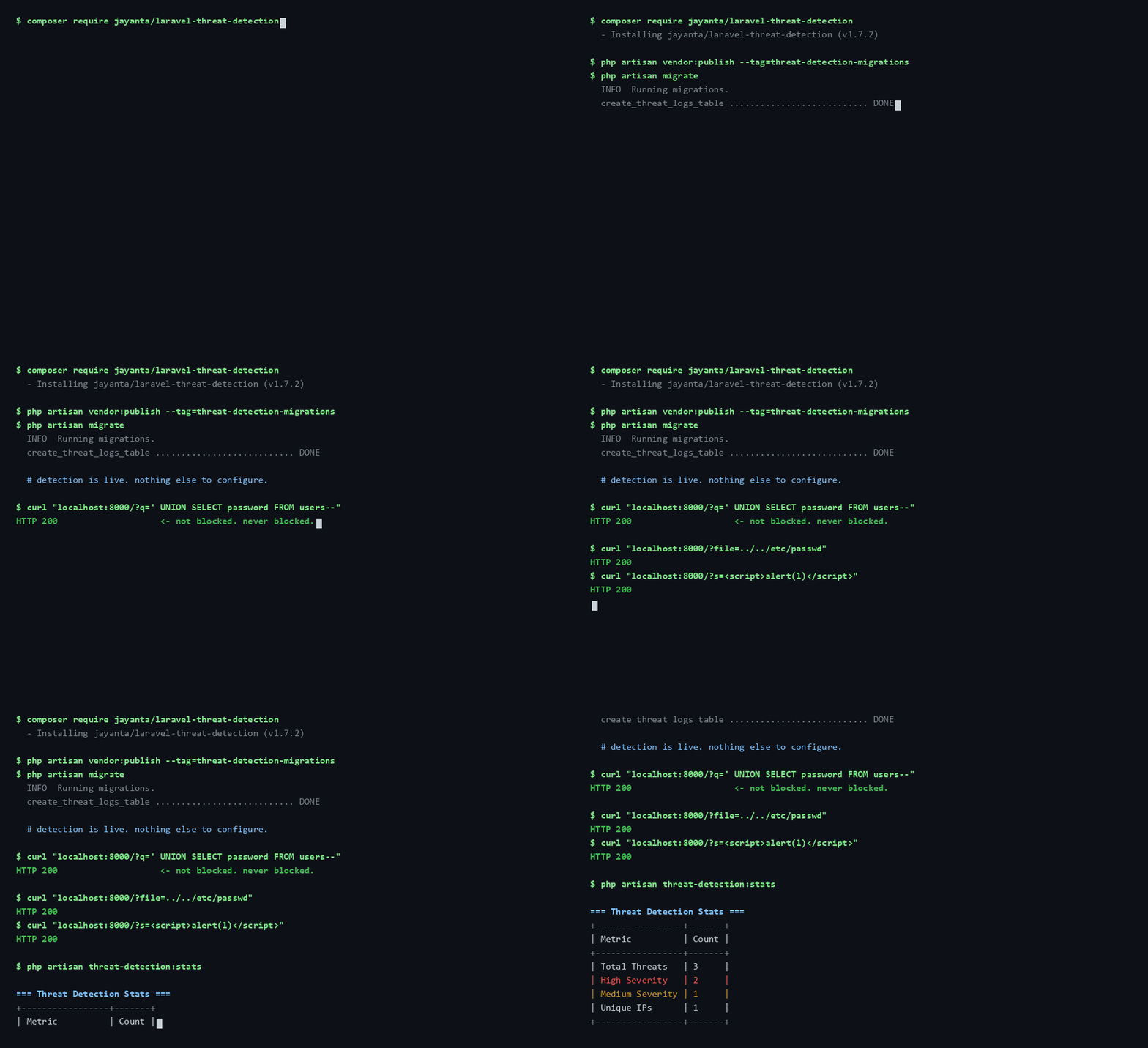
composer require jayanta/laravel-threat-detection
php artisan vendor:publish --tag=threat-detection-migrations
php artisan migrate
फिर अपने web समूह में मिडलवेयर जोड़ें (Laravel 11+ पर bootstrap/app.php में एक पंक्ति,
या Laravel 10 पर app/Http/Kernel.php में) — पूरा स्निपेट नीचे Quick Start में है।
बस इतना ही; डिटेक्शन लाइव है।
php artisan threat-detection:doctor # confirms it is actually recording
यह कहाँ फिट बैठता है: IDS बनाम WAF बनाम एज
यह पैकेज एक पैसिव, एप्लिकेशन-स्तरीय IDS है — यह देखता और रिकॉर्ड करता है, यह ब्लॉक नहीं करता। इसे किसी WAF या एज सेवा के साथ-साथ रखा जाना है, न कि उसकी जगह लेना है। प्रत्येक परत कुछ ऐसा देखती है जो अन्य नहीं देख सकतीं:
| यह पैकेज (ऐप IDS) | WAF (ModSecurity + OWASP CRS, Cloudflare WAF) | एज / CDN (Cloudflare) | |
|---|---|---|---|
| दुर्भावनापूर्ण अनुरोधों को ब्लॉक करता है | ❌ केवल लॉग करता है | ✅ | ✅ |
| पूर्ण ऐप संदर्भ (सटीक URL, डिकोड किया गया पेलोड, प्रमाणित उपयोगकर्ता) | ✅ | ⚠️ आंशिक | ❌ |
| आपके DB में अंतर्निहित डैशबोर्ड + थ्रेट लॉग | ✅ | ⚠️ भिन्न होता है | ⚠️ केवल एज |
| ऐप-विशिष्ट डिटेक्शन (जैसे आधार / PAN / IFSC PII) | ✅ अंतर्निहित + कस्टम | ⚠️ अपने नियम लिखें | ⚠️ कस्टम नियम, प्लान-निर्भर |
| ऑफ़लाइन काम करता है / कोई बाहरी सेवा नहीं | ✅ | ⚠️ निर्भर करता है | ❌ |
| आपके सर्वर तक पहुँचने से पहले ट्रैफ़िक रोकता है | ❌ | ⚠️ केवल क्लाउड WAF | ✅ |
| सेटअप | composer require, माइग्रेट, एक मिडलवेयर लाइन | मध्यम–उच्च | निम्न–मध्यम |
| लागत | मुफ़्त, MIT | भिन्न होती है | मुफ़्त टियर + सशुल्क |
संक्षेप में: एज/WAF आपके दरवाज़े का ताला है; यह अंदर का सुरक्षा कैमरा है, जिसके पास ऐप संदर्भ है ताकि यह बता सके कि किस रूट पर, किसके द्वारा, और कितनी बार क्या आज़माया जा रहा है। इसका उपयोग वास्तविक निर्णयों को सूचित करने के लिए करें — fail2ban प्रतिबंध, रेट लिमिट, जियो-ब्लॉकिंग — उन डेटा के साथ जो आपकी एज परत कभी नहीं देखती।
यह जानबूझकर क्या नहीं है
- WAF नहीं है। यह कभी ब्लॉक, फ़िल्टर या अनुरोध को संशोधित नहीं करता। प्रवर्तन के लिए Cloudflare, mod_security, या किसी वास्तविक WAF का उपयोग करें। (हैंड ऑफ करने के लिए कोई एज परत नहीं? ऑपरेटर-साइड हेल्पर्स पैकेज के निर्णयों को उजागर करते हैं ताकि आप अपना खुद का पाँच-लाइन ब्लॉकिंग मिडलवेयर लिख सकें — प्रवर्तन कोड आपका रहता है, पैकेज का नहीं।)
- सुरक्षित कोडिंग का विकल्प नहीं है। पैरामीटराइज़्ड क्वेरी, इनपुट वैलिडेशन, और आउटपुट एस्केपिंग आपके वास्तविक बचाव हैं। यह पैकेज मानता है कि आपका कोड पहले से सुरक्षित है और आपको दृश्यता देता है, सुरक्षा नहीं।
- एज सेवा नहीं है। यदि आप Cloudflare को आगे रख सकते हैं, तो रखें — फिर एप्लिकेशन-स्तरीय विवरण के लिए इसे जोड़ें जो एज सेवाएँ नहीं देख सकतीं।
- पूर्ण डिटेक्टर नहीं है, और हो भी नहीं सकता। पैटर्न मिलान उन हमलों को पकड़ता है जो ज्ञात हमलों जैसे दिखते हैं। एक नई तकनीक, या पर्याप्त रूप से फिर से लिखा गया परिचित हमला, बिना लॉग हुए निकल जाएगा — और आपको बताया नहीं जाएगा कि ऐसा हुआ। यहाँ मौन का अर्थ है "कुछ मेल नहीं खाया", कभी नहीं "कुछ हुआ ही नहीं"। यह अपनी जगह वहाँ कमाता है जहाँ उच्च-मात्रा, कम-प्रयास वाला ट्रैफ़िक होता है जो वास्तव में एक सार्वजनिक Laravel ऐप पर पहुँचने वाले अधिकांश हिस्से का निर्माण करता है: स्कैनर, रेकॉन प्रोब, ऑफ़-द-शेल्फ इंजेक्शन स्ट्रिंग्स, क्रेडेंशियल स्प्रे। एक शांत लॉग को साक्ष्य की अनुपस्थिति मानें, अनुपस्थिति का साक्ष्य नहीं।
पहले ही दिन अपनी ही सामग्री पर फ़्लैग होने की अपेक्षा करें
एक अनट्यून्ड इंस्टॉल वैध सामग्री पर फ़ायर करता है, और आपको यह इंस्टॉल करने के बाद नहीं बल्कि पहले जानना चाहिए।
ये अनुमानित नहीं, मापे गए हैं। नीचे दी गई पंक्तियाँ
LegitimateTrafficCorpusTest द्वारा तय किए गए फ़्लोर का एक नमूना हैं;
प्रत्येक यह सूचीबद्ध करता है कि वह अनुरोध सब कुछ क्या लॉग करता है, और
ReadmeNoiseFloorTest बिल्ड को विफल कर देता है
यदि कोई पंक्ति उस माप से मेल खाना बंद कर दे जो सूट उसके लिए मापता है।