
invisible_playwright v0.7.2
Playwright के लिए मुफ़्त एंटीडिटेक्ट ब्राउज़र स्टील्थ: अनडिटेक्टेड हेडलेस फ़ायरफ़ॉक्स फ़िंगरप्रिंट। Python स्क्रैपिंग, रीकैप्चा और बॉट डिटेक्शन बाईपास। ओपन सोर्स



Playwright gets caught by anti-bots and captchas.
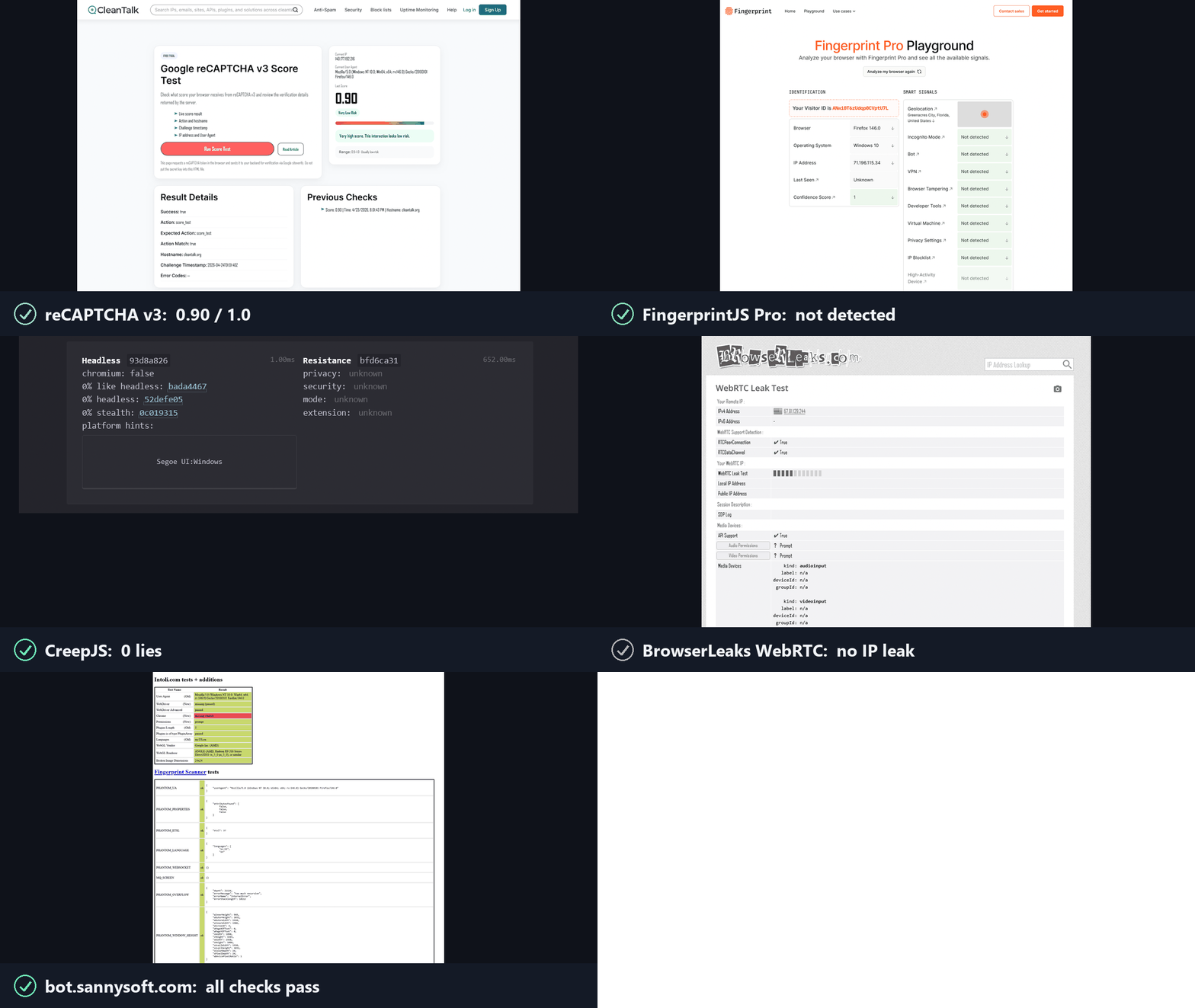
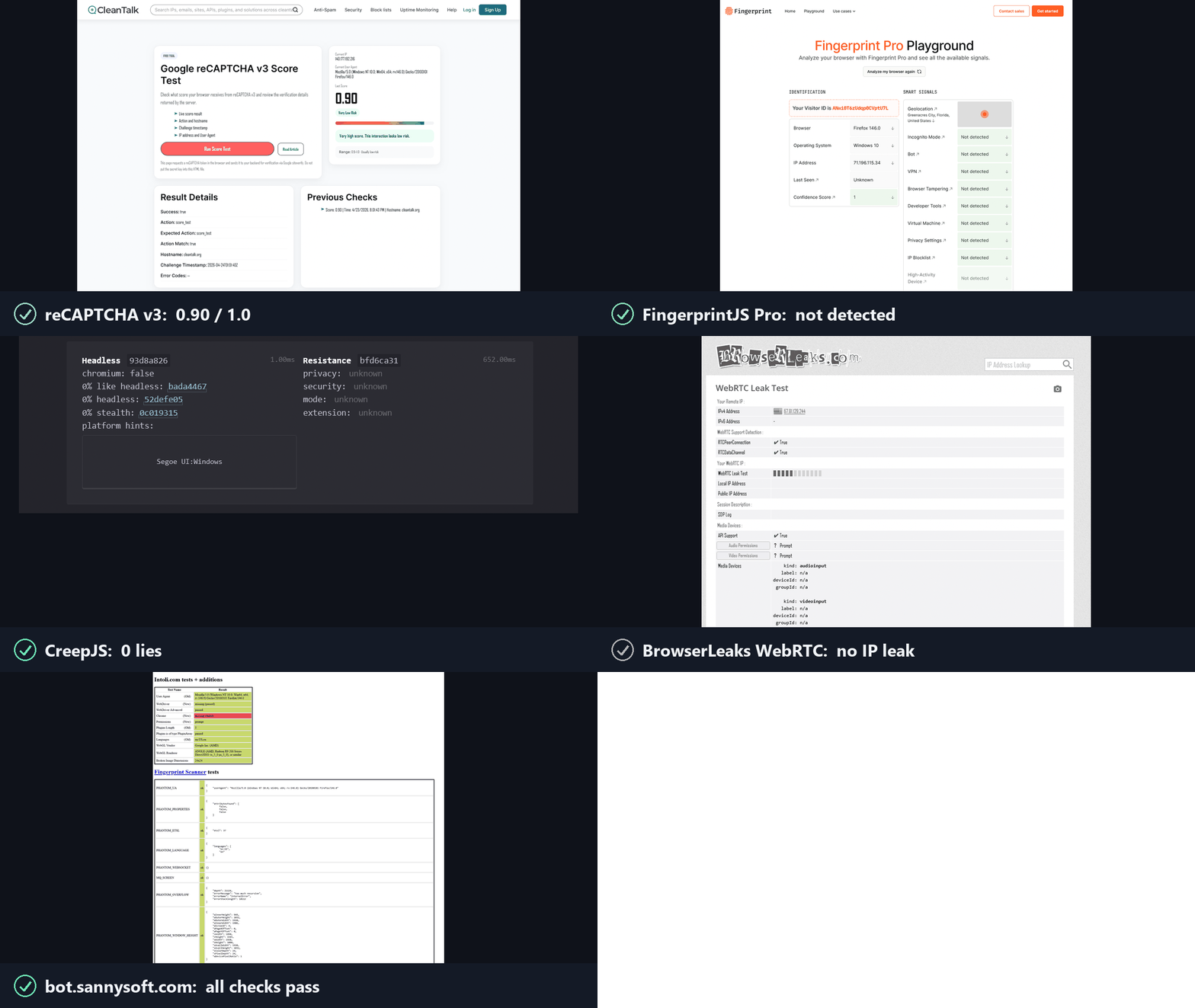
This one runs on an anti-detect Firefox with an undetected fingerprint, compatible with your existing Playwright code.
How it works
Anti-bots ask two questions, and reCAPTCHA, hCaptcha and Cloudflare Turnstile score the answers. invisible_playwright answers yes to both.
1. Is this a real browser? Yes. It is Firefox, patched at the C++ source level.
- The browser fingerprint is set inside the engine, not injected into the page: navigator, screen, GPU/WebGL, canvas, fonts, audio, WebRTC, timezone, network. Headless or headed, the same values either way.
- No JS shim, no override, no seam to read.
2. Is a real person using it? Yes. The actions are humanized in the driver.
- Every click, hover and drag follows a natural mouse path with human timing, no teleporting cursor.
- Each input is byte-identical to a real mouse: real input source, pressure, trusted events.
Install
Windows, in PowerShell:
powershell -ExecutionPolicy ByPass -c "irm https://astral.sh/uv/install.ps1 | iex"
$env:Path = "$env:USERPROFILE\.local\bin;$env:Path"
uv init --python ">=3.11" my-project
cd my-project
uv add invisible-playwright
uv run invisible-playwright fetch      # one-time download, sha256-verified: 240 MB, about 550 MB unpacked
Linux:
curl -LsSf https://astral.sh/uv/install.sh | sh
source $HOME/.local/bin/env
uv init --python ">=3.11" my-project
cd my-project
uv add invisible-playwright
uv run invisible-playwright fetch      # one-time download, sha256-verified: 262 MB, about 550 MB unpacked
Supported platforms: Windows x86_64, Linux x86_64. Linux arm64 is no longer supported from firefox-56 (firefox-55 is the last engine built for it).
Then save one of the examples below as main.py in my-project and run it with uv run main.py.
Usage
Random fingerprint per session
Playwright's API, sync and async, with no code changes. The same objects, the same calls, the same return values. A few surfaces are out of scope - tracing, HAR, CDP, the API request context - and each one refuses with a sentence saying why rather than misbehaving quietly. If you already use Playwright, switching is two lines:
- from playwright.sync_api import sync_playwright
- with sync_playwright() as p:
-     browser = p.firefox.launch()
+ from invisible_playwright import InvisiblePlaywright
+ with InvisiblePlaywright() as browser:
Every session gets a distinct fingerprint (GPU, audio, fonts, screen, ~200 fields) and Bezier-curve mouse motion.
Sync
from invisible_playwright import InvisiblePlaywright

with InvisiblePlaywright(proxy={"server": "socks5://...", "username": "u", "password": "p"}) as browser:
    page = browser.new_page()
    page.goto("https://example.com")
    page.click("#submit")   # mouse arcs to the button on a Bezier curve
Async
from invisible_playwright.async_api import InvisiblePlaywright

async with InvisiblePlaywright(proxy={"server": "socks5://...", "username": "u", "password": "p"}) as browser:
    page = await browser.new_page()
    await page.goto("https://example.com")
    await page.click("#submit")
The browser object is a playwright.sync_api.Browser / playwright.async_api.Browser - every Playwright method works as-is.
Log the seed to replay a run:
sf = InvisiblePlaywright()
with sf as browser:
    print("seed =", sf.seed)
    # ...
Reproducible fingerprint
with InvisiblePlaywright(seed=42) as browser:
    ...   # same GPU, same canvas hash, same audio context, every run
Proxies
proxy = {
    "server": "socks5://gate.example.com:1080",
    "username": "user",
    "password": "pass",
}
with InvisiblePlaywright(proxy=proxy) as browser:
    ...
Schemes supported: socks5, socks4, http, https. DNS is routed through the proxy by default, no local leak.
Serving one browser to many clients
launch_server() serves one browser on a WebSocket to any Playwright client. Install the
extra that carries the WebSocket library with uv add "invisible-playwright[remote]".
# server.py
from invisible_playwright import launch_server

with launch_server(seed=42, headless=True) as server:
    print(server.ws_endpoint)          # ws://127.0.0.1:<port>/<secret>
    input("serving, press Enter to stop")
# client.py: any Playwright client; this one is Playwright for Python (uv add playwright)
import sys
from playwright.sync_api import sync_playwright

with sync_playwright() as p:
    browser = p.firefox.connect(sys.argv[1])      # the address the server printed
    page = browser.new_page()
    page.goto("https://example.com")
    print(page.title())
    browser.close()                               # ends this client; the server's browser keeps running
The server listens on 127.0.0.1 with a random secret path; host=, port= and path= choose
another address. A client in another language (Node, Java, .NET, Go) connects to the same
address with the connect call of its own Playwright. The browser belongs to the server and
ends with server.close() (or with the with block).
On Linux, set MALLOC_ARENA_MAX=2 in the environment of the process that runs it (glibc keeps a memory
arena per thread otherwise); the server already hands freed memory back with malloc_trim
(INVPW_MALLOC_TRIM=0 turns that off).