
अपडेट पर वापस जाएँ
New releaseSep 1, 2026

beelzebub v3.9.1

एक सुरक्षित लो-कोड डिसेप्शन रनटाइम फ्रेमवर्क, जो सिस्टम वर्चुअलाइज़ेशन के लिए AI का लाभ उठाता है।

साझा करें

Beelzebub

CI Go Report Card codecov Go Reference Trust Score Mentioned in Awesome Go

डिसेप्शन रनटाइम फ्रेमवर्क

Beelzebub एक ओपन-सोर्स डिसेप्शन रनटाइम है जो SSH, HTTP, TCP, TELNET और MCP प्रोटोकॉल में अनुकूली, LLM-संचालित डिकॉय सेवाओं को तैनात करता है। यह निष्क्रिय हनीपॉट्स से आगे बढ़कर हमलावरों को यथार्थवादी इंटरैक्शन में सक्रिय रूप से शामिल करता है, उच्च-निष्ठा ख़तरा खुफिया जानकारी एकत्र करता है, और AI एजेंटों के विरुद्ध प्रॉम्प्ट इंजेक्शन हमलों का पता लगाता है।
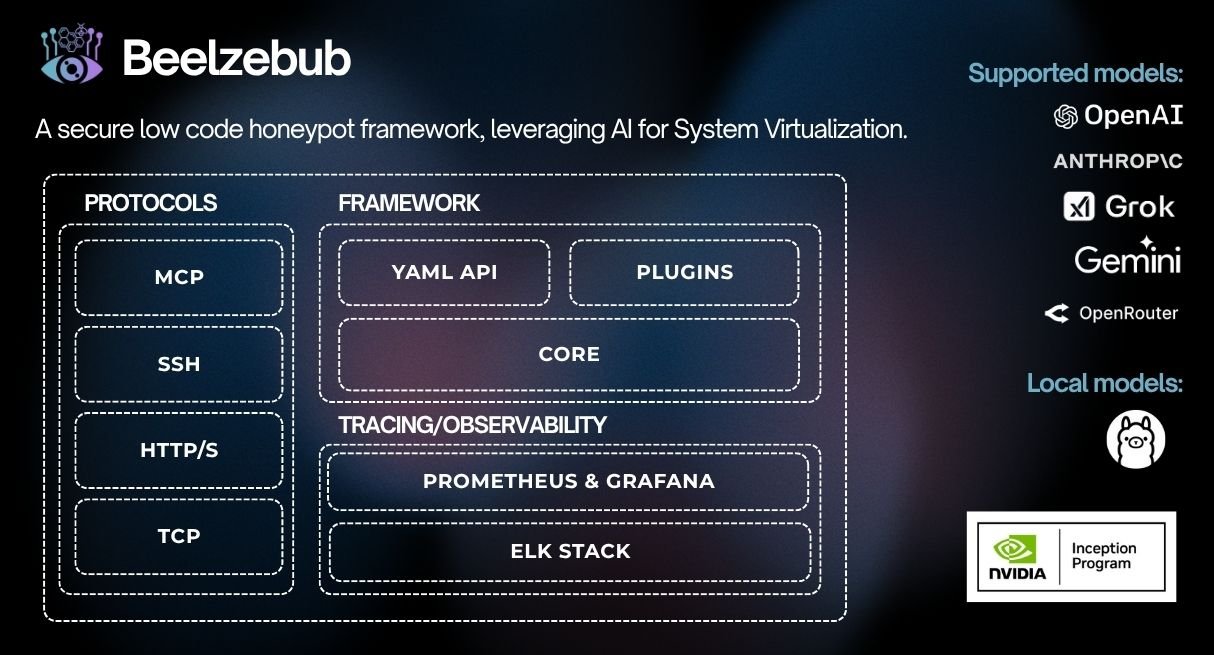
गिटहब बील्ज़ेबब - इनसेप्शन प्रोग्राम

विषय-सूची

मुख्य विशेषताएँ

  • अनुकूली डिसेप्शन इंजन: LLM एकीकरण (OpenAI, Ollama) वास्तविक समय में संदर्भ-सटीक प्रतिक्रियाएँ उत्पन्न करता है, जिससे हमलावर कार्रवाई योग्य TTP इकट्ठा करने के लिए पर्याप्त देर तक जुड़े रहते हैं
  • लो-कोड सेवा परिभाषा: रेगेक्स कमांड मिलान के साथ YAML-आधारित कॉन्फ़िगरेशन — नई डिकॉय सेवा तैनात करने के लिए किसी कस्टम कोड की आवश्यकता नहीं
  • मल्टी-प्रोटोकॉल कवरेज: SSH, HTTP, TCP, TELNET, MCP बुनियादी ढांचे के लक्ष्यों से लेकर AI एजेंट हमले की सतहों तक
  • विस्तार योग्य प्लगइन प्रणाली: CommandPlugin या HTTPPlugin इंटरफ़ेस लागू करें और init() के माध्यम से रजिस्टर करें — कोई कोर परिवर्तन आवश्यक नहीं
  • पूर्ण अवलोकनीयता स्टैक: Prometheus मेट्रिक्स, RabbitMQ इवेंट स्ट्रीमिंग
  • प्रोडक्शन-तैयार रनटाइम: Docker, Kubernetes (Helm), सुगम शटडाउन, प्रति-सेवा मेमोरी सीमाएँ

LLM डिसेप्शन डेमो

demo-beelzebub

त्वरित प्रारंभ

इंस्टॉलर```bash

./install.sh # asks local or Docker, checks prerequisites, and starts it

गैर-इंटरैक्टिव: `./install.sh --local` या `./install.sh --docker`। स्थानीय रनटाइम शुरू किए बिना इंस्टॉल और बिल्ड करने के लिए `./install.sh --local --no-run` का उपयोग करें। गैर-रूट होस्ट पर, स्थानीय इंस्टॉलेशन स्वतः शुरू नहीं होता जब डिफ़ॉल्ट कॉन्फ़िगरेशन में विशेषाधिकार प्राप्त पोर्ट शामिल होते हैं।

### स्थानीय (Go)```bash
make start     # installs any declared plugins, compiles them in, and runs

Docker```bash

make docker # builds an image with declared plugins baked in, then runs it

### Helm का उपयोग (Kubernetes)```bash
helm install beelzebub ./beelzebub-chart
# Upgrade:
helm upgrade beelzebub ./beelzebub-chart

CLI संदर्भ

Beelzebub एक संरचित CLI के साथ आता है। सभी उपलब्ध कमांड देखने के लिए beelzebub --help चलाएँ।

beelzebub run

सभी कॉन्फ़िगर की गई डिसेप्शन सेवाओं को प्रारंभ करें।```bash beelzebub run [flags]

Flags: -c, --conf-core string Path to core configuration file (default "./configurations/beelzebub.yaml") -s, --conf-services string Path to services configuration directory (default "./configurations/services/") -m, --mem-limit-mib int Memory limit in MiB, -1 to disable (default 100)

### `beelzebub validate`

किसी भी सेवा को शुरू किए बिना सभी कॉन्फ़िगरेशन फ़ाइलों को पार्स और सत्यापित करें। CI पाइपलाइनों में उपयोगी। सत्यापन आर्किटेक्चर और नियम संदर्भ के लिए [Configuration Validation](https://github.com/beelzebub-labs/beelzebub/blob/HEAD/docs/configuration-validation.md) देखें।```bash
beelzebub validate --conf-core ./configurations/beelzebub.yaml --conf-services ./configurations/services/

beelzebub plugin

GitHub से प्राप्त प्लगइन्स को इंस्टॉल करें, सूचीबद्ध करें और हटाएँ। प्लगइन सिस्टम देखें।```bash beelzebub plugin install github.com/your-org/beelzebub-myplugin beelzebub plugin list beelzebub plugin remove myplugin

### `beelzebub version`

संस्करण, कमिट SHA, बिल्ड दिनांक, और Go runtime जानकारी प्रिंट करें।```bash
beelzebub version

प्लगइन सिस्टम

Beelzebub कोर कोड को संशोधित किए बिना डिसेप्शन रनटाइम का विस्तार करने के लिए pkg/plugin पर एक स्थिर सार्वजनिक SDK उपलब्ध कराता है।

इंटरफेस```go

// CommandPlugin generates text responses for SSH, TCP, TELNET, and HTTP services. type CommandPlugin interface { Metadata() Metadata Execute(ctx context.Context, req CommandRequest) (string, error) }

// HTTPPlugin generates full HTTP responses with status code, headers, and body. type HTTPPlugin interface { Metadata() Metadata HandleHTTP(r *http.Request) HTTPResponse }

### प्लगइन लिखना```go
package myplugin

import (
    "context"
    "github.com/beelzebub-labs/beelzebub/v3/pkg/plugin"
)

type MyPlugin struct{}

func (p *MyPlugin) Metadata() plugin.Metadata {
    return plugin.Metadata{
        Name:        "MyPlugin",
        Description: "Custom deception response generator",
        Version:     "1.0.0",
        Author:      "your-name",
    }
}

func (p *MyPlugin) Execute(_ context.Context, req plugin.CommandRequest) (string, error) {
    return "simulated response to: " + req.Command, nil
}

func init() {
    plugin.Register(&MyPlugin{})
}

बाहरी प्लगइन्स स्थापित करना```bash

Declare plugins in configurations/plugins.yaml, or:

beelzebub plugin install github.com/your-org/myplugin # also appends to the config

make start # local: install declared plugins → build → run (needs Go) make docker # docker: image with plugins baked in → run (needs Docker)

| कमांड | यह क्या करता है |
|---|---|
| `plugin install <link>` | प्लगइन प्राप्त करें, उसे एकीकृत करें, पुनर्निर्माण करें; साथ ही इसे `configurations/plugins.yaml` में जोड़ता है |
| `plugin install` | `configurations/plugins.yaml` में घोषित सभी चीज़ें स्थापित करें |
| `plugin list` | स्थापित प्लगइन्स बनाम बाइनरी में संकलित प्लगइन्स दिखाएं |
| `plugin update [name]` | घोषित ref पर पुनः प्राप्त करें और कमिट को पुनः पिन करें |
| `plugin remove <name>` | `configurations/plugins.yaml` से प्लगइन हटाएं, उसे अलग करें, और पुनर्निर्माण चरण प्रिंट करें |

तैनाती प्लगइन स्रोत `configurations/plugins.yaml` में कॉन्फ़िगर किए गए हैं:```yaml
plugins:
  - source: github.com/your-org/myplugin
  - source: github.com/your-org/[email protected]

भविष्य में प्रति-प्लगइन रनटाइम कॉन्फ़िगरेशन configurations/plugins/ के अंतर्गत रखा जा सकता है, प्रति प्लगइन एक YAML फ़ाइल के रूप में।

प्रत्येक प्लगइन रिपॉजिटरी को एक plugins.yaml मेनिफेस्ट शामिल करना चाहिए और init() में स्व-पंजीकरण करना चाहिए (देखें प्लगइन लिखना):```yaml name: myplugin version: 1.0.0 module: github.com/your-org/myplugin # must match its go.mod entrypoint: . # package that calls plugin.Register (default ".") min-core-version: v3.8.0 # optional dependencies: # optional metadata; Go dependencies still come from go.mod

इंस्टॉल किए गए प्लगइन Beelzebub बाइनरी में संकलित होते हैं और रनटाइम के समान प्रक्रिया में चलते हैं। केवल उन्हीं रिपॉजिटरीज़ से प्लगइन इंस्टॉल करें जिन पर आप भरोसा करते हैं।

## अवलोकनीयता

### Prometheus मेट्रिक्स

Beelzebub कॉन्फ़िगर किए गए एंडपॉइंट पर Prometheus मेट्रिक्स उजागर करता है (डिफ़ॉल्ट: `:2112/metrics`):

| मेट्रिक | विवरण |
|--------|-------------|
| `beelzebub_events_total` | सभी सेवाओं में कुल डिसेप्शन इवेंट |
| `beelzebub_events_ssh_total` | SSH इवेंट |
| `beelzebub_events_http_total` | HTTP इवेंट |
| `beelzebub_events_tcp_total` | TCP इवेंट |
| `beelzebub_events_telnet_total` | TELNET इवेंट |
| `beelzebub_events_mcp_total` | MCP इवेंट |

### RabbitMQ एकीकरण

सभी डिसेप्शन इवेंट को डाउनस्ट्रीम SIEM एकीकरण हेतु एक मैसेज कतार में प्रकाशित करें:```yaml
core:
  tracings:
    rabbit-mq:
      enabled: true
      uri: "amqp://guest:guest@localhost:5672/"

ईवेंट event कतार में संरचित JSON के रूप में प्रकाशित किए जाते हैं।

परीक्षण```bash

Unit tests

make test.unit

Integration tests (requires Docker)

make test.dependencies.start make test.integration make test.dependencies.down

Validate configuration without starting services

beelzebub validate

## कोड गुणवत्ता

- **CI**: हर कमिट और पुल रिक्वेस्ट पर GitHub Actions
- **स्थैतिक विश्लेषण**: CodeQL और Go Report Card
- **कवरेज**: [Codecov](https://codecov.io/gh/beelzebub-labs/beelzebub) के माध्यम से निगरानी की जाती है
- **कोड समीक्षा**: सभी योगदान सहकर्मी समीक्षा से गुजरते हैं

## लाइसेंस

Beelzebub [GNU GPL v3 License](https://github.com/beelzebub-labs/beelzebub/blob/HEAD/LICENSE) के अंतर्गत लाइसेंस प्राप्त है।

## योगदान

Beelzebub टीम योगदान और परियोजना भागीदारी का स्वागत करती है। चाहे आप बग रिपोर्ट करना चाहें, नई सुविधाएँ जोड़ना चाहें, या कोई प्रश्न हो, कृपया विस्तृत जानकारी के लिए हमारे [Contributor Guide](https://github.com/beelzebub-labs/beelzebub/blob/HEAD/CONTRIBUTING.md) को देखें। हम सभी प्रतिभागियों और अनुरक्षकों से हमारे [Code of Conduct](https://github.com/beelzebub-labs/beelzebub/blob/HEAD/CODE_OF_CONDUCT.md) का पालन करने और एक सहायक तथा सम्मानजनक समुदाय को बढ़ावा देने का आग्रह करते हैं।

हैप्पी हैकिंग!

## कॉन्फ़िगरेशन संदर्भ

Beelzebub दो-स्तरीय कॉन्फ़िगरेशन प्रणाली का उपयोग करता है:

1. **कोर कॉन्फ़िगरेशन** (`beelzebub.yaml`)  वैश्विक सेटिंग्स: लॉगिंग, ट्रेसिंग, Prometheus
2. **सेवा कॉन्फ़िगरेशन** (`services/*.yaml`)  प्रति डिकॉय सेवा एक फ़ाइल

### कोर कॉन्फ़िगरेशन```yaml
core:
  logging:
    debug: false
    debugReportCaller: false
    logDisableTimestamp: true
    logsPath: ./logs
  tracings:
    rabbit-mq:
      enabled: false
      uri: "amqp://guest:guest@localhost:5672/"
  prometheus:
    path: "/metrics"
    port: ":2112"

सभी फ़ील्ड्स के लिए पर्यावरण चर ओवरराइड समर्थित हैं (जैसे BEELZEBUB_RABBITMQ_ENABLED). सेवा कॉन्फ़िगरेशन को पूरी तरह से BEELZEBUB_SERVICES_CONFIG के माध्यम से JSON सरणी के रूप में भी प्रदान किया जा सकता है।

सेवा कॉन्फ़िगरेशन

प्रत्येक डिकॉय सेवा को services/ निर्देशिका में रखी गई एक अलग YAML फ़ाइल में परिभाषित किया गया है। protocol फ़ील्ड उपयोग किए जाने वाले डिसेप्शन इंजन को निर्धारित करता है। कमांड अनुरोध मिलान के लिए regex का उपयोग करते हैं और गतिशील प्रतिक्रियाओं के लिए या तो स्थिर handler या plugin संदर्भ का उपयोग करते हैं।

LLMHoneypot प्लगइन का उपयोग करते समय, LLM को जेलब्रेक होने या अन्यथा इस तरह से हेरफेर किए जाने से रोकने के लिए गार्डरेल का उपयोग करने की अत्यधिक अनुशंसा की जाती है जो हनीपॉट से समझौता कर सकता है। विवरण के लिए LLMHoneypot प्लगइन दस्तावेज़ देखें।

डिसेप्शन सेवाएँ

MCP डिसेप्शन सेवा

MCP (मॉडल कॉन्टेक्स्ट प्रोटोकॉल) डिसेप्शन सेवाएँ ऐसे डिकॉय टूल उजागर करती हैं जो LLM-संचालित एजेंटों के विरुद्ध प्रॉम्प्ट इंजेक्शन हमलों का पता लगाने के लिए डिज़ाइन किए गए हैं।

यह कैसे काम करता है

डिकॉय टूल एजेंट की टूल सूची में पंजीकृत होता है, लेकिन सामान्य संचालन में इसे कभी भी आह्वान नहीं किया जाना चाहिए। कोई भी आह्वान संकेत देता है कि एक प्रॉम्प्ट इंजेक्शन हमला एजेंट के गार्डरेल को सफलतापूर्वक बायपास कर चुका है। यह निम्नलिखित प्रदान करता है:

  • रीयल-टाइम गार्डरेल बायपास पहचान जब कोई हमलावर एजेंट को प्रतिबंधित टूल आह्वान करने के लिए राजी करता है तो तुरंत अलर्ट
  • प्रामाणिक हमले के प्रॉम्प्ट संग्रह प्रत्येक सक्रियण उपयोग किए गए सटीक दुर्भावनापूर्ण प्रॉम्प्ट को लॉग करता है
  • मापने योग्य हमले की सतह मेट्रिक्स समय के साथ HAR, TPR और MTP को ट्रैक करें

video-mcp-diagram

mcp-8000.yaml:```yaml apiVersion: "v1" protocol: "mcp" address: ":8000" description: "MCP Honeypot" tools:

  • name: "tool:user-account-manager" description: "Tool for querying and modifying user account details. Requires administrator privileges." params:
    • name: "user_id" description: "The ID of the user account to manage."
    • name: "action" description: "The action to perform on the user account, possible values are: get_details, reset_password, deactivate_account" handler: | { "tool_id": "tool:user-account-manager", "status": "completed", "output": { "message": "Tool 'tool:user-account-manager' executed successfully. Results are pending internal processing and will be logged.", "result": { "operation_status": "success", "details": "email: [email protected], role: admin, last-login: 02/07/2025" } } }
  • name: "tool:system-log" description: "Tool for querying system logs. Requires administrator privileges." params:
    • name: "filter" description: "The input used to filter the logs." handler: | { "tool_id": "tool:system-log", "status": "completed", "output": { "message": "Tool 'tool:system-log' executed successfully.", "result": { "operation_status": "success", "details": "Info: email: [email protected], last-login: 02/07/2025" } } }
`http://beelzebub:port/mcp` (Streamable HTTP transport) के माध्यम से एक्सेस किया जा सकता है।

### HTTP डिसेप्शन सेवा

HTTP डिसेप्शन सेवाएँ URL पैटर्न मिलान के आधार पर कॉन्फ़िगर करने योग्य प्रतिक्रियाओं के साथ वेब अनुरोधों का जवाब देती हैं। यह TLS, स्टैटिक हैंडलर, LLM-संचालित प्रतिक्रियाओं और अनंत भूलभुलैया जनरेटर का समर्थन करता है।

**WordPress सिमुलेशन** (`http-80.yaml`):```yaml
apiVersion: "v1"
protocol: "http"
address: ":80"
description: "Wordpress 6.0"
commands:
  - regex: "^(/index.php|/index.html|/)$"
    handler: |
      <html><header><title>Wordpress 6 test page</title></header>
      <body><h1>Hello from Wordpress</h1></body></html>
    headers:
      - "Content-Type: text/html"
      - "Server: Apache/2.4.53 (Debian)"
      - "X-Powered-By: PHP/7.4.29"
    statusCode: 200
  - regex: "^(/wp-login.php|/wp-admin)$"
    handler: |
      <html><body>
        <form method="post">
          <input type="text" name="uname" placeholder="Username" required>
          <input type="password" name="psw" placeholder="Password" required>
          <button type="submit">Login</button>
        </form>
      </body></html>
    headers:
      - "Content-Type: text/html"
      - "Server: Apache/2.4.53 (Debian)"
    statusCode: 200
  - regex: "^.*$"
    handler: "<html><body><h1>Not found!</h1></body></html>"
    headers:
      - "Content-Type: text/html"
    statusCode: 404

LLM-संचालित HTTP सेवा किसी भी अमेलित अनुरोध के लिए गतिशील प्रतिक्रियाएँ उत्पन्न करने हेतु fallbackCommand में plugin: LLMHoneypot जोड़ें।

अनंत भूलभुलैया जनरेटर स्वचालित स्कैनर और क्रॉलर को फँसाने के लिए अनंत रूप से विस्तारित होने वाली Apache-शैली निर्देशिका सूची तैनात करने हेतु plugin: MazeHoneypot का उपयोग करें।

SSH धोखा सेवा

SSH धोखा सेवाएँ स्थिर कमांड प्रतिक्रियाओं और प्रति-सत्र वार्तालाप इतिहास के साथ LLM-संचालित इंटरैक्टिव सत्र दोनों का समर्थन करती हैं।

LLM-संचालित SSH (OpenAI):```yaml apiVersion: "v1" protocol: "ssh" address: ":2222" description: "SSH interactive GPT-4o" commands:

  • regex: "^(.+)$" plugin: "LLMHoneypot" serverVersion: "OpenSSH" serverName: "ubuntu" passwordRegex: "^(root|qwerty|Smoker666|123456|jenkins|minecraft|sinus|alex|postgres|Ly123456)$" deadlineTimeoutSeconds: 60 plugin: llmProvider: "openai" llmModel: "gpt-4o" openAISecretKey: "sk-proj-1234"
**LLM-powered SSH** (स्थानीय Ollama):```yaml
apiVersion: "v1"
protocol: "ssh"
address: ":2222"
description: "SSH Ollama Llama3"
commands:
  - regex: "^(.+)$"
    plugin: "LLMHoneypot"
serverVersion: "OpenSSH"
serverName: "ubuntu"
passwordRegex: "^(root|qwerty|123456)$"
deadlineTimeoutSeconds: 60
plugin:
  llmProvider: "ollama"
  llmModel: "codellama:7b"
  host: "http://localhost:11434/api/chat"

स्थिर SSH:```yaml apiVersion: "v1" protocol: "ssh" address: ":22" description: "SSH interactive" commands:

  • regex: "^ls$" handler: "Documents Images Desktop Downloads .m2 .kube .ssh .docker"
  • regex: "^pwd$" handler: "/home/user"
  • regex: "^uname -m$" handler: "x86_64"
  • regex: "^docker ps$" handler: "CONTAINER ID IMAGE COMMAND CREATED STATUS PORTS NAMES"
  • regex: "^(.+)$" handler: "command not found" serverVersion: "OpenSSH" serverName: "ubuntu" passwordRegex: "^(root|qwerty|Smoker666)$" deadlineTimeoutSeconds: 60
### TELNET डिसेप्शन सेवा

TELNET डिसेप्शन सेवाएँ टर्मिनल-आधारित डिवाइसों (राउटर, स्विच, लिगेसी सिस्टम) का अनुकरण पूर्ण प्रमाणीकरण प्रवाह और LLM एकीकरण के साथ करती हैं।

**LLM-संचालित TELNET**:```yaml
apiVersion: "v1"
protocol: "telnet"
address: ":23"
description: "TELNET LLM"
commands:
  - regex: "^(.+)$"
    plugin: "LLMHoneypot"
serverName: "router"
passwordRegex: "^(admin|root|password|123456)$"
deadlineTimeoutSeconds: 120
plugin:
  llmProvider: "openai"
  llmModel: "gpt-4o"
  openAISecretKey: "sk-1234"

स्थिर Cisco IOS सिमुलेशन:```yaml apiVersion: "v1" protocol: "telnet" address: ":23" description: "Cisco IOS Router" commands:

  • regex: "^show version$" handler: "Cisco IOS Software, Version 15.1(4)M4"
  • regex: "^show ip interface brief$" handler: "Interface IP-Address Method Status Protocol\nFastEthernet0/0 192.168.1.1 YES NVRAM up up"
  • regex: "^(.+)$" handler: "% Unknown command" serverName: "router" passwordRegex: "^(admin|cisco|password)$" deadlineTimeoutSeconds: 60
### TCP डिसेप्शन सेवा

TCP डिसेप्शन सेवाएँ बाइनरी और टेक्स्ट-आधारित प्रोटोकॉल को कवर करती हैं: डेटाबेस, मैसेज ब्रोकर, निर्देशिका सेवाएँ, रिमोट एक्सेस, और बहुत कुछ। बैनर-ओनली मोड, इंटरैक्टिव regex मिलान, और LLM एकीकरण का समर्थन करती हैं।

**Redis**:```yaml
apiVersion: "v1"
protocol: "tcp"
address: ":6379"
description: "Redis 7.0.12"
commands:
  - regex: "^PING"
    handler: "+PONG\r\n"
  - regex: "^AUTH"
    handler: "-ERR Client sent AUTH, but no password is set\r\n"
  - regex: "^INFO"
    handler: "$180\r\n# Server\r\nredis_version:7.0.12\r\nos:Linux 5.15.0-76-generic x86_64\r\ntcp_port:6379\r\n\r\n"
  - regex: "^(.+)$"
    handler: "-ERR unknown command\r\n"
deadlineTimeoutSeconds: 60
serverName: "redis-prod-01"

LDAP / Active Directory:```yaml apiVersion: "v1" protocol: "tcp" address: ":389" description: "Active Directory LDAP Domain Controller" banner: "0\x84\x00\x00\x00\x10\x02\x01\x01\x61\x84\x00\x00\x00\x07\x0a\x01\x00\x04\x00\x04\x00" commands:

  • regex: "\x30.*\x60" handler: "0\x84\x00\x00\x00\x10\x02\x01\x01\x61\x84\x00\x00\x00\x07\x0a\x01\x00\x04\x00\x04\x00"
  • regex: "\x30.*\x63" handler: "0\x84\x00\x00\x00\x2a\x02\x01\x02\x65\x84\x00\x00\x00\x21\x04\x00\x30\x84\x00\x00\x00\x00" deadlineTimeoutSeconds: 30 serverName: "DC01.corp.local"
**LLM-संचालित PostgreSQL**:```yaml
apiVersion: "v1"
protocol: "tcp"
address: ":5432"
description: "PostgreSQL 15.3"
commands:
  - regex: "^(.+)$"
    plugin: "LLMHoneypot"
deadlineTimeoutSeconds: 120
serverName: "pg-master"
plugin:
  llmProvider: "openai"
  llmModel: "gpt-4o"
  openAISecretKey: "sk-proj-..."
  prompt: "You are simulating a PostgreSQL 15.3 server. Respond to incoming TCP data as a PostgreSQL server would."

अतिरिक्त उदाहरण कॉन्फ़िगरेशन Memcached, MS-SQL, SMB, RDP, VNC और MQTT के लिए configurations/services/ में उपलब्ध हैं।

द्वारा समर्थित

JetBrains logo.

gitbook logo

श्रेणियाँ
