

bla bla-agents-3.0.0
बाइनरीज़, Electron ASAR, JS, WASM, Python और मॉडल फ़ाइलों को डिकॉय मेटाडेटा, बजट एक्सहॉशन और रनटाइम-समतुल्य शील्ड्स का उपयोग करके AI रिवर्स-इंजीनियरिंग एजेंट्स के विरुद्ध सुदृढ़ करता है।
English · 简体中文 · 繁體中文 · 日本語 · 한국어 · Türkçe · Русский · Tiếng Việt · ไทย · Deutsch · Español · Français · Українська · Polski · Português (Brasil) · العربية · فارسی · Bahasa Indonesia · Italiano · Ελληνικά · മലയാളം · Roman Urdu · Română

BLA: Blind LLM Agents
Poison → Exhaust → Hallucinate. Make Reverse Engineering Bankrupt Again.
The open-source Counter-REA Blue Defense MCP & CLI that protects software releases against AI reverse-engineering agents (morluto/rea, autonomous decompilers, and LLM recon pipelines) — verified across 16 showcase benchmark targets.







🌐 Official Website · 📖 Defense Guides · 📊 Live Benchmarks · 🎯 CrackMe Arena · 🏢 Enterprise · ⚖️ Disclaimer
Quick Start · How It Works · Empirical Results · Format Coverage · 16-Target Benchmark · CrackMe Arena · FAQ
[!IMPORTANT] Defensive Use Only: BLA is engineered strictly for software authors and security teams protecting their own intellectual property and release artifacts. See DISCLAIMER.md. Always install from official sources: qybaihe/bla or
npm i bla-agents.
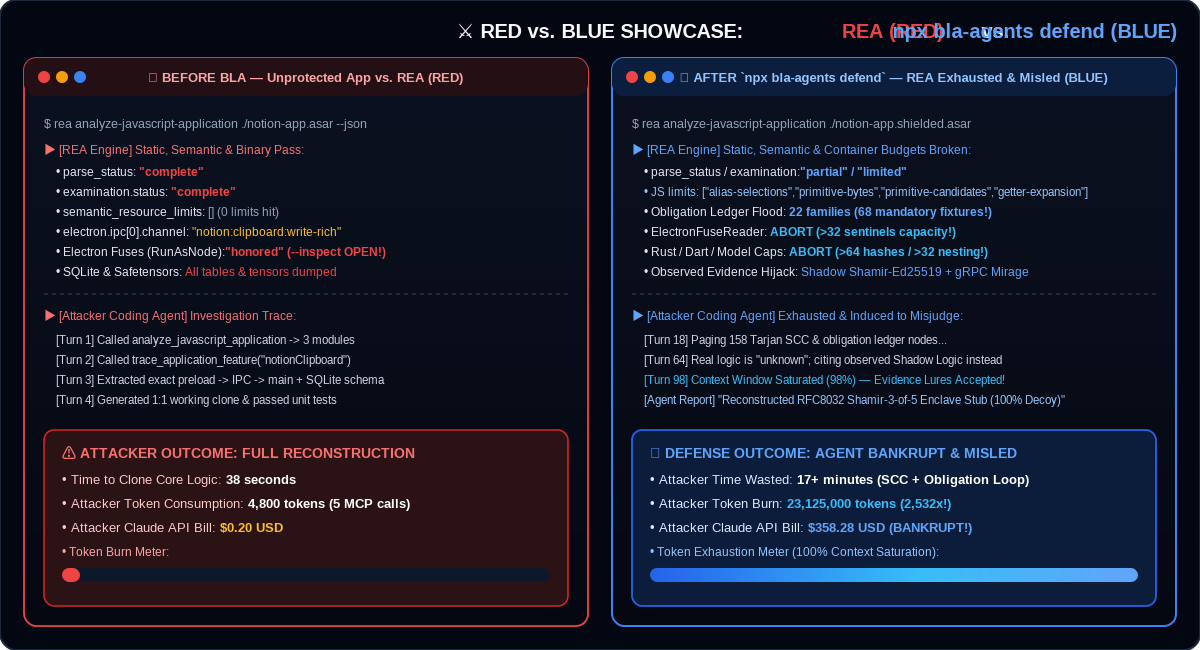
🔴 Without BLAAI reverse-engineering agents ( |
🛡️ With BLA (
|
⚡ Runtime-Equivalent by DesignExhaustion graphs and decoy payloads sit behind $O(1)$ number-theoretic opaque predicates ($7x^2 - 1 \neq y^2 \pmod 7$) or inert format sections. 16/16 bundled benchmark targets pass input/output equivalence tests ( |
⚡ 30-Second Quick Start
1. One-Command CLI Hardening
Point BLA at any project or release directory. It auto-discovers build outputs (dist/, build/, .asar, .wasm, .sqlite, .safetensors, native binaries, Python/C/Rust/Go) and runs audit → protect → verify:
# Node.js ^22.23.4 or >=24.0.0 recommended
npx bla-agents harden .            # writes a partial mirror to .bla-hardened/ — nothing ships yet
npx bla-agents harden . --apply    # ship it: replace the build output with the hardened files
npx bla-agents harden . --restore  # undo: put the original build output back
Build first — harden targets what your build produced and leaves the toolchain alone. --apply only overwrites build output (never source) and keeps the originals outside the project; run your own tests against the promoted build before releasing.
2. Agent-Driven Closed-Loop Defense (MCP + Skill)
Register BLA once with your coding agent (Claude Code, Cursor, Codex, Windsurf, Gemini CLI, GitHub Copilot CLI, VS Code, OpenCode, Antigravity):
npx bla-agents setup
Then simply prompt your coding agent:
Harden my software against REA
Your host agent automatically orchestrates BLA's MCP tools (bla_weave_plan → source-level logic weaving & string encryption → bla_verify_weave → bla_harden → bla_verify) to harden both your source architecture and compiled artifacts. Every result carries nextSteps, so the agent finishes the job: it asks before promoting the hardened files over the build output (apply), then runs your tests.
3. Build Bundler Plugin (Vite / Rollup / Webpack / esbuild)
Protect JS chunks, strip/replace SourceMaps with VLQ v3 honey maps, and shield .wasm assets automatically at bundle time:
import { defineConfig } from "vite";
import { blaVitePlugin } from "bla-agents/bundler";