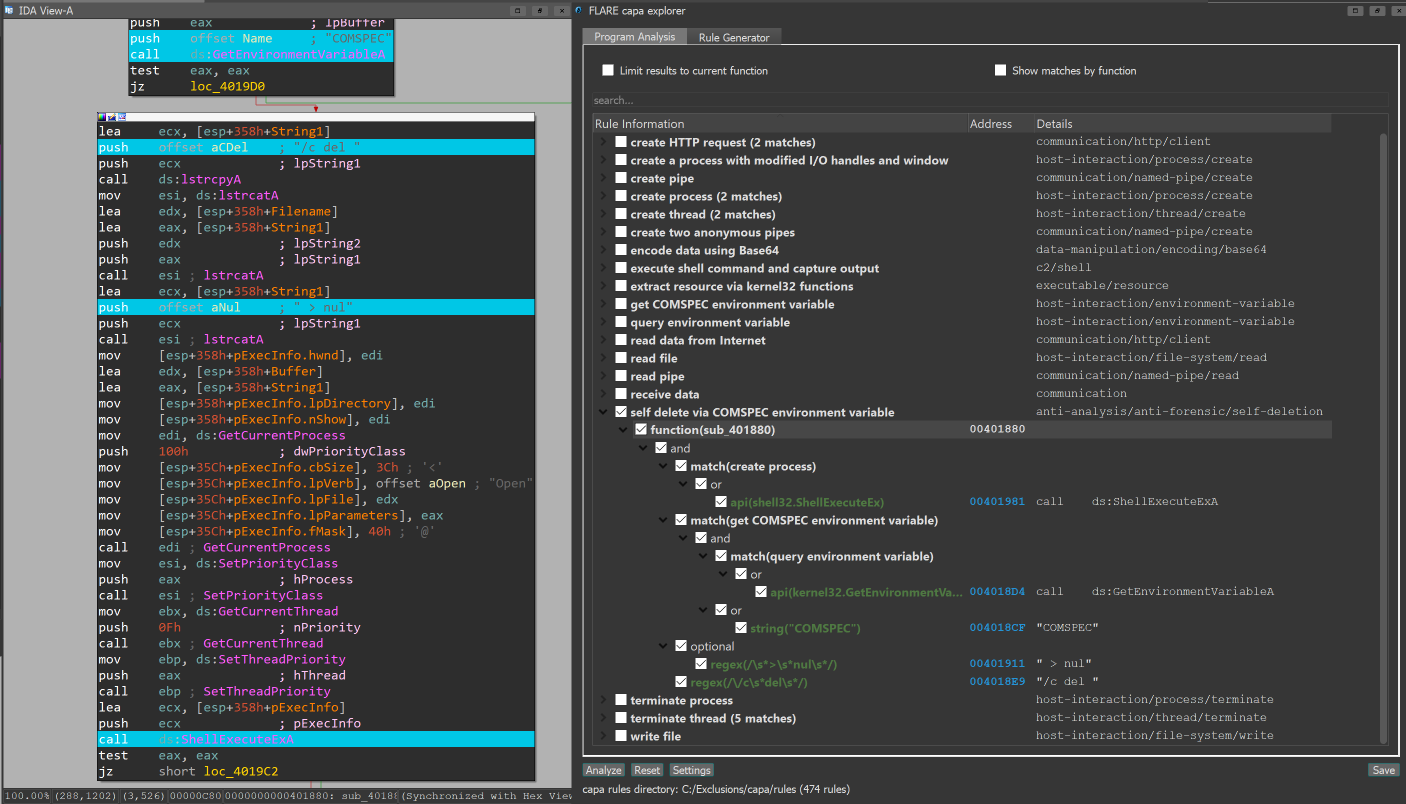

Outil d'analyse statique et dynamique basé sur des règles qui identifie les capacités dans les fichiers PE, ELF, .NET et shellcode, en les mappant aux techniques MITRE ATT&CK pour le triage de malware.
capa détecte les capacités dans les fichiers exécutables. Vous l'exécutez sur un PE, ELF, module .NET, fichier shellcode ou un rapport de bac à sable et il vous indique ce qu'il pense que le programme peut faire. Par exemple, il pourrait suggérer que le fichier est une porte dérobée, qu'il est capable d'installer des services, ou qu'il utilise HTTP pour communiquer.
Pour inspecter de manière interactive les résultats de capa dans votre navigateur, utilisez capa Explorer Web.
Si vous souhaitez inspecter ou écrire des règles capa, rendez-vous sur le dépôt capa-rules. Sinon, continuez à lire.
Vous trouverez ci-dessous une liste de nos articles de blog capa avec plus de détails.
$ capa.exe suspicious.exe
+--------------------+------------------------------------------------------------------------+ | ATT&CK Tactic | ATT&CK Technique | |--------------------+------------------------------------------------------------------------| | DEFENSE EVASION | Obfuscated Files or Information [T1027] | | DISCOVERY | Query Registry [T1012] | | | System Information Discovery [T1082] | | EXECUTION | Command and Scripting Interpreter::Windows Command Shell [T1059.003] | | | Shared Modules [T1129] | | EXFILTRATION | Exfiltration Over C2 Channel [T1041] | | PERSISTENCE | Create or Modify System Process::Windows Service [T1543.003] | +--------------------+------------------------------------------------------------------------+
+-------------------------------------------+-------------------------------------------------+ | CAPABILITY | NAMESPACE | |-------------------------------------------+-------------------------------------------------| | read and send data from client to server | c2/file-transfer | | execute shell command and capture output | c2/shell | | receive data (2 matches) | communication | | send data (6 matches) | communication | | connect to HTTP server (3 matches) | communication/http/client | | send HTTP request (3 matches) | communication/http/client | | create pipe | communication/named-pipe/create | | get socket status (2 matches) | communication/socket | | receive data on socket (2 matches) | communication/socket/receive | | send data on socket (3 matches) | communication/socket/send | | connect TCP socket | communication/socket/tcp | | encode data using Base64 | data-manipulation/encoding/base64 | | encode data using XOR (6 matches) | data-manipulation/encoding/xor | | run as a service | executable/pe | | get common file path (3 matches) | host-interaction/file-system | | read file | host-interaction/file-system/read | | write file (2 matches) | host-interaction/file-system/write | | print debug messages (2 matches) | host-interaction/log/debug/write-event | | resolve DNS | host-interaction/network/dns/resolve | | get hostname | host-interaction/os/hostname | | create process | host-interaction/process/create | | create registry key | host-interaction/registry/create | | create service | host-interaction/service/create | | create thread | host-interaction/thread/create | | persist via Windows service | persistence/service | +-------------------------------------------+-------------------------------------------------+
# téléchargement et utilisation
Téléchargez les versions stables des binaires autonomes de capa [ici](https://github.com/mandiant/capa/releases). Vous pouvez exécuter les binaires autonomes sans installation. capa est un outil en ligne de commande qui doit être exécuté depuis le terminal.
Pour utiliser capa comme une bibliothèque ou l'intégrer à un autre outil, consultez [doc/installation.md](https://github.com/mandiant/capa/blob/master/doc/installation.md) pour des instructions d'installation supplémentaires.
**Documentation :** [Utilisation et astuces](https://github.com/mandiant/capa/blob/master/doc/usage.md) · [Installation](https://github.com/mandiant/capa/blob/master/doc/installation.md) · [Limitations](https://github.com/mandiant/capa/blob/master/doc/limitations.md) · [FAQ](https://github.com/mandiant/capa/blob/master/doc/faq.md)
# capa Explorer Web
Le [capa Explorer Web](https://mandiant.github.io/capa/explorer/) vous permet d'explorer interactivement les résultats de capa dans votre navigateur web. En plus de la version en ligne, vous pouvez télécharger un fichier HTML autonome pour une utilisation hors ligne locale.
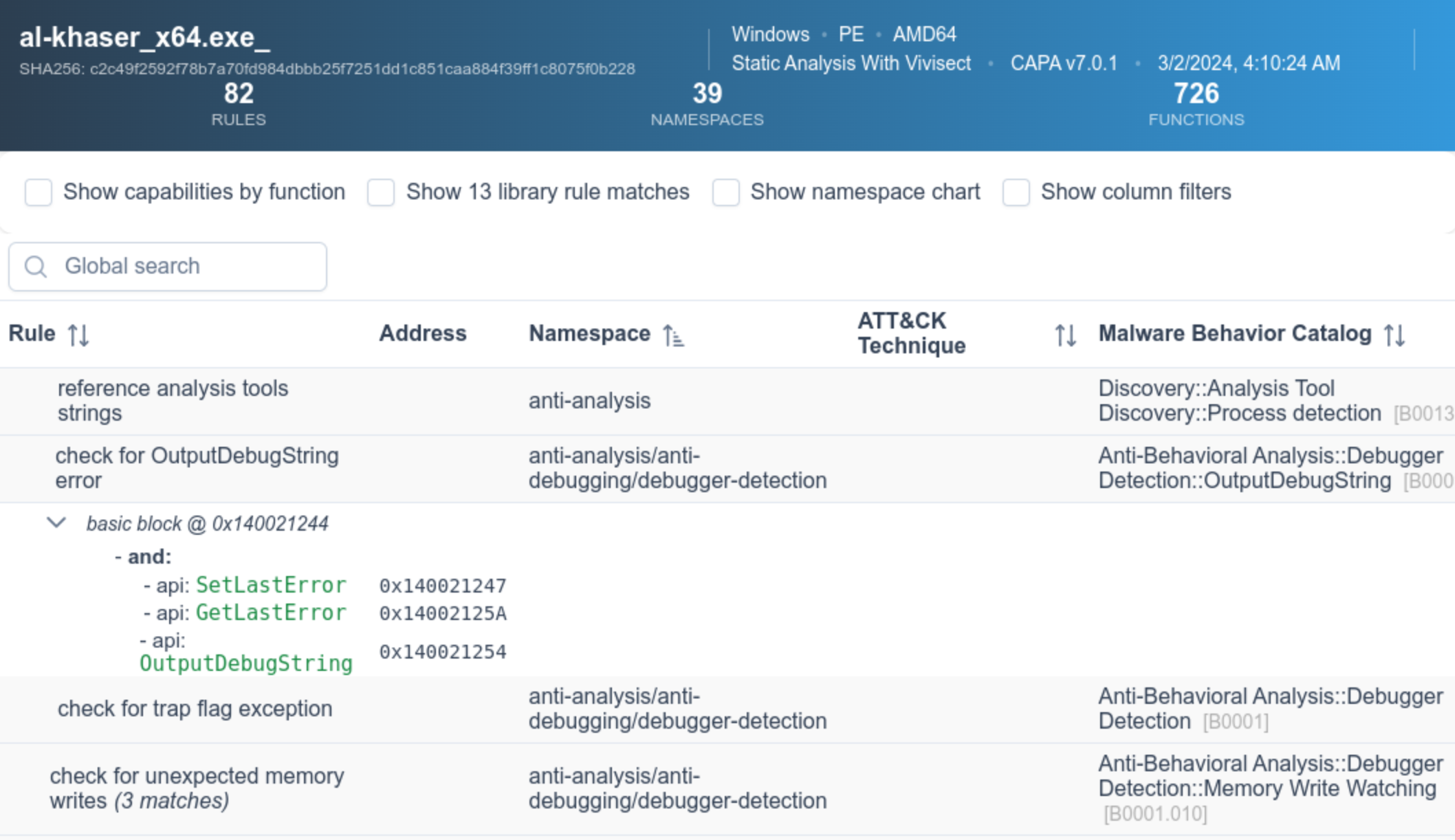
Plus de détails sur l'interface web sont disponibles dans le [README de capa Explorer Web](https://github.com/mandiant/capa/blob/master/web/explorer/README.md).
# exemple
Dans l'exemple de sortie ci-dessus, nous exécutons capa sur un binaire inconnu (`suspicious.exe`), et l'outil rapporte que le programme peut envoyer des requêtes HTTP, décoder des données via XOR et Base64, installer des services et lancer de nouveaux processus. Pris ensemble, cela nous fait penser que `suspicious.exe` pourrait être une porte dérobée persistante. Par conséquent, notre prochaine étape d'analyse pourrait être d'exécuter `suspicious.exe` dans un bac à sable et d'essayer de récupérer le serveur de commande et contrôle.
## résultats détaillés
En passant le drapeau `-vv` (pour très verbeux), capa rapporte exactement où il a trouvé des preuves de ces capacités. Cela est utile pour au moins deux raisons :
- cela aide à expliquer pourquoi nous devrions faire confiance aux résultats et nous permet de vérifier les conclusions, et
- cela montre où dans le binaire un analyste expérimenté pourrait étudier avec IDA Pro```
$ capa.exe suspicious.exe -vv
...
execute shell command and capture output
namespace c2/shell
author [email protected]
scope function
att&ck Execution::Command and Scripting Interpreter::Windows Command Shell [T1059.003]
references https://docs.microsoft.com/en-us/windows/win32/api/processthreadsapi/ns-processthreadsapi-startupinfoa
function @ 0x4011C0
and:
match: create a process with modified I/O handles and window @ 0x4011C0
and:
number: 257 = STARTF_USESTDHANDLES | STARTF_USESHOWWINDOW @ 0x4012B8
or:
number: 68 = StartupInfo.cb (size) @ 0x401282
or: = API functions that accept a pointer to a STARTUPINFO structure
api: kernel32.CreateProcess @ 0x401343
match: create pipe @ 0x4011C0
or:
api: kernel32.CreatePipe @ 0x40126F, 0x401280
optional:
match: create thread @ 0x40136A, 0x4013BA
or:
and:
os: windows
or:
api: kernel32.CreateThread @ 0x4013D7
or:
and:
os: windows
or:
api: kernel32.CreateThread @ 0x401395
or:
string: "cmd.exe" @ 0x4012FD
...
capa prend également en charge la détection de capacités dynamiques pour plusieurs sandboxes, notamment :
Pour utiliser cette fonctionnalité, soumettez votre fichier à un sandbox pris en charge, puis téléchargez et exécutez capa sur le fichier de rapport généré. Cette fonctionnalité permet à capa de faire correspondre des capacités avec les caractéristiques dynamiques et statiques capturées par le sandbox lors de l'exécution.
Voici un exemple d'exécution de capa sur un fichier packé, puis d'exécution de capa sur le rapport CAPE généré pour ce même fichier packé :```yaml $ capa 05be49819139a3fdcdbddbdefd298398779521f3d68daa25275cc77508e42310.exe WARNING:capa.capabilities.common:-------------------------------------------------------------------------------- WARNING:capa.capabilities.common: This sample appears to be packed. WARNING:capa.capabilities.common: WARNING:capa.capabilities.common: Packed samples have often been obfuscated to hide their logic. WARNING:capa.capabilities.common: capa cannot handle obfuscation well using static analysis. This means the results may be misleading or incomplete. WARNING:capa.capabilities.common: If possible, you should try to unpack this input file before analyzing it with capa. WARNING:capa.capabilities.common: Alternatively, run the sample in a supported sandbox and invoke capa against the report to obtain dynamic analysis results. WARNING:capa.capabilities.common: WARNING:capa.capabilities.common: Identified via rule: (internal) packer file limitation WARNING:capa.capabilities.common: WARNING:capa.capabilities.common: Use -v or -vv if you really want to see the capabilities identified by capa. WARNING:capa.capabilities.common:--------------------------------------------------------------------------------
$ capa 05be49819139a3fdcdbddbdefd298398779521f3d68daa25275cc77508e42310.json
┍━━━━━━━━━━━━━━━━━━━━━━━━┯━━━━━━━━━━━━━━━━━━━━━━━━━━━━━━━━━━━━━━━━━━━━━━━━━━━━━━━━━━━━━━━━━━━━━━━━━━━━━━━━━━━━┑ │ ATT&CK Tactic │ ATT&CK Technique │ ┝━━━━━━━━━━━━━━━━━━━━━━━━┿━━━━━━━━━━━━━━━━━━━━━━━━━━━━━━━━━━━━━━━━━━━━━━━━━━━━━━━━━━━━━━━━━━━━━━━━━━━━━━━━━━━━┥ │ CREDENTIAL ACCESS │ Credentials from Password Stores T1555 │ ├────────────────────────┼────────────────────────────────────────────────────────────────────────────────────┤ │ DEFENSE EVASION │ File and Directory Permissions Modification T1222 │ │ │ Modify Registry T1112 │ │ │ Obfuscated Files or Information T1027 │ │ │ Virtualization/Sandbox Evasion::User Activity Based Checks T1497.002 │ ├────────────────────────┼────────────────────────────────────────────────────────────────────────────────────┤ │ DISCOVERY │ Account Discovery T1087 │ │ │ Application Window Discovery T1010 │ │ │ File and Directory Discovery T1083 │ │ │ Query Registry T1012 │ │ │ System Information Discovery T1082 │ │ │ System Location Discovery::System Language Discovery T1614.001 │ │ │ System Owner/User Discovery T1033 │ ├────────────────────────┼────────────────────────────────────────────────────────────────────────────────────┤ │ EXECUTION │ System Services::Service Execution T1569.002 │ ├────────────────────────┼────────────────────────────────────────────────────────────────────────────────────┤ │ PERSISTENCE │ Boot or Logon Autostart Execution::Registry Run Keys / Startup Folder T1547.001 │ │ │ Boot or Logon Autostart Execution::Winlogon Helper DLL T1547.004 │ │ │ Create or Modify System Process::Windows Service T1543.003 │ ┕━━━━━━━━━━━━━━━━━━━━━━━━┷━━━━━━━━━━━━━━━━━━━━━━━━━━━━━━━━━━━━━━━━━━━━━━━━━━━━━━━━━━━━━━━━━━━━━━━━━━━━━━━━━━━━┙
┍━━━━━━━━━━━━━━━━━━━━━━━━━━━━━━━━━━━━━━━━━━━━━━━━━━━━━━┯━━━━━━━━━━━━━━━━━━━━━━━━━━━━━━━━━━━━━━━━━━━━━━━━━━━━━━┑ │ Capability │ Namespace │ ┝━━━━━━━━━━━━━━━━━━━━━━━━━━━━━━━━━━━━━━━━━━━━━━━━━━━━━━┿━━━━━━━━━━━━━━━━━━━━━━━━━━━━━━━━━━━━━━━━━━━━━━━━━━━━━━┥ │ check for unmoving mouse cursor (3 matches) │ anti-analysis/anti-vm/vm-detection │ │ gather bitkinex information │ collection/file-managers │ │ gather classicftp information │ collection/file-managers │ │ gather filezilla information │ collection/file-managers │ │ gather total-commander information │ collection/file-managers │ │ gather ultrafxp information │ collection/file-managers │ │ resolve DNS (23 matches) │ communication/dns │ │ initialize Winsock library (7 matches) │ communication/socket │ │ act as TCP client (3 matches) │ communication/tcp/client │ │ create new key via CryptAcquireContext │ data-manipulation/encryption │ │ encrypt or decrypt via WinCrypt │ data-manipulation/encryption │ │ hash data via WinCrypt │ data-manipulation/hashing │ │ initialize hashing via WinCrypt │ data-manipulation/hashing │ │ hash data with MD5 │ data-manipulation/hashing/md5 │ │ generate random numbers via WinAPI │ data-manipulation/prng │ │ extract resource via kernel32 functions (2 matches) │ executable/resource │ │ interact with driver via control codes (2 matches) │ host-interaction/driver │ │ get Program Files directory (18 matches) │ host-interaction/file-system │ │ get common file path (575 matches) │ host-interaction/file-system │ │ create directory (2 matches) │ host-interaction/file-system/create │ │ delete file │ host-interaction/file-system/delete │ │ get file attributes (122 matches) │ host-interaction/file-system/meta │ │ set file attributes (8 matches) │ host-interaction/file-system/meta │ │ move file │ host-interaction/file-system/move │ │ find taskbar (3 matches) │ host-interaction/gui/taskbar/find │ │ get keyboard layout (12 matches) │ host-interaction/hardware/keyboard │ │ get disk size │ host-interaction/hardware/storage │ │ get hostname (4 matches) │ host-interaction/os/hostname │ │ allocate or change RWX memory (3 matches) │ host-interaction/process/inject │ │ query or enumerate registry key (3 matches) │ host-interaction/registry │ │ query or enumerate registry value (8 matches) │ host-interaction/registry │ │ delete registry key │ host-interaction/registry/delete │ │ start service │ host-interaction/service/start │ │ get session user name │ host-interaction/session │ │ persist via Run registry key │ persistence/registry/run │ │ persist via Winlogon Helper DLL registry key │ persistence/registry/winlogon-helper │ │ persist via Windows service (2 matches) │ persistence/service │ ┕━━━━━━━━━━━━━━━━━━━━━━━━━━━━━━━━━━━━━━━━━━━━━━━━━━━━━━┷━━━━━━━━━━━━━━━━━━━━━━━━━━━━━━━━━━━━━━━━━━━━━━━━━━━━━━┙
# capa rules
capa utilise une collection de règles pour identifier les capacités dans un programme.
Ces règles sont faciles à écrire, même pour ceux qui débutent dans la rétro-ingénierie.
En créant des règles, vous pouvez étendre les capacités que capa reconnaît.
À certains égards, les règles capa sont un mélange des formats OpenIOC, Yara et YAML.
Voici un exemple de règle utilisée par capa :```yaml
rule:
meta:
name: create TCP socket
namespace: communication/socket/tcp
authors:
- [email protected]
- [email protected]
- [email protected]
scopes:
static: basic block
dynamic: call
mbc:
- Communication::Socket Communication::Create TCP Socket [C0001.011]
examples:
- Practical Malware Analysis Lab 01-01.dll_:0x10001010
features:
- or:
- and:
- number: 6 = IPPROTO_TCP
- number: 1 = SOCK_STREAM
- number: 2 = AF_INET
- or:
- api: ws2_32.socket
- api: ws2_32.WSASocket
- api: socket
- property/read: System.Net.Sockets.TcpClient::Client
Le dépôt github.com/mandiant/capa-rules contient des centaines de règles standard distribuées avec capa. Veuillez apprendre à écrire des règles et contribuer de nouvelles entrées lorsque vous trouvez des techniques intéressantes dans les malwares.
Si vous utilisez IDA Pro, vous pouvez utiliser le plugin capa explorer. capa explorer vous aide à identifier les zones intéressantes d'un programme et à construire de nouvelles règles capa en utilisant des caractéristiques extraites directement de votre base de données IDA Pro. Il utilise également vos modifications locales du .idb pour extraire de meilleures caractéristiques, comme lorsque vous renommez une variable globale contenant une adresse d'API résolue dynamiquement.

capa prend en charge l'utilisation de Ghidra (via PyGhidra) comme backend d'extraction de caractéristiques. Cela vous permet d'exécuter capa sur des binaires en utilisant le moteur d'analyse de Ghidra.
Vous pouvez exécuter et visualiser les résultats de capa dans l'interface Ghidra en utilisant capa explorer pour Ghidra.

Vous pouvez aussi exécuter capa depuis la ligne de commande en utilisant le backend Ghidra.
Le dépôt capa-testfiles contient les données que nous utilisons pour tester le code et les règles de capa
Abonnez-vous à la liste de diffusion FLARE pour les annonces de la communauté ! Envoyez « subscribe » à [email protected].