Skip to content
KitploitKITPLOIT
HerramientasBlog
Enviar
HerramientasBlog
Enviar

¡Herramientas de Hacking, PenTest y Ciberseguridad para tu Arsenal de Seguridad!

Kitploit es un directorio de herramientas de hacking, ciberseguridad y pentesting. Descubre las últimas actualizaciones de proyectos para encontrar vulnerabilidades, analizar sistemas, automatizar pruebas y fortalecer tu seguridad.

··Feeds·Contacto·Privacidad·© 2026 Kitploit

Directorio de Herramientas

Categorías

Ver todas las categorías
Loading categories
Check Risk WAF — Firewall de aplicaciones web (WAF) basado en la nube que proporciona protección L3/L7 contra ataques SQLi, XSS, DDoS y de bots. Incluye asistente de IA, CAPTCHA anti-bots, limitación de velocidad y DNS gestionado para la seguridad de aplicaciones web y API. | Kitploit
Herramientas/GitLabGitLab/check-risk-waf/check-risk-waf
Herramientas DefensivasEvasión de WAFSeguridad WebSeguridad en la NubeSeguridad de APIsAnti-Bot
GitLabcheck-risk-waf/check-risk-waf

Check Risk WAF

Firewall de aplicaciones web (WAF) basado en la nube que proporciona protección L3/L7 contra ataques SQLi, XSS, DDoS y de bots. Incluye asistente de IA, CAPTCHA anti-bots, limitación de velocidad y DNS gestionado para la seguridad de aplicaciones web y API.

Más Populares

Ver todos →

Descubre las herramientas más usadas por nuestra comunidad.

Explora todas las herramientas

Explora nuestra colección de herramientas

Ver todas las herramientas →
Ver Repositorio
8hace 3 mesesAún no revisado
Compartir
Check Risk

Check Risk WAF

Российское комплексное облачное WAF-решение для защиты веб-приложений и инфраструктуры

Solución integral rusa de WAF en la nube para la protección de aplicaciones web e infraestructura

Сайт · Документация · Русский · English

WAF — OSI L7 SLA 99.95% AI Assistant Anti-bot / Антибот — OSI L7 DDoS Protection — OSI L3 | L4


Русская версия

Check Risk WAF – это Российское комплексное облачное решение WAF (Web Application Firewall), работающее на уровнях L3, L4, L7, предназначенное для защиты ваших приложений от атак, уязвимостей, ботнет сетей, DOS/DDOS в одном решении. Обеспечивает отказоустойчивость работы веб-приложений путем создания защитной отказоустойчивой сети для каждого клиента в 3-х разных ЦОД c SLA 99.95%. Продукт имеет в себе AI ассистента для помощи и простоты работы пользователей в системе.

Продукт включен в реестр Российского программного обеспечения Министерством цифрового развития РФ. Реестровая запись №32239 от 17.02.2026

  • Презентация продукта
  • Брошюра продукта

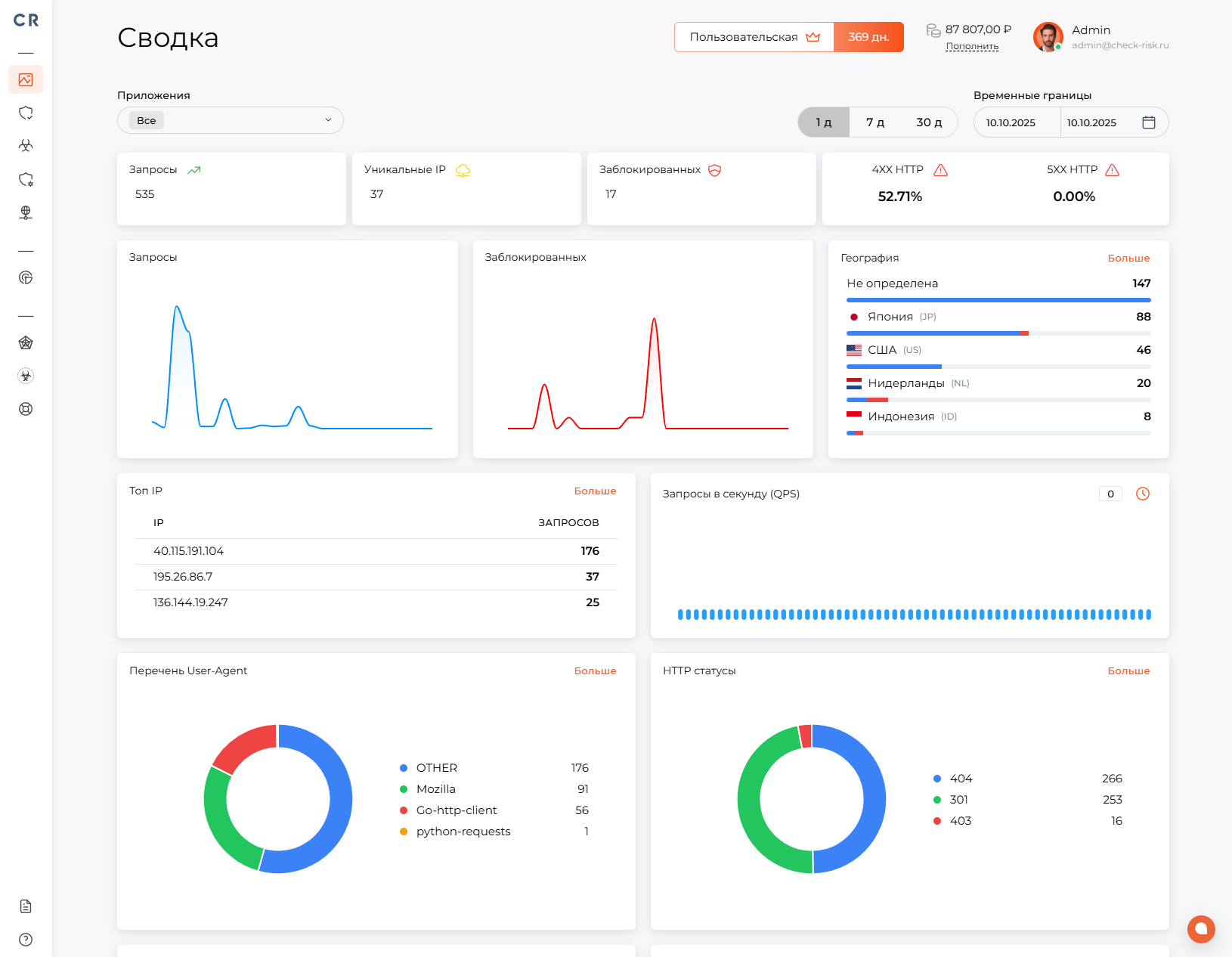
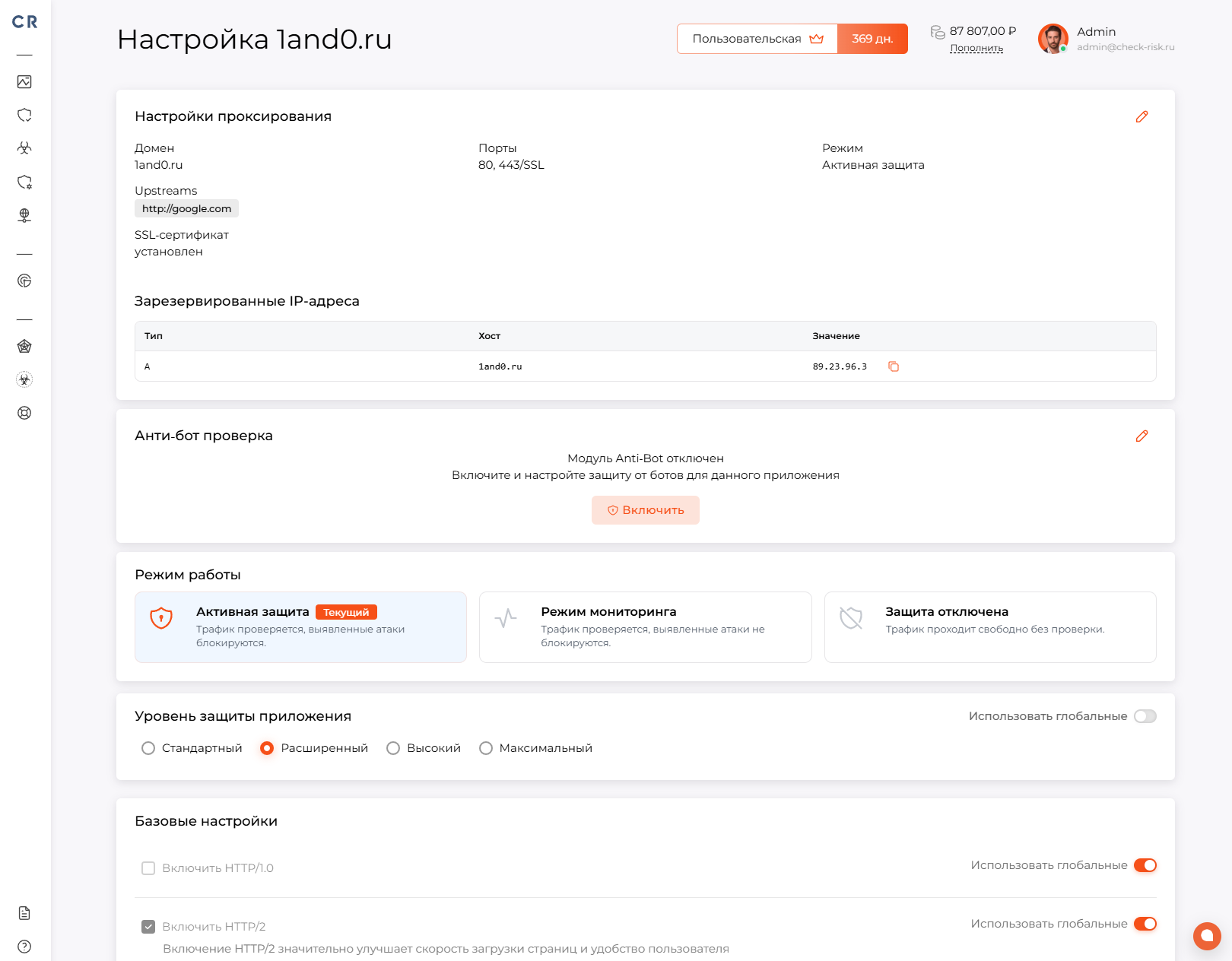
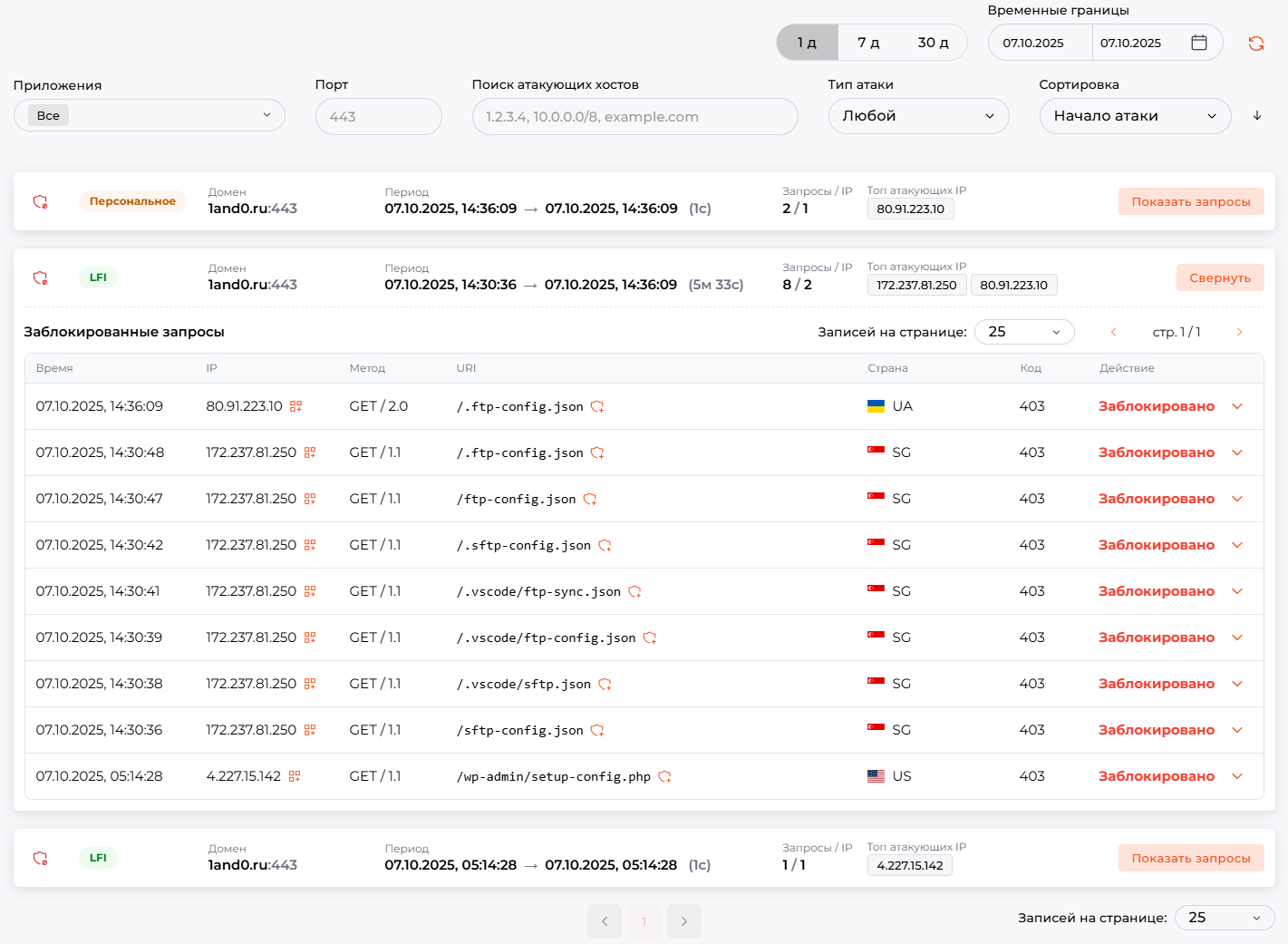
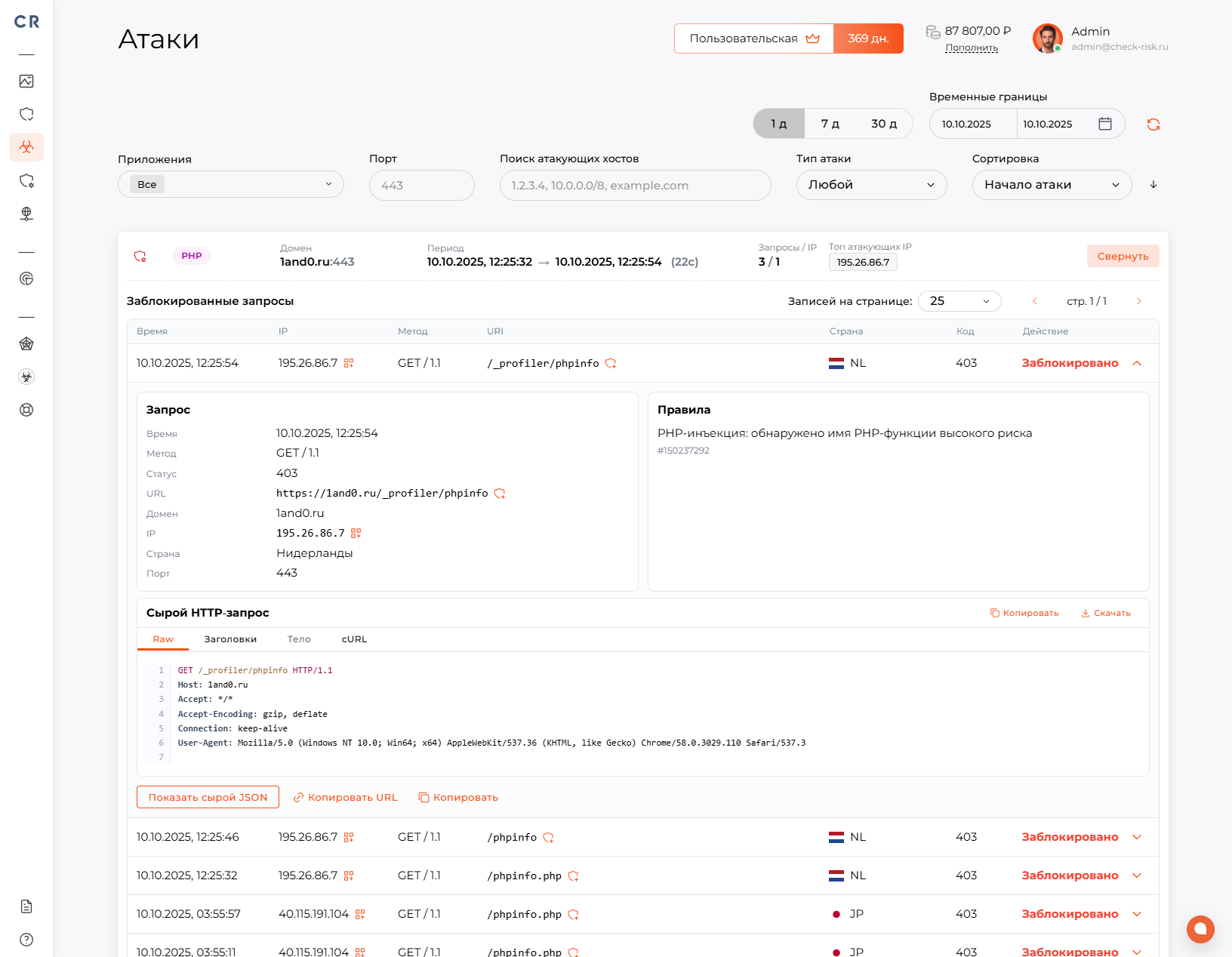
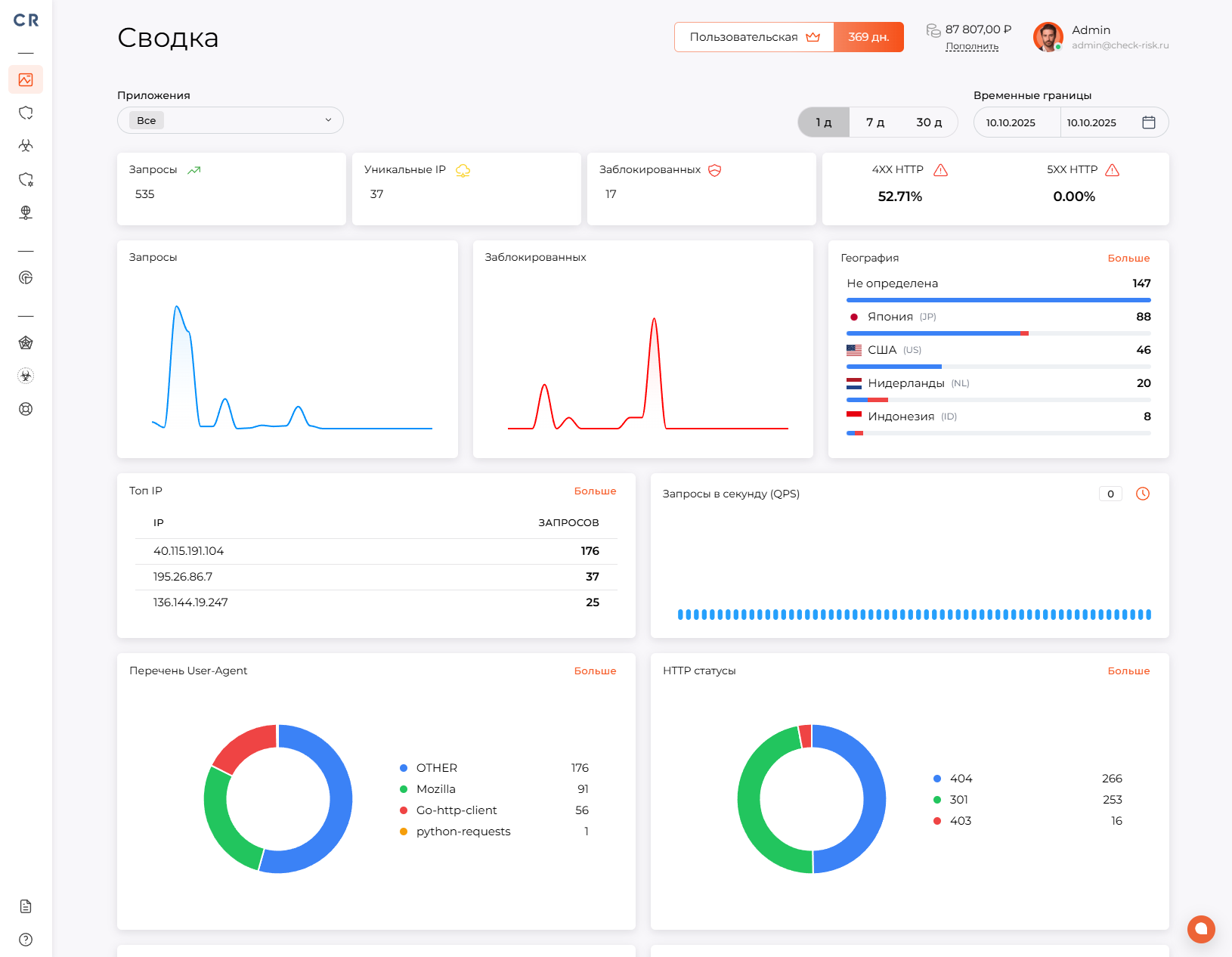
Скриншоты панели управления:

Скриншот главной панели управления Check Risk WAFСкриншот панели настройки приложения Check Risk WAF
Скриншот панели управления инцидентами Check Risk WAFСкриншот панели управления сетевой атакой Check Risk WAF

Check Risk WAF состоит из 3-х основных модулей:

WAF (межсетевой экран веб-приложений) – осуществляет защиту веб-приложений, фильтрует и отслеживает HTTP/HTTPS трафик в режиме Reverse Proxy.

Модуль обеспечивает защиту от:

  • SQL Injection - попытки внедрить SQL-код в параметры запроса, формы или URL, чтобы получить доступ к базе данных, изменить данные или обойти авторизацию.
  • XSS (Cross-Site Scripting ) - внедрение вредоносного JavaScript-кода на страницу, который может выполняться в браузере пользователя и использоваться для кражи cookies, токенов или данных сессии.
  • Code Injection - попытки внедрить и выполнить произвольный программный код внутри приложения.
  • OS Command Injection - выполнение системных команд на сервере через уязвимые параметры запроса.
  • CRLF Injection - внедрение управляющих символов перевода строки, которое может использоваться для подмены HTTP-заголовков, HTTP response splitting или атак на логи.
  • LDAP Injection - внедрение вредоносных LDAP-запросов для обхода аутентификации или получения данных из LDAP-каталогов.
  • XPath Injection - атаки на XML/XPath-запросы, позволяющие получить несанкционированный доступ к данным.
  • RCE (Remote Code Execution ) - попытки удалённого выполнения кода на сервере через уязвимости веб-приложения.
  • XXE, XML External Entity - атаки на XML-парсеры, которые могут привести к чтению локальных файлов, SSRF или раскрытию конфиденциальных данных.
  • SSRF, Server-Side Request Forgery - принуждение сервера выполнять запросы к внутренним или внешним ресурсам от имени приложения.
  • Path Traversal - попытки получить доступ к файлам за пределами разрешённой директории, например через конструкции вида ../.
  • Backdoor Access - попытки обращения к скрытым, вредоносным или несанкционированным точкам входа в приложение.
  • Brute Force - массовые попытки подбора логина, пароля, токенов или других учётных данных.
  • СПА (система предотвращения атак) IP – система автоматически обновляемой базы фидов опасных адресов, получаемых более чем из 30 бесплатных и коммерческих источников. Обновление базы данных происходит 1 раз в 1-у минуту.
  • СПА (система предотвращения атак) User Agent - система автоматически обновляемой базы фидов опасных User Agent приложений, использующихся в атаках на сетевые ресурсы. Обновление базы данных происходит 1 раз в 1-у минуту.

Антибот-защита – осуществляет выявление, блокирование автоматизированных программ, защиту веб приложений от автоматизированных атак, ботнет сетей.

Модуль обеспечивает защиту от:

  • Vulnerability Scanning Bots — автоматические сканеры, которые ищут уязвимые страницы, панели администрирования, устаревшие компоненты и открытые файлы.
  • Spam и Abuse в личных кабинетах — массовая отправка сообщений, заявок, комментариев или других действий от имени пользователей.
  • Click Fraud — накрутка кликов по рекламе, ссылкам, кнопкам или партнёрским программам.
  • Content Scraping — копирование текстов, изображений, каталогов, цен и другого контента сайта.
  • Inventory Hoarding / Scalping — автоматическое удержание товаров в корзине, массовый выкуп билетов, товаров или лимитированных предложений.
  • Form Spam — автоматическая отправка спама через формы обратной связи, регистрации, комментариев или заявок.
  • HTTP Flood — большое количество HTTP-запросов, направленных на перегрузку сайта, приложения или отдельных endpoint’ов.
  • Web Scraping — автоматический сбор контента сайта, цен, карточек товаров, персональных данных или другой информации.
  • Account Takeover — попытки захвата пользовательских аккаунтов с помощью автоматизированных входов, подбора данных или проверки украденных учётных записей.
  • Credential Stuffing — массовые попытки входа с использованием ранее скомпрометированных пар логин/пароль.

Непосредственная реализация антибот защиты выполнена в 4-х вариациях, которые доступны каждому пользователю:

Автоматическая проверка

Проверка проходит без действий пользователя. Страница проверки запускает JavaScript, выполняет лёгкую браузерную проверку и получает проверочный cookie. Подходит для минимального влияния на обычных посетителей.
Проверка действием (упрощённая)

Пользователь видит кнопку «Я не робот». После нажатия запускается такая же проверка браузера, как в автоматическом режиме, и при успехе выдаётся проверочный cookie. Подходит, когда нужно явное действие пользователя.
Проверка действием (капча)

Пользователь проходит слайдер-пазл. Система выдаёт задание, пользователь двигает ползунок, а сервер проверяет правильность позиции. При успешном решении выдаётся проверочный cookie. Это самый строгий ручной режим проверки.
Интеллектуальная проверка

Система сама выбирает уровень проверки по поведению посетителя: для доверенных пользователей показывает минимальную проверку, для сомнительных кнопку или пазл. Подходит как режим по умолчанию, когда нужен баланс между удобством и защитой.

Анти DOS/DDOS защита – осуществляет выявление атак на уровнях L3, L4 направленных на перегрузку сервисов и нарушение их сетевой доступности. Модуль сохраняет доступность сервисов, снижает нагрузку на инфраструктуру, предотвращает простои в работе.

Модуль обеспечивает защиту от:

  • DoS-атаки — попытки вывести сервис из строя с одного источника за счёт большого количества запросов или чрезмерного потребления ресурсов.
  • DDoS-атаки — распределённые атаки с множества устройств или ботнетов, направленные на перегрузку канала, сервера, приложения или отдельных сервисов.
  • HTTP Flood — массовая отправка HTTP/HTTPS-запросов к сайту, API или конкретным endpoint’ам для перегрузки приложения.
  • TCP Flood — большое количество TCP-соединений, создающих нагрузку на сетевую инфраструктуру и серверные ресурсы.
  • UDP Flood — массовый поток UDP-пакетов, направленный на перегрузку сетевого канала или оборудования.
  • SYN Flood — атака на механизм установления TCP-соединений, при которой сервер перегружается множеством незавершённых подключений.
  • Slow HTTP Attacks — атаки, при которых соединения удерживаются открытыми длительное время, постепенно исчерпывая ресурсы веб-сервера.
  • Application Layer DDoS — атаки на прикладном уровне, направленные на ресурсоёмкие страницы, формы, поиск, авторизацию, корзину или API-методы.
  • Volumetric Attacks — атаки большим объёмом трафика, цель которых — исчерпать пропускную способность канала связи.
  • Protocol Attacks — атаки на сетевые протоколы и состояния соединений, которые перегружают балансировщики, межсетевые экраны и серверы.
  • Botnet Traffic — вредоносный трафик от сетей заражённых устройств, используемых для массовых распределённых атак.
  • DNS Flood — большое количество DNS-запросов, направленных на перегрузку DNS-инфраструктуры.
  • API Flood — массовые запросы к API, способные вызвать деградацию сервиса, рост нагрузки на backend или отказ отдельных функций.
  • Resource Exhaustion — попытки исчерпать ресурсы сервера: CPU, память, сетевые соединения, пул потоков, базу данных или лимиты приложения.

Как работает Check Risk WAF:

Check Risk WAF SaaS — облачная защита веб-приложений и инфраструктуры

Подключение защиты предусмотрено в 2-х режимах:

Режим облачного управления – данный тип подключения предусматривает делегирование управления DNS записями на ns сервера Check Risk WAF:

  • ns1.check-risk.ru
  • ns2.check-risk.ru
  • ns3.check-risk.ru

При таком методе защиты система управляет A записями защищаемого домена или поддомена (ов), используя адреса из общего пула подсетей. Трафик в свою очередь перенаправляется в веб приложение с использованием Reverse Proxy, согласно заданным конфигурациям пользователем в личном кабинете. Такой метод защиты обеспечивает максимальную отказоустойчивости и адаптацию к мощным DDOS атакам.

Режим выделенной инфраструктуры – данный тип подключения предусматривает предоставления выделенной инфраструктуры пользователю от 3-х виртуальных машин в 3-х разных цод по выбору пользователя с SLA 99.95%. При таком методе защиты пользователю предоставляться 3 белых статичных IP v4 адреса. Пользователь указывает в A записи на своем NS сервере IP v4 адреса самостоятельно. Трафик в свою очередь перенаправляется в веб приложение с использованием Reverse Proxy, согласно заданным конфигурациям пользователем в личном кабинете.

Перечень функциональных возможностей Check Risk WAF:

ВозможностьОписание
Подключение веб-приложений под защиту WAFСоздание и управление защищаемыми доменами и приложениями с привязкой портов, серверов назначения, SSL-сертификатов и индивидуальных настроек защиты.
Подтверждение владения доменомПоддержка режимов защиты, мониторинга, работы без защиты, ожидания настройки и отключенного состояния.
Уровни защитыНастройка интенсивности фильтрации от стандартного до максимального уровня глобально или отдельно для конкретного приложения.
Проксирование и маршрутизация трафикаПрием HTTP/HTTPS-трафика, проверка запросов и передача очищенного трафика на серверы приложения.
Защита от типовых веб-атакОбнаружение и блокировка XSS, SQL-инъекций, атак включения файлов, удаленного выполнения кода, сканеров и протокольных аномалий.
Пользовательские правила WAFСоздание разрешающих, блокирующих и исключающих правил с условиями по IP, географии, приложению, URL, host, заголовкам, параметрам, телу запроса и HTTP-методу.
Исключения и точная настройка срабатыванийНастройка исключений для отдельных правил и сценариев, чтобы снижать ложные срабатывания без отключения защиты целиком.
IP-группы и списки адресовСоздание групп IP-адресов и сетей для дальнейшего использования в правилах разрешения, блокировки и исключений.
Географическая фильтрацияИспользование страны клиента в правилах защиты и аналитике трафика.
Anti-bot защитаПроверка подозрительного автоматизированного трафика и отделение ботов от легитимных пользователей.
Настройка доверенных ботовУправление обработкой проверенных ботов: разрешать всех, запрещать всех или разрешать только выбранный список.
Условное применение anti-botВключение anti-bot проверок только для заданных условий, например определенных URL, методов, параметров, заголовков или групп посетителей.
Rate limiting и QPS-лимитыОграничение интенсивности запросов, включая лимиты для приложения и лимиты на один клиентский IP.
Настройка источника клиентского IPВыбор доверенного источника реального IP клиента и действия при недоверенной цепочке проксирования.

English Version

Check Risk WAF is a Russian integrated cloud WAF (Web Application Firewall) solution operating at L3, L4, and L7 levels, designed to protect your applications from attacks, vulnerabilities, botnet networks, DOS/DDOS in a single solution. It ensures fault tolerance for web applications by creating a protective fault-tolerant network for each client across 3 different data centers with SLA 99.95%. The product includes an AI assistant to help users and simplify their work in the system.

The product is included in the Russian software registry by the Ministry of Digital Development of the Russian Federation. Registry entry No. 32239 dated 17.02.2026

  • Product presentation
  • Product brochure

Control panel screenshots:

Screenshot of the Check Risk WAF main dashboardScreenshot of the Check Risk WAF application settings panel
Screenshot of the Check Risk WAF incident management panelScreenshot of the Check Risk WAF network attack management panel

Check Risk WAF consists of 3 main modules:

WAF (Web Application Firewall) – protects web applications, filters and monitors HTTP/HTTPS traffic in Reverse Proxy mode.

The module protects against:

  • SQL Injection - attempts to inject SQL code into request parameters, forms or URL to access the database, modify data or bypass authentication.
  • XSS (Cross-Site Scripting) - injection of malicious JavaScript code into a page that can execute in the user's browser and be used to steal cookies, tokens or session data.
  • Code Injection - attempts to inject and execute arbitrary program code inside the application.
  • OS Command Injection - execution of system commands on the server through vulnerable request parameters.
  • CRLF Injection - injection of line feed control characters, which can be used for HTTP header injection, HTTP response splitting or log attacks.
  • LDAP Injection - injection of malicious LDAP queries to bypass authentication or retrieve data from LDAP directories.
  • XPath Injection - attacks on XML/XPath queries that allow unauthorized access to data.
  • RCE (Remote Code Execution) - attempts to remotely execute code on the server through web application vulnerabilities.
  • XXE, XML External Entity - attacks on XML parsers that can lead to local file reading, SSRF or disclosure of confidential data.
  • SSRF, Server-Side Request Forgery - forcing the server to make requests to internal or external resources on behalf of the application.
  • Path Traversal - attempts to access files outside the allowed directory, e.g. via constructs like ../.
  • Backdoor Access - attempts to access hidden, malicious or unauthorized entry points in the application.
  • Brute Force - mass attempts to guess login, password, tokens or other credentials.
  • IPS (Intrusion Prevention System) IP - automatically updated database of dangerous IP feeds from more than 30 free and commercial sources. Database is updated once every minute.
  • IPS (Intrusion Prevention System) User Agent - automatically updated database of dangerous User Agent feeds used in attacks on network resources. Database is updated once every minute.

Anti-bot protection – detects and blocks automated programs, protects web applications from automated attacks and botnet networks.

The module protects against:

  • Vulnerability Scanning Bots — automatic scanners searching for vulnerable pages, admin panels, outdated components and open files.
  • Spam and Abuse in personal accounts — mass sending of messages, applications, comments or other actions on behalf of users.
  • Click Fraud — click fraud on ads, links, buttons or affiliate programs.
  • Content Scraping — copying of texts, images, catalogs, prices and other website content.
  • Inventory Hoarding / Scalping — automatic holding of items in cart, mass purchase of tickets, items or limited offers.
  • Form Spam — automatic spam submission through contact forms, registration, comments or applications.
  • HTTP Flood — large number of HTTP requests aimed at overloading the site, application or specific endpoints.
  • Web Scraping — automatic collection of website content, prices, product cards, personal data or other information.
  • Account Takeover — attempts to take over user accounts through automated logins, data guessing or checking stolen credentials.
  • Credential Stuffing — mass login attempts using previously compromised username/password pairs.

The anti-bot protection is implemented in 4 variations available to all users:

Automatic check

The check runs without user action. The check page runs JavaScript, performs a light browser check and receives a verification cookie. Suitable for minimal impact on regular visitors.
Check by action (simplified)

The user sees a "I'm not a robot" button. After clicking, the same browser check as in automatic mode runs, and on success a verification cookie is issued. Suitable when explicit user action is needed.
Check by action (captcha)

The user completes a slider puzzle. The system gives a task, the user moves the slider, and the server verifies the correct position. On success, a verification cookie is issued. This is the strictest manual check mode.
Intelligent check

The system itself chooses the check level based on visitor behavior: for trusted users it shows minimal check, for suspicious users a button or puzzle. Suitable as default mode when balance between convenience and security is needed.

Anti DOS/DDOS protection – detects attacks at L3, L4 levels aimed at overloading services and disrupting their network availability. The module maintains service availability, reduces infrastructure load, prevents downtime.

The module protects against:

  • DoS attacks — attempts to disrupt a service from a single source through a large number of requests or excessive resource consumption.
  • DDoS attacks — distributed attacks from multiple devices or botnets aimed at overloading the channel, server, application or individual services.
  • HTTP Flood — mass sending of HTTP/HTTPS requests to a site, API or specific endpoints to overload the application.
  • TCP Flood — large number of TCP connections creating load on network infrastructure and server resources.
  • UDP Flood — mass stream of UDP packets aimed at overloading the network channel or equipment.
  • SYN Flood — attack on the TCP connection establishment mechanism, where the server is overloaded with numerous incomplete connections.
  • Slow HTTP Attacks — attacks where connections are kept open for a long time, gradually exhausting web server resources.
  • Application Layer DDoS — application layer attacks targeting resource-intensive pages, forms, search, authentication, cart or API methods.
  • Volumetric Attacks — attacks with large traffic volume aimed at exhausting the communication channel bandwidth.
  • Protocol Attacks — attacks on network protocols and connection states that overload load balancers, firewalls and servers.
  • Botnet Traffic — malicious traffic from networks of infected devices used for mass distributed attacks.
  • DNS Flood — large number of DNS requests aimed at overloading DNS infrastructure.
  • API Flood — mass requests to API that can cause service degradation, increased backend load or failure of individual functions.
  • Resource Exhaustion — attempts to exhaust server resources: CPU, memory, network connections, thread pool, database or application limits.

How Check Risk WAF works:

Check Risk WAF SaaS — cloud protection for web applications and infrastructure

Protection connection is provided in 2 modes:

Cloud management mode – this connection type involves delegating DNS record management to Check Risk WAF NS servers:

  • ns1.check-risk.ru
  • ns2.check-risk.ru
  • ns3.check-risk.ru

In this protection method, the system manages A records of the protected domain or subdomain(s), using addresses from a common subnet pool. Traffic is then redirected to the web application using Reverse Proxy, according to the user's configurations in the personal account. This protection method ensures maximum fault tolerance and adaptation to powerful DDoS attacks.

Dedicated infrastructure mode – this connection type involves providing the user with a dedicated infrastructure of 3 virtual machines in 3 different data centers chosen by the user, with SLA 99.95%. In this protection method, the user is provided with 3 static white IPv4 addresses. The user specifies these IPv4 addresses in A records on their NS server independently. Traffic is then redirected to the web application using Reverse Proxy, according to the user's configurations in the personal account.

List of Check Risk WAF features:

FeatureDescription
Connecting web applications under WAF protectionCreation and management of protected domains and applications with binding of ports, origin servers, SSL certificates and individual protection settings.
Domain ownership verificationSupport for protection, monitoring, unprotected, pending configuration and disabled states.
Protection levelsConfiguration of filtering intensity from standard to maximum level globally or separately for a specific application.
Traffic proxying and routingReceiving HTTP/HTTPS traffic, checking requests and forwarding clean traffic to application servers.
Protection against common web attacksDetection and blocking of XSS, SQL injection, file inclusion attacks, remote code execution, scanners and protocol anomalies.
Custom WAF rulesCreation of allow, block and bypass rules with conditions by IP, geography, application, URL, host, headers, parameters, request body and HTTP method.
Exceptions and fine-tuningConfiguring exceptions for individual rules and scenarios to reduce false positives without disabling protection entirely.
IP groups and address listsCreation of IP address and network groups for further use in allow, block and bypass rules.
Geographic filteringUsing client country in protection rules and traffic analytics.
Anti-bot protectionInspection of suspicious automated traffic and separation of bots from legitimate users.
Trusted bot configurationManagement of verified bot handling: allow all, block all, or allow only a selected list.
Conditional anti-bot applicationEnabling anti-bot checks only for specified conditions, e.g., certain URLs, methods, parameters, headers or visitor groups.
Rate limiting and QPS limitsRequest rate limiting, including application-wide limits and per client IP limits.
Client IP source configurationSelection of trusted source for real client IP and action when proxy chain is untrusted.
TLS/SSL settingsManagement of SSL protocols, cipher suites, HTTP/1, HTTP/2, forced HTTPS and HSTS.

English Version

Check Risk WAF is a Russian integrated cloud WAF (Web Application Firewall) solution operating at L3, L4, and L7 levels, designed to protect your applications from attacks, vulnerabilities, botnet networks, DOS/DDOS in a single solution. It ensures fault tolerance for web applications by creating a protective fault-tolerant network for each client across 3 different data centers with SLA 99.95%. The product includes an AI assistant to help users and simplify their work in the system.

The product is included in the Russian software registry by the Ministry of Digital Development of the Russian Federation. Registry entry No. 32239 dated 17.02.2026

  • Product presentation
  • Product brochure

Control panel screenshots:

Screenshot of the Check Risk WAF main dashboardScreenshot of the Check Risk WAF application settings panel
Screenshot of the Check Risk WAF incident management panelScreenshot of the Check Risk WAF network attack management panel

Check Risk WAF consists of 3 main modules:

WAF (Web Application Firewall) – protects web applications, filters and monitors HTTP/HTTPS traffic in Reverse Proxy mode.

The module protects against:

  • SQL Injection - attempts to inject SQL code into request parameters, forms or URL to access the database, modify data or bypass authentication.
  • XSS (Cross-Site Scripting) - injection of malicious JavaScript code into a page that can execute in the user's browser and be used to steal cookies, tokens or session data.
  • Code Injection - attempts to inject and execute arbitrary program code inside the application.
  • OS Command Injection - execution of system commands on the server through vulnerable request parameters.
  • CRLF Injection - injection of line feed control characters, which can be used for HTTP header injection, HTTP response splitting or log attacks.
  • LDAP Injection - injection of malicious LDAP queries to bypass authentication or retrieve data from LDAP directories.
  • XPath Injection - attacks on XML/XPath queries that allow unauthorized access to data.
  • RCE (Remote Code Execution) - attempts to remotely execute code on the server through web application vulnerabilities.
  • XXE, XML External Entity - attacks on XML parsers that can lead to local file reading, SSRF or disclosure of confidential data.
  • SSRF, Server-Side Request Forgery - forcing the server to make requests to internal or external resources on behalf of the application.
  • Path Traversal - attempts to access files outside the allowed directory, e.g. via constructs like ../.
  • Backdoor Access - attempts to access hidden, malicious or unauthorized entry points in the application.
  • Brute Force - mass attempts to guess login, password, tokens or other credentials.
  • IPS (Intrusion Prevention System) IP - automatically updated database of dangerous IP feeds from more than 30 free and commercial sources. Database is updated once every minute.
  • IPS (Intrusion Prevention System) User Agent - automatically updated database of dangerous User Agent feeds used in attacks on network resources. Database is updated once every minute.

Anti-bot protection – detects and blocks automated programs, protects web applications from automated attacks and botnet networks.

The module protects against:

  • Vulnerability Scanning Bots — automatic scanners searching for vulnerable pages, admin panels, outdated components and open files.
  • Spam and Abuse in personal accounts — mass sending of messages, applications, comments or other actions on behalf of users.
  • Click Fraud — click fraud on ads, links, buttons or affiliate programs.
  • Content Scraping — copying of texts, images, catalogs, prices and other website content.
  • Inventory Hoarding / Scalping — automatic holding of items in cart, mass purchase of tickets, items or limited offers.
  • Form Spam — automatic spam submission through contact forms, registration, comments or applications.
  • HTTP Flood — large number of HTTP requests aimed at overloading the site, application or specific endpoints.
  • Web Scraping — automatic collection of website content, prices, product cards, personal data or other information.
  • Account Takeover — attempts to take over user accounts through automated logins, data guessing or checking stolen credentials.
  • Credential Stuffing — mass login attempts using previously compromised username/password pairs.

The anti-bot protection is implemented in 4 variations available to all users:

Automatic check

The check runs without user action. The check page runs JavaScript, performs a light browser check and receives a verification cookie. Suitable for minimal impact on regular visitors.
Check by action (simplified)

The user sees a "I'm not a robot" button. After clicking, the same browser check as in automatic mode runs, and on success a verification cookie is issued. Suitable when explicit user action is needed.
Check by action (captcha)

The user completes a slider puzzle. The system gives a task, the user moves the slider, and the server verifies the correct position. On success, a verification cookie is issued. This is the strictest manual check mode.
Intelligent check

The system itself chooses the check level based on visitor behavior: for trusted users it shows minimal check, for suspicious users a button or puzzle. Suitable as default mode when balance between convenience and security is needed.

Anti DOS/DDOS protection – detects attacks at L3, L4 levels aimed at overloading services and disrupting their network availability. The module maintains service availability, reduces infrastructure load, prevents downtime.

The module protects against:

  • DoS attacks — attempts to disrupt a service from a single source through a large number of requests or excessive resource consumption.
  • DDoS attacks — distributed attacks from multiple devices or botnets aimed at overloading the channel, server, application or individual services.
  • HTTP Flood — mass sending of HTTP/HTTPS requests to a site, API or specific endpoints to overload the application.
  • TCP Flood — large number of TCP connections creating load on network infrastructure and server resources.
  • UDP Flood — mass stream of UDP packets aimed at overloading the network channel or equipment.
  • SYN Flood — attack on the TCP connection establishment mechanism, where the server is overloaded with numerous incomplete connections.
  • Slow HTTP Attacks — attacks where connections are kept open for a long time, gradually exhausting web server resources.
  • Application Layer DDoS — application layer attacks targeting resource-intensive pages, forms, search, authentication, cart or API methods.
  • Volumetric Attacks — attacks with large traffic volume aimed at exhausting the communication channel bandwidth.
  • Protocol Attacks — attacks on network protocols and connection states that overload load balancers, firewalls and servers.
  • Botnet Traffic — malicious traffic from networks of infected devices used for mass distributed attacks.
  • DNS Flood — large number of DNS requests aimed at overloading DNS infrastructure.
  • API Flood — mass requests to API that can cause service degradation, increased backend load or failure of individual functions.
  • Resource Exhaustion — attempts to exhaust server resources: CPU, memory, network connections, thread pool, database or application limits.

How Check Risk WAF works:

Check Risk WAF SaaS — cloud protection for web applications and infrastructure

Protection connection is provided in 2 modes:

Cloud management mode – this connection type involves delegating DNS record management to Check Risk WAF NS servers:

  • ns1.check-risk.ru
  • ns2.check-risk.ru
  • ns3.check-risk.ru

In this protection method, the system manages A records of the protected domain or subdomain(s), using addresses from a common subnet pool. Traffic is then redirected to the web application using Reverse Proxy, according to the user's configurations in the personal account. This protection method ensures maximum fault tolerance and adaptation to powerful DDoS attacks.

Dedicated infrastructure mode – this connection type involves providing the user with a dedicated infrastructure of 3 virtual machines in 3 different data centers chosen by the user, with SLA 99.95%. In this protection method, the user is provided with 3 static white IPv4 addresses. The user specifies these IPv4 addresses in A records on their NS server independently. Traffic is then redirected to the web application using Reverse Proxy, according to the user's configurations in the personal account.

List of Check Risk WAF features:

FeatureDescription
Connecting web applications under WAF protectionCreation and management of protected domains and applications with binding of ports, origin servers, SSL certificates and individual protection settings.
Domain ownership verificationSupport for protection, monitoring, unprotected, pending configuration and disabled states.
Protection levelsConfiguration of filtering intensity from standard to maximum level globally or separately for a specific application.
Traffic proxying and routingReceiving HTTP/HTTPS traffic, checking requests and forwarding clean traffic to application servers.
Protection against common web attacksDetection and blocking of XSS, SQL injection, file inclusion attacks, remote code execution, scanners and protocol anomalies.
Custom WAF rulesCreation of allow, block and bypass rules with conditions by IP, geography, application, URL, host, headers, parameters, request body and HTTP method.
Exceptions and fine-tuningConfiguring exceptions for individual rules and scenarios to reduce false positives without disabling protection entirely.
IP groups and address listsCreation of IP address and network groups for further use in allow, block and bypass rules.
Geographic filteringUsing client country in protection rules and traffic analytics.
Anti-bot protectionInspection of suspicious automated traffic and separation of bots from legitimate users.
Trusted bot configurationManagement of verified bot handling: allow all, block all, or allow only a selected list.
Conditional anti-bot applicationEnabling anti-bot checks only for specified conditions, e.g., certain URLs, methods, parameters, headers or visitor groups.
Rate limiting and QPS limitsRequest rate limiting, including application-wide limits and per client IP limits.
Client IP source configurationSelection of trusted source for real client IP and action when proxy chain is untrusted.
TLS/SSL settingsManagement of SSL protocols, cipher suites, HTTP/1, HTTP/2, forced HTTPS and HSTS.
  • SQL Injection - intentos de inyectar código SQL en parámetros de solicitud, formularios o URLs para obtener acceso a la base de datos, modificar datos o eludir la autorización.
  • XSS (Cross-Site Scripting) - inyección de código JavaScript malicioso en una página, que puede ejecutarse en el navegador del usuario y utilizarse para robar cookies, tokens o datos de sesión.
  • Code Injection - intentos de inyectar y ejecutar código de programa arbitrario dentro de la aplicación.
  • OS Command Injection - ejecución de comandos del sistema en el servidor a través de parámetros de solicitud vulnerables.
  • CRLF Injection - inyección de caracteres de control de salto de línea que pueden utilizarse para falsificar encabezados HTTP, realizar división de respuestas HTTP o atacar registros.
  • LDAP Injection - inyección de consultas LDAP maliciosas para eludir la autenticación u obtener datos de directorios LDAP.
  • XPath Injection - ataques a consultas XML/XPath que permiten el acceso no autorizado a datos.
  • RCE (Remote Code Execution) - intentos de ejecutar código de forma remota en el servidor a través de vulnerabilidades de aplicaciones web.
  • XXE, XML External Entity - ataques a analizadores XML que pueden provocar la lectura de archivos locales, SSRF o la divulgación de datos confidenciales.
  • SSRF, Server-Side Request Forgery - forzar al servidor a realizar solicitudes a recursos internos o externos en nombre de la aplicación.
  • Path Traversal - intentos de acceder a archivos fuera del directorio permitido, por ejemplo mediante construcciones como ../.
  • Backdoor Access - intentos de acceder a puntos de entrada ocultos, maliciosos o no autorizados en la aplicación.
  • Brute Force - intentos masivos de adivinar inicios de sesión, contraseñas, tokens u otras credenciales.
  • APS (attack prevention system) IP – un sistema con una base de datos de alimentación actualizada automáticamente de direcciones peligrosas obtenidas de más de 30 fuentes gratuitas y comerciales. La base de datos se actualiza cada 1 minuto.
  • APS (attack prevention system) User Agent - un sistema con una base de datos de alimentación actualizada automáticamente de User Agents peligrosos utilizados en ataques a recursos de red. La base de datos se actualiza cada 1 minuto.

Protección anti-bots – detecta y bloquea programas automatizados, y protege las aplicaciones web contra ataques automatizados y redes de bots.

El módulo proporciona protección contra:

  • Bots de escaneo de vulnerabilidades — escáneres automatizados que buscan páginas vulnerables, paneles de administración, componentes obsoletos y archivos expuestos.
  • Spam y abuso en cuentas personales — envío masivo de mensajes, solicitudes, comentarios u otras acciones en nombre de los usuarios.
  • Fraude de clics — inflado artificial de clics en anuncios, enlaces, botones o programas de afiliados.
  • Raspado de contenido — copia de textos, imágenes, catálogos, precios y otro contenido del sitio web.
  • Acaparamiento de inventario / Scalping — retención automatizada de artículos en carritos, compra masiva de entradas, productos u ofertas limitadas.
  • Spam en formularios — envío automatizado de spam a través de formularios de comentarios, registro, comentarios o solicitudes.
  • HTTP Flood — una gran cantidad de solicitudes HTTP destinadas a sobrecargar un sitio web, aplicación o puntos finales individuales.
  • Web Scraping — recolección automatizada de contenido del sitio web, precios, fichas de productos, datos personales u otra información.
  • Toma de cuentas — intentos de tomar el control de cuentas de usuario mediante inicios de sesión automatizados, adivinación de credenciales o verificación de credenciales robadas.
  • Relleno de credenciales — intentos masivos de inicio de sesión utilizando pares de inicio de sesión/contraseña previamente comprometidos.

La implementación directa de la protección anti-bots está disponible en 4 variantes, que están disponibles para todos los usuarios:

Verificación automática

La verificación se realiza sin intervención del usuario. La página de verificación ejecuta JavaScript, realiza una verificación ligera del navegador y recibe una cookie de verificación. Adecuado para un impacto mínimo en los visitantes habituales.
Verificación basada en acción (simplificada)

El usuario ve un botón “No soy un robot”. Después de hacer clic, se inicia la misma verificación del navegador que en el modo automático, y si tiene éxito, se emite una cookie de verificación. Adecuado cuando se requiere una acción explícita del usuario.
Verificación basada en acción (captcha)

El usuario completa un rompecabezas de deslizamiento. El sistema emite una tarea, el usuario mueve el deslizador y el servidor verifica la posición correcta. Después de completarlo con éxito, se emite una cookie de verificación. Este es el modo de verificación manual más estricto.
Verificación inteligente

El sistema elige el nivel de verificación según el comportamiento del visitante: los usuarios de confianza reciben una verificación mínima, mientras que los usuarios sospechosos ven un botón o un rompecabezas. Adecuado como modo predeterminado cuando se necesita un equilibrio entre usabilidad y protección.

Protección anti DOS/DDOS – detecta ataques en los niveles L3 y L4 destinados a sobrecargar servicios e interrumpir la disponibilidad de la red. El módulo preserva la disponibilidad del servicio, reduce la carga de la infraestructura y evita el tiempo de inactividad.

El módulo proporciona protección contra:

  • Ataques DoS — intentos de deshabilitar un servicio desde una sola fuente mediante una gran cantidad de solicitudes o consumo excesivo de recursos.
  • Ataques DDoS — ataques distribuidos desde muchos dispositivos o botnets destinados a sobrecargar un canal, servidor, aplicación o servicios individuales.
  • HTTP Flood — envío masivo de solicitudes HTTP/HTTPS a un sitio web, API o puntos finales específicos para sobrecargar la aplicación.
  • TCP Flood — una gran cantidad de conexiones TCP que crean carga en la infraestructura de red y los recursos del servidor.
  • UDP Flood — un flujo masivo de paquetes UDP destinado a sobrecargar un canal de red o equipo.
  • SYN Flood — un ataque al mecanismo de establecimiento de conexión TCP, donde el servidor se sobrecarga con muchas conexiones incompletas.
  • Ataques HTTP lentos — ataques en los que las conexiones se mantienen abiertas durante mucho tiempo, agotando gradualmente los recursos del servidor web.
  • DDoS a nivel de aplicación — ataques a nivel de aplicación dirigidos a páginas con uso intensivo de recursos, formularios, búsqueda, autorización, carrito de compras o métodos de API.
  • Ataques volumétricos — ataques con un gran volumen de tráfico, destinados a agotar el ancho de banda de un canal de comunicación.
  • Ataques de protocolo — ataques a protocolos de red y estados de conexión que sobrecargan balanceadores de carga, firewalls y servidores.
  • Tráfico de botnets — tráfico malicioso de redes de dispositivos infectados utilizado para ataques distribuidos masivos.
  • DNS Flood — una gran cantidad de solicitudes DNS destinadas a sobrecargar la infraestructura DNS.
  • API Flood — solicitudes masivas a una API que pueden causar degradación del servicio, mayor carga en el backend o fallo de funciones individuales.
  • Agotamiento de recursos — intentos de agotar los recursos del servidor: CPU, memoria, conexiones de red, grupo de hilos, base de datos o límites de la aplicación.

Cómo funciona Check Risk WAF:

Check Risk WAF SaaS — protección en la nube para aplicaciones web e infraestructura

La protección se puede conectar en 2 modos:

Modo de gestión en la nube – este tipo de conexión proporciona la delegación de la gestión de registros DNS a los servidores ns de Check Risk WAF:

  • ns1.check-risk.ru
  • ns2.check-risk.ru
  • ns3.check-risk.ru

Con este método de protección, el sistema gestiona los registros A del dominio o subdominio(s) protegido utilizando direcciones del conjunto de subredes compartidas. El tráfico, a su vez, se redirige a la aplicación web mediante Reverse Proxy según las configuraciones definidas por el usuario en la cuenta personal. Este método de protección proporciona la máxima tolerancia a fallos y adaptación a ataques DDOS potentes.

Modo de infraestructura dedicada – este tipo de conexión proporciona al usuario una infraestructura dedicada, a partir de 3 máquinas virtuales en 3 centros de datos diferentes seleccionados por el usuario con SLA 99.95%. Con este método de protección, el usuario recibe 3 direcciones IPv4 estáticas blancas. El usuario apunta de forma independiente los registros A en su servidor NS a las direcciones IPv4. El tráfico, a su vez, se redirige a la aplicación web mediante Reverse Proxy según las configuraciones definidas por el usuario en la cuenta personal.

Lista de capacidades funcionales de Check Risk WAF:

CapacidadDescripción
Conexión de aplicaciones web bajo protección WAFCreación y gestión de dominios y aplicaciones protegidas con enlace de puertos, servidores de destino, certificados SSL y configuraciones de protección individuales.
Confirmación de propiedad del dominioSoporte para estados de protección, monitoreo, sin protección, esperando configuración y deshabilitado.
Niveles de protecciónConfiguración de la intensidad del filtrado desde nivel estándar hasta máximo de forma global o por separado para una aplicación específica.
Proxy y enrutamiento de tráficoRecepción de tráfico HTTP/HTTPS, verificación de solicitudes y reenvío de tráfico limpio a los servidores de aplicación.
Protección contra ataques web típicosDetección y bloqueo de XSS, inyecciones SQL, ataques de inclusión de archivos, ejecución remota de código, escáneres y anomalías de protocolo.
Reglas WAF personalizadasCreación de reglas de permitir, bloquear y excluir con condiciones basadas en IP, geografía, aplicación, URL, host, encabezados, parámetros, cuerpo de solicitud y método HTTP.
Exclusiones y ajuste preciso de disparadoresConfiguración de exclusiones para reglas y escenarios individuales para reducir falsos positivos sin deshabilitar completamente la protección.
Grupos de IP y listas de direccionesCreación de grupos de direcciones IP y redes para su uso posterior en reglas de permitir, bloquear y excluir.
Filtrado geográficoUso del país del cliente en reglas de protección y análisis de tráfico.
Protección anti-botsVerificación de tráfico automatizado sospechoso y separación de bots de usuarios legítimos.
Configuración de bots de confianzaGestión de bots verificados: permitir todos, bloquear todos o permitir solo una lista seleccionada.
Aplicación condicional anti-botsHabilitación de verificaciones anti-bots solo para condiciones especificadas, como ciertas URL, métodos, parámetros, encabezados o grupos de visitantes.
Límites de tasa y QPSLimitación de la intensidad de solicitudes, incluidos límites para la aplicación y límites por IP de cliente.
Configuración de origen de IP del cliente
Descargar herramienta
TLS/SSL-настройки
Управление SSL-протоколами, наборами шифров, HTTP/1, HTTP/2, принудительным HTTPS и HSTS.
Загрузка пользовательских SSL-сертификатовДобавление собственных сертификатов и ключей с проверкой корректности, соответствия ключа сертификату и срока действия.
Выпуск сертификатов Let's EncryptСоздание заявок на выпуск сертификатов для подтвержденных доменов с поддержкой автопродления.
Управляемый DNSСоздание и ведение DNS-зон для доменов, подключаемых к WAF, с проверкой делегирования и статуса зоны.
Управление DNS-записямиСоздание, изменение и отключение основных типов DNS-записей, включая A, AAAA, CNAME, MX, NS, TXT, CAA, SRV и другие.
Импорт и экспорт DNS-зонИмпорт zone file, сравнение изменений, экспорт целевого состояния зоны и отслеживание статусов применения.
Автосинхронизация WAF DNS-записейАвтоматическое создание и обновление служебных DNS-записей, направляющих трафик домена через WAF.
Публичные тестовые доменыПредоставление тестового адреса для проверки прохождения трафика через WAF до переключения основного домена.
Настройка HTTP-заголовковДобавление или удаление заголовков запросов и ответов для проксирования, совместимости и усиления безопасности.
Поддержка прокси-заголовковНастройка передачи исходного протокола, host и цепочки клиентских IP при проксировании запроса.
Сжатие ответовВключение сжатия ответов для повышения эффективности передачи данных.
Поддержка SSEПоддержка потоковой передачи событий для приложений, которым нужны постоянные HTTP-соединения.
Кастомные страницы ошибокНастройка текста и HTML-страниц для блокировок, превышения лимитов, ошибок шлюза, таймаута и anti-bot проверки.
Журналирование событийСбор журналов обычных запросов и событий безопасности с данными о домене, клиенте, запросе, статусе, сработавшем правиле и действии системы.
Аналитика трафика и атакАгрегация показателей по запросам, посетителям, блокировкам, ошибкам, странам, страницам, источникам переходов, user-agent и IP-адресам.
Дашборд WAFОтображение ключевых метрик защиты: запросов, посетителей, блокировок, ошибок, anti-bot проверок, нагрузки, топ IP, стран, страниц и статусов.
Анализ атак и эпизодовГруппировка связанных событий атак с указанием длительности, числа событий, уникальных IP и наличия блокировок.
Просмотр деталей HTTP-запросаПереход от события атаки к деталям запроса, сообщениям правил, статусу ответа и действию системы.
Создание правил из событий атакФормирование нового правила или исключения на основе конкретного события в журнале атак.
AI-анализ атакАнализ выбранного события атаки, определение характера события и подготовка рекомендации или правила при ложном срабатывании.
Интеграция с SIEMПередача событий запросов и безопасности во внешние системы мониторинга и корреляции событий.
Глобальные и локальные настройкиНастройка параметров защиты глобально для пользователя или индивидуально для отдельного приложения.
Права субпользователейРазграничение доступа к сайтам и разделам WAF: статистике, атакам, правилам, IP-группам, DNS и настройкам.
Тарифные лимиты и дополнительные QPSУчет тарифного плана, базового лимита производительности и дополнительных оплачиваемых QPS.
Клиентские WAF-кластерыПоддержка выделенных кластеров для клиентов с отдельными параметрами эксплуатации и хранения данных.
Upload custom SSL certificatesAdding own certificates and keys with validation of correctness, key-certificate match and expiration.
Let's Encrypt certificate issuanceCreating requests for certificate issuance for verified domains with auto-renewal support.
Managed DNSCreation and maintenance of DNS zones for domains connected to WAF, with delegation and zone status verification.
DNS record managementCreation, modification and disabling of major DNS record types, including A, AAAA, CNAME, MX, NS, TXT, CAA, SRV and others.
DNS zone import and exportImport of zone file, comparison of changes, export of target zone state and tracking of application statuses.
Auto-sync WAF DNS recordsAutomatic creation and update of service DNS records directing domain traffic through WAF.
Public test domainsProvision of a test address to verify traffic passing through WAF before switching the main domain.
HTTP header configurationAdding or removing request and response headers for proxying, compatibility and security enhancement.
Proxy header supportConfiguration of forwarding original protocol, host and client IP chain when proxying the request.
Response compressionEnabling response compression to improve data transfer efficiency.
SSE supportSupport for server-sent events for applications needing persistent HTTP connections.
Custom error pagesCustomization of text and HTML pages for blocks, rate limit exceeded, gateway errors, timeout and anti-bot check.
Event loggingCollection of logs for regular requests and security events with data on domain, client, request, status, triggered rule and system action.
Traffic and attack analyticsAggregation of metrics on requests, visitors, blocks, errors, countries, pages, referrers, user-agents and IP addresses.
WAF dashboardDisplay of key protection metrics: requests, visitors, blocks, errors, anti-bot checks, load, top IPs, countries, pages and statuses.
Attack and episode analysisGrouping of related attack events with duration, event count, unique IPs and block presence.
HTTP request details viewNavigation from attack event to request details, rule messages, response status and system action.
Create rules from attack eventsFormation of a new rule or exception based on a specific event in the attack log.
AI attack analysisAnalysis of selected attack event, determination of event nature and preparation of recommendation or rule in case of false positive.
SIEM integrationForwarding of request and security events to external monitoring and correlation systems.
Global and local settingsConfiguration of protection parameters globally for the user or individually for a specific application.
Subuser permissionsGranular access control to sites and WAF sections: statistics, attacks, rules, IP groups, DNS and settings.
Plan limits and additional QPSAccounting for plan, base performance limit and additional paid QPS.
Client WAF clustersSupport for dedicated clusters for clients with separate operation and data storage parameters.
Upload custom SSL certificatesAdding own certificates and keys with validation of correctness, key-certificate match and expiration.
Let's Encrypt certificate issuanceCreating requests for certificate issuance for verified domains with auto-renewal support.
Managed DNSCreation and maintenance of DNS zones for domains connected to WAF, with delegation and zone status verification.
DNS record managementCreation, modification and disabling of major DNS record types, including A, AAAA, CNAME, MX, NS, TXT, CAA, SRV and others.
DNS zone import and exportImport of zone file, comparison of changes, export of target zone state and tracking of application statuses.
Auto-sync WAF DNS recordsAutomatic creation and update of service DNS records directing domain traffic through WAF.
Public test domainsProvision of a test address to verify traffic passing through WAF before switching the main domain.
HTTP header configurationAdding or removing request and response headers for proxying, compatibility and security enhancement.
Proxy header supportConfiguration of forwarding original protocol, host and client IP chain when proxying the request.
Response compressionEnabling response compression to improve data transfer efficiency.
SSE supportSupport for server-sent events for applications needing persistent HTTP connections.
Custom error pagesCustomization of text and HTML pages for blocks, rate limit exceeded, gateway errors, timeout and anti-bot check.
Event loggingCollection of logs for regular requests and security events with data on domain, client, request, status, triggered rule and system action.
Traffic and attack analyticsAggregation of metrics on requests, visitors, blocks, errors, countries, pages, referrers, user-agents and IP addresses.
WAF dashboardDisplay of key protection metrics: requests, visitors, blocks, errors, anti-bot checks, load, top IPs, countries, pages and statuses.
Attack and episode analysisGrouping of related attack events with duration, event count, unique IPs and block presence.
HTTP request details viewNavigation from attack event to request details, rule messages, response status and system action.
Create rules from attack eventsFormation of a new rule or exception based on a specific event in the attack log.
AI attack analysisAnalysis of selected attack event, determination of event nature and preparation of recommendation or rule in case of false positive.
SIEM integrationForwarding of request and security events to external monitoring and correlation systems.
Global and local settingsConfiguration of protection parameters globally for the user or individually for a specific application.
Subuser permissionsGranular access control to sites and WAF sections: statistics, attacks, rules, IP groups, DNS and settings.
Plan limits and additional QPSAccounting for plan, base performance limit and additional paid QPS.
Client WAF clustersSupport for dedicated clusters for clients with separate operation and data storage parameters.
Selección de una fuente confiable de la IP real del cliente y acciones para una cadena de proxy no confiable.
Configuración TLS/SSLGestión de protocolos SSL, conjuntos de cifrado, HTTP/1, HTTP/2, HTTPS forzado y HSTS.
Carga de certificados SSL personalizadosAdición de certificados y claves personalizados con verificación de corrección, coincidencia de clave con certificado y fecha de vencimiento.
Emisión de certificados Let's EncryptCreación de solicitudes de emisión de certificados para dominios confirmados con soporte de renovación automática.
DNS gestionadoCreación y mantenimiento de zonas DNS para dominios conectados a WAF, con delegación y verificación del estado de la zona.
Gestión de registros DNSCreación, modificación y deshabilitación de tipos principales de registros DNS, incluidos A, AAAA, CNAME, MX, NS, TXT, CAA, SRV y otros.
Importación y exportación de zonas DNSImportación de un archivo de zona, comparación de cambios, exportación del estado de la zona de destino y seguimiento de los estados de la aplicación.
Sincronización automática de registros DNS de WAFCreación y actualización automática de registros DNS de servicio que enrutan el tráfico del dominio a través de WAF.
Dominios de prueba públicosProporcionar una dirección de prueba para verificar el tráfico que pasa a través de WAF antes de cambiar el dominio principal.
Configuración de encabezados HTTPAgregar o eliminar encabezados de solicitud y respuesta para proxy, compatibilidad y seguridad mejorada.
Soporte de encabezados de proxyConfiguración de la transmisión del protocolo original, host y cadena de IP del cliente al hacer proxy de una solicitud.
Compresión de respuestasHabilitación de la compresión de respuestas para mejorar la eficiencia de la transferencia de datos.
Soporte SSESoporte de transmisión de eventos enviados por el servidor para aplicaciones que necesitan conexiones HTTP persistentes.
Páginas de error personalizadasConfiguración de páginas de texto y HTML para bloqueos, superación de límites, errores de gateway, tiempos de espera y verificaciones anti-bots.
Registro de eventosRecopilación de registros de solicitudes ordinarias y eventos de seguridad con datos sobre el dominio, cliente, solicitud, estado, regla activada y acción del sistema.
Analítica de tráfico y ataquesAgregación de métricas por solicitudes, visitantes, bloqueos, errores, países, páginas, referentes, user-agent y direcciones IP.
Panel de control WAFVisualización de métricas clave de protección: solicitudes, visitantes, bloqueos, errores, verificaciones anti-bots, carga, principales IP, países, páginas y estados.
Análisis de ataques y episodiosAgrupación de eventos de ataque relacionados con duración, número de eventos, número de IP únicas y presencia de bloqueo.
Visualización de detalles de solicitudes HTTPNavegación desde un evento de ataque a los detalles de la solicitud, mensajes de regla, estado de respuesta y acción del sistema.
Creación de reglas a partir de eventos de ataqueCreación de una nueva regla o exclusión basada en un evento específico en el registro de ataques.
Análisis de ataques con IAAnálisis de un evento de ataque seleccionado, determinación de la naturaleza del evento y preparación de una recomendación o regla en caso de falso positivo.
Integración SIEMEnvío de eventos de solicitud y seguridad a sistemas externos de monitoreo y correlación de eventos.
Configuraciones globales y localesConfiguración de parámetros de protección de forma global para el usuario o individualmente para una aplicación separada.
Permisos de subusuariosSeparación del acceso a sitios y secciones de WAF: estadísticas, ataques, reglas, grupos de IP, DNS y configuraciones.
Límites de tarifa y QPS adicionalContabilización del plan tarifario, límite de rendimiento base y QPS pagado adicionalmente.
Clústeres WAF de clienteSoporte de clústeres dedicados para clientes con parámetros operativos y de almacenamiento de datos separados.