
Guía para construir un iPhone virtual usando componentes VPHONE600AP del firmware PCC de Apple, con parcheo de firmware, modificación de cadena de arranque y depuración del kernel para investigación de seguridad en iOS.
A finales de 2024, Apple comenzó a presentar Private Cloud Compute, afirmando abrir un nuevo horizonte para la privacidad de la IA basada en la nube. Luego, alrededor de finales de 2025, aparecieron noticias interesantes: Apple había añadido recientemente componentes relacionados con vphone600ap al firmware PCC, comenzando con cloudOS 26.

Fuente: https://x.com/matteyeux/status/2006339694783848660/photo/1
"¿Máquina virtual del entorno de investigación del iPhone?"
¿Es este un movimiento planificado por Apple para construir y distribuir un entorno de iPhone virtual para otros investigadores de seguridad en el futuro, o fue simplemente un error? Dado que el kernel de compilación DEVELOPMENT/KASAN fue descubierto una vez en las OTA de iOS 15.0 beta a 15.1 beta3 en 2021, la posibilidad de un descuido no puede descartarse. En ese momento, el kernel permaneció incluido durante aproximadamente 4 meses, de junio a octubre de 2021.
Luego, alrededor de enero de este año, se publicó un tuit mostrando un iPhone virtual arrancando utilizando estos componentes relacionados con vphone600ap.

Fuente: https://x.com/_inside/status/2008951845725548783
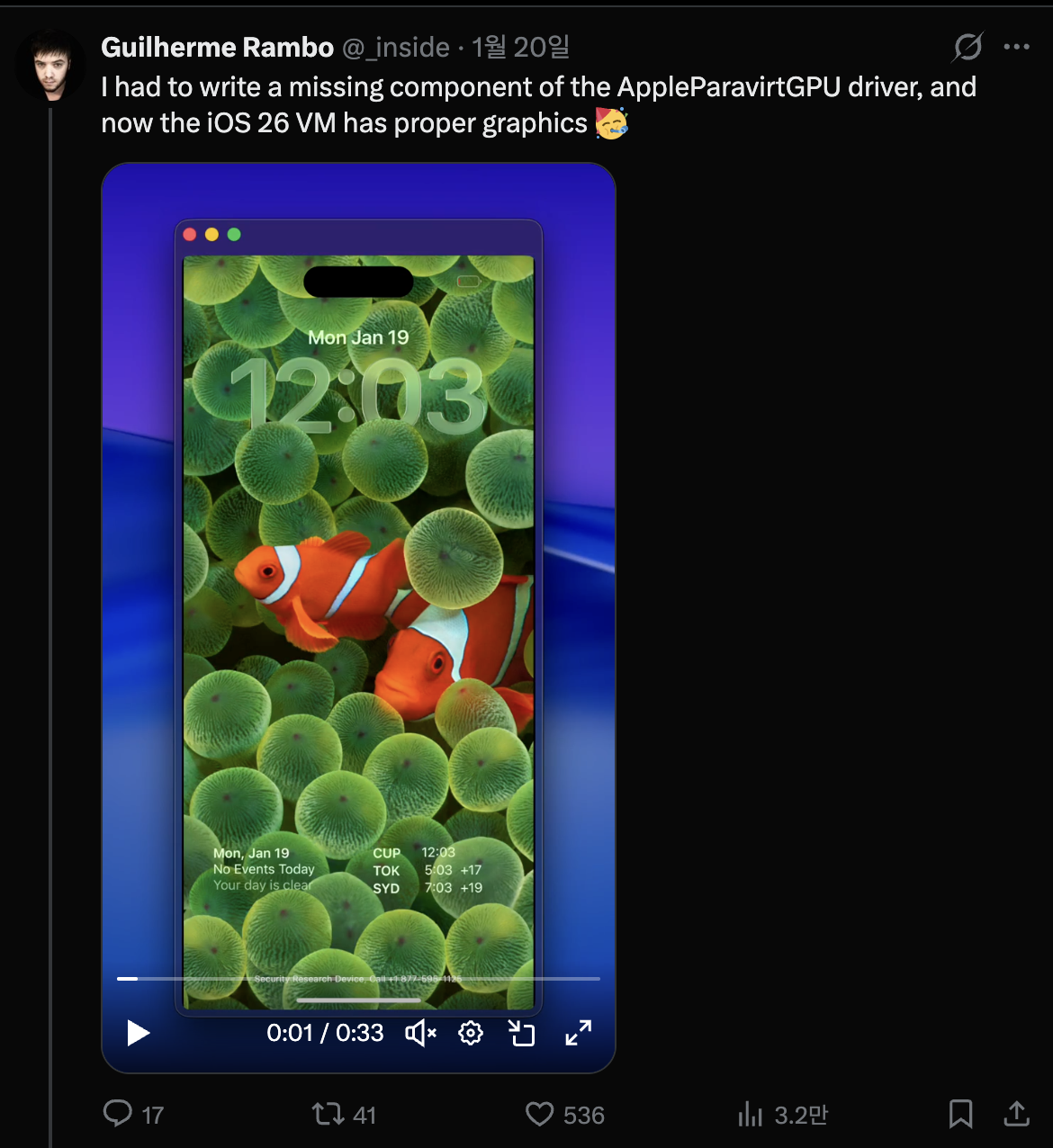
Por lo que vi, casi todo funcionaba de manera realmente elegante. En comparación con el proyecto QEMUAppleSilicon(Inferno) que había visto anteriormente, se ejecuta mucho más rápido y fluido. Además, incluso parecía soportar aceleración Metal. Finalmente, completamente cautivado por ello, me sumergí y comencé a construir mi propio iPhone virtual el 31 de enero.

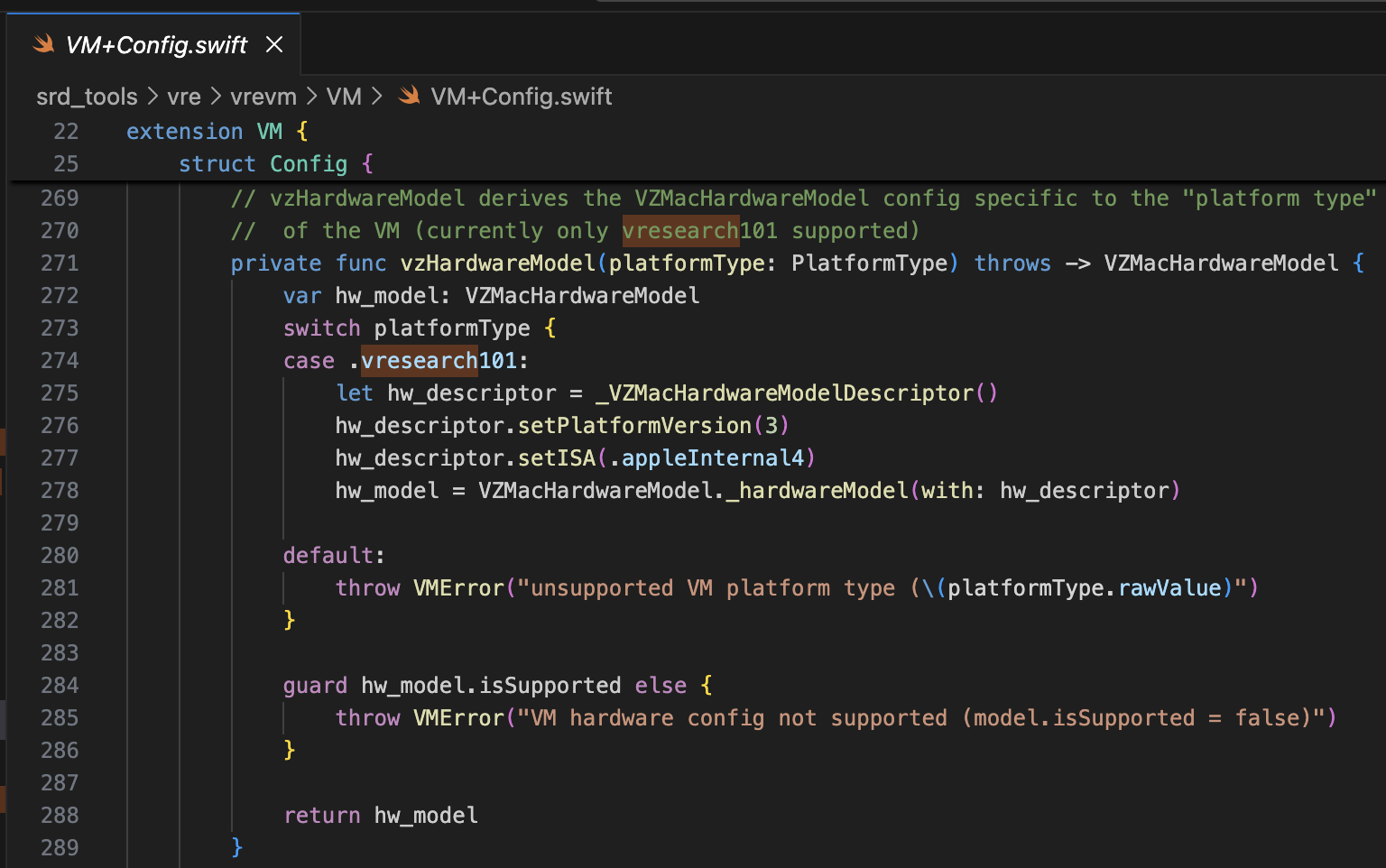
El proyecto de referencia es security-pcc. Corresponde al código fuente del binario /System/Library/SecurityResearch/usr/bin/vrevm. Un punto interesante es que utiliza métodos privados proporcionados por Virtualization.framework. En la máquina virtual utilizada para la investigación de PCC, se puede ver que el ISA y PlatformVersion se especifican explícitamente durante el proceso de inicialización del modelo de hardware.
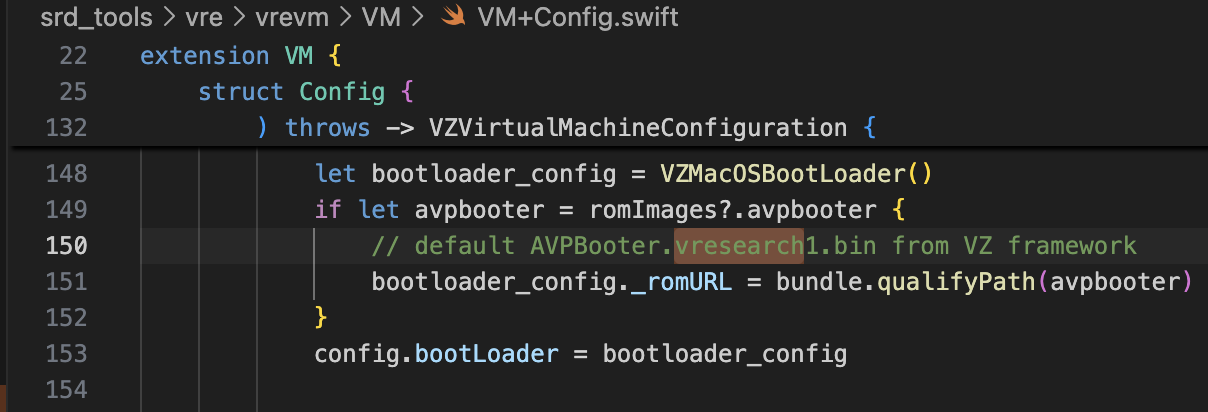
Para el bootrom, se utiliza AVPBooter.vresearch1.bin (/System/Library/Frameworks/Virtualization.framework/Resources/AVPBooter.vresearch1.bin)
y para el SEPROM (avpsepbooter), se utiliza AVPSEPBooter.vresearch1.bin, que carga por separado un archivo SEPStorage que funciona de manera similar a AuxiliaryStorage. (/System/Library/Frameworks/Virtualization.framework/Versions/A/Resources/AVPSEPBooter.vresearch1.bin)
Otro punto interesante es que si observas el código para establecer la resolución, se configura a 1290x2796, que corresponde a los dispositivos iPhone 14 Pro Max, 15 Plus, 15 Pro Max y 16 Plus.
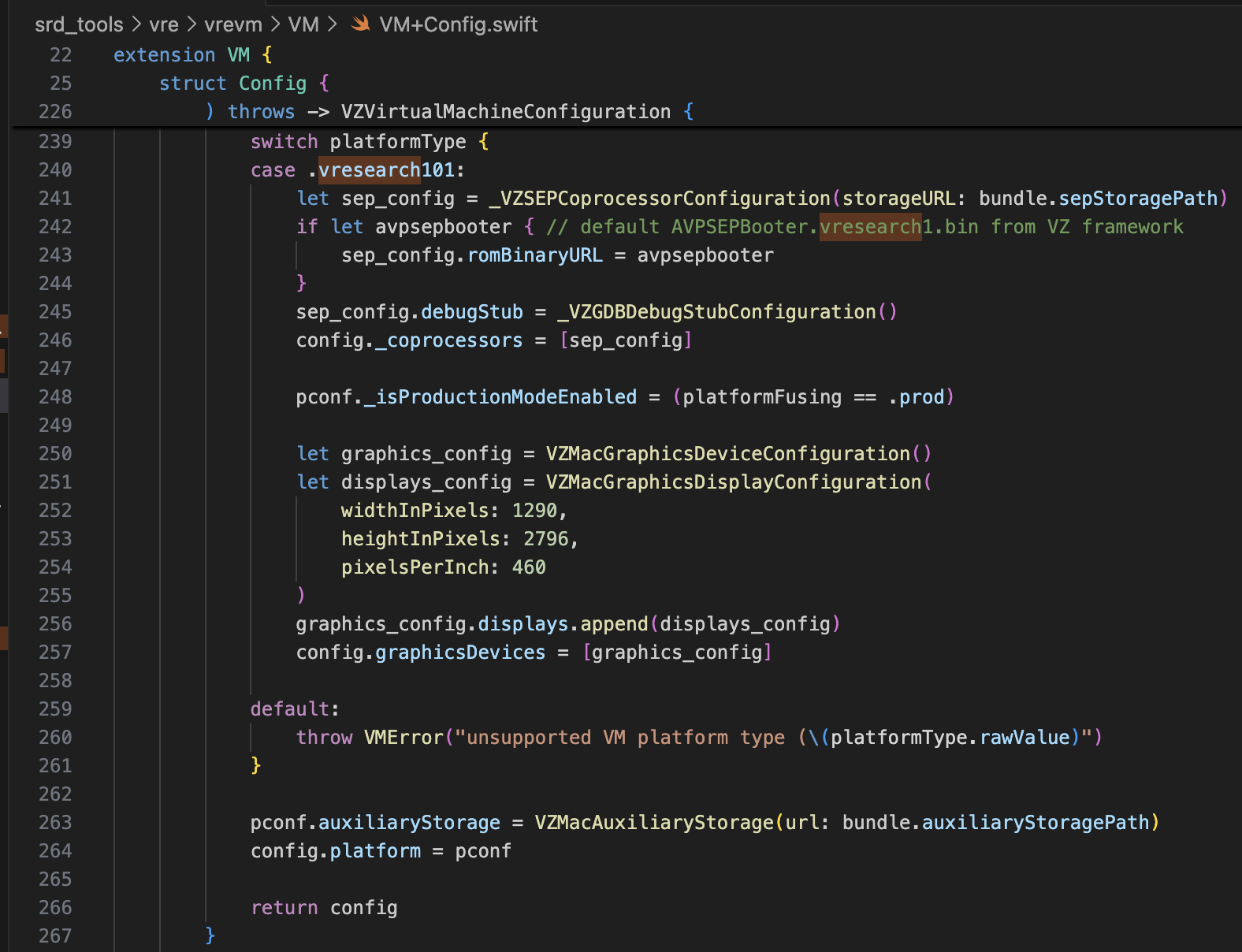
Con solo esta información, debería ser más que suficiente para modificar super-tart y arrancar el iPhone virtual. Realicé las modificaciones como se muestra a continuación.
/Sources/tart/VM.swift```swift ... class VM: NSObject, VZVirtualMachineDelegate, ObservableObject { ... // vzHardwareModel derives the VZMacHardwareModel config specific to the "platform type" // of the VM (currently only vresearch101 supported) static private func vzHardwareModel_VRESEARCH101() throws -> VZMacHardwareModel { var hw_model: VZMacHardwareModel
guard let hw_descriptor = _VZMacHardwareModelDescriptor() else { fatalError("Failed to create hardware descriptor") } hw_descriptor.setPlatformVersion(3) // .appleInternal4 = 3 hw_descriptor.setBoardID(0x90) hw_descriptor.setISA(2) hw_model = VZMacHardwareModel._hardwareModel(withDescriptor: hw_descriptor)
guard hw_model.isSupported else { fatalError("VM hardware config not supported (model.isSupported = false)") }
return hw_model }
static func craftConfiguration( diskURL: URL, nvramURL: URL, romURL: URL, sepromURL: URL? = nil, vmConfig: VMConfig, network: Network = NetworkShared(), additionalStorageDevices: [VZStorageDeviceConfiguration], directorySharingDevices: [VZDirectorySharingDeviceConfiguration], serialPorts: [VZSerialPortConfiguration], suspendable: Bool = false, nested: Bool = false, audio: Bool = true, clipboard: Bool = true, sync: VZDiskImageSynchronizationMode = .full, caching: VZDiskImageCachingMode? = nil ) throws -> VZVirtualMachineConfiguration { let configuration: VZVirtualMachineConfiguration = .init()
// Boot loader let bootloader = try vmConfig.platform.bootLoader(nvramURL: nvramURL) Dynamic(bootloader)._setROMURL(romURL) configuration.bootLoader = bootloader
// SEP ROM let homeURL = FileManager.default.homeDirectoryForCurrentUser var sepstoragePath = homeURL.appendingPathComponent(".tart/vms/vphone/SEPStorage").path let sepstorageURL = URL(fileURLWithPath: sepstoragePath) let sep_config = Dynamic._VZSEPCoprocessorConfiguration(storageURL: sepstorageURL) if let sepromURL { // default AVPSEPBooter.vresearch1.bin from VZ framework sep_config.romBinaryURL = sepromURL } sep_config.debugStub = Dynamic._VZGDBDebugStubConfiguration(port: 8001) configuration._setCoprocessors([sep_config.asObject])
// Some vresearch101 config let pconf = VZMacPlatformConfiguration() pconf.hardwareModel = try vzHardwareModel_VRESEARCH101()
let serial = Dynamic._VZMacSerialNumber.initWithString("AAAAAA1337") let identifier = Dynamic.VZMacMachineIdentifier._machineIdentifierWithECID(0x1111111111111111, serialNumber: serial.asObject) pconf.machineIdentifier = identifier.asObject as! VZMacMachineIdentifier
pconf._setProductionModeEnabled(true) var auxiliaryStoragePath = homeURL.appendingPathComponent(".tart/vms/vphone/nvram.bin").path let auxiliaryStorageURL = URL(fileURLWithPath: auxiliaryStoragePath) pconf.auxiliaryStorage = VZMacAuxiliaryStorage(url: auxiliaryStorageURL)
if #available(macOS 14, *) { let keyboard = VZUSBKeyboardConfiguration() configuration.keyboards = [keyboard] }
if #available(macOS 14, *) { let touch = _VZUSBTouchScreenConfiguration() configuration._setMultiTouchDevices([touch]) } ... configuration.platform = pconf
# Modificando el Firmware
El proyecto referenciado es [vma2pwn](https://github.com/nick-botticelli/vma2pwn). Específicamente para la versión 12.0.1, arranca una máquina virtual Mac con casi toda la cadena de arranque modificada.
Primero veamos el script [prepare.sh](https://github.com/nick-botticelli/vma2pwn/blob/main/prepare.sh). Extrae componentes del firmware, como el gestor de arranque y el kernel comprimido en formato IM4P, a formato RAW y parchea instrucciones/datos en direcciones hardcodeadas específicas. RestoreRamdisk es el sistema de archivos raíz utilizado al restaurar el firmware, y AVPBooter es el BootROM utilizado en la máquina virtual.
En resumen, extrae los archivos individuales incluidos en el firmware y parchea las comprobaciones de integridad para permitir la restauración de firmware personalizado, o modifica los parámetros boot-args para facilitar la visualización de registros relacionados con el arranque.
Finalmente, [vma2pwn.sh](https://github.com/nick-botticelli/vma2pwn/blob/main/vma2pwn.sh) es el encargado de restaurar el firmware personalizado. Lo hace entrando previamente en modo DFU. Aquí, la máquina virtual utiliza algo llamado super-tart. Esta es una versión de la máquina virtual tart existente con características añadidas como un bootrom personalizado, salida serie, modo DFU y depuración GDB. (Nota: SIP/AMFI debe estar desactivado para que funcione.)
Lo he estado utilizando últimamente de manera muy útil mientras [estudio vulnerabilidades de 1 día del kernel XNU (CVE-2021-30937, CVE-2021-30955)](https://github.com/wh1te4ever/xnu_1day_practice). Es fantástico porque admite depuración del kernel en vivo.
## Construyendo Firmware Personalizado
Mezclé los componentes de cloudOS 26.1 (23B85) e iOS 26.1 (iPhone17,3; 23B85), eh…, pero… no recuerdo los detalles exactos. Para ser preciso, tuve que mezclar adecuadamente los componentes relacionados con iPhone 16 y vphone para crear el firmware personalizado, pero he olvidado exactamente cuáles terminé mezclando. Según recuerdo:
- BuildManifest.plist:
Modifiqué los elementos del diccionario bajo la clave Manifest. Lo configuré para que durante el proceso de restauración, se usaran SystemVolume, SystemVolumeCanonicalMetadata, OS, StaticTrustCache, RestoreTrustCache y RestoreRamDisk del modelo iPhone 16 (iOS 26.1). El resto se configuró para usar archivos relacionados con vphone del firmware PCC.
- Restore.plist:
Creo que añadí propiedades relacionadas con DeviceMap o SupportedProductTypes, o cambié el elemento SystemRestoreImageFileSystems.
Los archivos a continuación son el resultado final de mi mezcla.
[Restore.plist](https://github.com/wh1te4ever/super-tart-vphone-writeup/blob/HEAD/contents/Restore.plist)
[BuildManifest.plist](https://github.com/wh1te4ever/super-tart-vphone-writeup/blob/HEAD/contents/BuildManifest.plist)
- get_fw.py (Parcial)```python
...
# 3. Import things from cloudOS
# kernelcache
os.system("cp 399b664dd623358c3de118ffc114e42dcd51c9309e751d43bc949b98f4e31349_extracted/kernelcache.* iPhone17,3_26.1_23B85_Restore")
# agx, all_flash, ane, dfu, pmp...
os.system("cp 399b664dd623358c3de118ffc114e42dcd51c9309e751d43bc949b98f4e31349_extracted/Firmware/agx/* iPhone17,3_26.1_23B85_Restore/Firmware/agx")
os.system("cp 399b664dd623358c3de118ffc114e42dcd51c9309e751d43bc949b98f4e31349_extracted/Firmware/all_flash/* iPhone17,3_26.1_23B85_Restore/Firmware/all_flash")
os.system("cp 399b664dd623358c3de118ffc114e42dcd51c9309e751d43bc949b98f4e31349_extracted/Firmware/ane/* iPhone17,3_26.1_23B85_Restore/Firmware/ane")
os.system("cp 399b664dd623358c3de118ffc114e42dcd51c9309e751d43bc949b98f4e31349_extracted/Firmware/dfu/* iPhone17,3_26.1_23B85_Restore/Firmware/dfu")
os.system("cp 399b664dd623358c3de118ffc114e42dcd51c9309e751d43bc949b98f4e31349_extracted/Firmware/pmp/* iPhone17,3_26.1_23B85_Restore/Firmware/pmp")
# sptm, txm, etc...
os.system("cp 399b664dd623358c3de118ffc114e42dcd51c9309e751d43bc949b98f4e31349_extracted/Firmware/*.im4p iPhone17,3_26.1_23B85_Restore/Firmware")
# 4. TODO: parse what things needed from BuildManifest.plist, Restore.plist in cloudOS 26.1
# It will be really complicated, so import things from already parse completed
os.system("sudo cp custom_26.1/BuildManifest.plist iPhone17,3_26.1_23B85_Restore")
os.system("sudo cp custom_26.1/Restore.plist iPhone17,3_26.1_23B85_Restore")
os.system("echo 'Done, grabbed all needed components for restoring'")
Hice referencia a esa publicación. Debes parchear image4_validate_property_callback para cargar un bootloader personalizado después. Simplemente usa la función "Text-search (slow!)" en IDA Pro para buscar "0x4447", y parchea el epílogo de la función correspondiente para que siempre devuelva 0.

Antes de restaurar el firmware, fueron necesarias algunas modificaciones para admitir el modelo vresearch101ap. Una vez compilado, la restauración del firmware es posible usando la herramienta idevicerestore.
https://github.com/wh1te4ever/libirecovery

Similar a AVPBooter, los bootloaders usados para la restauración, iBSS e iBEC, fueron parcheados para omitir la verificación de firmas. También habilité la salida de registro serial para que, si hay algún problema de arranque, se pueda identificar la causa de inmediato.
Como verás más adelante, omitir la verificación SSV (Signed System Volume) es necesario para cargar un Cryptex arbitrario. Esto se realiza en el LLB, que se carga al iniciar en modo normal en lugar de modo DFU, y la verificación también se realiza a veces en el kernel.
Además, parcheé el TXM para que, incluso si un binario/biblioteca no está registrado en Trustcache, sea reconocido como si lo estuviera.
patch(0x9D10, 0xd503201f) #nop patch(0x9D14, 0xd2800000) #mov x0, #0
patch(0x122d4, 0xd0000082) #adrp x2, #0x12000 patch(0x122d8, 0x9101c042) #add x2, x2, #0x70 patch(0x24070, "serial=3 -v debug=0x2014e %s")
patch(0xA0D8, 0xd503201f) #nop patch(0xA0DC, 0xd2800000) #mov x0, #0
patch(0x12888, 0xD0000082) #adrp x2, #0x12000 patch(0x1288C, 0x91264042) #add x2, x2, #0x990 patch(0x24990, "serial=3 -v debug=0x2014e %s")
patch(0x2BFE8, 0x1400000b) patch(0x2bca0, 0xd503201f) patch(0x2C03C, 0x17ffff6a) patch(0x2fcec, 0xd503201f) patch(0x2FEE8, 0x14000009)
patch(0x1AEE4, 0xd503201f) #nop
patch(0x2c1f8, 0xd2800000) #FFFFFFF0170301F8 patch(0x2bef4, 0xd2800000) #FFFFFFF01702FEF4 patch(0x2c060, 0xd2800000) #FFFFFFF017030060
patch(0x2476964, 0xd503201f) #FFFFFE000947A964
patch(0x23cfde4, 0xd503201f) #FFFFFE00093D3DE4
patch(0xf6d960, 0xd503201f) #FFFFFE0007F71960 ...
Después de convertir al formato RAW y parchearlo, debes convertirlo de vuelta a IM4P.
En el caso del kernel o TXM, existe una estructura PAYP, por lo que fue necesario preservar esa estructura.
A continuación se muestra el código que convierte IM4P → RAW → IM4P usando las herramientas [pyimg4](https://pypi.org/project/pyimg4/), [img4tool](https://github.com/tihmstar/img4tool), [img4](https://github.com/xerub/img4lib).
- patch_fw.py (Contenido parcial, Parte 2)```python
...
# Patch iBSS
if not os.path.exists("iPhone17,3_26.1_23B85_Restore/Firmware/dfu/iBSS.vresearch101.RELEASE.im4p.bak"):
os.system("cp iPhone17,3_26.1_23B85_Restore/Firmware/dfu/iBSS.vresearch101.RELEASE.im4p iPhone17,3_26.1_23B85_Restore/Firmware/dfu/iBSS.vresearch101.RELEASE.im4p.bak")
os.system("tools/img4 -i iPhone17,3_26.1_23B85_Restore/Firmware/dfu/iBSS.vresearch101.RELEASE.im4p.bak -o iBSS.vresearch101.RELEASE")
... # patch things from raw
os.system("tools/img4tool -c iPhone17,3_26.1_23B85_Restore/Firmware/dfu/iBSS.vresearch101.RELEASE.im4p -t ibss iBSS.vresearch101.RELEASE")
# Patch iBEC
if not os.path.exists("iPhone17,3_26.1_23B85_Restore/Firmware/dfu/iBEC.vresearch101.RELEASE.im4p.bak"):
os.system("cp iPhone17,3_26.1_23B85_Restore/Firmware/dfu/iBEC.vresearch101.RELEASE.im4p iPhone17,3_26.1_23B85_Restore/Firmware/dfu/iBEC.vresearch101.RELEASE.im4p.bak")
os.system("tools/img4 -i iPhone17,3_26.1_23B85_Restore/Firmware/dfu/iBEC.vresearch101.RELEASE.im4p.bak -o iBEC.vresearch101.RELEASE")
... # patch things from raw
os.system("tools/img4tool -c iPhone17,3_26.1_23B85_Restore/Firmware/dfu/iBEC.vresearch101.RELEASE.im4p -t ibec iBEC.vresearch101.RELEASE")
# Patch LLB
if not os.path.exists("iPhone17,3_26.1_23B85_Restore/Firmware/all_flash/LLB.vresearch101.RESEARCH_RELEASE.im4p.bak"):
os.system("cp iPhone17,3_26.1_23B85_Restore/Firmware/all_flash/LLB.vresearch101.RESEARCH_RELEASE.im4p iPhone17,3_26.1_23B85_Restore/Firmware/all_flash/LLB.vresearch101.RESEARCH_RELEASE.im4p.bak")
os.system("tools/img4 -i iPhone17,3_26.1_23B85_Restore/Firmware/all_flash/LLB.vresearch101.RESEARCH_RELEASE.im4p.bak -o LLB.vresearch101.RESEARCH_RELEASE")
... # patch things from raw
os.system("tools/img4tool -c iPhone17,3_26.1_23B85_Restore/Firmware/all_flash/LLB.vresearch101.RESEARCH_RELEASE.im4p -t illb LLB.vresearch101.RESEARCH_RELEASE")
# 6. Grab & Patch TXM
if not os.path.exists("iPhone17,3_26.1_23B85_Restore/Firmware/txm.iphoneos.research.im4p.bak"):
os.system("cp iPhone17,3_26.1_23B85_Restore/Firmware/txm.iphoneos.research.im4p iPhone17,3_26.1_23B85_Restore/Firmware/txm.iphoneos.research.im4p.bak")
os.system("pyimg4 im4p extract -i iPhone17,3_26.1_23B85_Restore/Firmware/txm.iphoneos.research.im4p.bak -o txm.raw")
... # patch things from raw
#create im4p
os.system("pyimg4 im4p create -i txm.raw -o txm.im4p -f trxm --lzfse")
# preserve payp structure
txm_im4p_data = Path('iPhone17,3_26.1_23B85_Restore/Firmware/txm.iphoneos.research.im4p.bak').read_bytes()
payp_offset = txm_im4p_data.rfind(b'PAYP')
if payp_offset == -1:
print("Couldn't find payp structure !!!")
sys.exit()
with open('txm.im4p', 'ab') as f:
f.write(txm_im4p_data[(payp_offset-10):])
payp_sz = len(txm_im4p_data[(payp_offset-10):])
print(f"payp sz: {payp_sz}")
txm_im4p_data = bytearray(open('txm.im4p', 'rb').read())
txm_im4p_data[2:5] = (int.from_bytes(txm_im4p_data[2:5], 'big') + payp_sz).to_bytes(3, 'big')
open('txm.im4p', 'wb').write(txm_im4p_data)
os.system("mv txm.im4p iPhone17,3_26.1_23B85_Restore/Firmware/txm.iphoneos.research.im4p")
# 7. Grab & patch kernelcache
if not os.path.exists("iPhone17,3_26.1_23B85_Restore/kernelcache.research.vphone600.bak"):
os.system("cp iPhone17,3_26.1_23B85_Restore/kernelcache.research.vphone600 iPhone17,3_26.1_23B85_Restore/kernelcache.research.vphone600.bak")
os.system("pyimg4 im4p extract -i iPhone17,3_26.1_23B85_Restore/kernelcache.research.vphone600.bak -o kcache.raw")
... # patch things from raw
#create im4p
os.system("pyimg4 im4p create -i kcache.raw -o krnl.im4p -f krnl --lzfse")
# preserve payp structure
kernel_im4p_data = Path('iPhone17,3_26.1_23B85_Restore/kernelcache.research.vphone600.bak').read_bytes()
payp_offset = kernel_im4p_data.rfind(b'PAYP')
if payp_offset == -1:
print("Couldn't find payp structure !!!")
sys.exit()
with open('krnl.im4p', 'ab') as f:
f.write(kernel_im4p_data[(payp_offset-10):])
payp_sz = len(kernel_im4p_data[(payp_offset-10):])
print(f"payp sz: {payp_sz}")
kernel_im4p_data = bytearray(open('krnl.im4p', 'rb').read())
kernel_im4p_data[2:5] = (int.from_bytes(kernel_im4p_data[2:5], 'big') + payp_sz).to_bytes(3, 'big')
open('krnl.im4p', 'wb').write(kernel_im4p_data)
os.system("mv krnl.im4p iPhone17,3_26.1_23B85_Restore/kernelcache.research.vphone600")
...
Una vez que todo esté listo, pongamos la máquina virtual en modo DFU e intentemos restaurarla.
A continuación se muestra una captura de pantalla del pánico que ocurre si el SEP no está configurado correctamente. Si lo configuras correctamente, debería pasar este punto sin problemas.

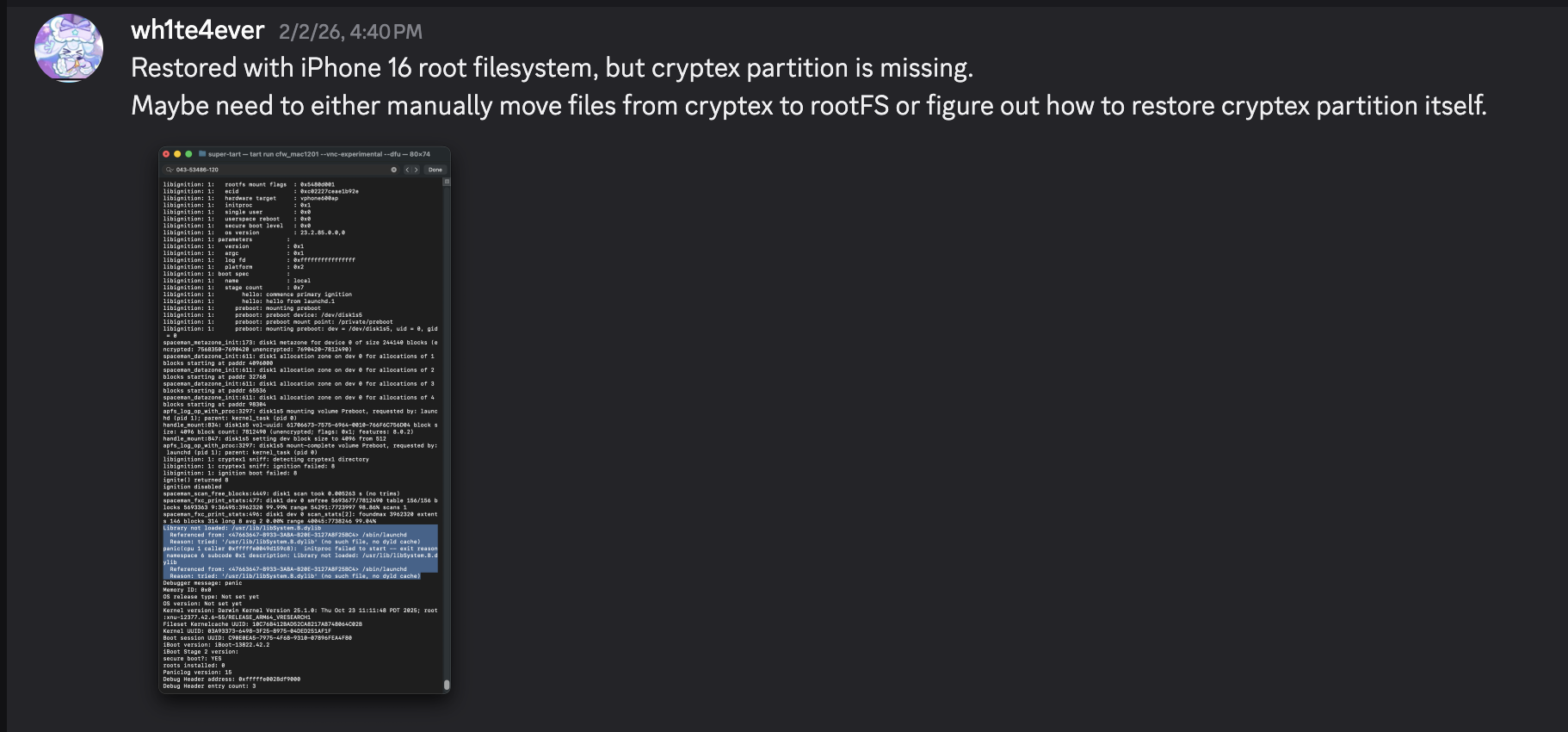
Después de que la restauración se complete, se reinicia automáticamente. Sin embargo, ocurre un pánico en el proceso launchd porque falta la biblioteca /usr/lib/libSystem.B.dylib. Esta biblioteca se encuentra dentro de dyld_shared_cache en la partición Cryptex, y por alguna razón, la partición Cryptex no pudo restaurarse. Como solución temporal, debes crear un SSH Ramdisk para modificar el sistema de archivos raíz e inyectar los archivos necesarios. Esa es exactamente la razón por la que se necesitaba el parche relacionado con la verificación SSV.


Voy a intentar solucionar el problema de fallo de arranque utilizando el ramdisk usado en https://github.com/verygenericname/SSHRD_Script.
Para cargar componentes como el bootloader o el kernel usando la herramienta irecovery en modo DFU, se necesita una imagen IMG4, la cual requiere un archivo IM4M. Por lo tanto, primero obtuve el archivo shsh usando la herramienta idevicerestore, y luego lo convertí en un archivo IM4M.```bash idevicerestore -e -y ./iPhone17,3_26.1_23B85_Restore -t
mv shsh/[ECID]-iPhone99,11-26.1.shsh shsh/[ECID]-iPhone99,11-26.1.shsh.gz
gunzip shsh/[ECID]-iPhone99,11-26.1.shsh.gz
...
pyimg4 im4m extract -i shsh/[ECID]-iPhone99,11-26.1.shsh -o vphone.im4m
Luego, usando ese archivo IM4M, generé varios archivos IMG4 para cada uno de los componentes de firmware utilizados, como iBSS, iBEC y el devicetree.```python
# 1. Grab & Patch iBSS
if not os.path.exists("iPhone17\\,3_26.1_23B85_Restore/Firmware/dfu/iBSS.vresearch101.RELEASE.im4p.bak"):
os.system("cp iPhone17\\,3_26.1_23B85_Restore/Firmware/dfu/iBSS.vresearch101.RELEASE.im4p iPhone17\\,3_26.1_23B85_Restore/Firmware/dfu/iBSS.vresearch101.RELEASE.im4p.bak")
os.system("tools/img4 -i iPhone17\\,3_26.1_23B85_Restore/Firmware/dfu/iBSS.vresearch101.RELEASE.im4p.bak -o iBSS.vresearch101.RELEASE")
... # patch things from raw
os.system("tools/img4tool -c iBSS.vresearch101.RELEASE.im4p -t ibss iBSS.vresearch101.RELEASE")
os.system("tools/img4 -i iBSS.vresearch101.RELEASE.im4p -o ./Ramdisk/iBSS.vresearch101.RELEASE.img4 -M ./vphone.im4m")
# 2. Grab & Patch iBEC
if not os.path.exists("iPhone17\\,3_26.1_23B85_Restore/Firmware/dfu/iBEC.vresearch101.RELEASE.im4p.bak"):
os.system("cp iPhone17\\,3_26.1_23B85_Restore/Firmware/dfu/iBEC.vresearch101.RELEASE.im4p iPhone17\\,3_26.1_23B85_Restore/Firmware/dfu/iBEC.vresearch101.RELEASE.im4p.bak")
os.system("tools/img4 -i iPhone17\\,3_26.1_23B85_Restore/Firmware/dfu/iBEC.vresearch101.RELEASE.im4p -o iBEC.vresearch101.RELEASE")
... # patch things from raw
os.system("tools/img4tool -c iBEC.vresearch101.RELEASE.im4p -t ibec iBEC.vresearch101.RELEASE")
os.system("tools/img4 -i iBEC.vresearch101.RELEASE.im4p -o Ramdisk/iBEC.vresearch101.RELEASE.img4 -M vphone.im4m")
# 3. Grab SPTM
os.system("tools/img4 -i iPhone17\\,3_26.1_23B85_Restore/Firmware/sptm.vresearch1.release.im4p -o Ramdisk/sptm.vresearch1.release.img4 -M vphone.im4m -T sptm")
# 4. Grab devicetree
os.system("tools/img4 -i iPhone17\\,3_26.1_23B85_Restore/Firmware/all_flash/DeviceTree.vphone600ap.im4p -o Ramdisk/DeviceTree.vphone600ap.img4 -M vphone.im4m -T rdtr")
# 5. Grab sep
os.system("tools/img4 -i iPhone17\\,3_26.1_23B85_Restore/Firmware/all_flash/sep-firmware.vresearch101.RELEASE.im4p -o Ramdisk/sep-firmware.vresearch101.RELEASE.img4 -M vphone.im4m -T rsep")
# 6. Grab & Patch TXM
if not os.path.exists("iPhone17\\,3_26.1_23B85_Restore/Firmware/txm.iphoneos.release.im4p.bak"):
os.system("cp iPhone17\\,3_26.1_23B85_Restore/Firmware/txm.iphoneos.release.im4p iPhone17\\,3_26.1_23B85_Restore/Firmware/txm.iphoneos.release.im4p.bak")
os.system("pyimg4 im4p extract -i iPhone17\\,3_26.1_23B85_Restore/Firmware/txm.iphoneos.release.im4p.bak -o txm.raw")
... # patch things from raw
#create im4p
os.system("pyimg4 im4p create -i txm.raw -o txm.im4p -f trxm --lzfse")
# preserve payp structure
txm_im4p_data = Path('iPhone17,3_26.1_23B85_Restore/Firmware/txm.iphoneos.release.im4p.bak').read_bytes()
payp_offset = txm_im4p_data.rfind(b'PAYP')
if payp_offset == -1:
print("Couldn't find payp structure !!!")
sys.exit()
with open('txm.im4p', 'ab') as f:
f.write(txm_im4p_data[(payp_offset-10):])
payp_sz = len(txm_im4p_data[(payp_offset-10):])
print(f"payp sz: {payp_sz}")
txm_im4p_data = bytearray(open('txm.im4p', 'rb').read())
txm_im4p_data[2:5] = (int.from_bytes(txm_im4p_data[2:5], 'big') + payp_sz).to_bytes(3, 'big')
open('txm.im4p', 'wb').write(txm_im4p_data)
# sign
os.system("pyimg4 img4 create -p txm.im4p -o Ramdisk/txm.img4 -m vphone.im4m")
# 7. Grab & patch kernelcache
if not os.path.exists("iPhone17\\,3_26.1_23B85_Restore/kernelcache.research.vphone600.bak"):
os.system("cp iPhone17\\,3_26.1_23B85_Restore/kernelcache.research.vphone600 iPhone17\\,3_26.1_23B85_Restore/kernelcache.research.vphone600.bak")
os.system("pyimg4 im4p extract -i iPhone17\\,3_26.1_23B85_Restore/kernelcache.research.vphone600.bak -o kcache.raw")
... # patch things from raw
#create im4p
os.system("pyimg4 im4p create -i kcache.raw -o krnl.im4p -f rkrn --lzfse")
# preserve payp structure
kernel_im4p_data = Path('iPhone17,3_26.1_23B85_Restore/kernelcache.research.vphone600.bak').read_bytes()
payp_offset = kernel_im4p_data.rfind(b'PAYP')
if payp_offset == -1:
print("Couldn't find payp structure !!!")
sys.exit()
with open('krnl.im4p', 'ab') as f:
f.write(kernel_im4p_data[(payp_offset-10):])
payp_sz = len(kernel_im4p_data[(payp_offset-10):])
print(f"payp sz: {payp_sz}")
kernel_im4p_data = bytearray(open('krnl.im4p', 'rb').read())
kernel_im4p_data[2:5] = (int.from_bytes(kernel_im4p_data[2:5], 'big') + payp_sz).to_bytes(3, 'big')
open('krnl.im4p', 'wb').write(kernel_im4p_data)
# sign
os.system("pyimg4 img4 create -p krnl.im4p -o Ramdisk/krnl.img4 -m vphone.im4m")
# 8. Grab ramdisk & build custom ramdisk
os.system("pyimg4 im4p extract -i iPhone17,3_26.1_23B85_Restore/043-53775-129.dmg -o ramdisk.dmg")
os.system("mkdir SSHRD")
os.system("sudo hdiutil attach -mountpoint SSHRD ramdisk.dmg -owners off")
os.system("sudo hdiutil create -size 254m -imagekey diskimage-class=CRawDiskImage -format UDZO -fs APFS -layout NONE -srcfolder SSHRD -copyuid root ramdisk1.dmg")
os.system("sudo hdiutil detach -force SSHRD")
os.system("sudo hdiutil attach -mountpoint SSHRD ramdisk1.dmg -owners off")
... #remove unneccessary files for expand space
#resign all things preserving ents
target_path= [
"SSHRD/usr/local/bin/*", "SSHRD/usr/local/lib/*",
"SSHRD/usr/bin/*", "SSHRD/bin/*",
"SSHRD/usr/lib/*", "SSHRD/sbin/*", "SSHRD/usr/sbin/*", "SSHRD/usr/libexec/*"
]
for pattern in target_path:
for path in glob.glob(pattern):
if os.path.isfile(path) and not os.path.islink(path):
if "Mach-O" in subprocess.getoutput(f"file \"{path}\""):
os.system(f"tools/ldid_macosx_arm64 -S -M -Cadhoc \"{path}\"")
#8-2. Grab & build custom ramdisk's trustcache while building custom ramdisk
os.system("pyimg4 im4p extract -i iPhone17,3_26.1_23B85_Restore/Firmware/043-53775-129.dmg.trustcache -o trustcache.raw")
os.system("tools/trustcache_macos_arm64 create sshrd.tc SSHRD")
os.system("pyimg4 im4p create -i sshrd.tc -o trustcache.im4p -f rtsc")
# sign
os.system("pyimg4 img4 create -p trustcache.im4p -o Ramdisk/trustcache.img4 -m vphone.im4m")
#8-2. end
os.system("sudo hdiutil detach -force SSHRD")
os.system("sudo hdiutil resize -sectors min ramdisk1.dmg")
# sign
os.system("pyimg4 im4p create -i ramdisk1.dmg -o ramdisk1.dmg.im4p -f rdsk")
os.system("pyimg4 img4 create -p ramdisk1.dmg.im4p -o Ramdisk/ramdisk.img4 -m vphone.im4m")
Una vez que todas las imágenes IMG4 estén creadas, carguémoslas una por una e iniciemos con el Ramdisk.
sleep 1; irecovery -f Ramdisk/sptm.vresearch1.release.img4 irecovery -c firmware
irecovery -f Ramdisk/txm.img4 irecovery -c firmware
irecovery -f Ramdisk/trustcache.img4 irecovery -c firmware irecovery -f Ramdisk/ramdisk.img4 irecovery -c ramdisk irecovery -f Ramdisk/DeviceTree.vphone600ap.img4 irecovery -c devicetree irecovery -f Ramdisk/sep-firmware.vresearch101.RELEASE.img4 irecovery -c firmware irecovery -f Ramdisk/krnl.img4 irecovery -c bootx
Luego, verás la cara del Creeper de Minecraft en la tercera ventana de la izquierda, como se muestra a continuación.
Si revisas el menú USB en la aplicación Información del Sistema y ves "iPhone Research...",
ahora puedes acceder al shell del iPhone virtual usando la herramienta [iproxy](https://github.com/libimobiledevice/libusbmuxd/blob/master/tools/iproxy.c). (`iproxy 2222 22 &`)

Para modificar el sistema de archivos raíz, renombra la instantánea.```python
ssh [email protected] -p2222
#pw: alpine
mount_apfs -o rw /dev/disk1s1 /mnt1
snaputil -l /mnt1
# (then will output will be printed with hash, result may be differ)
com.apple.os.update-8AAB8DBA5C8F1F756928411675F4A892087B04559CFB084B9E400E661ABAD119
snaputil -n <com.apple.os.update-hash> orig-fs /mnt1
umount /mnt1
exit
Descifra el archivo AEA usando la herramienta ipsw para crear un archivo dmg, móntalo y luego transfiere los archivos desde la partición Cryptex a la máquina virtual. Junto con la transferencia de archivos, se requirieron parches específicos. Para mayor comodidad, agregué tres procesos específicos para que se inicien al arrancar: bash, dropbear y trollvnc.
seputil tenía un problema por el cual no podía encontrar correctamente el archivo gigalocker, así que lo parcheé para que siempre busque AA.gl. Además, parcheé launchd_cache_loader para asegurar que el archivo modificado /System/Library/xpc/launchd.plist se cargue correctamente.```python ... ========= INSTALL CRYPTEX(SystemOS, AppOS) =========
key = subprocess.check_output("ipsw fw aea --key iPhone17,3_26.1_23B85_Restore/043-54303-126.dmg.aea", shell=True, text=True).strip() print(f"key: {key}") os.system(f"aea decrypt -i iPhone17,3_26.1_23B85_Restore/043-54303-126.dmg.aea -o CryptexSystemOS.dmg -key-value '{key}'")
os.system(f"cp iPhone17,3_26.1_23B85_Restore/043-54062-129.dmg CryptexAppOS.dmg")
os.system("mkdir CryptexSystemOS") os.system("sudo hdiutil attach -mountpoint CryptexSystemOS CryptexSystemOS.dmg -owners off")
os.system("mkdir CryptexAppOS") os.system("sudo hdiutil attach -mountpoint CryptexAppOS CryptexAppOS.dmg -owners off")
remote_cmd("/sbin/mount_apfs -o rw /dev/disk1s1 /mnt1")
remote_cmd("/bin/rm -rf /mnt1/System/Cryptexes/App") remote_cmd("/bin/rm -rf /mnt1/System/Cryptexes/OS")
remote_cmd("/bin/mkdir -p /mnt1/System/Cryptexes/App") remote_cmd("/bin/chmod 0755 /mnt1/System/Cryptexes/App") remote_cmd("/bin/mkdir -p /mnt1/System/Cryptexes/OS") remote_cmd("/bin/chmod 0755 /mnt1/System/Cryptexes/OS")
print("Copying cryptexs to vphone! Will take about 3 mintues...") os.system("tools/sshpass -p 'alpine' scp -q -r -ostricthostkeychecking=false -ouserknownhostsfile=/dev/null -o StrictHostKeyChecking=no -P 2222 CryptexSystemOS/. '[email protected]:/mnt1/System/Cryptexes/OS'") os.system("tools/sshpass -p 'alpine' scp -q -r -ostricthostkeychecking=false -ouserknownhostsfile=/dev/null -o StrictHostKeyChecking=no -P 2222 CryptexAppOS/. '[email protected]:/mnt1/System/Cryptexes/App'")
remote_cmd("/bin/ln -sf ../../../System/Cryptexes/OS/System/Library/Caches/com.apple.dyld /mnt1/System/Library/Caches/com.apple.dyld")
remote_cmd("/bin/ln -sf ../../../../System/Cryptexes/OS/System/DriverKit/System/Library/dyld /mnt1/System/DriverKit/System/Library/dyld")
os.system("rm custom_26.1/seputil 2>/dev/null") os.system("rm custom_26.1/seputil.bak 2>/dev/null")
file_path = "/mnt1/usr/libexec/seputil.bak" if not check_remote_file_exists(file_path): print(f"Created backup {file_path}") remote_cmd("/bin/cp /mnt1/usr/libexec/seputil /mnt1/usr/libexec/seputil.bak")
os.system("tools/sshpass -p 'alpine' scp -q -o StrictHostKeyChecking=no -o UserKnownHostsFile=/dev/null -P 2222 [email protected]:/mnt1/usr/libexec/seputil.bak ./custom_26.1") os.system("mv custom_26.1/seputil.bak custom_26.1/seputil")
fp = open("custom_26.1/seputil", "r+b") patch(0x1B3F1, "AA") fp.close()
os.system("tools/ldid_macosx_arm64 -S -M -Ksigncert.p12 -Icom.apple.seputil custom_26.1/seputil")
os.system("tools/sshpass -p 'alpine' scp -q -r -ostricthostkeychecking=false -ouserknownhostsfile=/dev/null -o StrictHostKeyChecking=no -P 2222 custom_26.1/seputil '[email protected]:/mnt1/usr/libexec/seputil'") remote_cmd("/bin/chmod 0755 /mnt1/usr/libexec/seputil")
os.system("rm custom_26.1/seputil 2>/dev/null")
remote_cmd("/sbin/mount_apfs -o rw /dev/disk1s3 /mnt3") remote_cmd("/bin/mv /mnt3/*.gl /mnt3/AA.gl")
... # ========= INSTALL AppleParavirtGPUMetalIOGPUFamily =========
os.system("tools/sshpass -p 'alpine' scp -q -r -ostricthostkeychecking=false -ouserknownhostsfile=/dev/null -o StrictHostKeyChecking=no -P 2222 jb/iosbinpack64.tar '[email protected]:/mnt1'")
remote_cmd("/usr/bin/tar --preserve-permissions --no-overwrite-dir -xvf /mnt1/iosbinpack64.tar -C /mnt1") remote_cmd("/bin/rm /mnt1/iosbinpack64.tar")
''' /iosbinpack64/bin/mkdir -p /var/dropbear /iosbinpack64/bin/cp /iosbinpack64/etc/profile /var/profile /iosbinpack64/bin/cp /iosbinpack64/etc/motd /var/motd '''
os.system("rm custom_26.1/launchd_cache_loader 2>/dev/null") os.system("rm custom_26.1/launchd_cache_loader.bak 2>/dev/null")
file_path = "/mnt1/usr/libexec/launchd_cache_loader.bak" if not check_remote_file_exists(file_path): print(f"Created backup {file_path}") remote_cmd("/bin/cp /mnt1/usr/libexec/launchd_cache_loader /mnt1/usr/libexec/launchd_cache_loader.bak")
os.system("tools/sshpass -p 'alpine' scp -q -o StrictHostKeyChecking=no -o UserKnownHostsFile=/dev/null -P 2222 [email protected]:/mnt1/usr/libexec/launchd_cache_loader.bak ./custom_26.1") os.system("mv custom_26.1/launchd_cache_loader.bak custom_26.1/launchd_cache_loader")
fp = open("custom_26.1/launchd_cache_loader", "r+b") patch(0xB58, 0xd503201f) fp.close()
os.system("tools/ldid_macosx_arm64 -S -M -Ksigncert.p12 -Icom.apple.launchd_cache_loader custom_26.1/launchd_cache_loader")
os.system("tools/sshpass -p 'alpine' scp -q -r -ostricthostkeychecking=false -ouserknownhostsfile=/dev/null -o StrictHostKeyChecking=no -P 2222 custom_26.1/launchd_cache_loader '[email protected]:/mnt1/usr/libexec/launchd_cache_loader'") remote_cmd("/bin/chmod 0755 /mnt1/usr/libexec/launchd_cache_loader")
os.system("rm custom_26.1/launchd_cache_loader 2>/dev/null")
os.system("tools/sshpass -p 'alpine' scp -q -r -ostricthostkeychecking=false -ouserknownhostsfile=/dev/null -o StrictHostKeyChecking=no -P 2222 jb/LaunchDaemons/bash.plist '[email protected]:/mnt1/System/Library/LaunchDaemons'") os.system("tools/sshpass -p 'alpine' scp -q -r -ostricthostkeychecking=false -ouserknownhostsfile=/dev/null -o StrictHostKeyChecking=no -P 2222 jb/LaunchDaemons/dropbear.plist '[email protected]:/mnt1/System/Library/LaunchDaemons'") os.system("tools/sshpass -p 'alpine' scp -q -r -ostricthostkeychecking=false -ouserknownhostsfile=/dev/null -o StrictHostKeyChecking=no -P 2222 jb/LaunchDaemons/trollvnc.plist '[email protected]:/mnt1/System/Library/LaunchDaemons'") remote_cmd("/bin/chmod 0644 /mnt1/System/Library/LaunchDaemons/bash.plist") remote_cmd("/bin/chmod 0644 /mnt1/System/Library/LaunchDaemons/dropbear.plist") remote_cmd("/bin/chmod 0644 /mnt1/System/Library/LaunchDaemons/trollvnc.plist")
os.system("rm custom_26.1/launchd.plist 2>/dev/null") os.system("rm custom_26.1/launchd.plist.bak 2>/dev/null")
file_path = "/mnt1/System/Library/xpc/launchd.plist.bak" if not check_remote_file_exists(file_path): print(f"Created backup {file_path}") remote_cmd("/bin/cp /mnt1/System/Library/xpc/launchd.plist /mnt1/System/Library/xpc/launchd.plist.bak")
os.system("tools/sshpass -p 'alpine' scp -q -o StrictHostKeyChecking=no -o UserKnownHostsFile=/dev/null -P 2222 [email protected]:/mnt1/System/Library/xpc/launchd.plist.bak ./custom_26.1") os.system("mv custom_26.1/launchd.plist.bak custom_26.1/launchd.plist")
os.system("plutil -convert xml1 custom_26.1/launchd.plist")
target_file = 'custom_26.1/launchd.plist' source_file = 'jb/LaunchDaemons/bash.plist' insert_key = '/System/Library/LaunchDaemons/bash.plist'
with open(target_file, 'rb') as ft, open(source_file, 'rb') as fs: target_data = plistlib.load(ft) source_data = plistlib.load(fs)
target_data.setdefault('LaunchDaemons', {})[insert_key] = source_data
with open(target_file, 'wb') as f: plistlib.dump(target_data, f, sort_keys=False)
source_file = 'jb/LaunchDaemons/dropbear.plist' insert_key = '/System/Library/LaunchDaemons/dropbear.plist'
with open(target_file, 'rb') as ft, open(source_file, 'rb') as fs: target_data = plistlib.load(ft) source_data = plistlib.load(fs)
target_data.setdefault('LaunchDaemons', {})[insert_key] = source_data
with open(target_file, 'wb') as f: plistlib.dump(target_data, f, sort_keys=False)
source_file = 'jb/LaunchDaemons/trollvnc.plist' insert_key = '/System/Library/LaunchDaemons/trollvnc.plist'
with open(target_file, 'rb') as ft, open(source_file, 'rb') as fs: target_data = plistlib.load(ft) source_data = plistlib.load(fs)
target_data.setdefault('LaunchDaemons', {})[insert_key] = source_data
with open(target_file, 'wb') as f: plistlib.dump(target_data, f, sort_keys=False)
os.system("tools/sshpass -p 'alpine' scp -q -r -ostricthostkeychecking=false -ouserknownhostsfile=/dev/null -o StrictHostKeyChecking=no -P 2222 custom_26.1/launchd.plist '[email protected]:/mnt1/System/Library/xpc'") remote_cmd("/bin/chmod 0644 /mnt1/System/Library/xpc/launchd.plist")
os.system("rm custom_26.1/launchd.plist 2>/dev/null")
... remote_cmd("/sbin/halt") ...
# Primer intento de arranque
El proceso de arranque debería funcionar bien ahora, pero cuando intentas continuar más allá de la pantalla de configuración negra, hace respring y no avanza más.


# Implementando Metal
Al verificar con un programa personalizado llamado MetalTest, se muestra que Metal no es compatible.```python
#import <stdio.h>
#import <Metal/Metal.h>
#import <Foundation/Foundation.h>
int main(int argc, char *argv[], char *envp[]) {
id<MTLDevice> device = MTLCreateSystemDefaultDevice();
NSLog(@"device: %@", device);
if (device) {
NSLog(@"Metal Device Create Success: %@", [device name]);
} else {
NSLog(@"Metal Not Supported!");
}
return 0;
}
Normalmente, el resultado debería haber sido similar al que se muestra a continuación.```python
seo@seos-Virtual-Machine Desktop % sysctl kern.version
kern.version: Darwin Kernel Version 25.0.0: Mon Aug 25 21:17:21 PDT 2025; root:xnu-12377.1.9~3/RELEASE_ARM64_VMAPPLE
seo@seos-Virtual-Machine Desktop % ./MetalTest
2026-02-08 23:16:56.846 MetalTest[682:5810] device: <AppleParavirtDevice: 0x102c48fe0>
name = Apple Paravirtual device
2026-02-08 23:16:56.847 MetalTest[682:5810] Metal Device Create Success: Apple Paravirtual device
seo@seos-Virtual-Machine Desktop %
Al verificar con ioreg -l, como puedes ver, el kernel estaba reconociendo AppleParavirtGPU.

Al verificar en un iPad de 7ª generación con iOS 16.6.1, llamar a la función MTLCreateSystemDefaultDevice accede internamente al controlador IOGPU a través de una biblioteca específica llamada AGXMetalA10. Esta biblioteca AGXMetalA10 se encuentra en /System/Library/Extensions.
De repente se me ocurrió una idea: ¿no habría también bibliotecas relacionadas con GPU/Metal utilizadas para el iPhone virtual?

Al verificar esa misma ruta en la máquina virtual PCC, se revela que existen 7 archivos allí.
Tomé el /System/Library/Extensions/AppleParavirtGPUMetalIOGPUFamily.bundle usado en PCC y lo coloqué directamente en el iPhone virtual. (Usé el Ramdisk SSH para esto.)

Al verificar MetalTest nuevamente, la función MTLCreateSystemDefaultDevice ahora funciona correctamente.

Sin embargo, debido a que un archivo dylib específico no existe en la dsc (caché compartida dyld) del modelo iPhone 16, necesité realizar ingeniería inversa por separado e implementarlo desde la dsc en el PCC.


Una vez implementado, ahora te recibe la pantalla de configuración con un fondo. Como no pude implementar correctamente el botón de inicio, resolví esto usando una solución temporal controlando a través de iproxy/VNC.

Solo es compatible con Macs Apple Silicon, y los dispositivos/versiones confirmados que funcionan son los siguientes:
Espero que probablemente funcione en cualquier objetivo que soporte pccvre.

Fuente: https://security.apple.com/documentation/private-cloud-compute/vresetup
A diferencia de la versión Tahoe 26, no es posible la interacción táctil usando solo el objeto VZVirtualMachineView, por lo que fue necesario sobrescribir las funciones de eventos del ratón.
// Display let graphics_config = VZMacGraphicsDeviceConfiguration() let displays_config = VZMacGraphicsDisplayConfiguration( widthInPixels: 1179, heightInPixels: 2556, pixelsPerInch: 460 ) graphics_config.displays.append(displays_config) configuration.graphicsDevices = [graphics_config] ...