El framework de parcheo de firmware basado en C para chips WiFi Broadcom/Cypress que permite el modo monitor, la inyección de tramas y mucho más.

Nexmon es nuestro framework de parcheo de firmware basado en C para chips WiFi Broadcom/Cypress que te permite escribir tus propios parches de firmware, por ejemplo, para habilitar el modo monitor con cabeceras radiotap e inyección de tramas.
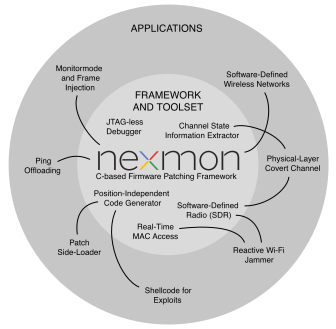
A continuación, encontrarás una visión general de lo que es posible con nexmon. Este repositorio se centra principalmente en habilitar el modo monitor y la inyección de tramas en muchos chips. Si quieres funciones adicionales, los siguientes proyectos pueden resultarte interesantes:
Nuestro software puede dañar tu hardware y puede anular la garantía de tu hardware. Usas nuestras herramientas bajo tu propio riesgo y responsabilidad. ¡Si no te gustan estos términos, no uses nexmon!
Los siguientes dispositivos son actualmente compatibles con nuestro parche de firmware nexmon.
1 bcm43430a1 fue etiquetado erróneamente como bcm43438 en el pasado.
2 usa LD_PRELOAD=libnexmon.so en lugar de LD_PRELOAD=libfakeioctl.so para inyectar tramas a través de ioctls
3 los parches de flash deben tener 8 bytes de longitud y estar alineados en un límite de 8 bytes
4 chip Wi-Fi 802.11ad del primer router Wi-Fi de 60 GHz Talon AD7200. Parchea tu firmware usando nexmon-arc y ejecútalo con nuestra imagen LEDE personalizada lede-ad7200
5 Se deshabilitó la protección de ejecución (llamada Execute Never) en la región 1, porque interfiere con el código de nexmon (Permission fault on Section)
6 Para usar nexutil, debes desactivar SELinux o ponerlo en modo permisivo
7 Consulta pico-nexmon para ver aplicaciones de ejemplo que usan Pico SDK con nexmon.
8 los parches de flash deben tener 16 bytes de longitud y estar alineados en un límite de 16 bytes.
9 Usa el módulo Magisk para instalar firmware, nexutil y configurar las políticas de SELinux.
sudo apt-get install git gawk qpdf adb flex bisongit clone https://github.com/seemoo-lab/nexmon.gitcd nexmon
source setup_env.shmakecd patches/bcm4339/6_37_34_43/nexmon/
makemake backup-firmwaremake install-firmware (asegúrate de que tu smartphone esté conectado a tu máquina de antemano)make en la carpeta utilties (Nota: necesitarás tener el Android NDK correctamente instalado para ello).adb shellnexutil -m2LD_PRELOAD=libfakeioctl.so tcpdump -i wlan0Para poder comunicarte con el firmware sin privilegios de root, creamos una interfaz UDP accesible a través de libnexio, que también usa nexutil. Primero tienes que demostrar al firmware que en general tienes privilegios de root estableciendo una cookie de seguridad. Luego puedes usarla para conexiones basadas en UDP. Tu interfaz wlan0 también necesita una dirección IP en el rango 192.168.222.0/24 o tendrás que cambiar el broadcast-ip predeterminado de nexutil:
ifconfig wlan0 192.168.222.1 netmask 255.255.255.0nexutil -x<cookie (uint)>nexutil -X<cookie> -m1Nota: Actualmente soportamos las versiones de Kernel 4.4 (obsoleta), 4.9, 4.14, 4.19, 5.4, 5.10 y 5.15. Raspbian contiene la versión de firmware 7.45.154 para la bcm43455c0. También soportamos la versión de firmware más reciente 7.45.189 de Cypress. Raspberry Pi OS contiene la versión de firmware 7.45.206. Por favor, prueba cuál te funciona mejor.
Asegúrate de que los siguientes comandos se ejecuten como root: sudo su
Actualiza tu instalación de Raspbian: apt-get update && apt-get upgrade
Instala las cabeceras del kernel para compilar el controlador y algunas dependencias: sudo apt install raspberrypi-kernel-headers git libgmp3-dev gawk qpdf bison flex make autoconf libtool texinfo
Clona nuestro repositorio: git clone https://github.com/seemoo-lab/nexmon.git
Ve al directorio raíz de nuestro repositorio: cd nexmon
/usr/lib/arm-linux-gnueabihf/libisl.so.10; si no, compílalo desde el código fuente:cd buildtools/isl-0.10, ./configure, make, , iw phy `iw dev wlan0 info | gawk '/wiphy/ {printf "phy" $2}'` interface add mon0 type monitorifconfig mon0 up.tcpdump -i mon0modinfo brcmfmac #the first line should be the full pathmv "<PATH TO THE DRIVER>/brcmfmac.ko" "<PATH TO THE DRIVER>/brcmfmac.ko.orig"cp /home/pi/nexmon/patches/bcm43430a1/7_45_41_46/nexmon/brcmfmac_kernel49/brcmfmac.ko "<PATH TO THE DRIVER>/"cp /home/pi/nexmon/patches/bcm43430a1/7_45_41_46/nexmon/brcmfmac_4.14.y-nexmon/brcmfmac.ko "<PATH TO THE DRIVER>/"depmod -aTo build the utilities such as nexmon or dhdutil for Android, you need to download the old NDK version 11c,
extract it and export the environment variable NDK_ROOT pointing to the directory where you extracted the NDK
files.
The Wi-Fi firmware consists of a read-only part stored in the ROM of every Wi-Fi chip and another part that is loaded by the driver into the RAM. To analyze the whole firmware, one needs to extract the ROM. There are two options to do this. Either you write a firmware patch that simply copies the contents of the ROM to RAM and then you dump the RAM, or you directly dump the ROM after loading the regular firmware into the RAM. Even though, the second option is easier, it only works, if the ROM can be directly accessed by the driver, which is not always the case. Additionally, the firmware loaded into RAM can contain ROM patches that overlay the data stored in ROM. By dumping the ROM after loading the original RAM firmware, it contains flash patches. Hence, the ROM needs to be dumped again for every RAM firmware update to be consistent. As a conclusion, we prefer to dump the clean ROM after copying it to RAM.
To dump the ROM directly, you need to know, where to find it and how large it is. On chips with Cortex-M3 it is usually at upper addresses such as 0x800000, while on chips with Cortex-R4 it is likely at 0x0. Run dhdutil to perform the dump:
dhdutil membytes -r 0x0 0xA0000 > rom.bin```
## Dumping a clean ROM after copying to RAM
For the BCM4339 and BCM4358, we created `rom_extraction` projects that load a firmware patch that copies ROM to
RAM and them dumps it using dhdutil. To dump the ROM simply execute the following in the project directory:
make dump-rom```
After ROM extraction, the rom.bin file will be copies to the corresponding firmwares subdirectory. To apply the
flash patches of a specific RAM firmware version, enter its directory and execute:
make rom.bin```
# Structure of this repository
* `buildtools`: Contains compilers and other tools to build the firmware
* `firmwares`
* `<chip version>`
* `<firmware version>`
* `<firmware file>`: The original firmware that will be loaded into the RAM of the WiFi Chip
* `definitions.mk`: Contains mainly firmware specific addresses
* `structs.h`: Structures only valid for this firmware version
* `Makefile`: Used to extract flashpatches and ucode
* `flashpatches.c` (generated by Makefile): Contains flashpatches
* `ucode.bin` (extracted by Makefile): Contains uncompressed Ucode
* `structs.common.h`: Structures that are common between firmware versions
* `patches`
* `<chip version>`
* `<firmware version>`
* `nexmon`
* `Makefile`: Used to build the firmware
* `patch.ld`: Linker file
* `src`
* `patch.c`: General patches to the firmware
* `injection.c`: Code related to frame injection
* `monitormode.c`: Code related to monitor mode with radiotap headers
* `ioctl.c`: Handling of custom IOCTLs
* ...
* `obj` (generated by Makefile): Object files created from C files
* `log` (generated by Makefile): Logs written during compilation
* `gen` (generated by Makefile): Files generated during the build process
* `nexmon.pre` (generated by gcc plugin): Extracted at-attributes and targetregion-pragmas
* `nexmon.ld` (generated from nexmon.pre): Linker file use to place patch code at defined addresses in the firmware
* `nexmon.mk` (generated from nexmon.pre): Make file used take code from patch.elf and place it into firmware
* `flashpatches.ld` (generated from nexmon.pre): Linker file that places flashpatches at target locations in firmware ROM
* `flashpatches.mk` (generated from nexmon.pre): Make file used to insert flashpatch config and data structures into firmware
* `patch.elf` (generated from object files and linker scripts): contains the newly compiled code placed at predefined addresses
* `common`
* `wrapper.c`: Wrappers for functions that already exist in the firmware
* `ucode_compression.c`: [tinflate](http://achurch.org/tinflate.c) based ucode decompression
* `radiotap.c`: RadioTap header parser
* `helper.c`: Helpful utility functions
* `driver`: Patched brcmfmac driver
* `include`: Common include files
* `firmware_version.h`: Definitions of chip and firmware versions
* `patcher.h`: Macros use to perform patching for existing firmware code (e.g., BPatch patches a branch instruction)
* `capabilities.h`: Allows to indicate capabilities (such as, monitor mode and frame injection)
* `nexioctl.h`: Defines custom IOCTL numbers
# Related projects
* [bcmon](https://bcmon.blogspot.de/): Monitor Mode and Frame Injection for the bcm4329 and bcm4330
* [monmob](https://github.com/tuter/monmob): Monitor Mode and Frame Injection for the bcm4325, bcm4329 and bcm4330
* [P4wnP1](https://github.com/mame82/P4wnP1): Highly customizable attack platform, based on Raspberry Pi Zero W and Nexmon
* [kali Nethunter OS](https://github.com/nethunteros): ROM that brings Kali Linux to smartphones with Nexmon support
* [dustcloud-nexmon](https://github.com/dgiese/dustcloud-nexmon): Nexmon for Xiaomi IoT devices (ARM based)
* [InternalBlue](https://github.com/seemoo-lab/internalblue): Bluetooth experimentation framework based on Reverse Engineering of Broadcom Bluetooth Controllers
# Interesting articles on firmware hacks
If you know more projects that use nexmon or perform similar firmware hacks, let us know and we will add a link.
* [Project Zero](https://googleprojectzero.blogspot.de/2017/09/over-air-vol-2-pt-1-exploiting-wi-fi.html): Over The Air - Vol. 2, Pt. 1: Exploiting The Wi-Fi Stack on Apple Devices
* [broadpwn](https://blog.exodusintel.com/2017/07/26/broadpwn/): Remotely Compromising Android and IOS via a Bug in Broadcom's Wi-Fi Chipsets
* [Project Zero](https://googleprojectzero.blogspot.de/2017/04/over-air-exploiting-broadcoms-wi-fi_4.html): Over The Air: Exploiting Broadcom's Wi-Fi Stack (Part 1)
* [Project Zero](https://googleprojectzero.blogspot.de/2017/04/over-air-exploiting-broadcoms-wi-fi_11.html): Over The Air: Exploiting Broadcom's Wi-Fi Stack (Part 2)
# Read my PhD thesis
* Matthias Schulz. [**Teaching Your Wireless Card New Tricks: Smartphone Performance and Security Enhancements through Wi-Fi Firmware Modifications**](http://tuprints.ulb.tu-darmstadt.de/7243/). Dr.-Ing. thesis, Technische Universität Darmstadt, Germany, February 2018. [pdf](http://tuprints.ulb.tu-darmstadt.de/7243/7/dissertation_2018_matthias_thomas_schulz.pdf)
# Read our papers
* F. Gringoli, M. Schulz, J. Link, and M. Hollick. [**Free Your CSI: A Channel State Information Extraction Platform For Modern Wi-Fi Chipsets**](https://doi.org/10.1145/3349623.3355477). Accepted to appear in *Proceedings of the 13th Workshop on Wireless Network Testbeds, Experimental evaluation & CHaracterization (WiNTECH 2019)*, October 2019. [code](https://nexmon.org/csi)
* D. Mantz, J. Classen, M. Schulz, and M. Hollick. [**InternalBlue - Bluetooth Binary Patching and Experimentation Framework**](https://dl.acm.org/citation.cfm?id=3326089). *In Proceedings of the 17th Annual International Conference on Mobile Systems, Applications, and Services (MobiSys '19)*. June 2019.
* M. Schuß, C. A. Boano, M. Weber, M. Schulz, M. Hollick, K. Römer. [**JamLab-NG: Benchmarking Low-Power Wireless Protocols under Controlable and Repeatable Wi-Fi Interference**](https://dl.acm.org/citation.cfm?id=3324331). *Proceedings of the 2019 International Conference on Embedded Wireless Systems and Networks (EWSN 2019)*, February 2019.
* M. Schulz, D. Wegemer, and M. Hollick. [**The Nexmon Firmware Analysis and Modification Framework: Empowering Researchers to Enhance Wi-Fi Devices**](https://doi.org/10.1016/j.comcom.2018.05.015). *Elsevier Computer Communications (COMCOM) Journal*. 2018.
* M. Schulz, J. Link, F. Gringoli, and M. Hollick. [**Shadow Wi-Fi: Teaching Smart- phones to Transmit Raw Signals and to Extract Channel State Information to Implement Practical Covert Channels over Wi-Fi**](https://dl.acm.org/citation.cfm?id=3210333). Accepted to appear in *Proceedings of the 16th ACM International Conference on Mobile Systems, Applications, and Services*, MobiSys 2018, June 2018.
* D. Steinmetzer, D. Wegemer, M. Schulz, J. Widmer, M. Hollick. [**Compressive Millimeter-Wave Sector Selection in Off-the-Shelf IEEE 802.11ad Devices**](https://dl.acm.org/citation.cfm?id=3143384). *Proceedings of the 13th International Conference on emerging Networking EXperiments and Technologies*, CoNEXT 2017, December 2017.
* M. Schulz, D. Wegemer, M. Hollick. [**Nexmon: Build Your Own Wi-Fi Testbeds With Low-Level MAC and PHY-Access Using Firmware Patches on Off-the-Shelf Mobile Devices**](https://dl.acm.org/citation.cfm?id=3131476). *Proceedings of the 11th ACM International Workshop on Wireless Network Testbeds, Experimental Evaluation & Characterization (WiNTECH 2017)*, October 2017. [pdf](https://www.seemoo.tu-darmstadt.de/mschulz/wintech2017) [video](https://youtu.be/m5Zrk4n4hoE)
* M. Schulz, F. Knapp, E. Deligeorgopoulos, D. Wegemer, F. Gringoli, M. Hollick. [**DEMO: Nexmon in Action: Advanced Applications Powered by the Nexmon Firmware Patching Framework**](https://dl.acm.org/citation.cfm?id=3133333), Accepted for publication in *Proceedings of the 11th ACM International Workshop on Wireless Network Testbeds, Experimental Evaluation & Characterization (WiNTECH 2017)*, October 2017. [pdf](https://www.seemoo.tu-darmstadt.de/mschulz/wintech2017demo)
* M. Schulz, F. Gringoli, D. Steinmetzer, M. Koch and M. Hollick. [**Massive Reactive Smartphone-Based Jamming using Arbitrary Waveforms and Adaptive Power Control**](https://dl.acm.org/citation.cfm?id=3098253). Proceedings of the *10th ACM Conference on Security and Privacy in Wireless and Mobile Networks (WiSec 2017)*, July 2017. [pdf](https://www.seemoo.tu-darmstadt.de/mschulz/wisec2017) [video](https://youtu.be/S2XPBK0KdiQ)
* M. Schulz, E. Deligeorgopoulos, M. Hollick and F. Gringoli. [**DEMO: Demonstrating Reactive Smartphone-Based Jamming**](https://dl.acm.org/citation.cfm?id=3106022). Proceedings of the *10th ACM Conference on Security and Privacy in Wireless and Mobile Networks (WiSec 2017)*, July 2017. [pdf](https://www.seemoo.tu-darmstadt.de/mschulz/wisec2017demo)
* M. Schulz. [**Nexmon - Wie man die eigene WLAN-Firmware hackt**](http://heise.de/-3538660),
c't 26/2016, S. 168, Heise Verlag, 2016.
* M. Schulz, D. Wegemer, M. Hollick. [**DEMO: Using NexMon, the C-based WiFi
firmware modification framework**](https://dl.acm.org/citation.cfm?id=2942419),
Proceedings of the *9th ACM Conference on Security and Privacy in Wireless and
Mobile Networks (WiSec 2016)*, July 2016. [pdf](https://www.seemoo.tu-darmstadt.de/mschulz/wisec2016demo1)
* M. Schulz, D. Wegemer and M. Hollick. [**NexMon: A Cookbook for Firmware
Modifications on Smartphones to Enable Monitor Mode**](http://arxiv.org/abs/1601.07077),
CoRR, vol. abs/1601.07077, December 2015.
[bibtex](http://dblp.uni-trier.de/rec/bibtex/journals/corr/SchulzWH16)
[Get references as bibtex file](https://nexmon.org/bib)
# Reference our project
Any use of this project which results in an academic publication or other publication which includes a bibliography should include a citation to the Nexmon project and probably one of our papers depending on the code you use. Find all references in our [bibtex file](https://github.com/seemoo-lab/nexmon/blob/HEAD/nexmon.bib). Here is the reference for the project only:
@electronic{nexmon:project, author = {Schulz, Matthias and Wegemer, Daniel and Hollick, Matthias}, title = {Nexmon: The C-based Firmware Patching Framework}, url = {https://nexmon.org}, year = {2017} }```
| Chip WiFi | Versión de firmware | Usado en | Sistema operativo | M | RT | I | FP | UC | CT |
|---|
| bcm4330 | 5_90_100_41_sta | Samsung Galaxy S2 | Cyanogenmod 13.0 | X | X | X | X | O | |
| bcm4335b0 | 6.30.171.1_sta | Samsung Galaxy S4 | LineageOS 14.1 | X | X | X | X | O | |
| bcm4339 | 6_37_34_43 | Nexus 5 | Android 6 Stock | X | X | X | X | X | O |
| bcm43430a11 | 7_45_41_26 | Raspberry Pi 3 y Zero W | Raspbian 8 | X | X | X | X | X | O |
| bcm43430a11 | 7_45_41_46 | Raspberry Pi 3 y Zero W | Raspbian Stretch | X | X | X | X | X | O |
| bcm43439a07 | 7_95_49 (2271bb6 CY) | Raspberry Pi Pico W | Pico SDK | X | X | X | X | ||
| bcm43451b1 | 7_63_43_0 | iPhone 6 | iOS 10.1.1 (14B100) | X | X | ||||
| bcm43455 | 7_45_77_0_hw | Huawei P9 | Android 7 Stock | X | X | X | X | X | |
| bcm43455 | 7_120_5_1_sta_C0 | Galaxy J7 2017 | ? | X | X | ||||
| bcm43455 | 7_45_77_0_hw(8-2017) | Huawei P9 | Android 7 Stock | X | X | X | X | X | |
| bcm434555 | 7_46_77_11_hw | Huawei P9 | Android 8 China Stock | X | X | X | X | X | |
| bcm43455 | 7_45_59_16 | Sony Xperia Z5 Compact | LineageOS 14.1 | X | X | X | X | X | |
| bcm43455c0 | 7_45_154 | Raspberry Pi B3+/B4 | Raspbian Kernel 4.9/14/19 | X | X | X | X | ||
| bcm43455c0 | 7_45_189 | Raspberry Pi B3+/B4 | Raspbian Kernel 4.14/19, 5.4 | X | X | X | X | ||
| bcm43455c0 | 7_45_206 | Raspberry Pi B3+/B4 | Raspberry Pi OS Kernel 5.4 | X | X | X | X | X | |
| bcm43455c0 | 7_45_234 (4ca95bb CY) | Raspberry Pi B3+/B4/5 | Raspberry Pi OS | X | X | ||||
| bcm43436b03 | 9_88_4_65 | Raspberry Pi Zero 2 W | Raspberry Pi OS Kernel 5.10 | X | X | X | X | X | |
| bcm4356 | 7_35_101_5_sta | Nexus 6 | Android 7.1.2 | X | X | X | X | O | |
| bcm4358 | 7_112_200_17_sta | Nexus 6P | Android 7 Stock | X | X | X | X | O | |
| bcm4358 | 7_112_201_3_sta | Nexus 6P | Android 7.1.2 Stock | X | X | X | X | O | |
| bcm43582 | 7_112_300_14_sta | Nexus 6P | Android 8.0.0 Stock | X | X | X | X | X | O |
| bcm43596a03 | 9_75_155_45_sta_c0 | Samsung Galaxy S7 | Android 7 Stock | X | O | X | |||
| bcm43596a03,2 | 9_96_4_sta_c0 | Samsung Galaxy S7 | LineageOS 14.1 | X | X | X | O | X | |
| bcm4375b13,5,6 | 18_38_18_sta | Samsung Galaxy S10 | rooteado + SELinux desactivado | X | X | X | O | X | |
| bcm4375b13,5,6 | 18_41_8_9_sta | Samsung Galaxy S20 | rooteado + SELinux desactivado | X | X | X | O | X | |
| bcm4389c15,8,9 | 20_82_42_sta (r994653) | Samsung Galaxy S22 Plus | Android 14, rooteado con Magisk | X | X | ||||
| bcm4389c15,8,9 | 20_101_36_2 (r994653) | Google Pixel 7 y 7 Pro | rooteado con Magisk | X | X | ||||
| bcm4389c15,8,9 | 20_101_57 (r1035009) | Google Pixel 7 y 7 Pro | rooteado con Magisk | X | X | ||||
| bcm4398d05,8,9 | 24_671_6_9 (r1031525) | Google Pixel 8 | rooteado con Magisk | X | X | ||||
| bcm6715b05 | 17_10_188_6401 (r808804) | Asus RT-AX86U Pro | Firmware stock 3.0.0.4_388.23565 | / | X | ||||
| qca95004 | 4-1-0_55 | TP-Link Talon AD7200 | Imagen LEDE personalizada |
make installln -s /usr/local/lib/libisl.so /usr/lib/arm-linux-gnueabihf/libisl.so.10/usr/lib/arm-linux-gnueabihf/libmpfr.so.4; si no, compílalo desde el código fuente:cd buildtools/mpfr-3.1.4, autoreconf -f -i, ./configure, make, make install, ln -s /usr/local/lib/libmpfr.so /usr/lib/arm-linux-gnueabihf/libmpfr.so.4sudo dpkg --add-architecture armhfsudo apt-get updatesudo apt-get install libc6:armhf libisl23:armhf libmpfr6:armhf libmpc3:armhf libstdc++6:armhfsudo ln -s /usr/lib/arm-linux-gnueabihf/libisl.so.23.0.0 /usr/lib/arm-linux-gnueabihf/libisl.so.10sudo ln -s /usr/lib/arm-linux-gnueabihf/libmpfr.so.6.1.0 /usr/lib/arm-linux-gnueabihf/libmpfr.so.4Luego puedes configurar el entorno de compilación para compilar parches de firmware
source setup_env.shmakeVe a la carpeta patches para el chipset bcm43430a1/bcm43455c0/bcm43436b0: cd patches/bcm43430a1/7_45_41_46/nexmon/ / patches/bcm43455c0/<7_45_154 or 7_45_189>/nexmon/ / cd patches/bcm43436b0/9_88_4_65/nexmon/
makemake backup-firmwaremake install-firmwareInstala nexutil: desde el directorio raíz de nuestro repositorio cambia a la carpeta nexutil: cd utilities/nexutil/. Compila e instala nexutil: make && make install.
Opcional: elimina wpa_supplicant para tener un mejor control sobre la interfaz WiFi: apt-get remove wpasupplicant
Además, desactivar las funciones de ahorro de energía (iw dev wlan0 set power_save off) puede ayudar a prevenir caídas del firmware.
Nota: Para conectarte a puntos de acceso normales tienes que ejecutar nexutil -m0 primero
reboot
* Note: It is possible to connect to an access point or run your own access point in parallel to the monitor mode interface on the wlan0 interface.
