 proxymanapp/atlantis-android
Captura el tráfico HTTP/HTTPS de aplicaciones Android y envíalo a Proxyman para depuración.

Capture HTTP/HTTPS traffic from Android apps and send to Proxyman for debugging.
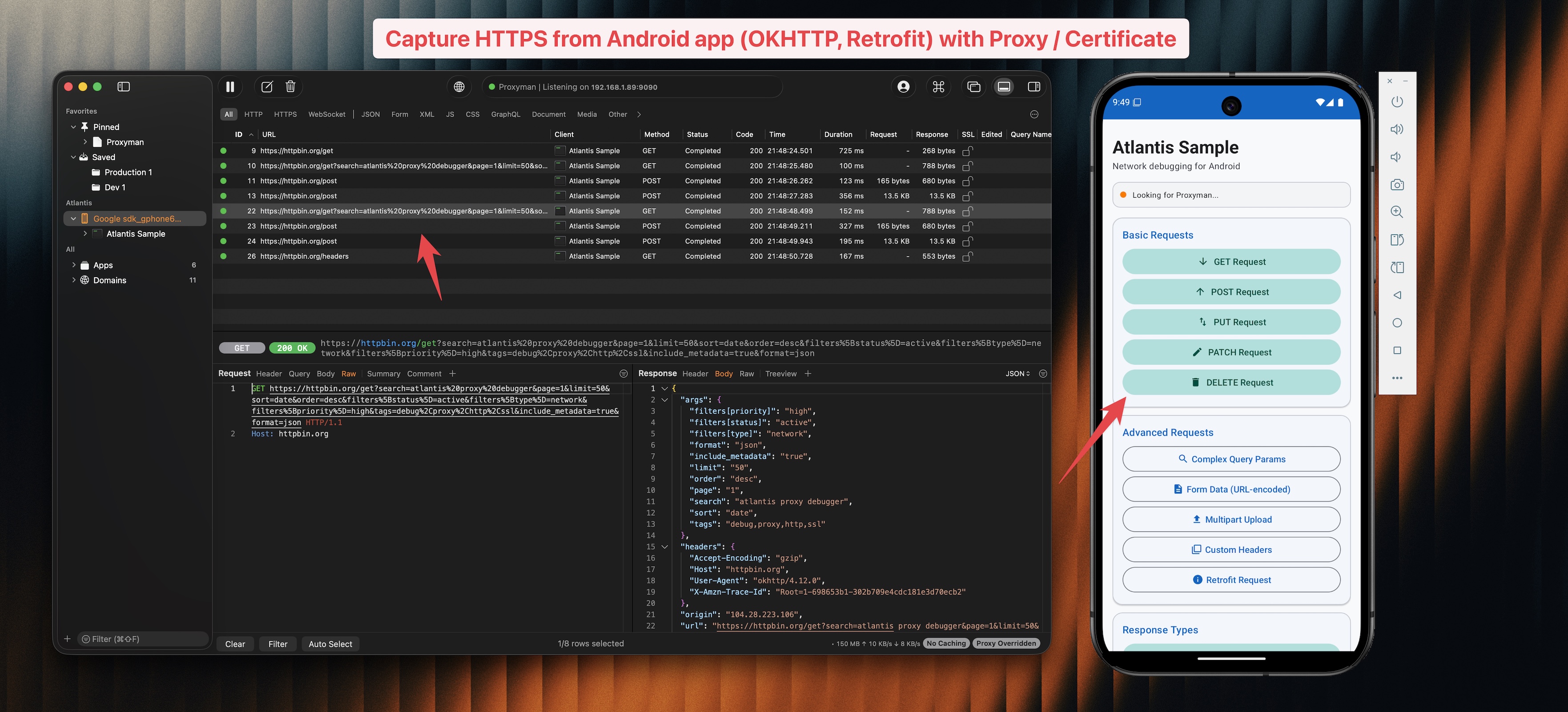
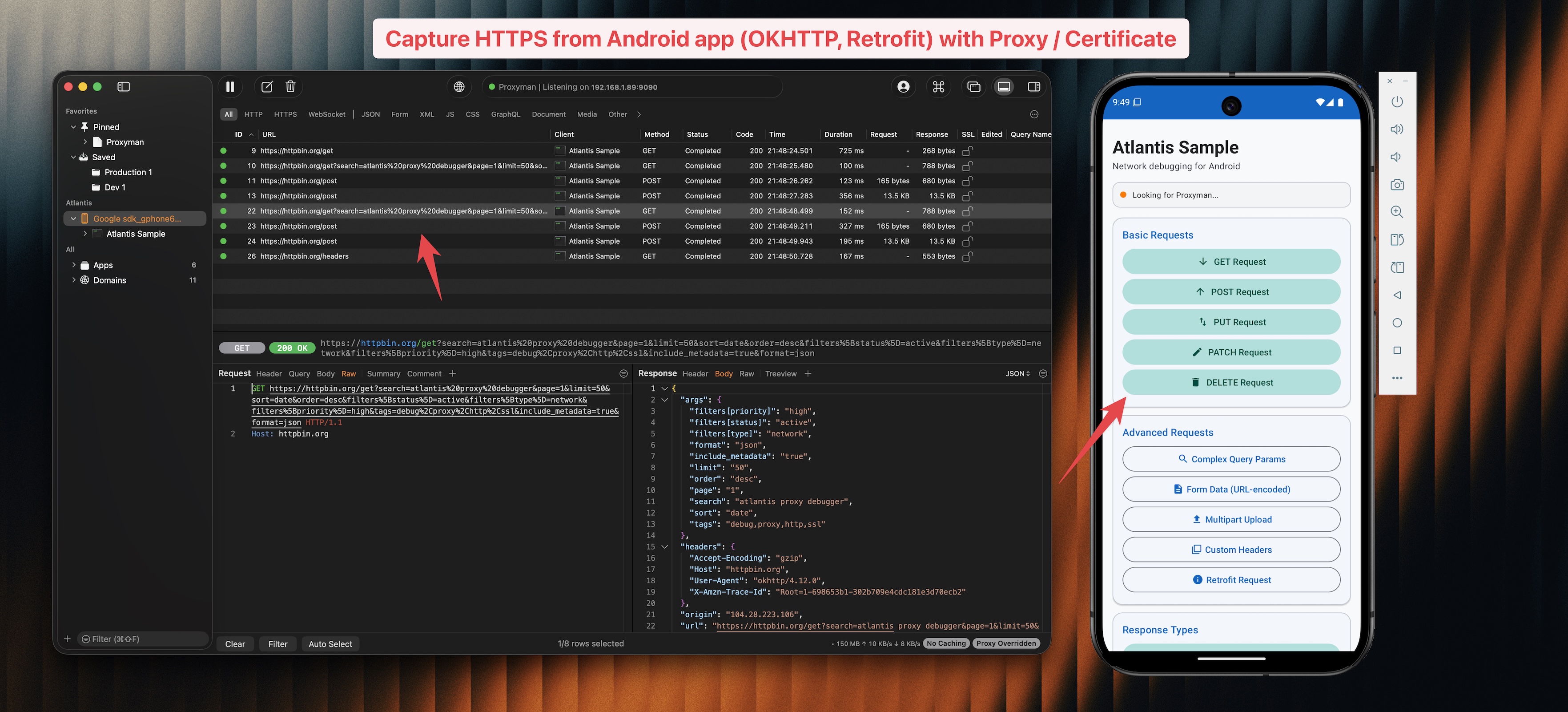
Atlantis Android es una biblioteca complementaria de Proxyman que te permite capturar e inspeccionar el tráfico de red de tus aplicaciones Android sin necesidad de configurar un proxy ni instalar certificados.
Add the JitPack repository to your settings.gradle.kts:
dependencyResolutionManagement {
    repositories {
        maven { url = uri("https://jitpack.io") }
    }
}
Then add the dependency in your module's build.gradle.kts:
dependencies {
    debugImplementation("com.github.ProxymanApp:atlantis-android:v1.0.0")
}
Or with Groovy (build.gradle):
dependencies {
    debugImplementation 'com.github.ProxymanApp:atlantis-android:v1.0.0'
}
Add the dependency in your module's build.gradle.kts:
dependencies {
    debugImplementation("com.proxyman:atlantis-android:1.0.0")
}
Or with Groovy (build.gradle):
dependencies {
    debugImplementation 'com.proxyman:atlantis-android:1.0.0'
}
class MyApplication : Application() {
    override fun onCreate() {
        super.onCreate()

        if (BuildConfig.DEBUG) {
            Atlantis.start(this)
        }
    }
}
val okHttpClient = OkHttpClient.Builder()
    .addInterceptor(Atlantis.getInterceptor())
    .build()
Envuelve tu WebSocketListener con Atlantis.wrapWebSocketListener() para capturar mensajes WebSocket:
val listener = Atlantis.wrapWebSocketListener(object : WebSocketListener() {
    override fun onOpen(webSocket: WebSocket, response: Response) {
        // your logic
    }
    override fun onMessage(webSocket: WebSocket, text: String) {
        // your logic
    }
    // ...
})

okHttpClient.newWebSocket(request, listener)
Abre Proxyman en tu Mac, ejecuta tu aplicación Android y ¡observa cómo aparece el tráfico!
atlantis-android/
├── atlantis/              # Library module
│   └── src/
│       ├── main/kotlin/
│       │   └── com/proxyman/atlantis/
│       │       ├── Atlantis.kt                  # Main entry point
│       │       ├── AtlantisInterceptor.kt        # OkHttp interceptor
│       │       ├── AtlantisWebSocketListener.kt  # WebSocket capture
│       │       ├── Base64Utils.kt                # Base64 encoding
│       │       ├── Configuration.kt              # Config model
│       │       ├── GzipCompression.kt            # Compression
│       │       ├── Message.kt                    # Message types
│       │       ├── NsdServiceDiscovery.kt        # mDNS discovery
│       │       ├── Packages.kt                   # Data models
│       │       └── Transporter.kt                # TCP connection
│       └── test/kotlin/                          # Unit tests
├── sample/                # Sample app
├── PUBLISHING.md          # Publishing guide
└── README.md
Simplemente abre la carpeta atlantis-android en Android Studio. Descargará automáticamente el wrapper de Gradle y sincronizará el proyecto.
Si tienes Gradle instalado localmente:
cd atlantis-android
gradle wrapper --gradle-version 8.7
# Build the library
./gradlew :atlantis:build

# Run tests
./gradlew :atlantis:test

# Build sample app
./gradlew :sample:assembleDebug
./gradlew :atlantis:test
Consulta PUBLISHING.md para obtener instrucciones sobre cómo publicar en Maven Central o JitPack.
Licencia Apache 2.0
