 knqyf263/ndff
Un monitor de red basado en flujos con Inspección Profunda de Paquetes.

ndff es un recolector de flujos con la librería nDPI para fluentd.
ndff se ha implementado sobre la base de ndpiReader, que es un ejemplo en nDPI.
nDPI es una librería de código abierto con licencia LGPLv3 para la inspección profunda de paquetes. ndpiReader es un ejemplo en nDPI que tiene las siguientes características.
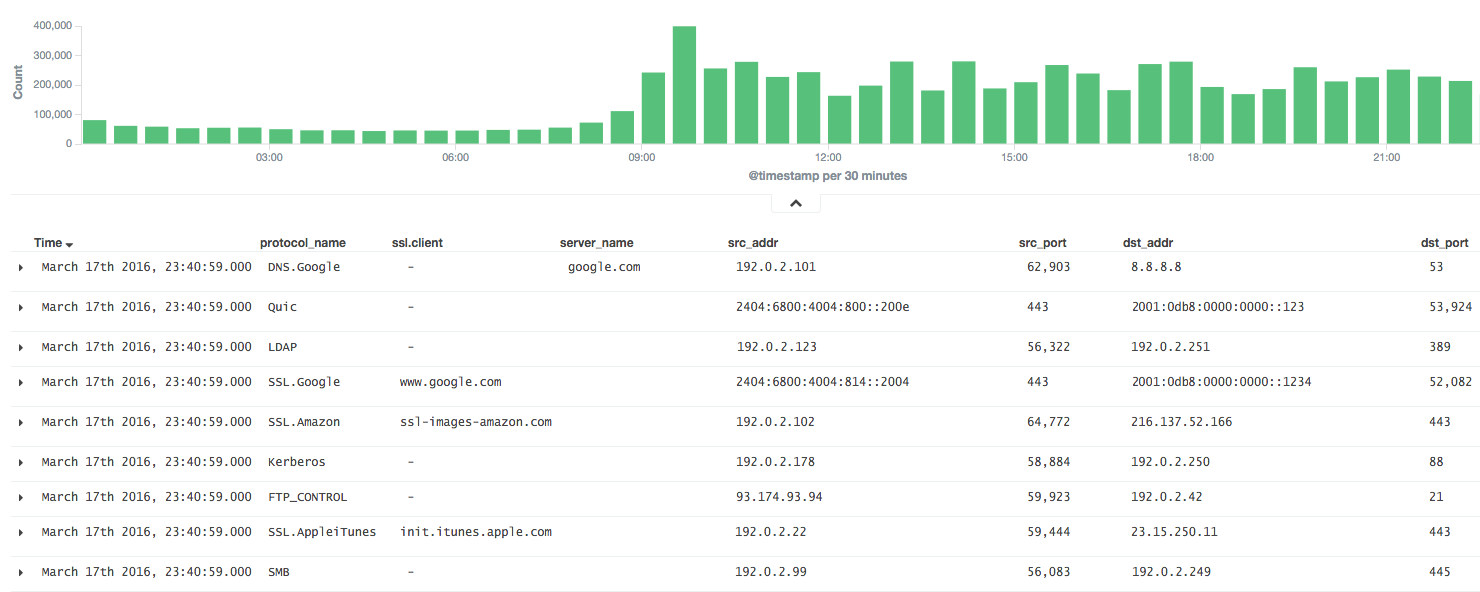
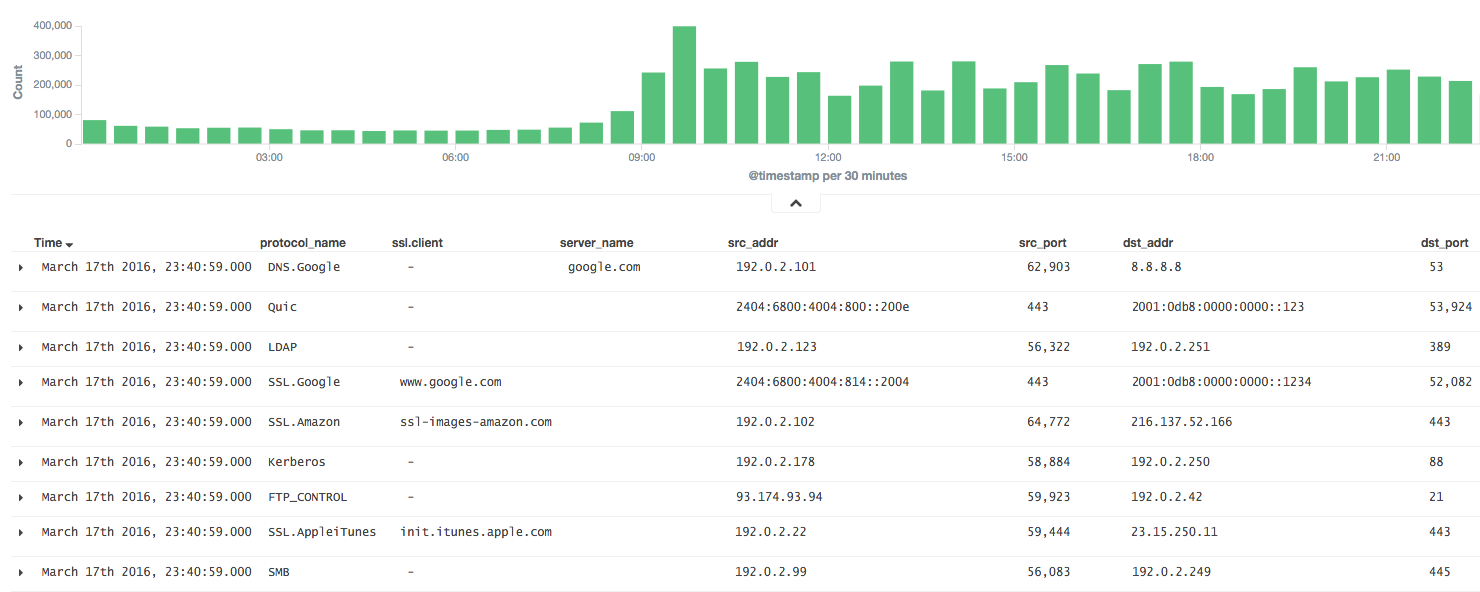
Es muy útil si los resultados de nDPI pueden analizarse en fluentd.
Por lo tanto, ndff agrega los paquetes como un flujo, al igual que NetFlow, y reenvía los resultados al servidor fluentd en formato JSON o MessagePack.
Instale ndff desde el binario (CentOS 6).
$ sudo yum -y install libpcap msgpack json-c
$ sudo rpm -ivh https://forensics.cert.org/centos/cert/6.5/x86_64/nDPI-1.7.1-1.el6.x86_64.rpm
$ sudo rpm -ivh https://github.com/knqyf263/ndff/releases/download/0.0.2/ndff-0.0.2-1.x86_64.rpm
Y ejecute
$ sudo ndff -i eth0 -s 127.0.0.1 -p 24224 -m msgpack
Consulte INSTALL.md
Luego, instale json-c o msgpack-c.
En el caso de json-c:
$ git clone https://github.com/json-c/json-c.git
$ cd json-c
$ sh autogen.sh
$ ./configure
$ make
$ make install
Finalmente, instale ndff desde el repositorio de git.
$ git clone https://github.com/knqyf263/ndff.git
$ cd ndff
$ ./autogen.sh
$ make
$ sudo make install
$ ndff
ndff -i <file|device> [-s <server>] [-m <json|msgpack>] [-f <filter>]
          [-p <port>][-P <protos>][-t <tag>][-q][-d][-D][-h][-T][-v <level>]
          [-n <threads>] [-w <file>]

Usage:
  -i <file.pcap|device>     | Specify a pcap file/playlist to read packets from or a device for live capture (comma-separated list)
  -m <json|msgpack>         | Specify a protocol to send messages to the server (json or msgpack)
  -f <BPF filter>           | Specify a BPF filter for filtering selected traffic
  -s <server>               | Specify a server for fluentd (If not, ndff runs in the dry-run mode)
  -p <port>                 | Specify a port for fluentd (default: 24224)
  -P <file>.protos          | Specify a protocol file (eg. protos.txt)
  -n <num threads>          | Number of threads. Default: number of interfaces in -i. Ignored with pcap files.
  -g <id:id...>             | Thread affinity mask (one core id per thread)
  -d                        | Daemonize (run in background)
  -D                        | Disable protocol guess and use only DPI
  -q                        | Quiet mode
  -t                        | Specify a tag for fluentd (default: ndpi.flow)
  -T                        | Dissect GTP/TZSP tunnels
  -r                        | Print nDPI version and git revision
  -w <path>                 | Write test output on the specified file. This is useful for
                            | testing purposes in order to compare results across runs
  -h                        | This help
  -v <1|2>                  | Verbose 'unknown protocol' packet print. 1=verbose, 2=very verbose
Ejecute ndff en primer plano o en segundo plano
Exporte los resultados a stdout.
$ sudo ndff -v 2 -i eth0
[WARN] No server is specified. This is dry-run mode.
[INFO] Capturing live traffic from device eth0...
[INFO] Running thread 0...

	1	ICMPV6 [2001:db8::253]:0 <-> [2001:db8::22]:0 [VLAN: 262][proto: 102/ICMPV6][1 pkts/90 bytes]
	2	UDP 192.0.2.10:1985 <-> 192.0.2.11:1985 [VLAN: 262][proto: 125/Skype][1 pkts/98 bytes]
	3	VRRP 192.0.2.10:0 <-> 192.0.2.11:0 [VLAN: 262][proto: 73/VRRP][1 pkts/60 bytes]
	4	UDP 192.0.2.12:1985 <-> 192.0.2.13:1985 [proto: 125/Skype][1 pkts/94 bytes]
	5	TCP 192.0.2.14:22 <-> 192.0.2.15:51462 [proto: 92/SSH][11 pkts/1510 bytes]
Exporte los resultados al archivo.
$ sudo ndff -v 2 -i tests/pcap/bittorrent.pcap -w bittorrent.txt
[WARN] No server is specified. This is dry-run mode.
[INFO] Reading packets from pcap file tests/pcap/bittorrent.pcap...
[INFO] Running thread 0...

$ head -n5 bittorrent.txt
        1       TCP 192.168.1.3:52888 <-> 82.58.216.115:38305 [proto: 37/BitTorrent][1 pkts/134 bytes][BT Hash: dcfcdccfb9e670ccc3dd40c78c161f2bea243126]
        2       TCP 192.168.1.3:52887 <-> 82.57.97.83:53137 [proto: 37/BitTorrent][1 pkts/134 bytes][BT Hash: dcfcdccfb9e670ccc3dd40c78c161f2bea243126]
        3       TCP 192.168.1.3:52895 <-> 83.216.184.241:51413 [proto: 37/BitTorrent][1 pkts/134 bytes][BT Hash: dcfcdccfb9e670ccc3dd40c78c161f2bea243126]
        4       TCP 79.53.228.2:14627 <-> 192.168.1.3:52896 [proto: 37/BitTorrent][1 pkts/134 bytes][BT Hash: dcfcdccfb9e670ccc3dd40c78c161f2bea243126]
        5       TCP 192.168.1.3:52894 <-> 120.62.33.241:39332 [proto: 37/BitTorrent][1 pkts/134 bytes][BT Hash: dcfcdccfb9e670ccc3dd40c78c161f2bea243126]
Envíe al servidor fluentd.
$ sudo ndff -q -i eth0 -s fluentd.example.com -p 22425 -t json.ndpi.flow -m json
Capturing live traffic from device eth0...
Running thread 0...
La salida en el servidor fluentd queda como se muestra a continuación
2016-03-29 14:41:23 +0900 ndpi.flow: {"protocol":"ICMPV6","src_addr":"2001:DB8::1234","src_port":0,"dst_addr":"2001:DB8::5678","dst_port":0,"detected_protocol":102,"protocol_name":"ICMPV6","out_pkts":1,"out_bytes":86,"in_pkts":0,"in_bytes":0,"first_switched":1459230083,"last_switched":1459230083,"server_name":""}
2016-03-29 14:41:00 +0900 ndpi.flow: {"protocol":"UDP","src_addr":"192.0.2.2","src_port":1985,"dst_addr":"192.0.2.3","dst_port":1985,"detected_protocol":125,"protocol_name":"Skype","out_pkts":16,"out_bytes":1568,"in_pkts":0,"in_bytes":0,"first_switched":1459230060,"last_switched":1459230100,"server_name":""}
2016-03-29 14:41:35 +0900 ndpi.flow: {"protocol":"TCP","src_addr":"192.0.2.4","src_port":49751,"dst_addr":"192.0.2.5","dst_port":80,"detected_protocol":7,"protocol_name":"HTTP","out_pkts":6,"out_bytes":514,"in_pkts":4,"in_bytes":816,"first_switched":1459230095,"last_switched":1459230096,"server_name":"google.co.jp"}
2016-03-29 14:41:35 +0900 ndpi.flow: {"protocol":"UDP","src_addr":"192.0.2.4,"src_port":36605,"dst_addr":"192.0.2.6","dst_port":53,"master_protocol":5,"detected_protocol":126,"protocol_name":"DNS.Google","out_pkts":2,"out_bytes":152,"in_pkts":2,"in_bytes":488,"first_switched":1459230095,"last_switched":1459230095,"server_name":"www.google.co.jp"}
$ sudo ndff -q -i eth0 -s fluentd.example.com -p 22425 -t msgpack.ndpi.flow -m msgpack
Capturing live traffic from device eth0...
Running thread 0...
