 hahwul/deadfinder
Herramienta CLI rápida para escanear sitios web, mapas del sitio y listas de URL en busca de enlaces rotos, con trabajadores concurrentes, informes de cobertura y múltiples formatos de salida.


Encuentra enlaces muertos (enlaces rotos)


Documentación • Instalación • Github Action • Contribuir • Registro de cambios
Un enlace muerto (enlace roto) es un enlace dentro de una página web que no se puede conectar. Estos enlaces pueden tener un impacto negativo en el SEO y la seguridad. Esta herramienta facilita su identificación y modificación.
¿Buscas la v1 (gema de Ruby)? Ahora reside en la rama
legacy/v1y continúa publicando la gemadeadfinderpara versiones de corrección de errores y seguridad.mainalberga la reescritura en Crystal (v2+).
brew install deadfinder
# https://formulae.brew.sh/formula/deadfinder
A partir de la versión posterior a la 2.1.0:
choco install deadfinder
docker run ghcr.io/hahwul/deadfinder:latest deadfinder url https://example.com
Descarga el archivo para tu plataforma desde la última versión, extráelo y coloca deadfinder (deadfinder.exe en Windows) en tu PATH.
nix run github:hahwul/deadfinder
nix profile install github:hahwul/deadfinder
nix develop github:hahwul/deadfinder
Requiere Crystal >= 1.19.1 y cmake (para el postinstall del analizador HTML lexbor — sin él, shards install falla con 'cmake': No such file or directory).
# macOS
brew install crystal cmake

# Debian / Ubuntu
sudo apt install crystal cmake
shards install
crystal build src/cli_main.cr -o deadfinder --release
# or: just build
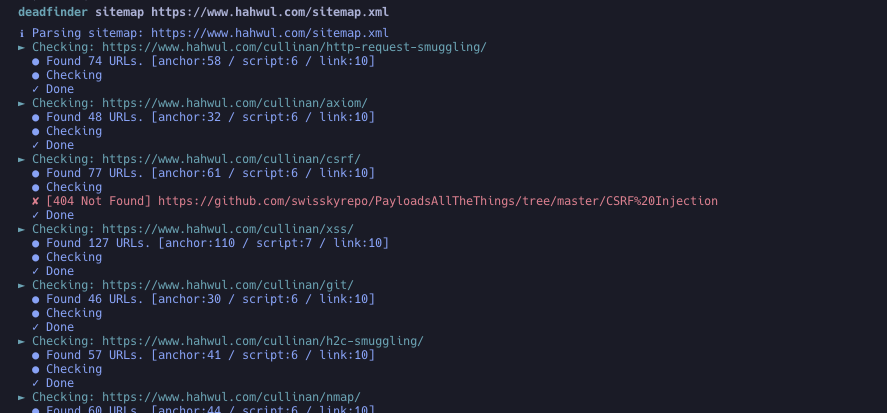
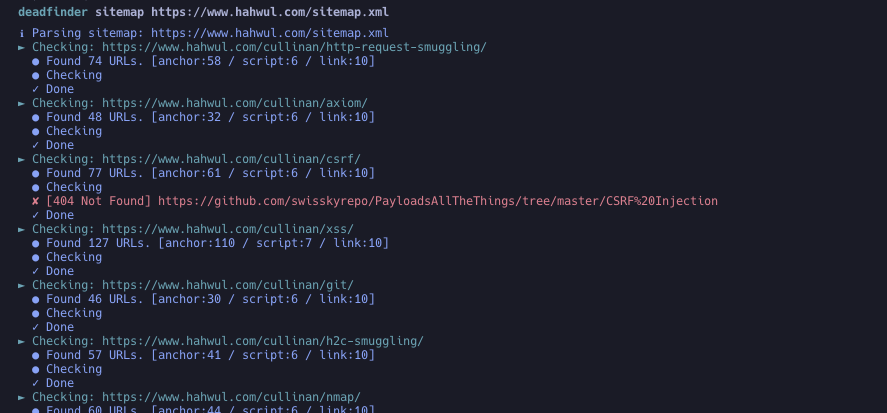
deadfinder sitemap https://www.hahwul.com/sitemap.xml
Fija una etiqueta de versión específica. @latest no es una referencia válida de Actions.
steps:
- name: Run DeadFinder
  uses: hahwul/deadfinder@v2       # tracks the latest 2.x — pin a specific tag (e.g. @2.1.0) for stricter reproducibility
  id: broken-link
  with:
    command: sitemap           # url / file / sitemap / pipe
    target: https://www.hahwul.com/sitemap.xml
    # timeout: 10
    # concurrency: 50
    # silent: false
    # headers: "X-API-Key: 123444"
    # worker_headers: "User-Agent: Deadfinder Bot"
    # include30x: false
    # user_agent: "Apple"
    # proxy: "http://localhost:8070"
    # proxy_auth: "id:pw"
    # insecure: false
    # match:  ""
    # ignore: ""
    # limit: 0
    # output_format: json
    # coverage: true
    # visualize: report.png
    # fail_on_dead: true       # fail the step when a dead link is found
    # method: auto             # auto / head / get
    # retry: 2
    # delay: 0                 # ms between requests to the same host
    # accept_status: "403,999"
    # dead_status: ""
    # target_concurrency: 10
    # check_anchors: false

- name: Output Handling
  run: echo '${{ steps.broken-link.outputs.output }}'
Si has encontrado un enlace muerto y quieres añadirlo automáticamente como un issue, consulta el artículo "Automating Dead Link Detection".
Usage: deadfinder <command> [options]

Commands:
  pipe                        Scan the URLs from STDIN
  file <FILE>                 Scan the URLs from File (`-` for STDIN)
  url <URL>                   Scan the Single URL
  sitemap <SITEMAP-URL>       Scan the URLs from sitemap
  completion <SHELL>          Generate completion script (bash/zsh/fish)
  version                     Show version

Options:
  -r, --include30x                 Include 30x redirections as dead links
  -c, --concurrency=N              Number of concurrent workers (default: 50)
      --target-concurrency=N       Targets scanned in parallel; total in-flight
                                   requests stay capped at -c (default: 10)
  -t, --timeout=N                  Timeout in seconds (default: 10)
      --method=METHOD              Link check method: auto, head, get (default: auto)
      --retry=N                    Retry transient failures N times (default: 2)
      --delay=MS                   Minimum ms between requests to the same host
      --accept-status=LIST         Statuses to treat as alive (e.g. 200,403,999)
      --dead-status=LIST           Statuses to treat as dead (e.g. 500-599)
      --exclude-status=LIST        Alias of --dead-status
  -o, --output=FILE                File to write results (`-` for stdout)
  -f, --output_format=FORMAT       Output format: json, yaml, toml, csv, sarif (default: json)
  -H, --headers=HEADER             Custom HTTP headers for initial request
      --worker_headers=HEADER      Custom HTTP headers for worker requests
      --user_agent=UA              User-Agent string
  -p, --proxy=PROXY                Proxy server (HTTP and HTTPS CONNECT)
      --proxy_auth=USER:PASS       Proxy authentication
  -k, --insecure                   Skip TLS certificate verification (not recommended)
  -m, --match=PATTERN              Match URL pattern (regex)
  -i, --ignore=PATTERN             Ignore URL pattern (regex)
  -s, --silent                     Silent mode
  -v, --verbose                    Verbose mode
      --debug                      Debug mode
      --limit=N                    Limit number of URLs to scan
      --check-anchors              Verify #fragment targets exist in the linked document
      --coverage                   Enable coverage tracking and reporting
  -F, --fail-on-dead               Exit with code 2 when anything dead is found
      --visualize=PATH             Generate visualization PNG
  -h, --help                       Show help
# Scan the URLs from STDIN (multiple URLs)
cat urls.txt | deadfinder pipe

# Scan the URLs from a file
deadfinder file urls.txt

# `-` and other non-regular files (process substitution, /dev/stdin, FIFOs) work too
deadfinder file -  < urls.txt
deadfinder file <(subfinder -d example.com -silent | httpx -silent)

# Scan a single URL
deadfinder url https://www.hahwul.com

# Scan the URLs from a sitemap
deadfinder sitemap https://www.hahwul.com/sitemap.xml
pipe / file)Una URL por línea. La lista se normaliza antes del escaneo:
#http:// / https:// se reportan y se omiten--limit N cuenta solo los objetivos reales y deja de leer la entrada una vez alcanzado# production
https://www.hahwul.com
https://www.hahwul.com/cullinan/
# staging
https://staging.hahwul.com
