 feder-cr/invisible_playwright
Patched Firefox browser with C++-level fingerprint spoofing and humanized mouse automation. Drop-in Playwright replacement that passes all major bot detection suites for stealth web scraping.






Sponsored
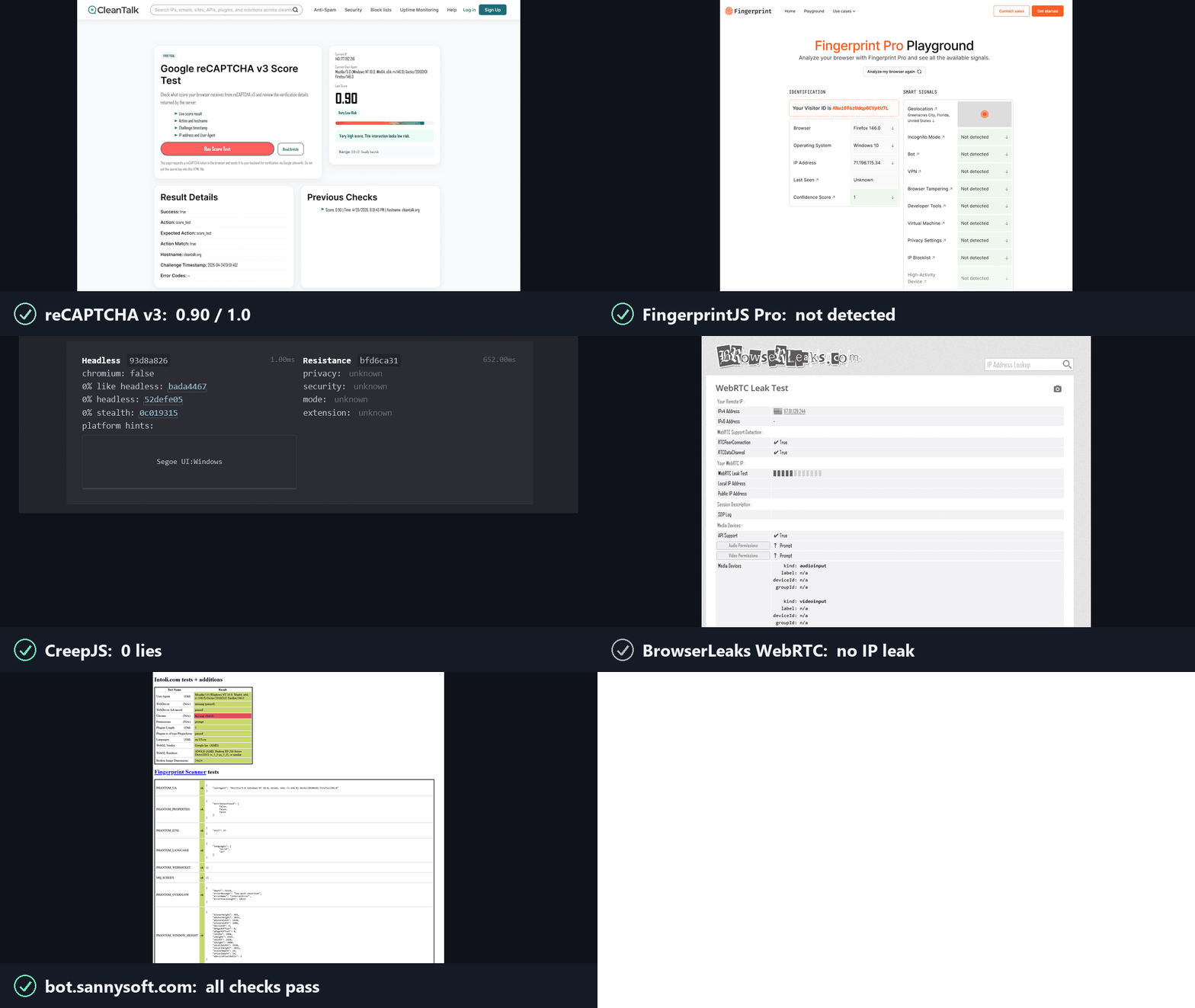
Anti-bots ask two questions, and reCAPTCHA, hCaptcha and Cloudflare Turnstile score the answers. invisible_playwright answers yes to both.
1. Is this a real browser? Yes. It is Firefox, patched at the C++ source level.
2. Is a real person using it? Yes. The actions are humanized in the driver.
Windows, in PowerShell:
powershell -ExecutionPolicy ByPass -c "irm https://astral.sh/uv/install.ps1 | iex"
$env:Path = "$env:USERPROFILE\.local\bin;$env:Path"
uv init --python ">=3.11" my-project
cd my-project
uv add invisible-playwright
uv run invisible-playwright fetch      # one-time download, sha256-verified: 240 MB, about 550 MB unpacked
Linux:
curl -LsSf https://astral.sh/uv/install.sh | sh
source $HOME/.local/bin/env
uv init --python ">=3.11" my-project
cd my-project
uv add invisible-playwright
uv run invisible-playwright fetch      # one-time download, sha256-verified: 262 MB, about 550 MB unpacked
Supported platforms: Windows x86_64, Linux x86_64. Linux arm64 is no longer supported from firefox-56 (firefox-55 is the last engine built for it).
Then save one of the examples below as main.py in my-project and run it with uv run main.py.
Playwright's API, sync and async, with no code changes. The same objects, the same calls, the same return values. A few surfaces are out of scope - tracing, HAR, CDP, the API request context - and each one refuses with a sentence saying why rather than misbehaving quietly. If you already use Playwright, switching is two lines:
- from playwright.sync_api import sync_playwright
- with sync_playwright() as p:
-     browser = p.firefox.launch()
+ from invisible_playwright import InvisiblePlaywright
+ with InvisiblePlaywright() as browser:
Every session gets a distinct fingerprint (GPU, audio, fonts, screen, ~200 fields) and Bezier-curve mouse motion.
Sync
from invisible_playwright import InvisiblePlaywright

with InvisiblePlaywright(proxy={"server": "socks5://...", "username": "u", "password": "p"}) as browser:
    page = browser.new_page()
    page.goto("https://example.com")
    page.click("#submit")   # mouse arcs to the button on a Bezier curve
Async
from invisible_playwright.async_api import InvisiblePlaywright

async with InvisiblePlaywright(proxy={"server": "socks5://...", "username": "u", "password": "p"}) as browser:
    page = await browser.new_page()
    await page.goto("https://example.com")
    await page.click("#submit")
The browser object is a playwright.sync_api.Browser / playwright.async_api.Browser - every Playwright method works as-is.
Log the seed to replay a run:
sf = InvisiblePlaywright()
with sf as browser:
    print("seed =", sf.seed)
    # ...
with InvisiblePlaywright(seed=42) as browser:
    ...   # same GPU, same canvas hash, same audio context, every run
proxy = {
    "server": "socks5://gate.example.com:1080",
    "username": "user",
    "password": "pass",
}
with InvisiblePlaywright(proxy=proxy) as browser:
    ...
Schemes supported: socks5, socks4, http, https. DNS is routed through the proxy by default, no local leak.
launch_server() serves one browser on a WebSocket to any Playwright client. Install the
extra that carries the WebSocket library with uv add "invisible-playwright[remote]".
# server.py
from invisible_playwright import launch_server

with launch_server(seed=42, headless=True) as server:
    print(server.ws_endpoint)          # ws://127.0.0.1:<port>/<secret>
    input("serving, press Enter to stop")
# client.py: any Playwright client; this one is Playwright for Python (uv add playwright)
import sys
from playwright.sync_api import sync_playwright

with sync_playwright() as p:
    browser = p.firefox.connect(sys.argv[1])      # the address the server printed
    page = browser.new_page()
    page.goto("https://example.com")
    print(page.title())
    browser.close()                               # ends this client; the server's browser keeps running
Descubre las herramientas más usadas por nuestra comunidad.
Sin datos de popularidad aún.
