 dmdhrumilmistry/security-harness
Arnés de revisión estática de seguridad de aplicaciones multiagente para agentes de codificación de IA: mapea bases de código, caza clases de vulnerabilidades, encadena y verifica hallazgos, y reporta a SARIF, JSON y PDF.







Website · Docs · Quick start · Install · Usage · Memory & console · PR review · CLI docs
indra runs, watches and orchestrates AI coding agents (Claude Code, Codex, Gemini CLI, or a local model through Ollama) on your machines, and ships a multi-agent application-security review harness built on them.
indra CLI is one binary: a web console to launch agents, watch every tool call and steer
them; workflows of agents, skills and shell commands with conditions, loops and failure handling
(drawn in a graph editor, kept in your repository as code, or written by Claude from a description
through indra's MCP server); boards synced with Jira, GitHub, ClickUp and Linear; remote
nodes over SSH or a dial-in link; browser terminals; users and roles; and graph memory./plugin marketplace add dmdhrumilmistry/indra
/plugin install indra@indra
/indra full security review of ./api
A review teamRecon, one hunter per vulnerability class in parallel, an exploit chainer, a verifier that refutes first, and a reporter. Each stage runs on the model its job needs. |
Memory that compoundsindra mem keeps past findings, known guards and confirmed false positives as a graph of
Markdown notes, and hands them to the next run's hunters.
|
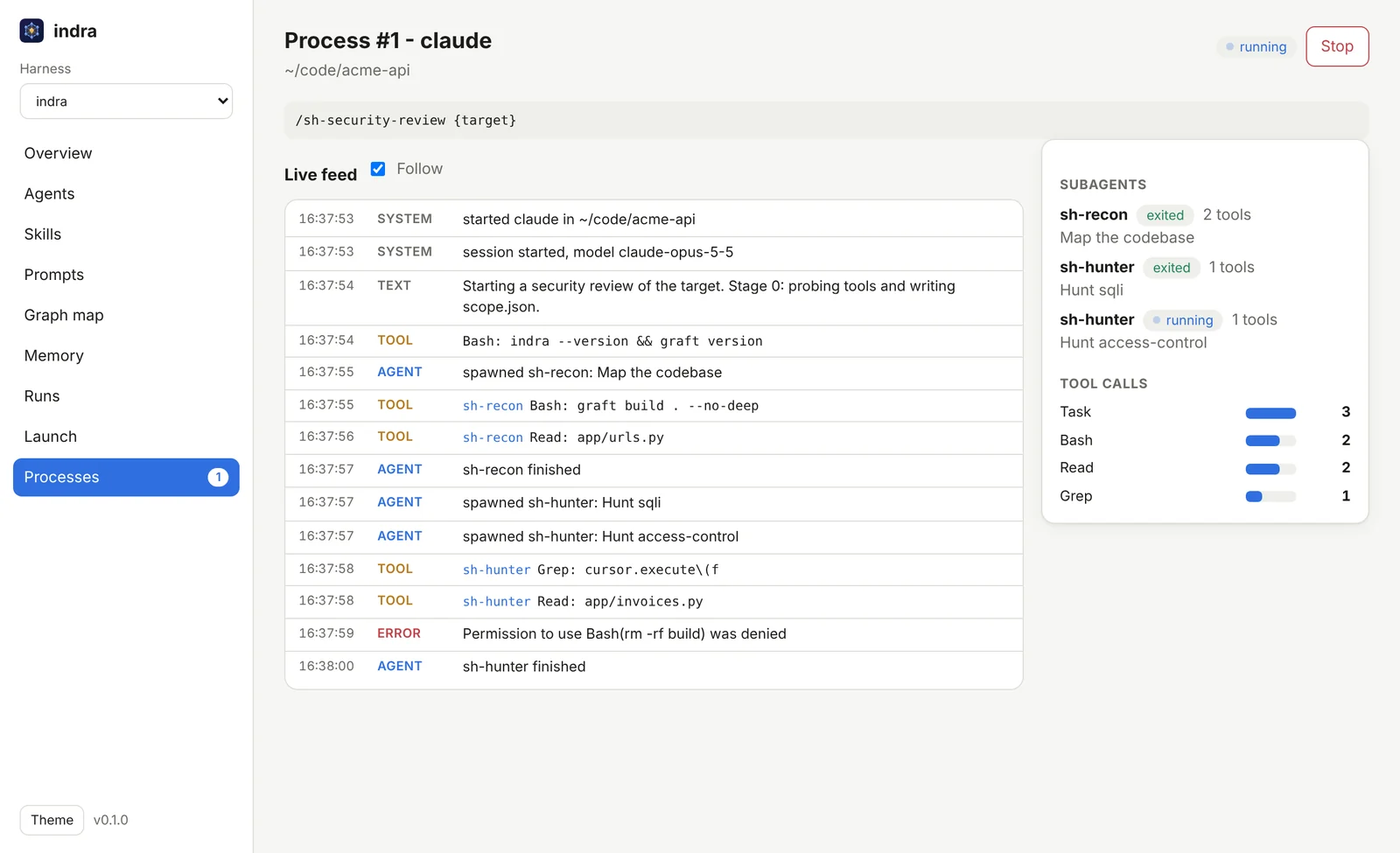
Watch it workindra serve shows every subagent, its tool calls, refused permissions and cost, live,
on this machine or remote ones, and workflows chain agents and commands with conditions and loops.
|
Scope: indra performs static analysis (source review, data-flow tracing, PoC and payload construction) on code you own or are authorized to test. It does not attack live third-party systems.
indra/                           # this repository: a plugin marketplace + the indra CLI
├── plugins/indra/               # the indra plugin
│   ├── skills/
│   │   ├── indra                # /indra - the entry point, routes any appsec request
│   │   ├── sh-security-review   # the pipeline orchestrator (stages 0-6)
│   │   ├── sh-pr-review         # review one pull request, post inline comments
│   │   ├── sh-threat-model      # threat model: data flows, trust boundaries, STRIDE threats
│   │   ├── sh-memory            # long-term graph memory across runs
│   │   ├── sh-publish           # findings to Jira, Confluence, GitHub issues, Notion
│   │   └── sh-kb-*  (15)        # per-vulnerability-class knowledge bases
│   ├── agents/
│   │   ├── sh-recon             # map: code graph, stack, SBOM/CVE, attack surface
│   │   ├── sh-threat-modeler    # model: trust boundaries, controls, ranked threats, hunt plan
│   │   ├── sh-hunter            # find: source-to-sink hunting, one per class, in parallel
│   │   ├── sh-chainer           # escalate: combine findings into attack chains
│   │   ├── sh-verifier          # confirm: refute first, then prove impact with a PoC
│   │   └── sh-reporter          # deliver: README/JSON/SARIF/HTML/PDF/doc
│   └── references/              # shared contracts (finding schema, SARIF map, rubrics)
├── tools/indra/                 # the indra CLI (Rust): graph memory + agent web console
├── site/                        # the project website (GitHub Pages)
└── assets/                      # logo, banner and screenshots
sh-kb-* skills)access-control (IDOR/BOLA/priv-esc) · sqli · xss · ssrf · injection (cmd/code/SSTI/LDAP) · auth (session/JWT) · deserialization · path-traversal (LFI/RFI) · secrets · csrf · xxe · open-redirect · crypto · race-conditions · file-upload. Dependency CVEs and the SBOM are handled by the recon stage.
1. Get indra (one file; no Rust, Python or Node needed):
# Linux or macOS
curl -fsSL https://raw.githubusercontent.com/dmdhrumilmistry/indra/main/install.sh | sh
# Windows (PowerShell)
irm https://raw.githubusercontent.com/dmdhrumilmistry/indra/main/install.ps1 | iex
2. Open the console:
indra serve --open
That's it. The console opens in your browser: launch agents, watch them, read their results.