
 bishopfox/bfinject
Inyección de Dylib para iOS 11.0 - 11.1.2 con los jailbreaks LiberiOS y Electra

Inyección sencilla de dylibs para iOS de 64 bits con jailbreak 11.0 - 11.1.2. Compatible con los jailbreaks de Electra y LiberiOS.
bfinject carga dylibs arbitrarios en apps de App Store en ejecución. Tiene soporte integrado para descifrar apps de App Store y viene incluido con iSpy y Cycript.
bfinject es un envoltorio que se encarga de firmar correctamente tus dylibs antes de inyectarlos mediante bfinject4realz. Es completamente independiente, no requiere jailbreakd, QiLin ni nada parecido. Simplemente funciona.
Nota: bfinject no funciona en Electra si "Tweaks" está habilitado. Reinicia y vuelve a ejecutar Electra sin tweaks para poder usar bfinject. Si ves errores relacionados con "thread_create", este es el problema.
Nota: bfdecrypt está disponible como dylib independiente aquí: https://github.com/BishopFox/bfdecrypt/
wget de Electra no soporta SSL.ssh root@your-device-ip # (the password is 'alpine')
mkdir bfinject
cd bfinject
wget http://<your_server>/bfinject.tar
tar xvf bfinject.tar
wget de LiberiOS no soporta SSL.ssh root@your-device-ip # (the password is 'alpine')
export PATH=$PATH:/jb/usr/bin:/jb/bin:/jb/sbin:/jb/usr/sbin:/jb/usr/local/bin:
cd /jb
mkdir bfinject
cd bfinject
wget http://<your_server>/bfinject.tar
tar xvf bfinject.tar
bash bfinject para obtener ayudabash o no funcionará. Sandbox y todo eso.-bash-3.2# bash bfinject
Syntax: bfinject [-p PID | -P appname] [-l /path/to/yourdylib | -L feature]
For example:
bfinject -P Reddit.app -l /path/to/evil.dylib # Injects evil.dylib into the Reddit app
or
bfinject -p 1234 -L cycript # Inject Cycript into PID
or
bfinject -p 4566 -l /path/to/evil.dylib # Injects the .dylib of your choice into PID
Instead of specifying the PID with -p, bfinject can search for the correct PID based on the app name.
Just enter "-P identifier" where "identifier" is a string unique to your app, e.g. "fing.app".
Available features:
cycript - Inject and run Cycript
decrypt - Create a decrypted copy of the target app
test - Inject a simple .dylib to make an entry in the console log
ispy - Inject iSpy. Browse to http://<DEVICE_IP>:31337/
Antes de hacer nada más complejo, comprueba que funciona. bfinject tiene pruebas automáticas integradas. Aquí tienes un ejemplo usando la app de Reddit como objetivo:
Cs-iPhone:~ root# bash bfinject -P Reddit -L test
[+] Electra detected.
[+] Injecting into '/var/containers/Bundle/Application/55C94FAA-A282-4FDC-967D-6A012D01087E/Reddit.app/Reddit'
[+] Getting Team ID from target application...
[+] Thinning dylib into non-fat arm64 image
[+] Signing injectable .dylib with Team ID 2TDUX39LX8 and platform entitlements...
[bfinject4realz] Calling task_for_pid() for PID 486.
[bfinject4realz] Calling thread_create() on PID 486
[bfinject4realz] Looking for ROP gadget... found at 0x1019a2ba0
[bfinject4realz] Fake stack frame at 0x12ac5c000
[bfinject4realz] Calling _pthread_set_self() at 0x182bfb814...
[bfinject4realz] Returned from '_pthread_set_self'
[bfinject4realz] Calling dlopen() at 0x1829bb460...
[bfinject4realz] Returned from 'dlopen'
[bfinject4realz] Success! Library was loaded at 0x1c016e1c0
[+] So long and thanks for all the fish.
En la pantalla del dispositivo deberías ver esto:

Si no, algo está roto ;)
Este es un ejemplo de descifrado de la app de Reddit en un iPhone con jailbreak de Electra:
Cs-iPhone:~ root# bash bfinject -P Reddit -L decrypt
[+] Electra detected.
[+] Injecting into '/var/containers/Bundle/Application/BCEBDD64-6738-45CE-9B3C-C6F933EA0793/Reddit.app/Reddit'
[+] Getting Team ID from target application...
[+] Thinning dylib into non-fat arm64 image
[+] Signing injectable .dylib with Team ID 2TDUX39LX8 and platform entitlements...
[bfinject4realz] Calling task_for_pid() for PID 3218.
[bfinject4realz] Calling thread_create() on PID 3218
[bfinject4realz] Looking for ROP gadget... found at 0x1016a5110
[bfinject4realz] Fake stack frame at 0x10a06c000
[bfinject4realz] Calling _pthread_set_self() at 0x181303814...
[bfinject4realz] Returned from '_pthread_set_self'
[bfinject4realz] Calling dlopen() at 0x1810c3460...
[bfinject4realz] Returned from 'dlopen'
[bfinject4realz] Success! Library was loaded at 0x1c03e1100
[+] So long and thanks for all the fish.
Verás esta pantalla en tu dispositivo:
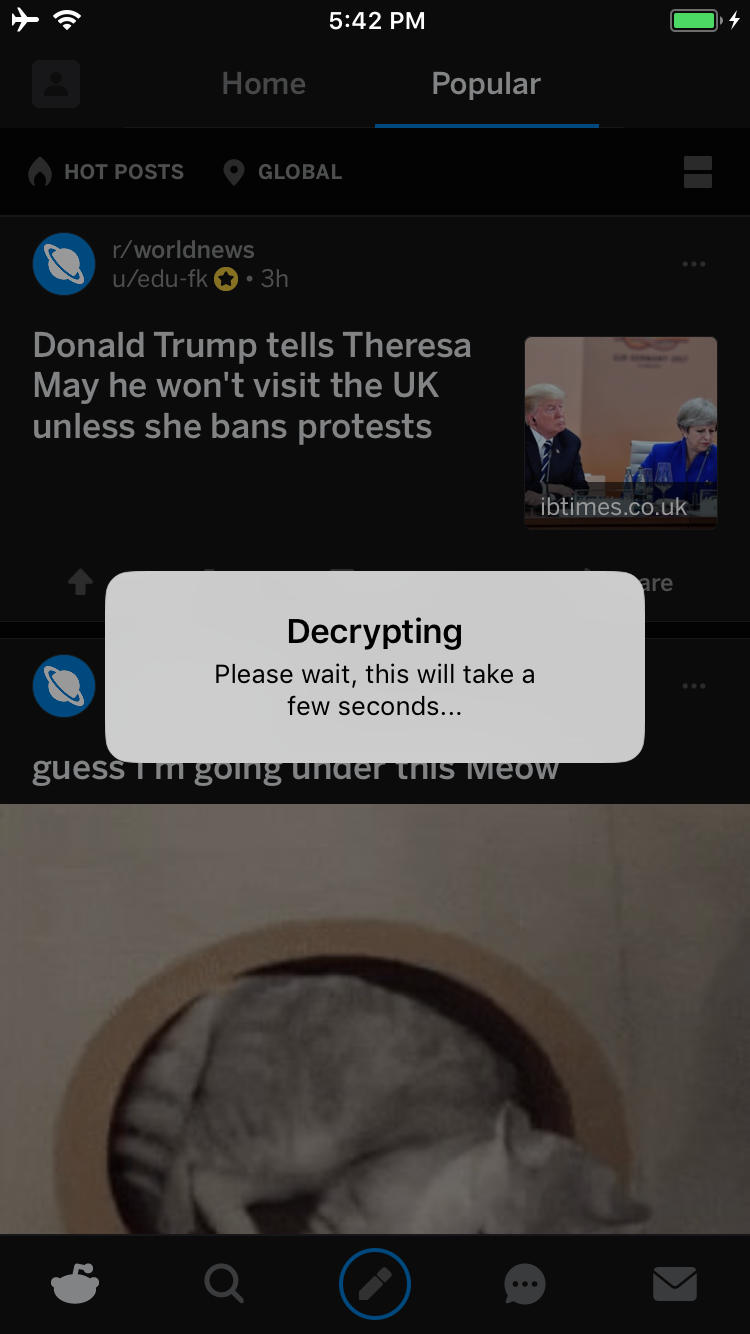
Cuando termine, se te mostrará una alerta de interfaz para preguntarte si quieres iniciar un servicio desde el que puedas descargar tu IPA descifrado:
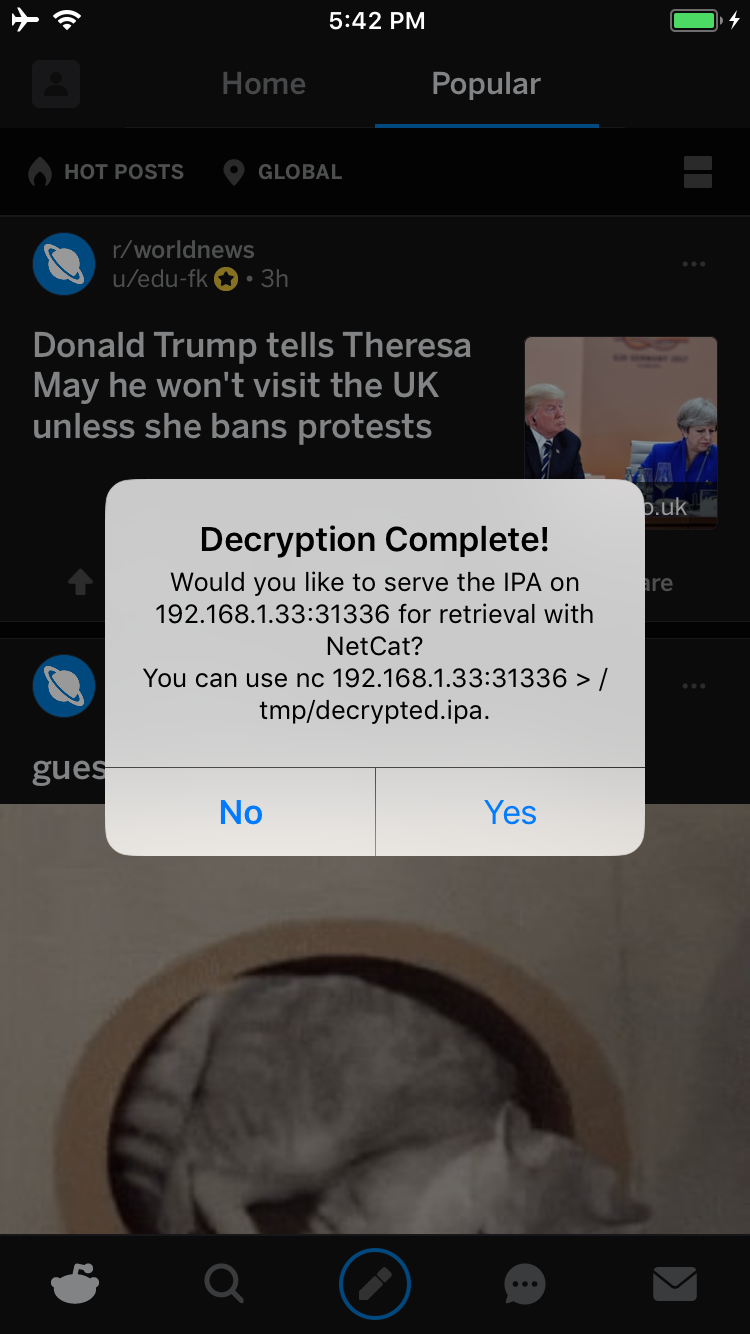
Si tocas Yes, se iniciará un servicio en el puerto 31336 de tu dispositivo. Conéctate a él y recibirás una copia sin procesar del IPA, que puedes descargar con netcat así:
carl@calisto-3 /tmp $ nc 192.168.1.33 31336 > decrypted.ipa
carl@calisto-3 /tmp $ ls -l decrypted.ipa
-rw-r--r--  1 carl  wheel  14649063 Jan 25 16:57 decrypted.ipa
carl@calisto-3 /tmp $ file decrypted.ipa
decrypted.ipa: iOS App Zip archive data, at least v2.0 to extract
Alternativamente, revisa el registro de consola del dispositivo; te indicará dónde se almacena el IPA descifrado. Por ejemplo:
[dumpdecrypted] Wrote /var/mobile/Containers/Data/Application/6E6A5887-8B58-4FC5-A2F3-7870EDB5E8D1/Documents/decrypted-app.ipa
También puedes buscar el IPA en el sistema de archivos así:
find /var/mobile/Containers/Data/Application/ -name decrypted-app.ipa
Para sacar el .ipa del dispositivo puedes usar netcat. En tu portátil, configura un servicio a la escucha:
ncat -l 0.0.0.0 12345 > decrypted.ipa
Y en el dispositivo con jailbreak:
cat /path/to/decrypted.ipa > /dev/tcp/<IP_OF_YOUR_COMPUTER>/12345
