
Skip to content
KitploitKITPLOIT
ToolsExploitsBlog
Log in
Submit
ToolsExploitsBlog
Submit

Hacking, PenTest, and Cybersecurity Tools for Your Security Arsenal!

Kitploit is a directory of hacking, cybersecurity, and pentesting tools. Discover the latest project updates to find vulnerabilities, analyze systems, automate testing, and strengthen your security.

FeedsContactPrivacy© 2026 Kitploit

Tool Directory

Categories

View all categories
Loading categories
eviltwin — Practical defense guidelines against Evil Twin attacks in public Wi-Fi — full research cycle: threat analysis, isolated lab simulation (Kali Linux / airgeddon), and 6-rule protection framework | Kitploit
Tools/GitLabGitLab/novacode1337/eviltwin
Defensive ToolsWi-Fi AuditingPhishingWireless SecurityPrivacySocial EngineeringPapers & ResearchLearning & EducationLabs & Practice
GitLabnovacode1337/eviltwin

eviltwin

Practical defense guidelines against Evil Twin attacks in public Wi-Fi — full research cycle: threat analysis, isolated lab simulation (Kali Linux / airgeddon), and 6-rule protection framework


1 month agoNot yet reviewed
Share
View RepositoryWebsite

Evil Twin Attack Defense Framework

Practical Security Guidelines for Public Wi-Fi Users

Award Research Environment Tools Status

Individual research project. MAOU Gymnasium №16, Tyumen, Russia (2026)
Author: Saveliy Golubev | Supervisor: Yulia Myshko, Informatics Teacher

Awarded 3rd Place at the Lomonosov Readings Research Conference (МАОУ Гимназия №16, Тюмень, 2026)


Overview

This project presents a full research cycle on the Evil Twin attack, one of the most prevalent and underestimated threats in public Wi-Fi environments. The work combines rigorous theoretical analysis with hands-on simulation in an isolated laboratory, culminating in a practical set of defensive guidelines for everyday users.

Core hypothesis: A live, controlled demonstration of an Evil Twin attack produces more effective and internalized security guidelines than purely theoretical analysis.


Recognition

Award3rd Place, Individual Research Project
EventLomonosov Readings (Ломоносовские чтения), School Research Conference
InstitutionMAOU Gymnasium №16, Tyumen, Russia
Year2026
CategoryInformatics

The project was recognized by the conference jury for combining a rigorous theoretical analysis of 802.11 vulnerabilities with a fully reproducible lab simulation and a practical, user-oriented defense framework, bridging academic research and applied digital safety education.


Problem Statement

Public Wi-Fi networks (cafes, airports, universities) have become standard infrastructure. Their primary advantage, open accessibility, is also their greatest security liability. Evil Twin attacks exploit this by:

  • Mimicking legitimate access points with identical SSIDs
  • Forcing victim devices to reconnect via deauthentication packets
  • Capturing credentials through a phishing captive portal
  • Performing Man-in-the-Middle interception of all unencrypted traffic

The attack requires no advanced skills. Off-the-shelf tools automate every stage within minutes. This accessibility is precisely what makes it dangerous and worthy of public education.


Research Scope

ChapterFocus
1. Theoretical Analysis802.11 architecture vulnerabilities, attack mechanics (5-stage model), comparison with other Wi-Fi attacks, legal and ethical framework
2. Lab SimulationIsolated VirtualBox environment, airgeddon v11.22 framework, captive portal mechanics, WPA2 shared-key attack variant
3. Defense Guidelines6-rule protection framework, technical detection methods, VPN vs Tor vs hotspot comparison, vendor/ISP responsibilities

Technical Stack

Attack Simulation Environment

  • Host OS: Windows 10/11
  • Virtualization: Oracle VM VirtualBox 7.0 (Internal Network mode, fully air-gapped)
  • Attack OS: Kali Linux 2024.1 Rolling Release
  • Primary Framework: airgeddon v11.22
  • Supporting Tools: hostapd, dnsmasq, lighttpd, iptables, aireplay-ng, airodump-ng

Network Isolation Architecture

[Physical Host: Windows]
        │
        └─ [VirtualBox Internal Network] ──► NO external connectivity
                │
                ├─ Kali Linux VM (attacker)
                └─ Android Device (victim, manual connection)

Attack Chain

flowchart LR
    A["1. Reconnaissance\nairodump-ng\nmonitor mode"]
    B["2. Evil Twin\nhostapd\ncloned SSID"]
    C["3. Deauth\naireplay-ng\nforced disconnect"]
    D["4. Interception\ndnsmasq + iptables\nall traffic routed"]
    E["5. Phishing Portal\nlighttpd\ncredentials captured"]
    A --> B --> C --> D --> E
    style C fill:#c0392b,color:#fff
    style E fill:#c0392b,color:#fff

Experiment Results

The full attack chain was reproduced in ~15 minutes from VM launch to credential capture:

  1. Reconnaissance: wireless interface placed in monitor mode, target SSID identified
  2. Evil Twin Deployment: rogue AP created with matching SSID Free_Public_Lab, encryption disabled
  3. Deauthentication: aireplay-ng deauth packets forced the victim device to disconnect from the legitimate AP
  4. Captive Portal Setup: dnsmasq, lighttpd and iptables redirected all HTTP traffic to a phishing login page
  5. Credential Capture: test credentials (test_user / Sup3rSecret!) entered by the victim, immediately displayed in the attacker terminal

Extended scenario: Attack was also validated against a WPA2 network with a shared password (PublicPassword123), confirming that knowing the network password offers no protection against Evil Twin.

All experiments were conducted exclusively on researcher-owned equipment in a physically and logically isolated environment, using test credentials only. No real user data was intercepted at any point.

Key Findings

  • Technical barrier is low: the entire attack runs from a menu-driven script with basic CLI knowledge
  • HTTPS is insufficient: Phishing portals can serve valid certificates (e.g., Let's Encrypt), making HTTPS checks alone unreliable
  • Auto-connect is the primary attack enabler: Devices automatically joining strongest-signal known SSIDs are the critical vulnerability
  • Social engineering dominates: the attack doesn't break cryptography, it bypasses it by exploiting user trust

Practical Defense Guidelines (6-Rule Framework)

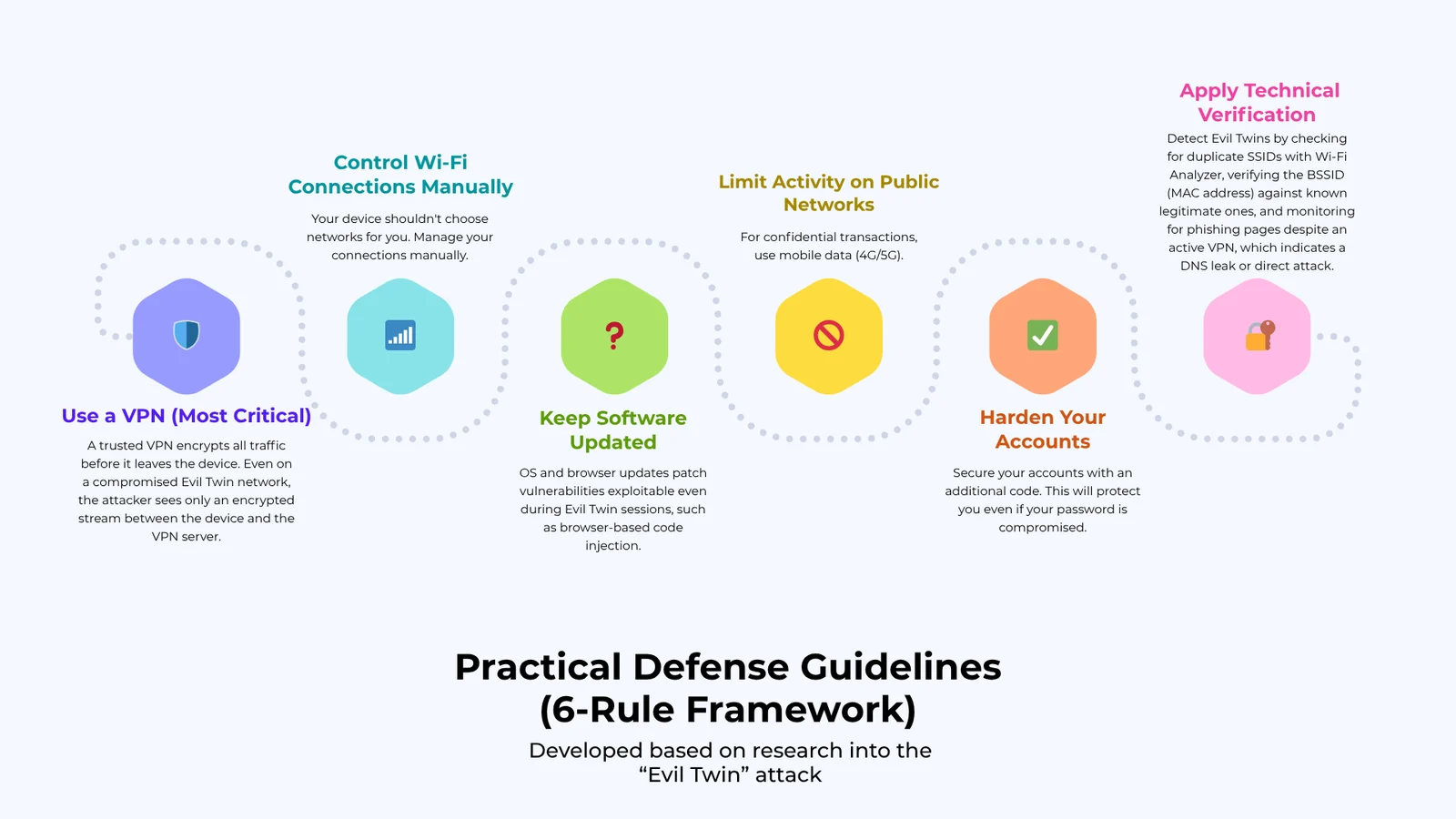
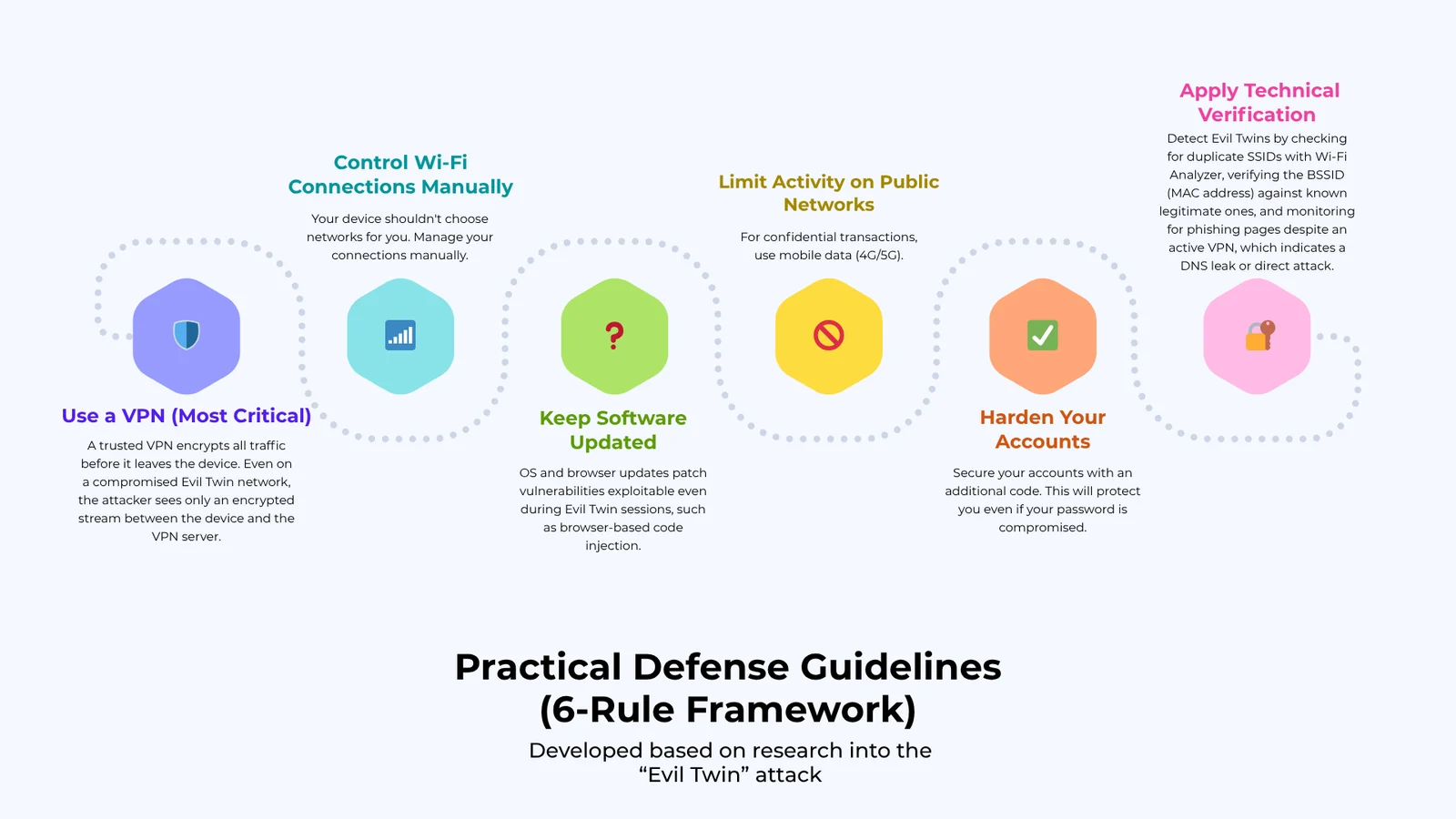
Practical Defense Guidelines, 6-Rule Framework

Rule 1. Use a VPN (most critical)

A trusted VPN encrypts all traffic before it leaves the device. Even on a compromised Evil Twin network, the attacker sees only an encrypted stream between the device and the VPN server.

  • Choose providers with a no-logs policy and modern protocols (WireGuard or OpenVPN)
  • Activate VPN before connecting to any public network

Rule 2. Control Wi-Fi connections manually

  • Disable auto-connect to open networks on all devices
  • Delete saved networks from hotels, cafes, transit hubs after use
  • Verify the exact SSID with staff before connecting, and watch for near-identical names (e.g., Starbucks_Free vs Google Starbucks)

Rule 3. Limit activity on public networks

  • Without an active VPN: avoid any authentication (email, banking, social media)
  • For sensitive operations: use mobile data (4G/5G), since cellular networks provide built-in encryption between device and tower

Rule 4. Harden your accounts

  • Enable Two-Factor Authentication (2FA) on all critical accounts, so even captured credentials become useless without the OTP
  • Use a password manager to maintain unique passwords per service, preventing credential stuffing

Rule 5. Apply technical verification

  • Check for duplicate SSIDs using apps like Wi-Fi Analyzer; two networks with the same name but different signal strengths can indicate a twin
  • Compare BSSID (MAC address) of the connected AP against the known legitimate one
  • Look for DNS leak protection in your VPN; a phishing page appearing despite an active VPN is a direct attack indicator

Rule 6. Keep software updated

  • OS and browser updates patch vulnerabilities that can be exploited even within an Evil Twin session (e.g., browser-based code injection)

Detection Methods (Advanced Users)

Download Tool

Most Popular

View all →

Discover the most used tools by our community.

  • 1

    OsintHunter

    letox4/osinthunter

    🎯 The ultimate OSINT toolkit: investigation graph, confidence scoring, alias families, map, timeline and reports. 49 modules, 400+ sites, no API keys required.

    513
  • 2

    ghostlock-app

    yukonga/ghostlock-app

    GhostLock One-Tap Execution App (CVE-2026-43499)

    471
  • 3

    ARTEX

    baarai/artex

    LLM multi-agent autonomous penetration testing platform with planner/worker agents, asset and exploration graphs, MITM traffic recording, and vulnerability retesting.

    345
  • 4

    redforge

    cybersecurity91/redforge

    Browser-side red team toolkit with 102 offline tools for recon, payload generation, credential attacks, crypto, encoding and engagement reporting.

    311
  • 5

    estorides

    grisuno/estorides

    Aggregates 99+ free OSINT sources in parallel, resolves entities into a knowledge graph, and exports STIX 2.1, MISP, or GraphML with LLM-assisted analysis.

    303
  • 6

    opencti

    opencti-platform/opencti

    Open Cyber Threat Intelligence Platform

    303

Explore all tools

Browse our collection of tools

View all tools →