NetScope
Offline-first network investigation and response platform for Windows.
NetScope is a desktop application for security analysts, incident responders, and
CTF players. It takes a packet capture (.pcap / .pcapng) or a live interface
and turns it into a complete, evidence-backed investigation — verdict, attack
story, indicators of compromise, extracted loot, and one-click response actions —
entirely on your machine, with no cloud services and no paid APIs.



Why NetScope
You can get most of this by hand with Wireshark, Suricata, and a few scripts —
NetScope's job is to do that correlation automatically, in one pass, without
sending anything off your machine:
- One verdict, not fifteen tabs. NetScope correlates protocol analysis,
IOC matching, and anomaly detection into a single attack story instead of
requiring you to manually cross-reference tshark output, Suricata alerts,
and IOC feeds yourself.
- Zero cloud, zero API keys. No VirusTotal key, no cloud upload, nothing
leaves your machine — this matters when you're handling a live incident or
a client's capture.
- Free, not "free tier." No paid backend, no usage limits, no license.
- Response, not just analysis. Firewall rules, process termination, and
memory capture are built in — most free analyzers stop at "here's what
happened," NetScope also helps you act on it.
Screenshots
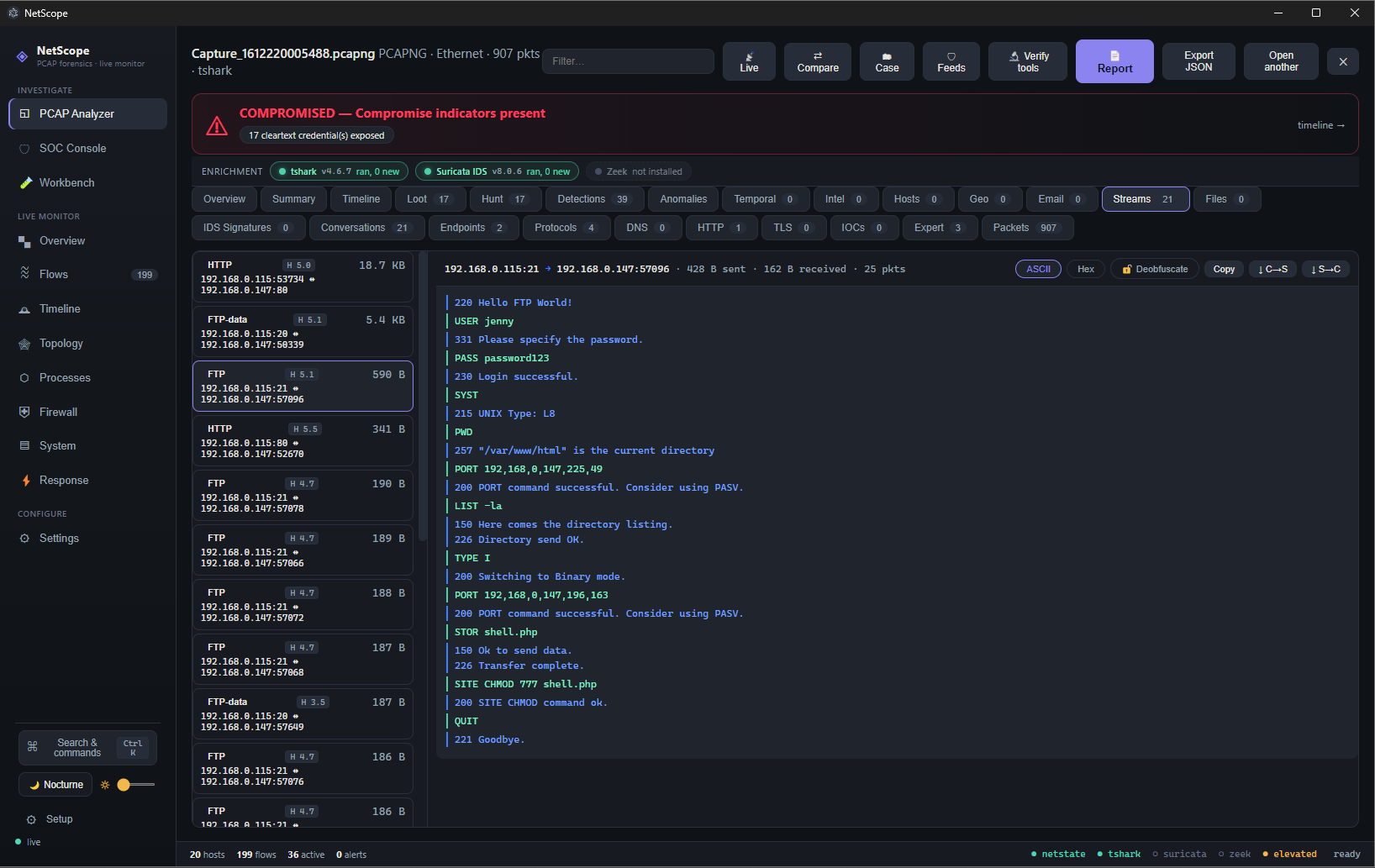
Stream reassembly with a live verdict banner — an FTP session reconstructed from
the capture, cleartext credentials exposed, and tshark + Suricata enrichment
layered on top automatically:
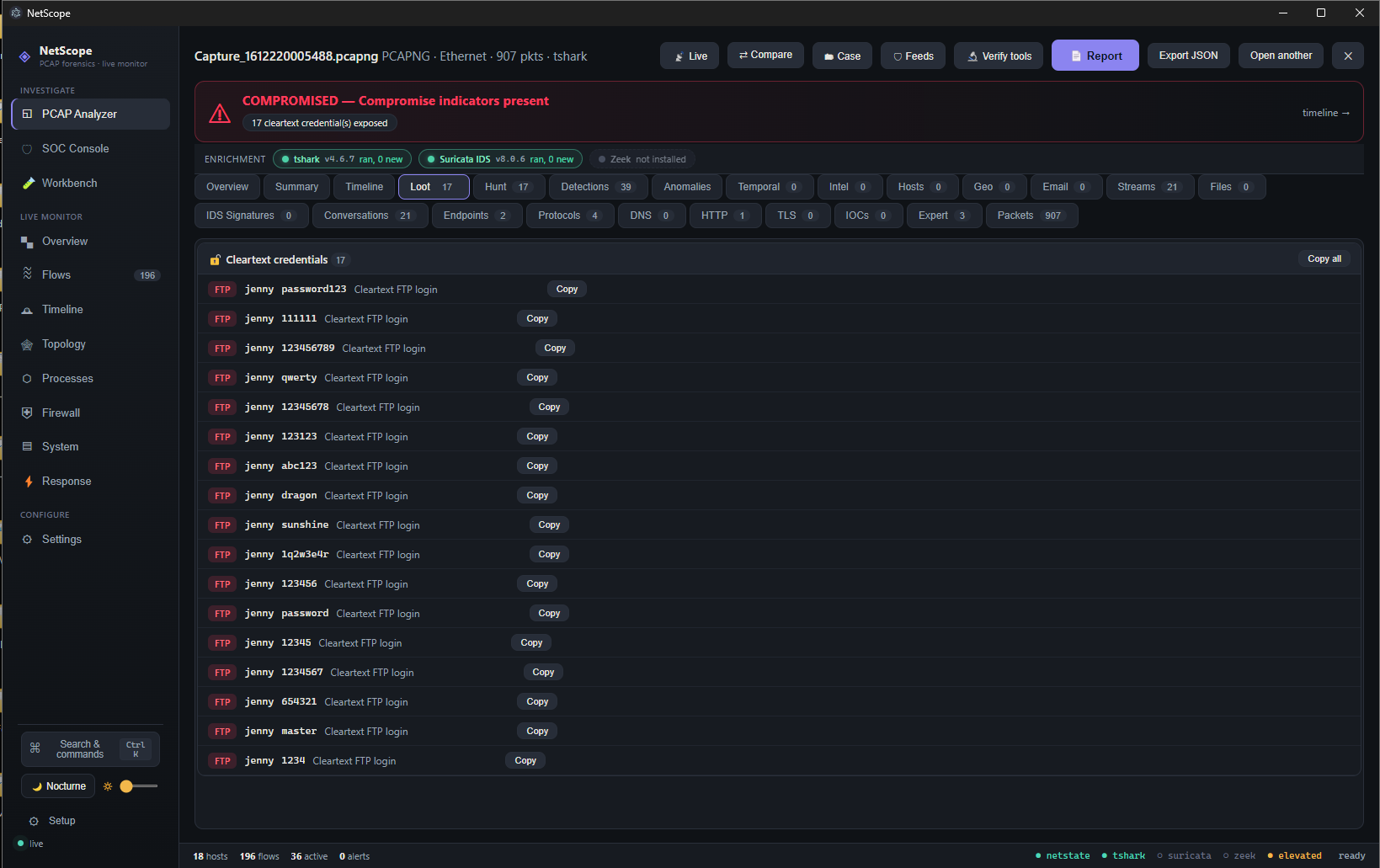
The Loot tab — credentials, hashes, keys, and tokens extracted from the capture,
each with one-click copy:
Download
Prebuilt Windows binaries are attached to every release:
→ Download the latest release
| File | What it is |
|---|
NetScope-Setup-<version>.exe | Installer. Creates Start-menu and desktop shortcuts. Recommended. |
NetScope-Portable-<version>.exe | Single portable executable. No install — just run it. |
NetScope-<version>-win.zip | Zipped application folder. Unzip and run NetScope.exe. |
Full install and run instructions — including running from source — are in
INSTALL.md.
NetScope requests administrator rights at launch. Elevation is required for its
response actions (host firewall rules, process termination, memory capture).
You will see one Windows UAC prompt when it starts.
What it does
NetScope has two entry points that feed the same analysis engine:
- Offline PCAP analysis — open a capture and get a full forensic breakdown.
- Live monitoring — capture from a local interface (via
dumpcap) and analyze
the same way, with live ARP-watch and DNS defense.
Everything runs locally. The parser and analyzer are pure TypeScript and require
no external tools; when free tools such as tshark, Suricata, Zeek, or yara
are installed, NetScope layers their detections on top automatically.
Investigation surface
- Overview — a command-center verdict, key metrics, the reconstructed attack
story, top evidence, and recommended next steps.
- Threats and detections — correlated findings with severity, MITRE ATT&CK
technique mapping, and an attack-chain signature engine (CVE exploits, reverse
shells, offensive tooling).
- Protocol forensics — HTTP (user-agent, Log4j), DNS (transaction analysis,
tunneling and exfiltration reconstruction with auto-decode), TLS (JA3/JA4
fingerprinting against an offline malware-family database), SMB, FTP, SMTP/MIME,
DHCP, NBNS, Kerberos, ICMP, ARP.
- Hosts — inventory built from DHCP / NBNS / Kerberos, with OS fingerprinting.
- Loot — extracted credentials, NTLM / NetNTLMv2 hashes (hashcat-ready), flags,
API keys, and JWTs, with cracking hints.
- Anomalies — beaconing, high-entropy channels, traffic asymmetry, rare
user-agents, and weak crypto, ranked.
- Temporal analysis — rhythm fingerprinting, cross-protocol session stitching,
TCP-timestamp clock-skew (NAT / multi-host detection), and OS-fingerprint drift.
- Intel — known-bad indicators from free offline feeds (abuse.ch, FireHOL, Tor).
- Geo / Exfil — offline GeoIP country breakdown and a world map of endpoints.
- Protocols pivot — a protocol hierarchy tree with port and service breakdown.
- Workbench — a transform / decode / scripting bench for arbitrary artifacts,
including a deobfuscator and a PE parser.
- Stream reassembly — TCP/UDP follow-stream, file carving and extraction, ZIP
and multi-part reassembly.
- Compare — diff a capture against a saved baseline.
Response
- Host firewall rule creation, process termination, and memory capture (elevated).
- STIX 2.1 / CSV / Sigma indicator export.
- Markdown and HTML incident-report generation.
- Local case management: notes, tags, bookmarks, and status, persisted on disk.
Install and run
See INSTALL.md for the full guide. The short version:
Use the app: download the installer or portable build from the
Releases page and run it.
Run from source:
npm install
npm run dev
Build your own Windows binaries:
npm run build:win
Artifacts are written to release/.
Quick start
- Open NetScope and drop in a
.pcap / .pcapng file, or select a live
interface to capture from.
- NetScope parses the capture and shows a verdict on the Overview tab —
severity, the reconstructed attack story, and top evidence.
- Drill into Threats, Protocol forensics, or Loot for the
supporting detail behind that verdict.
(A short screen recording of this flow will go here.)
Architecture
NetScope is an Electron application with a strict process boundary.
src/
  main/       Electron main process — analysis engine, services, IPC handlers
    services/pcap/   pure-TS PCAP parser, decoders, analyzers, worker thread
  preload/    context-isolated bridge (window.netscope) — no Node in the renderer
  renderer/   React 19 UI (Vite)
  shared/     IPC contract and data model shared by main and renderer
- Context isolation is on and Node integration is off in the renderer. All
privileged work happens in the main process and is reached through a typed IPC
contract (
src/shared/ipc.ts).
- PCAP parsing runs on a worker thread with a dynamic packet budget scaled to
file size, so large captures never block the UI or the correlation engine.
- No network calls at runtime. Threat-intel, GeoIP, and JA3 databases are
cached locally from free sources; analysis works fully offline.
 spectralzero/netscope
