 rorywag/hayabusa-bulk-runner
Bulk-run Hayabusa across a folder of triage collections, one run per host, with per-host reports and a cross-host triage dashboard

A PowerShell wrapper that runs Hayabusa across a folder of KAPE collections, one run per host, and rolls the results up into a single cross-host triage view.
Hayabusa already takes a whole directory with -d, and its HTML summary breaks the results down by computer. A folder of KAPE collections still leaves two jobs to do by hand. Each ZIP has to be extracted and each disk image mounted before Hayabusa can read it, and a run over all of them gives one combined output, with no report or timeline of its own for each host. This does that part. Point it at a folder with one entry per host and you get, for each host, Hayabusa's HTML alert report, a CSV timeline and a log, plus a dashboard showing which hosts are worst and which rules fired where.
Full usage reference: docs/USAGE.md
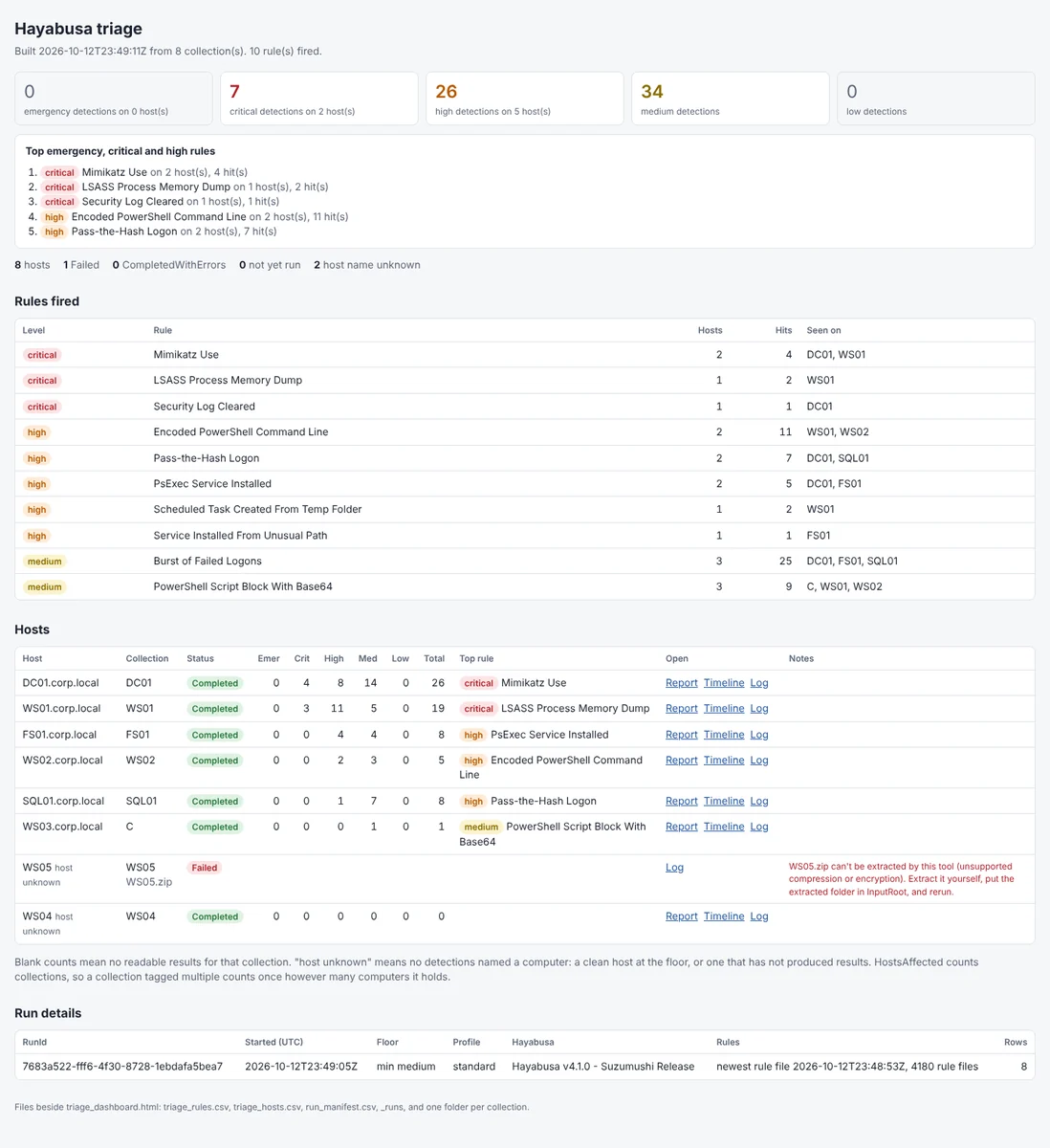
Computer field, so loose output that KAPE named after a drive still lands under the right host.-IdentityOnly does just that, without Hayabusa. See Host identity.The dashboard after a run over eight hosts, with the severity floor at medium:
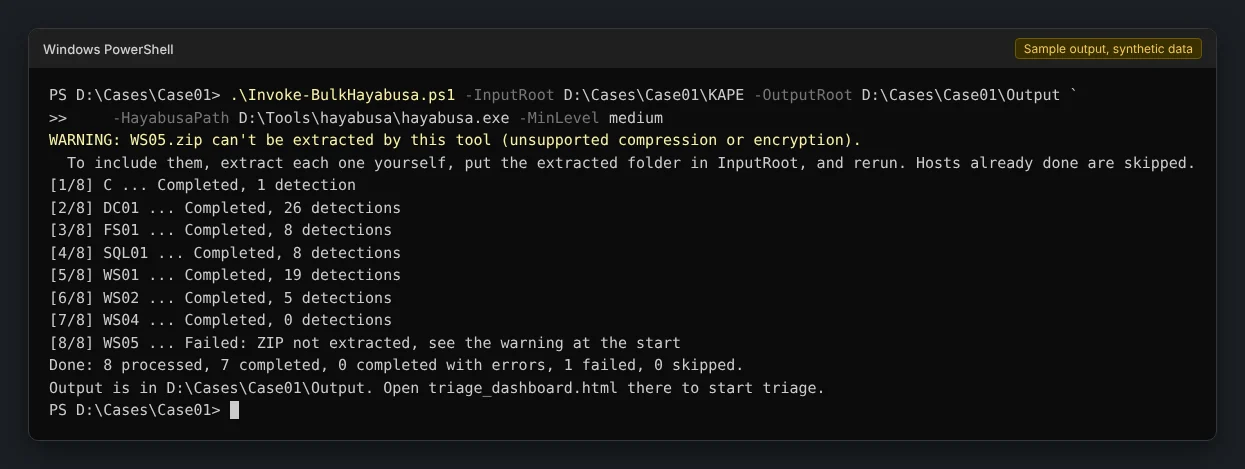
The console during the same run:
The host identity dashboard, over a six-host domain, with one workstation's other interfaces and its built-in and system accounts unfolded:

Released. It's early days, so bugs may surface. It's been run against real Hayabusa 4.3.1 and KAPE images and ZIPs on Windows, and the test suite runs in CI on Windows PowerShell 5.1, PowerShell 7 on Windows, and PowerShell 7 on Linux. A full-disk image with several volumes, such as a cloud VM's OS disk, takes paths that KAPE and Velociraptor collections don't, and those haven't yet been run against a real image of that kind. See Less common image layouts.
hayabusa.exe update-rules once at the start of the engagement and leave the rules alone until it's finished, so every host is checked against the same set.Clone the repository, or download it as a ZIP from GitHub and extract it:
git clone https://github.com/rorywag/Hayabusa-Bulk-Runner.git
Keep the lib folder beside the three scripts, Invoke-BulkHayabusa.ps1, Invoke-HayabusaRollup.ps1 and Test-HayabusaCompatibility.ps1, since they load everything from it. Windows marks files from a downloaded ZIP as coming from the internet. The Process-scope execution policy shown below already allows them, so there's nothing to unblock.
.\Invoke-BulkHayabusa.ps1 -InputRoot D:\Cases\Case01\KAPE -OutputRoot D:\Cases\Case01\Output -HayabusaPath D:\Tools\hayabusa\hayabusa.exe
It prints a header, then a block for each host as it goes with a line for each step, then a summary and where to look:
Hayabusa-Bulk-Runner 0.12.0, running Hayabusa
Input     D:\Cases\Case01\KAPE, 4 collections, 3 folders, 1 VHDX
Output    D:\Cases\Case01\Output
Hayabusa  4.3.1, D:\Tools\hayabusa\hayabusa.exe
Rules     newest rule file 2026-10-30T09:12:44Z, 4321 rule files

Before the run
  1 disk image is hashed before mounting and again after teardown, so it's read in full twice.

[1/4] DC01  VHDX, 38.2 GB
      Hash before mount     done                         5m12s
      Mount                 done                            6s
      Hayabusa              12 detections                9m41s
      Teardown              done                            4s
      Hash after teardown   unchanged                    5m09s
      Completed in 20m12s
[2/4] FS02  folder
      Hayabusa              6 detections                 3m02s
      Completed in 3m02s
[3/4] WS03  folder
      Hayabusa              failed, exit code 2, no CSV written   41s
WARNING: [3/4] WS03 ... Failed: Hayabusa exited with code 2. See D:\Cases\Case01\Output\WS03\WS03_hayabusa.log. No CSV was written.
      Failed in 41s
[4/4] WS04  skipped, already Completed

Summary
  Collection  Status     Detections    Time
  DC01        Completed          12  20m12s
  FS02        Completed           6   3m02s
  WS03        Failed                    41s
  WS04        Skipped
3 processed, 2 completed, 0 completed with errors, 1 failed, 1 skipped, in 24m01s.
Triage dashboard     D:\Cases\Case01\Output\triage_dashboard.html
Combined timeline    D:\Cases\Case01\Output\combined_timeline.csv, 18 rows
Run log              D:\Cases\Case01\Output\_runs\run_20261101T091502Z_3f2c8a1e-5b7d-4c90-9e21-6a4f0d8b7c13.log
Progress bars show how far a long hash or a Hayabusa run has got, and the same lines go to a log in _runs. See Reading the console.
In a fresh PowerShell window the script may be blocked by the execution policy. This allows it for that window only, and changes nothing on the machine:
Set-ExecutionPolicy -Scope Process -ExecutionPolicy Bypass
