 microsoft/restler-fuzzer
RESTler is the first stateful REST API fuzzing tool for automatically testing cloud services through their REST APIs and finding security and reliability bugs in these services.

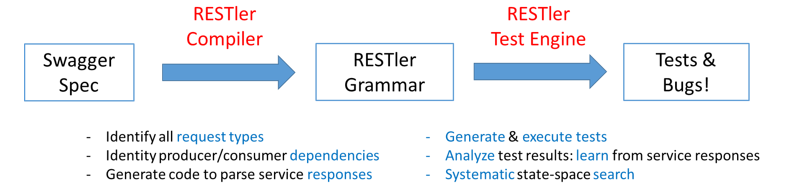
RESTler is the first stateful REST API fuzzing tool for automatically testing cloud services through their REST APIs and finding security and reliability bugs in these services. For a given cloud service with an OpenAPI (formerly Swagger) specification, RESTler analyzes its entire specification, and then generates and executes tests that exercise the service through its REST API.
RESTler intelligently infers producer-consumer dependencies among request types from the OpenAPI definition. During testing, it checks for specific classes of bugs and dynamically learns how the service behaves from prior service responses. This intelligence allows RESTler to explore deeper service states reachable only through specific request sequences and to find more bugs.
RESTler is described in these peer-reviewed research papers:
If you use RESTler in your research, please cite the (default) ICSE'2019 paper (BibTeX).
RESTler includes multiple test generation strategies. In order to get a comprehensive comparative view w.r.t. to (i) efficiency
(i.e., how quickly can RESTler find crashes) and (ii) effectiveness
(i.e., how many crashes can RESTler find in a give time frame),
we recommend comparing against all documented fuzzing_mode(s)
because each one provides a different trade-off between breadth and depth of state space exploration.
We also recommend running test mode before any fuzzing, as described below,
to discover and fix setup issues (e.g. adding required pre-requisite parameter values to the dictionary) prior to fuzzing.
RESTler was created at Microsoft Research and is still under active development.
For an overview and demo on how to get started, see Webinar - Fuzzing to Improve the Security and Reliability of Cloud Services.
RESTler was designed to run on 64-bit machines with Windows or Linux. Experimental support for macOS is also enabled.
In the root of this repo, run
docker build -t restler .
The resulting docker container will have RESTler available in directory /RESTler/restler with main binary Restler.
You can then use this docker image as basis to add the application under test to execute fuzzing inside isolated docker containers.
Prerequisites: Install Python 3.12.8 and .NET 8.0, for your appropriate OS.
Create a directory where you'd like to place the RESTler binaries:
mkdir restler_bin
Switch to the repo root directory and run the following Python script:
python ./build-restler.py --dest_dir <full path to restler_bin above>
Note: if you get nuget error NU1403 when building, a quick workaround is to clear your cache with this command
dotnet nuget locals all --clear
RESTler runs in 4 main modes (in order):
For a quick intro with simple examples, see this Tutorial.
To quickly try RESTler on your API, see Quick Start.
There are currently two categories of bugs found by RESTler.
500 ("Internal Server Error") is received, a bug is reported.When a bug is found, RESTler reports bugs triaged in bug buckets, and provides a replay log that can be used to reproduce the bug (see Replay).
For tips on using RESTler effectively, please see Best Practices and Improving API Coverage.
See also these Frequently Asked Questions.
If you're interested in using RESTler at scale as part of your CI/CD pipeline, check out the REST API Fuzz Testing self-hosted service.
If you have a request/suggestion/question, please file an issue. See Contributing.md for instructions.
This project welcomes contributions and suggestions. Most contributions require you to agree to a Contributor License Agreement (CLA) declaring that you have the right to, and actually do, grant us the rights to use your contribution. For details, visit https://cla.microsoft.com.
When you submit a pull request, a CLA-bot will automatically determine whether you need to provide a CLA and decorate the PR appropriately (e.g., label, comment). Simply follow the instructions provided by the bot. You will only need to do this once across all repositories using our CLA.
