
 mandiant/silketw
C# wrapper for ETW that serializes kernel and user-mode event data to JSON for threat hunting, malware analysis, and incident response, with Yara integration and Elasticsearch shipping.
SilkETW & SilkService are flexible C# wrappers for ETW, they are meant to abstract away the complexities of ETW and give people a simple interface to perform research and introspection. While both projects have obvious defensive (and offensive) applications they should primarily be considered as research tools.
For easy consumption, output data is serialized to JSON. The JSON data can either be written to file and analyzed locally using PowerShell, stored in the Windows eventlog or shipped off to 3rd party infrastructure such as Elasticsearch.
For more information on the future of SilkETW & SilkService, see the Roadmap section.
For more background on SilkETW and SilkService please consult the following resources.
SilkETW is buit on .Net v4.5 and uses a number of 3rd party libraries, as shown below. Please see LICENSE-3RD-PARTY for further details.
ModuleId                                 Version LicenseUrl
--------                                 ------- ----------
McMaster.Extensions.CommandLineUtils     2.3.2   https://licenses.nuget.org/Apache-2.0
Microsoft.Diagnostics.Tracing.TraceEvent 2.0.36  https://github.com/Microsoft/perfview/blob/master/LICENSE.TXT
Newtonsoft.Json                          12.0.1  https://licenses.nuget.org/MIT
System.ValueTuple                        4.4.0   https://github.com/dotnet/corefx/blob/master/LICENSE.TXT
YaraSharp                                1.3.1   https://github.com/stellarbear/YaraSharp/blob/master/LICENSE
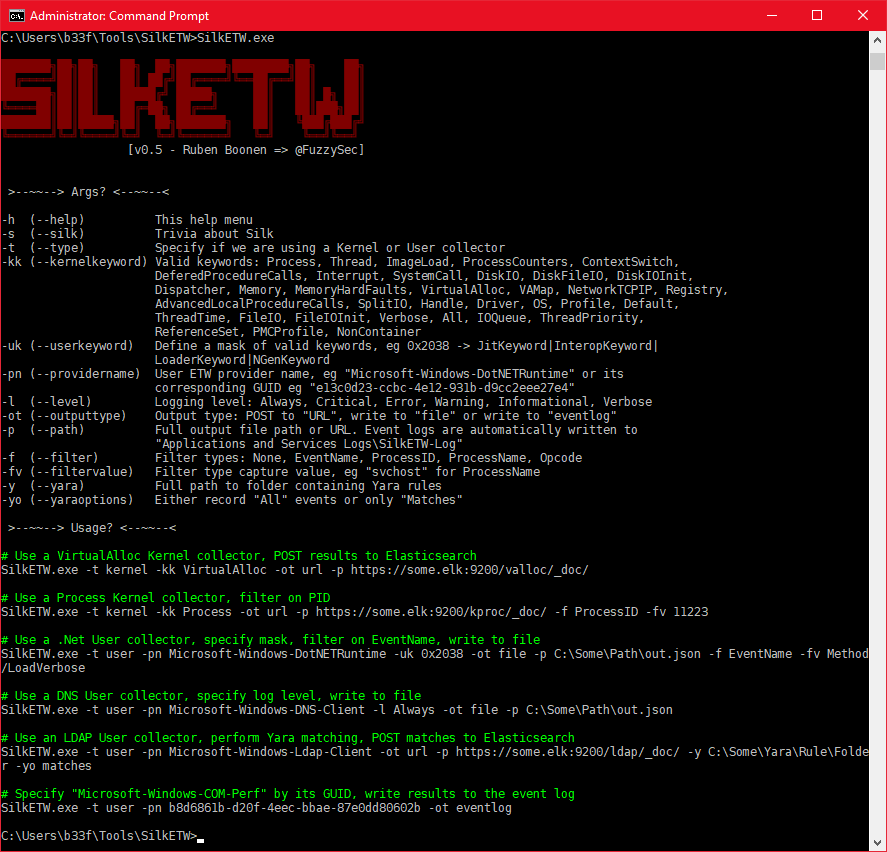
Command line usage is fairly straight forward and user input is validated in the execution prologue. See the image below for further details.
SilkService was created because a large number of people wanted to run SilkETW headless and perform ETW collection for multiple sources at the same time. While there is obvious appeal to this, the following points should be kept in mind.
After compiling or downloading the release package you can install the service by issuing the following command from an elevated prompt.
sc create SillkService binPath= "C:\Path\To\SilkService.exe" start= demand
SilkService ingests an XML configuration file, "SilkServiceConfig.xml", which should be placed in the same directory as the service binary. An example configuration file can be seen below.
<SilkServiceConfig>
	<!--
		This is a user collector
		-> Microsoft-Windows-DotNETRuntime
		-> GUID or string based name
	-->
	<ETWCollector>
		<Guid>45c82358-c52d-4892-8237-ba001d396fb4</Guid>
		<CollectorType>user</CollectorType>
		<ProviderName>e13c0d23-ccbc-4e12-931b-d9cc2eee27e4</ProviderName>
		<UserKeywords>0x2038</UserKeywords>
		<OutputType>url</OutputType>
		<Path>https://some.elk:9200/NetETW/_doc/</Path>
	</ETWCollector>
	<!--
		This is a user collector
	-->
	<ETWCollector>
		<Guid>6720babc-dedc-4906-86b9-d0bc0089ec50</Guid>
		<CollectorType>user</CollectorType>
		<ProviderName>Microsoft-Windows-DNS-Client</ProviderName>
		<OutputType>eventlog</OutputType>
		<YaraScan>C:\Some\Path\RuleFolder</YaraScan>
		<YaraOptions>Matches</YaraOptions>
	</ETWCollector>
	<!--
		This is a kernel collector
	-->
	<ETWCollector>
		<Guid>21ac2393-3bbb-4702-a01c-b593e21913dc</Guid>
		<CollectorType>kernel</CollectorType>
		<KernelKeywords>Process</KernelKeywords>
		<OutputType>file</OutputType>
		<Path>C:\Users\b33f\Desktop\kproc.json</Path>
	</ETWCollector>
</SilkServiceConfig>
Note that each ETWCollector element should have a random GUID, this is used for internal tracking and logging purposes. You can generate GUID's in PowerShell using the following command:
PS C:\> [guid]::NewGuid()

Guid
----
eee52b87-3f32-4651-b0c3-e7bb9af334aa
At runtime SilkService will create a "Logs" subfolder to record service runtime information. This is an invaluable resource to poll the service state, verify service parameter validation and review error information. SilkService has a preference to shut down gracefully if it encounters any type of error, even if such an error does not strictly require termination. This design decision was made purposely as it is not a sound strategy to have dangling collectors or partial operability.
Always consult the service log if the service shuts itself down!
It is always possible that something goes wrong. Consult the service log for further details. While SilkService is configured to terminate and clean up ETW collectors or error it is possible that a stale collector remains registered after process termination. To list running collectors you can use the following command.
logman -ets
If any stale collectors are identified they can be removed by issuing the following commands from an elevated prompt.
Get-EtwTraceProvider |Where-Object {$.SessionName -like "SilkService*"} |ForEach-Object {Stop-EtwTraceSession -Name $.SessionName}
Get-EtwTraceProvider |Where-Object {$_.SessionName -like "SilkService*"} |Remove-EtwTraceProvider
The JSON output, prior to serialization, is formatted according to the following C# struct.
public struct EventRecordStruct
{
    public Guid ProviderGuid;
    public List<String> YaraMatch;
    public string ProviderName;
    public string EventName;
    public TraceEventOpcode Opcode;
    public string OpcodeName;
    public DateTime TimeStamp;
    public int ThreadID;
    public int ProcessID;
    public string ProcessName;
    public int PointerSize;
    public int EventDataLength;
    public Hashtable XmlEventData;
}
