 la3ar0v/tuxresponse
Automated Linux incident response script with live triage, memory acquisition (LiME), disk imaging, YARA scanning, and HTML report generation.

Linux Incident Response
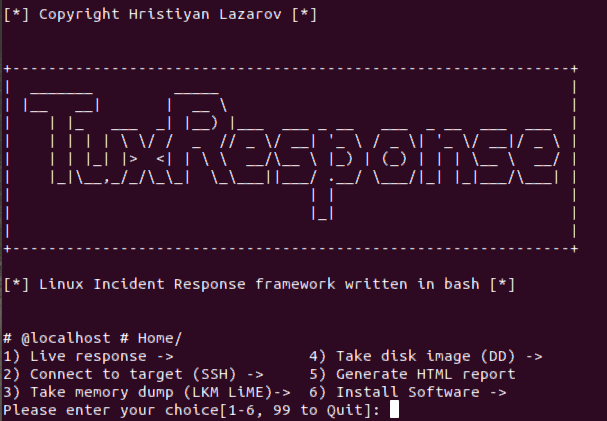
TuxResponse is incident response script for linux systems written in bash. It can automate incident response activities on Linux systems and enable you to triage systems quickly, while not compromising with the results. Usually corporate systems would have some kind of monitoring and control, but there are exceptions due to shadow IT and non-standard images deployed in corps. What amounts to typing of 10 commands with trial end testing, can be done in a press of a button.
Tested on:
Primary purpose:
External tools in the package:
INSTALL LiME
function init_lime(){

  if [ -f /usr/bin/yum ]; then
    yum -y install make kernel-headers kernel-devel gcc
  elif [ -f /usr/bin/apt-get ]; then
    apt-add-repository universe
    apt-get -y install make linux-headers-$(uname -r) gcc
  fi

  rm -f /tmp/v1.8.1.zip
  wget -P/tmp https://github.com/504ensicsLabs/LiME/archive/v1.8.1.zip
  unzip /tmp/v1.8.1.zip
  rm -f /tmp/v1.8.1.zip

  pushd LiME-1.8.1/src
    make
    mv lime-*.ko /tmp/lime.ko
  popd
  rm -rf LiME-1.8.1
}
When responding to incidents, if you have to install LiME by manually typing all the commands, that will slow you down significantly.
1)System info, IP, Date, Time, local TZ, last boot - 'hostnamectl; who -b; uname -a; uptime; ifconfig; date; last reboot'
    1)Check mounted filesystems -'df -h'
    2)Hash executables (MD5) - 'find /usr/bin -type f -exec file "{}" \; | grep -i "elf" | cut -f1 -d: | xargs -I "{}" -n 1 md5sum {}'
    3)Modified files - 'modified_files_period_select' (calling a function in tuxresponse.sh)
    4)List all hidden directories - 'find / -type d -name "\.*"'
    5)Files/dirs with no user/group name - 'find / \( -nouser -o -nogroup \) -exec ls -l {} \; 2>/dev/null'
    6)Changed files from packages -'packaged_files_changed' (calling a function in tuxresponse.sh)
      1) Check for rootkits - runs 'chkrootkit'
      2) Yara scan - calling a function tuxresponse.sh 'yara_select' (scans system with all YARA linux rules available in master repo)
      3) EXIFTool - calling a function tuxresponse.sh 'exiftool_select' (installs EXIFTool)
      1) List running processes - 'ps -axu'
      2) Deleted binaries still running - 'ls -alR /proc/*/exe 2> /dev/null | grep deleted'
      3) Active Network Connections (TCP, UDP) - 'ss -tunap | sed "s/[ \t]\+/|/g"'
      4) Dump process based on PID - 'dump_process_select' (calling a function in tuxresponse.sh)
          1) Enter PID to dump: **(this is the command executed - gcore -a -o "${DUMP_FILE}" ${DUMP_PID} )**
      5) Process running from /tmp, /dev - 'ls -alR /proc/*/cwd 2> /dev/null | grep -E "tmp|dev"'
1) List all active network connections/raw sockets - 'netstat -nalp; netstat -plant'
      1) List all users connected to the system - 'w'
      2) Get users with passwords - 'getent passwd'
1) Check bash history file - 'cat ~/.bash_history | nl'
      1) List All Cron Jobs - 'list_all_crontab' (calling a function in tuxresponse.sh)
      2) List All on-startup/boot programs - 'list_all_onstartup' (calling a function in tuxresponse.sh)
      1) Dump Users .bash_history - 'cat_all_bash_history' (calling a function in tuxresponse.sh)
      2) Find logs with binary inside -  'grep [[:cntrl:]] /var/log/*.log'
That option enables you to connect to a remote system, copy over all scripts and tools and analyze the system.
That option enables you to compile LiME from source and dump the RAM memory off the system. This is the easiest way to do it as the other way around would be to compile from source for all major kernel versions and insert the LKM.
That option enables you to do a full disk image of the target system using well-known tool - dd. The function is taking source and destination as parameters and inserts them in the following command 'dd if=${IMAGE_IN} | pv | dd of='${IMAGE_OUT}' bs=4K conv=noerror,sync'. If you're investigating remote system, the script is going to copy itself there. Then if the parameter ${TARGET_HOST} is set, then the script is going to download the image to analyst system using this command >> "ssh -p${TARGET_PORT} ${TARGET_USER}@${TARGET_HOST} 'dd if=${IMAGE_IN} bs=4K conv=noerror,sync' | pv | dd of='${IMAGE_OUT}'" (im heavily using pv to make sure progress is tracked)
Everything you do is recorded in text files, thus easy to go back and look at the output. The beauty of this is that you can upload it in your favourite log analysis tools and make sense of it at later stage. On top of that, you can use that function to generate HTML report and look at the command-generated output in a more human readable form.
      Install binaries that are required by the script to function correctly.
      1) Dependancies
      2) Yara and rules
      3) ExifTool
      4) Init check
      5) chckrootkit
      6) LiME
Hardening and forensic-soundness pass on tuxresponse.sh:
YYYYMMDDTHHMMSSZ) instead of local time, for defensible timestamping.evidence/manifest.txt; disk images get a sibling .sha256 file.modified_files_period_select no longer touches a timestamp file on the target filesystem (which contaminated /tmp atime/mtime before the find walk). It now uses find / -xdev -newermt "1 $opt ago".eval ${DD_CMD} in _create_disk_image; the dd/ssh pipeline runs directly, and the source device is validated against ^/dev/[a-zA-Z0-9]+$ before use.dump_process_select validates the PID is numeric and that /proc/<pid> exists before invoking gcore.exec_CMD no longer uses eval; shell-pipeline commands from the internal catalog are dispatched via bash -c.set -euo pipefail with globals initialized up-front.DISTO → DISTRO typo in the Arch Linux detection branch (previously silently misnamed the distro).apt-get install netstat → net-tools.evidence/*.txt via glob (no more ls parsing) and skips the manifest; output variables quoted.VERSION='1.1' constant; banner prints the version.shellcheck -S error is clean.Note: the menu-driven mode still depends on
.cmds.sh,.menu_en.sh, andforensics.sh, which are not present in this repo. Rebuilding the command/menu catalog is tracked as a separate effort.
