
Skip to content
KitploitKITPLOIT
ToolsExploitsBlog
Log in
Submit
ToolsExploitsBlog
Submit

Hacking, PenTest, and Cybersecurity Tools for Your Security Arsenal!

Kitploit is a directory of hacking, cybersecurity, and pentesting tools. Discover the latest project updates to find vulnerabilities, analyze systems, automate testing, and strengthen your security.

FeedsContactPrivacy© 2026 Kitploit

Tool Directory

Categories

View all categories
Loading categories
masstin — Lateral movement tracker for anything: Windows, Linux and macOS logs, forensic images (E01, VMDK, VHDX; no mounting) and triage packages into one timeline, with a statistical hunt and a graph viewer. One Rust binary for Windows, Linux and macOS. | Kitploit
Tools/GitHubGitHub/jupyterj0nes/masstin
Defensive ToolsDisk ForensicsLateral MovementNetwork ForensicsForensicsDigital ForensicsIncident ResponseAnomaly DetectionLog Analysis
GitHubjupyterj0nes/masstin

masstin

Lateral movement tracker for anything: Windows, Linux and macOS logs, forensic images (E01, VMDK, VHDX; no mounting) and triage packages into one timeline, with a statistical hunt and a graph viewer. One Rust binary for Windows, Linux and macOS.


107194 days agoReviewed by Kitploit
Share
View RepositoryWebsite

Masstin

Masstin logo

Lateral movement tracker for anything.
Every login from every log you have, in one timeline. One statistical hunt over it. A window that shows who went where. One binary: no SIEM, no database, no plugins.

Release crates.io License: AGPL v3 Platform

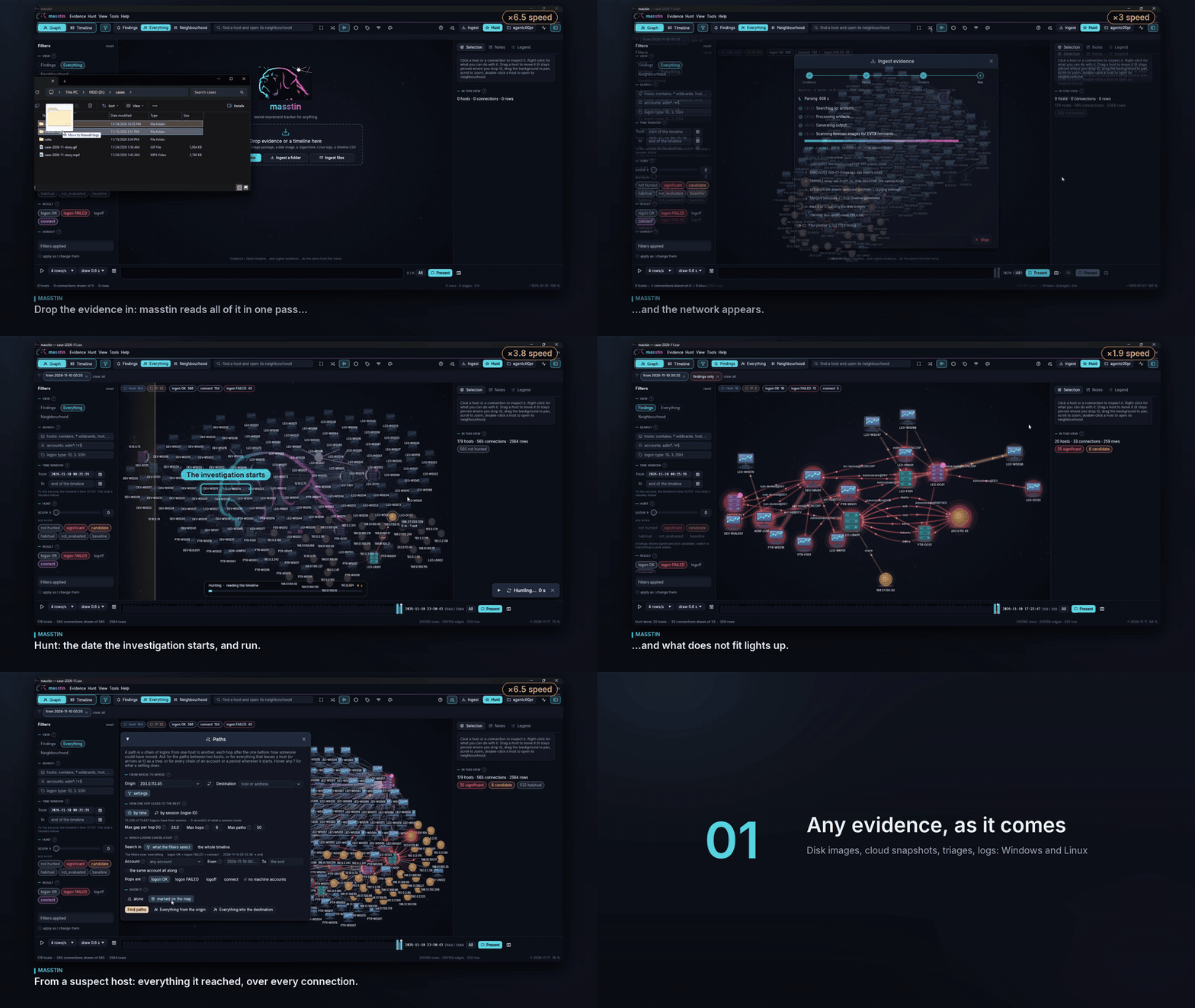
masstin in fifteen seconds: a case folder is dropped on the window and read in one pass, the network appears as a map, the hunt marks the connections this network had never made before, and from a suspect host everything it reached lights up
A case folder dropped on the window and read in one pass. The network appears, the hunt lights up what this network had never done before, and from a suspect host everything it reached is marked. A lab case, real clicks, sped up where the badge says so.

From the evidence to the story

  1. Any evidence, as it comes. Drag the case folder onto the window: disk images, cloud snapshots, KAPE / Velociraptor / UAC triages, loose EVTX, Linux and macOS logs, mixed as they came. Nothing to mount, nothing to convert. Masstin looks inside, says what it found, reads file systems, shadow copies and deleted logs straight from the images, and writes one timeline with the same columns whatever the source. From a terminal it is one action, masstin -a parse -d <folder>. Parsing →
  2. It finds the intrusion for you. No rules to write. Give graph-hunt the day the investigation starts: every connection after it is weighed against what the network did before, and what survives a false-discovery-rate test lights up, most unusual first, each finding with its reason in words. The only number you choose is the FDR. graph-hunt →
  3. How the attacker moved. Hosts drawn as the machines they are, the accounts on the lines. Open a host's neighbourhood, ask for the time-respecting paths from one host to another or for everything a suspect host reached, and the route stands out of the whole picture hop by hop. The questions an analyst asks of a login graph are on a menu, and your verdicts and notes go back into the timeline. The viewer →
  4. A video for your client. Tell each step in your own words and masstin replays the intrusion connection by connection, with the clock and your captions, and records it as an MP4 or a GIF next to the evidence. Tools › Film the window records the window itself as you work. Presentation and recording →

https://github.com/user-attachments/assets/fe6a9609-1ff0-4661-9da4-8e2ab356270d

The four steps in ninety seconds. The long version walks through every one of them, with guides and case walkthroughs, at weinvestigateanything.com.

Quick start

One file, no installer, no runtime dependencies. Get the one for your system from the Releases page.

Windows

  1. Download masstin-vX.Y.Z-windows.exe.
  2. Double-click it. The window opens: drop your evidence on it, and ingest, hunt and look from there. No terminal needed.

If SmartScreen stops it the first time, More info › Run anyway.

The same from PowerShell, for scripts and servers:

.\masstin-vX.Y.Z-windows.exe                                      # the window
.\masstin-vX.Y.Z-windows.exe -a parse -d D:\evidence\case -o timeline.csv

Linux

  1. Download masstin-vX.Y.Z-linux.
  2. Make it executable and run it. On a desktop, the window opens, the same as on Windows:
chmod +x masstin-vX.Y.Z-linux
./masstin-vX.Y.Z-linux                                            # the window

On a server with no desktop, everything the window does is on the command line (below).

macOS

Download masstin-vX.Y.Z-macos-arm64 (Apple silicon) or masstin-vX.Y.Z-macos-x86_64 (Intel), chmod +x it and run it. If Gatekeeper blocks it, run xattr -d com.apple.quarantine masstin-* once.

From source

cargo install masstin, on stable Rust.

The viewer writes nothing where it runs: a timeline's saved views, story and notes live next to the CSV with its name, the recent list under the user's configuration folder (where things are kept →).

The first three steps from a terminal

# 1. the evidence folder (images, zips, triages, loose files): masstin says what it found
#    and reads it all -> one timeline
masstin -a parse -d /evidence/case-2026-03 -o timeline.csv

# 2. what happened after the cutoff that this network had never done before?
#    every row of timeline.csv gets its verdict (hunt, hunt_score, hunt_why); the report explains the findings
masstin -a graph-hunt-csv -f timeline.csv --investigation-from "2026-03-15 00:00:00" --report hunt.md

# 3. the graph, with the hunt's states on it; marks go back into the CSV
masstin -a view -f timeline.csv

Known-bad host or account? --seed 10.10.1.50 on the hunt reconstructs the chain from it. Neo4j or Memgraph wanted anyway? load-memgraph / load-neo4j export the graph (Graph databases →).

What it reads

SourceWhat masstin takes from it
Windows37 Event IDs across 12 EVTX channels (Security 4624/4625/4634/4648/4768/4769/4776/4778/5140/5145…, Terminal Services, RDP, SMB, WinRM, WMI, Sysmon 3, OpenSSH, Scheduled Tasks); UAL databases; MountPoints2 from NTUSER.DAT; Volume Shadow Copies; EVTX chunks carved from unallocated space.
Forensic imagesE01, VMDK, VHD / VHDX, QCOW2, dd / raw (split in segments too), cloud snapshots with no extension (known by their content), mounted volumes, images packed inside zips. NTFS, ext4 and XFS walked, LVM volumes included; BitLocker detected and reported.
Linuxauth.log, secure, messages, wtmp / btmp / lastlog, audit.log, binary journald. Session ends paired to their login, syslog times to UTC.
macOSThe Unified Log, as a .logarchive (read directly on any OS) or a log show JSON export: SSH and Screen Sharing logons.
Triage packages and feedsKAPE, Velociraptor, UAC, Cortex XDR, plain zips and tarballs nested in each other; a Cortex XDR tenant read through its API, Winlogbeat JSON, Cortex XDR exports, Mordor / OTRF datasets.
Anything else-a parse --rules <rule> with a YAML rule (csv, regex, key=value, JSON). Rules ship for Palo Alto, Cisco, Fortinet, Check Point, OpenVPN, Squid, Zscaler ZPA, Cloudflare Access. Custom parsers →
Download Tool

Most Popular

View all →

Discover the most used tools by our community.

  • 1

    Callisto

    jetp1ane/callisto

    Automated binary vulnerability analysis tool that decompiles executables via Ghidra, scans pseudo-C code with Semgrep, and validates findings using GPT-3.5-Turbo to reduce false positives.

    1.5k
  • 2

    ghostlock-app

    yukonga/ghostlock-app

    One-tap Android kernel exploit app for CVE-2026-43499, providing privilege escalation via kernel module loading, with offset extraction and on-device analysis tools.

    996
  • 3

    wifit3

    derv82/wifit3

    Wifite but USB-only & cross-platform.

    722
  • 4

    OsintHunter

    letox4/osinthunter

    🎯 The ultimate OSINT toolkit: investigation graph, confidence scoring, alias families, map, timeline and reports. 49 modules, 400+ sites, no API keys required.

    505
  • 5

    DFRoot

    a2333c/dfroot

    Android root tool for Samsung Galaxy S25 Ultra (SM-S938B) that chains DirtyFrag CVE-2026-43284 and CVE-2026-43499 to gain root automatically at boot via KernelSU.

    355
  • 6

    mcp-reverse

    1llu50ry/mcp-reverse

    MCP server exposing 180+ reverse-engineering tools that aggregate Ghidra, IDA, x64dbg, Frida and 56 other backends with native binary parsers and a 4,200-skill knowledge base.

    334

Explore all tools

Browse our collection of tools

View all tools →