
 joda32/yowie
Finds the SaaS services an organisation subscribes to, using only externally observable data. Built for shadow IT discovery.
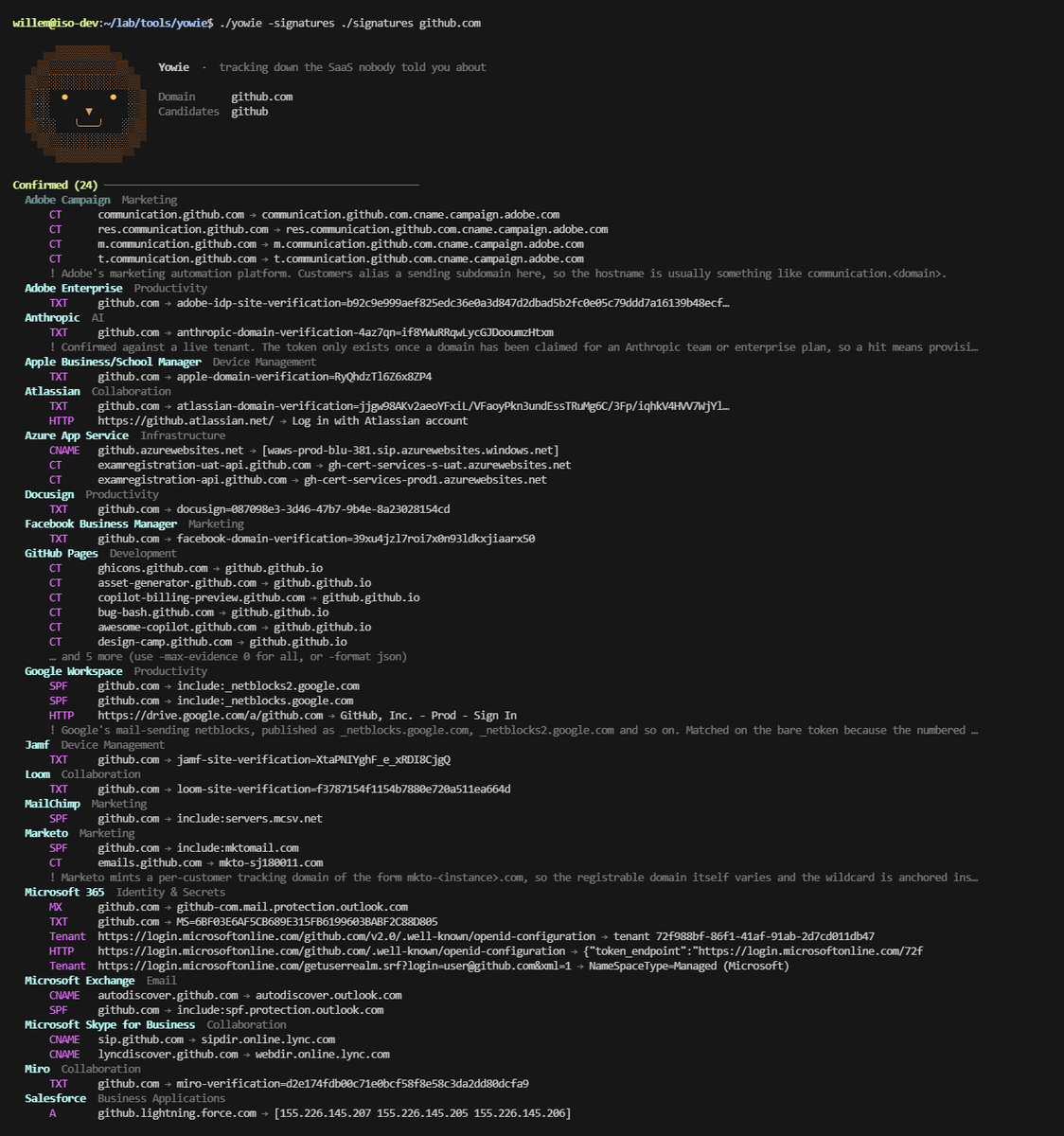
     ▄▄▓▓▓▓▓▓▓▓▓▄▄
   ▄▓▓▒▒▒▒▒▒▒▒▒▒▒▓▓▄    Yowie  ·  tracking down the SaaS nobody told you about
  ▓▓▒▒░░░░░░░░░░░▒▒▓▓
  ▓▒░░  ●       ●  ░▒▓  Domain      acme.com.au
  ▓▒░░      ▼      ░▒▓  Candidates  acme, acmecorp
  ▓▓▒░░   ╰───╯   ░▒▓▓
   ▀▓▓▒▒░░░░░░░░░▒▒▓▓▀
     ▀▀▓▓▓▓▓▓▓▓▓▓▓▀▀
Finds the SaaS services an organisation subscribes to, using only externally observable data. Built for shadow IT discovery: the services worth finding are the ones nobody told you about.
Named for the Australian bush cryptid, because you are hunting something everyone insists isn't there.

786 signatures covering 593 vendors across nine detectors, plus 109 parked awaiting confirmation. Findings are graded and every one carries the record or response that produced it.
go build -o yowie ./cmd/yowie
Go 1.22 or later. The signature packs are embedded in the binary, so the single file is all you need to deploy.
yowie [flags] <domain> [candidate ...]
The domain is the organisation's root domain. Candidates are the short strings a vendor tenant might be named after — trading names, abbreviations, old brands carried over from acquisitions. Supply as many as you can; each one is another chance to find a tenant. With none given, the first label of the domain is used.
yowie acme.com.au acme acmecorp acmegroup
yowie -format html -o report.html acme.com.au acme
yowie -format json acme.com.au | jq '.findings[] | select(.confidence=="high")'
yowie -only dns,spf,dmarc -compact acme.com.au
yowie -signatures ./signatures -validate
| Detector | Signal |
|---|---|
dns | TXT verification tokens, CNAME, MX and NS records |
vanity | Vendor-hosted tenants named after the organisation (acme.zendesk.com) |
http | Application-layer fingerprints for services with no DNS footprint |
spf | The full SPF include graph, following nested includes and redirects |
dmarc | DMARC aggregate/forensic report destinations |
bimi | BIMI logo and Verified Mark Certificate hosting |
mta-sts | MTA-STS policy contents |
tenant | Microsoft tenant ID, federated identity provider, and sibling domains |
ct | Subdomains from Certificate Transparency logs, resolved and attributed |
Select with -only or -skip, e.g. -skip ct,http for a fast DNS-only pass.
The last two deserve a note, because they find things a signature list cannot.
tenant asks Microsoft's unauthenticated endpoints who the domain belongs
to. Autodiscover's federation information returns every domain attached to the
same tenant, which routinely surfaces business units, acquisitions and
abandoned brands. Each one is another domain worth scanning.
ct inverts the discovery model. Every other check asks "does this
organisation use vendor X?" against a fixed list, so it can only find vendors
somebody already wrote a signature for. CT asks "what has this organisation
actually pointed its subdomains at?" A team that signs up for a product and
wires up support.acme.com gets a certificate issued, and that certificate is
public and permanent. Targets matching no signature are reported as leads, which
is how you find the thing you did not know to look for.
Findings are graded, and the grade is the point:
acme.blogspot.com might not be your acme.Two independent detectors agreeing on a vendor promotes a Probable finding to Confirmed. Every finding carries the exact record or response that triggered it, so a report is defensible without re-running the tool.
The promotion has one exception, and it is the difference between "this tenant exists" and "this tenant is yours" — see the namespace note under accuracy.
-no-unknown drops the unattributed leads if you want signal only.
-format cli (default), json, jsonl, csv, html. Use -o to write to a
file. The HTML report is self-contained — no external assets — so it survives
being emailed or dropped on a share drive.
Progress goes to stderr and results to stdout, so yowie -format json acme.com > out.json
still shows a live progress line.
Signatures live in signatures/*.yaml. The binary embeds them; -signatures <dir>
or YOWIE_SIGNATURES=<dir> loads from disk instead, which is how you iterate
without rebuilding.
version: 1
pack: dns-txt
description: "Domain-ownership verification tokens published as TXT records."
defaults:
  confidence: high

signatures:
  - id: txt-1password
    vendor: "1Password"
    category: "Identity & Secrets"
    type: txt
    query: "{domain}"
    match:
      contains: "1password-site-verification"
{domain} expands to the root domain, {candidate} to each candidate string.
A signature referencing {candidate} is evaluated once per candidate.
| Type | Matches | Notes |
|---|---|---|
txt, cname, mx, ns | match.contains against the records of query | Case-insensitive |
vanity_a, vanity_cname | Baseline comparison; no match block | query must contain {candidate} |
http | match.present, match.absent, or match.status alone | See status handling below |
spf_include | match.contains against the resolved SPF include graph | |
dmarc_rua | match.contains against DMARC report destinations | |
cname_target | query is a bare hosting suffix | Applied to hosts discovered by ct; * matches one label |
disabled: true parks a signature without losing the research behind it.
notes: carries analyst guidance through to the report.
Run yowie -validate after editing. Validation is strict — an unknown key is an
error, not a silent no-op — and the packs are also checked by go test, so a
typo cannot quietly cost you coverage in every future scan.
| Pack | Contents |
|---|---|
dns-txt, dns-cname, dns-mx | Verification tokens and delegated hostnames. Live. |
email-spf, email-dmarc | Senders and DMARC processors. Live. |
vanity-tenants, http-endpoints | Tenant hostnames and app fingerprints. Live. |
cname-targets | Hosting suffixes for CT-discovered subdomains. Live. |
ai-services | AI and LLM platforms. Parked. |
file-transfer | Managed file transfer — MOVEit, GoAnywhere, Egnyte. Parked. |
finance-procurement | Finance, expense, payroll, procurement. Parked. |
security-grc | Security tooling and compliance automation. Parked. |
graveyard | Unverified entries, and platforms whose operator could not be identified. Parked. |
Five packs ship entirely disabled. They are structurally complete and pass validation, but their match criteria have never been confirmed against a live tenant, so they are not evaluated during a scan.
This is deliberate. A signature with a wrong contains value never fires and
never errors — it just makes a vendor look covered when it is not. Shipping
those disabled keeps the research in the repo without inflating the numbers.
