Skip to content
KitploitKITPLOIT
ToolsBlog
Submit
ToolsBlog
Submit

Hacking, PenTest, and Cybersecurity Tools for Your Security Arsenal!

Kitploit is a directory of hacking, cybersecurity, and pentesting tools. Discover the latest project updates to find vulnerabilities, analyze systems, automate testing, and strengthen your security.

··Feeds·Contact·Privacy·© 2026 Kitploit

Tool Directory

Categories

View all categories
Loading categories
birdy-edwards — Automated AI powered Facebook intelligence tool for target profiling, network analysis and threat reporting. Runs entirely on-device via Ollama. Anyone wants to use lite version check the link below. | Kitploit
Tools/GitHubGitHub/jeet-ganguly/birdy-edwards
OSINT (Open Source Intelligence)Information GatheringSocial EngineeringThreat IntelligenceCrawlerAI Security
GitHubjeet-ganguly/birdy-edwards

birdy-edwards

Automated AI powered Facebook intelligence tool for target profiling, network analysis and threat reporting. Runs entirely on-device via Ollama. Anyone wants to use lite version check the link below.

View Repository
72978 days agoReviewed by Kitploit

Most Popular

View all →

Discover the most used tools by our community.

Explore all tools

Browse our collection of tools

View all tools →
Share
Website

BIRDY-EDWARDS 2.0

Infiltrate & Expose

Automated AI powered Facebook intelligence tool for target profiling, network analysis and threat reporting. Runs entirely on-device via Ollama. AI-powered Facebook SOCMINT platform — 100% local, zero cloud dependency. For lite version check this repo click here

BIRDY-EDWARDS Logo

Python Flask Ollama Docker License Platform Version

Installation · Troubleshooting · Disclaimer · Contributing


Documentation

Full usage guides for both investigation modes are available on the project website:

  • Click Here

Documentation


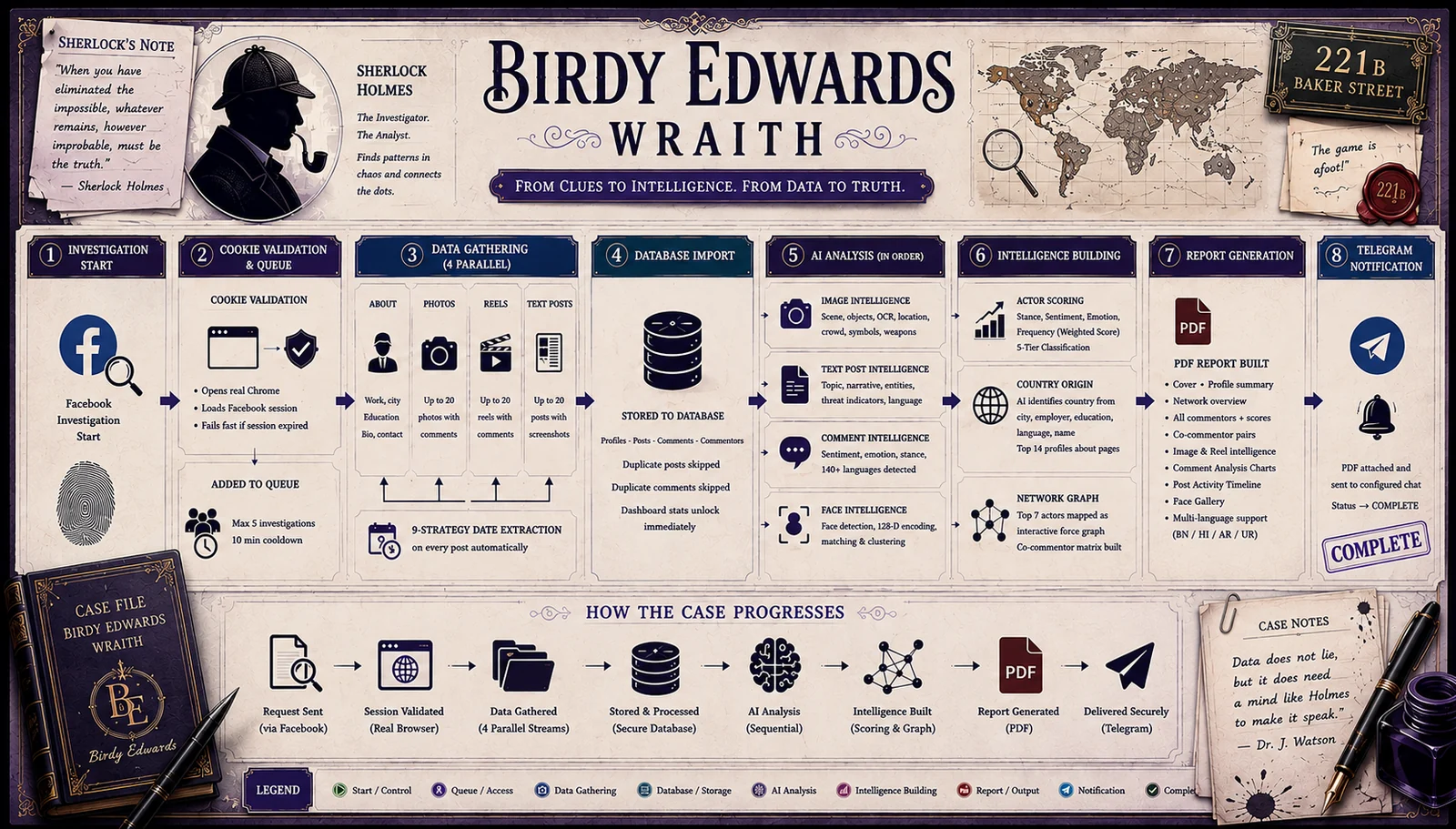
How it works

BIRDY-EDWARDS Pipeline

What's new in v2.0

  • 🗽 Flexibility - Now you can stop investigation in any phase and generate report pdf
  • 🎬 Reel intelligence — AI extracts context summary, topic, named entities, and hashtags from every reel caption
  • 🔗 Co-commentor coordination matrix — Heatmap of who comments alongside whom. Click any cell to see shared posts
  • 👤 HOG + CNN hybrid face detection — Auto model selection by image size with CNN→HOG fallback. Face detection now runs on text post screenshots too
  • 📬 Telegram notifications — PDF report automatically sent to your configured Telegram chat on completion
  • 📄 Full PDF suite — Added image intelligence, reel intelligence, face gallery, post timeline, co-commentor pairs sections. Bengali, Hindi, Arabic, Urdu render correctly
  • ⚙️ Investigation queue — Up to 5 investigations queued and auto-executed sequentially
  • 🔄 Real-time progress page — Live stat counters unlock as data arrives during the pipeline
  • 📅 Date and Time Modification - During scraping it may possible that we gather the date only not exact timestamp, so as an investigator if you want to modify this into exact timestamp it is possible now.

Features

  • 🔍 Profile collection — Automated data gathering of posts, photos, reels, about data, comments, commentor profile links and names with 9-strategy date extraction
  • 🗂️ Batch investigation — Submit up to 10 mixed post URLs and run full AI pipeline across all of them
  • 🧠 Interaction intelligence — AI sentiment, stance, emotion, and language analysis per interaction in 140+ languages including Bengali, Hindi, Arabic, Urdu, Kuki
  • 📊 Actor scoring — Weighted composite score with 5-tier classification. Top 14 secondary profiles scraped in medium and deep scans
  • 🌍 Country detection — LLM identifies country of origin from profile signals with confidence % badge and on-demand per-commentor detection
  • 🔬 Image intelligence — Vision LLM per photo for scene, crowd, symbols, weapons, OCR, and location estimation
  • 🎬 Reel + text post intelligence — AI extracts entities, topics, narrative types, and threat indicators from captions and posts
  • 👤 Face intelligence — HOG + CNN hybrid detection, 128D encoding, identity clustering, D3 face tree visualization
  • 🕸️ Network graphs — Interactive D3 force graph, co-commentor heatmap matrix with shared posts on click, surname cluster edges
  • 📄 PDF reports — Full intelligence report with image intelligence, reel intelligence, face gallery, post timeline, co-commentor analysis and multilingual script rendering
  • 📬 Telegram delivery — PDF report sent automatically to configured chat on investigation completion
  • 🤖 Local AI — Ollama powered, gemma4:e2b / e4b / 12b and other models, runs on GPU or CPU
  • 🐳 Docker ready — One command deployment on Linux and Windows

⚠️ Disclaimer

BIRDY-EDWARDS is developed strictly for authorized intelligence, law enforcement, and academic research purposes only.

Scope of data access:

  • This tool operates exclusively using a valid Facebook session authenticated by the operator
  • It only accesses publicly visible profile data, posts, photos, reels, and comments
  • It does not access private messages, locked profiles, restricted content, or any data not visible to a logged-in user
  • It does not use bots, fake accounts, or automated account creation — the operator supplies their own authenticated session

Legal responsibility:

  • This tool must only be used on profiles and content where you have explicit legal authorization to collect and analyze data
  • Use without authorization may violate Facebook's Terms of Service, applicable privacy laws (GDPR, IT Act, DPDP Act), and local regulations
  • The developer assumes no liability for misuse, unauthorized data collection, or any harm caused by improper use
  • All investigations are the sole responsibility of the operator

By using BIRDY-EDWARDS, you confirm that your use is lawful, authorized, and compliant with all applicable laws in your jurisdiction.


System Requirements


Installation

Prerequisites

Step 1 — Install Docker

  • Linux: https://docs.docker.com/engine/install/ubuntu/
  • Windows: https://docs.docker.com/desktop/install/windows-install/

Step 2 — Install Ollama

  • Linux:
root@kitploit:~
curl -fsSL https://ollama.com/install.sh | sh
  • Windows: Download installer from https://ollama.com/download

Step 3 — Start Ollama bound to all interfaces

  • Linux:
root@kitploit:~
OLLAMA_HOST=0.0.0.0:11434 ollama serve

To make this permanent:

root@kitploit:~
sudo systemctl edit ollama

Add:

root@kitploit:~
[Service]
Environment="OLLAMA_HOST=0.0.0.0:11434"
root@kitploit:~
sudo systemctl daemon-reload && sudo systemctl restart ollama
  • Windows: Ollama listens on all interfaces by default — no extra configuration needed. If not then,
root@kitploit:~
$env:OLLAMA_HOST="0.0.0.0"
ollama serve

Quick Start

Step 1 — Clone the repository

root@kitploit:~
git clone https://github.com/jeet-ganguly/birdy-edwards.git
cd birdy-edwards

Step 2 — Create required files and directories

  • Linux:
root@kitploit:~
mkdir -p app/reports app/face_data app/post_screenshots app/status
touch app/fb_cookies.pkl app/socmint.db app/socmint_manual.db app/.ollama_model app/queue.db
  • Windows (PowerShell):
root@kitploit:~
New-Item -ItemType Directory app/reports, app/face_data, app/post_screenshots, app/status
New-Item -ItemType File app/fb_cookies.pkl, app/socmint.db, app/socmint_manual.db, app/.ollama_model

Step 3 — Build the Docker image

⚠️ First build takes 15–25 minutes — dlib compiles from source. Subsequent builds are fast (layers cached).

root@kitploit:~
docker compose build

Step 4 — Start the container

root@kitploit:~
docker compose up -d

docker compose logs -f

Step 5 — Open the web UI

root@kitploit:~
http://localhost:5000

Step 6 — Import session cookies

root@kitploit:~
http://localhost:5000/tools/import-cookies

Pull an AI Model

Pull a model on your host machine:

root@kitploit:~
ollama pull gemma4:e2b

Or use the AI Model panel in the web UI — select a model and click Apply & Pull.

If you are using a Virtual Machine, choose a model according to the VM's allocated RAM.


Import Session Cookies

BIRDY-EDWARDS requires a valid Facebook session. Use the Cookie-Editor browser extension — works on all platforms, no Selenium required.

🔒 Operational Security: It is strongly recommended to use a dedicated sock puppet account for investigations rather than your personal Facebook account. This protects your identity and prevents your primary account from being flagged or restricted.

  1. Install Cookie-Editor → Chrome · Firefox
  2. Log into your dedicated investigation account on Facebook
  3. Click Cookie-Editor while on facebook.com
  4. Click Export → Export as JSON
  5. Go to http://localhost:5000/tools/import-cookies and paste

Configure Telegram Notifications

Get your PDF report delivered automatically after every investigation.

  1. Create a Telegram bot via @BotFather and copy the bot token
  2. Get your chat ID — send a message to your bot then visit https://api.telegram.org/bot<TOKEN>/getUpdates
  3. Go to the Telegram panel in the web UI
  4. Paste your bot token and chat ID and click Save
  5. Click Test to verify the connection

From this point every completed investigation automatically sends a notification with the PDF report attached.


How You Can Help

If you find BIRDY-EDWARDS useful or interesting, here are a few ways you can support the project:

  • ⭐ Star the repository — it helps others discover the tool
  • 🐛 Report bugs — open an Issue if something isn't working
  • 🔧 Contribute — check the Contributing section to get started
  • 📢 Share it — post it in OSINT communities, forums, X or with colleagues who might find it useful
  • 💬 Give feedback — suggestions for new features or improvements are always welcome

Every contribution, big or small, helps build better tools for the OSINT and threat intelligence community.


Troubleshooting

Ollama not reachable from Docker

root@kitploit:~
docker exec -it birdy-edwards curl http://host.docker.internal:11434/api/tags

If it fails, restart Ollama with OLLAMA_HOST=0.0.0.0:11434 ollama serve

DB error: no such table or other DB related error
Start a new investigation — schema is created automatically on first use. If you stop the process during analysis, delete that investigation and start a new one.

Cookies expired
Go to http://localhost:5000/tools/import-cookies and re-import fresh cookies.

Port 5000 already in use
Change in docker-compose.yml: "5001:5000" then access at http://localhost:5001

Out of memory during build
Increase Docker Desktop memory to 8 GB+ via Settings → Resources → Memory

Map not loading
Leaflet + ArcGIS tiles require internet access on the host machine. If running fully air-gapped, the map container will appear blank — all other features work normally.

Telegram not sending
Confirm your bot has been started by sending it a /start message. Verify the chat ID is correct using the getUpdates URL. Check that port 443 is not blocked on your network.


Contributing

Contributions are welcome. Please follow these guidelines to keep the project clean and consistent.

Reporting bugs

  • Open an Issue describing the bug, steps to reproduce, and your environment (OS, RAM, Docker version)
  • Attach relevant logs from docker compose logs

Feature requests

  • Open an Issue with a clear description of the feature and its use case
  • Discuss before opening a Pull Request for large changes

Submitting a Pull Request

  • Fork the repository
  • Create a feature branch: git checkout -b feature/your-feature-name
  • Commit your changes: git commit -m "Add: short description"
  • Push to your branch: git push origin feature/your-feature-name
  • Open a Pull Request against main

Code guidelines

  • Follow existing code style — Python 3.12, Flask conventions
  • Test your changes locally via Docker before submitting
  • Do not commit fb_cookies.pkl, databases, or any scraped data
  • Keep scraper changes minimal — Facebook DOM changes frequently

What we welcome

  • Bug fixes and stability improvements
  • New Ollama model support
  • UI improvements
  • Documentation improvements
  • Additional language support for OCR and comment analysis

What we do not accept

  • Features that bypass platform security controls
  • Changes that introduce cloud dependencies
  • Code that stores or transmits investigation data externally

Acknowledgements

  • Inspired by Sherlock
  • Inspired by the OSINT and threat intelligence research community
  • SeleniumBase — Undetected Chrome automation
  • Ollama — Local LLM inference engine
  • face_recognition — Face detection and encoding library
  • Leaflet — Interactive map library
  • ArcGIS — Map tiles with correct constitutional boundaries
  • pyvis — Interactive network graph visualization
  • reportlab — PDF generation
  • pytesseract — OCR engine wrapper
  • D3.js — Data visualization and interactive graphs

BIRDY-EDWARDS Wraith 2.0 · Infiltrate & Expose ·

Download Tool
ComponentMinimumRecommended
OSUbuntu 24.04 LTS / Windows 10+Ubuntu 24.04 LTS
RAM8 GB16 GB
Storage20 GB free40 GB free
DockerDocker Desktop / EngineLatest stable
OllamaLatestLatest
RAMRecommended ModelNotes
8 GBgemma4:e2bBest vision, 140+ languages
16 GBgemma4:e4bBetter reasoning, 140+ languages
32 GBgemma4:12bHigher accuracy across all modules
32 GB+gemma4:27bMaximum accuracy