 hullabrian/eventhorizon
Tool that gathers a customizable set of ETW telemetry and generates user-defined detections

EventHorizon is a tool meant to arm security analysts and/or researchers with Event Tracing for Windows (ETW) telemetry that, coupled with sigma-like rules, allow for robust endpoint detection and response capabilities. That being said, EventHorizon is in no way a replacement for proper solutions. This project primarily is meant to allow for ease of use when collecting ETW telemetry as well as generating detection rules without having to write code. In order to increase this ease of use, the setup process for EventHorizon is intended to be as simple as possible, with a provided .msi installer (see releases tab) and basic installation instructions (see wiki).
[!WARNING]
Only use EventHorizon in a testing environment (NOT PRODUCTION). Installation requires certain Windows security features to be disabled, and I do not guarantee that EventHorizon is a secure or professionally written piece of software.
To get started, go to the EventHorizon Wiki
While I cannot promise that I will be maintaining EventHorizon, in the future I would like to add/change a few things:
EventHorizon consists of several components spread across both user and kernel mode. The following sections are aimed to provide a detailed overview of the components and a general idea of what they do.
As far as user mode goes in EventHorizon there is a single service called EventHorizon which serves to orchestrate the other various usermode components of EventHorizon. Files related to usermode functionality are located in C:\Program Files\EventHorizon\ although this path can change during installation.
EventHorizon's kernel mode component consists of a single Early Launch Antimalware (ELAM) driver named EventHorizonELAM which is located in C:\Windows\System32\drivers\.

EventHorizon also attempts to have as little overhead as possible on the system. At idle, it typically will only use a little over 2MB of RAM. That being said, the more telemetry being received and the more rules that are loaded, the more processing power/RAM will be used. If you use a provider which has a high volume of events then you can quickly ramp up resource consumption.
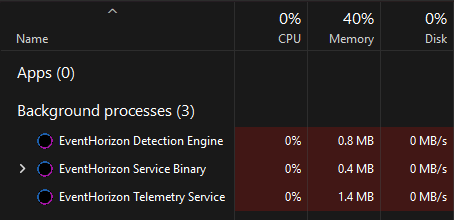
EventHorizon Orchestration (EventHorizon.exe): orchestrates user mode components related to EventHorizon's functionality. When the service starts, it will spawn the telemetry executable and detection engine with PPL AntiMalware protections and monitor them if they for some reason terminate. Also handles uninstallation requests.
EventHorizon Telemetry (EventHorizonTelemetry.exe): reads ETW configuration, subscribes to relevant providers, filters incoming events, and sends them through a named pipe using a queue to the detection engine.
EventHorizon Detection Engine (EventHorizonDetectionEngine.exe): loads rules, receives telemetry from the telemetry executable, and fires detections in the Windows Event Viewer if rules are triggered.

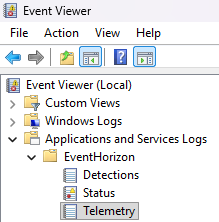
Within the Windows Event Viewer under Applications and Services Logs > EventHorizon are 3 different channels used by EventHorizon.
Events related to the channel names are placed there. Please refer to the wiki for more information on specific events.
As previously mentioned, EventHorizon's kernel mode component consists of a single Early Launch Antimalware (ELAM) driver named EventHorizonELAM which is located in C:\Windows\System32\drivers\. This ELAM driver is what allows EventHorizon's user mode components to gain PPL AntiMalware protections. Additionally, the driver responds to requests made by user mode components through IOCTLs to:
EventHorizon relies on a few libraries:
Below is a list of resources I used during development, but first I'd like to thank a few people for their direct contributions. First off, I'd like to thank Jacob Acuna for his early contributions to the overall structure and functionality of the project. Additionally I'd like to thank Eric Esquivel, Julian Peña, and Kyle Avery for their valuable insights.
