 gwerneckp/vidaa-tv-spyware
What my Hisense VIDAA TV does in the background: ACR viewing tracking, decoded and captured, and how to turn it off

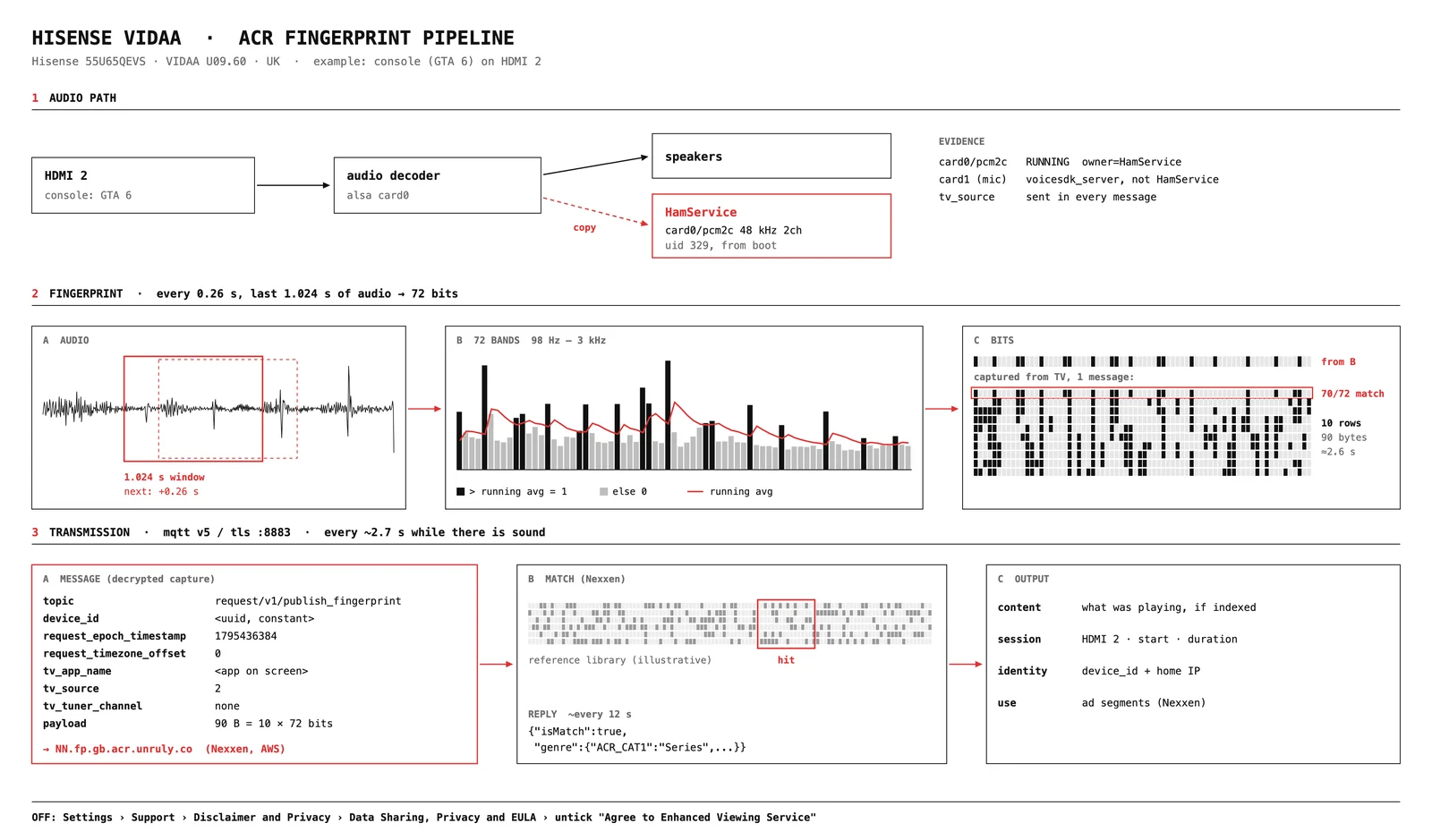
I bought this TV and got frustrated with it fast. I couldn't install Jellyfin, which is what I use to watch films I own. And the TV was bloated: the home screen had no way of reorganising apps, and it was full of ads and VIDAA promotions I didn't care about.
Then I found carteakey/alvidaa and started looking into how to fix that. I ended up rooting the TV. I did it by getting a file of my own onto the TV through the browser-facing fetcher action, which is a file write that needs no privileges, and then letting the superwatch daemon install it: its postinst runs as uid 0. Boot persistence is a vendor js-service, so nothing in the boot chain is modified. A full write-up is here: 55U65QEVS / V0000.09.60A.Q0602. If you have a VIDAA TV and you're interested in doing the same, I recommend reading that repo.
I'd also recommend doing it with the help of an agentic AI model; I used DeepSeek. But make sure you understand what's happening at each step. Bricking your TV is always a risk with this kind of thing, and rooting it has warranty implications too.
Once that was done, I started looking around the TV for bloat, for fun: removing apps and checking which services were always running. That's when I came across what's in this repo.
I'm as privacy-conscious as the next person. I don't really like ads, but I don't mind watching a few, especially if the service I'm getting is free. Sometimes, though, you have to draw a line on how much data companies collect from something you paid for.
What annoyed me most was this. If I'm playing video games on another input, one that has nothing to do with VIDAA's software, the sound of what I'm playing gets fingerprinted, just because it's coming out of the TV, and sent to an ad company whose business is targeting ads.
So here's what I found, and what I removed from my TV.
The rest of this page is the readable version. The numbered files go into how each part works, with the evidence.
The TV is a Hisense 55U65QEVS (MediaTek MT9618, VIDAA U09.60, firmware V0000.09.60A.Q0602, UK model). I checked all this on 21–23 November 2026.
| What | Running on my TV? | Sends data out? | Details |
|---|---|---|---|
| Viewing tracking (ACR). Recognises what's on screen from its sound, on every input. | yes, on since setup (now switched off, see 7) | yes, to an ad company | 01 |
| Microphone. The built-in mic is read all the time for hands-free voice. | yes | nothing seen | 02 |
| Advertising ID and ads. A per-TV ID for ads, plus an ad module. | yes | with ad requests | 03 |
| Usage logs. Which app, what happened, when, tagged with serial and MAC. | on demand | yes, to Hisense | 04 |
| Always-on cloud links. VIDAA, Netflix and Prime Video stay connected while you're not using them. | yes | yes | 05, 06 |
The first one is the big one.
flowchart LR
    subgraph inputs[What you watch]
        A[Apps on the TV]
        H[HDMI: console, set-top box, laptop]
        T[Live TV]
    end
    inputs --> S((TV sound output))
    S --> HAM[HamService<br/>audio fingerprint<br/>continuously]
    HAM -->|"fingerprint + device ID + app name<br/>+ input + time (+ your IP)"| NX[(Nexxen<br/>ad company)]
    NX -->|"match: what you're watching"| HAM
    MIC[Built-in microphone] --> VS[voicesdk_server<br/>wake-word pipeline]
    TV[TV system] -->|usage logs, serial, MAC| HS[(Hisense / VIDAA)]
    NF[Netflix, Prime Video<br/>preloaded] -->|always connected| AWS[(Their servers)]
One process, HamService, holds a permanent encrypted connection to a server on Amazon's cloud. Inside it is a software kit from Nexxen (formerly Tremor International / Unruly), an advertising company. What it does is automatic content recognition, or ACR.
It runs all the time, and the method is simple. I decoded it from the program's machine code and then checked it against real traffic (below):
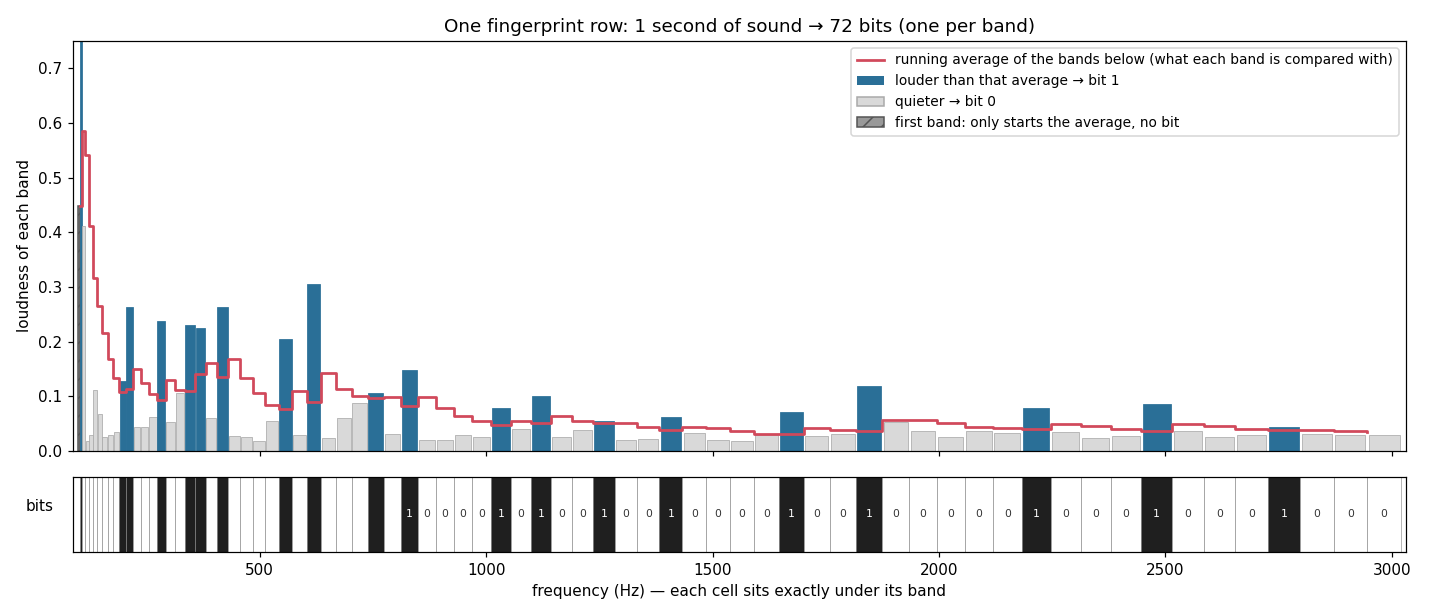
sequenceDiagram
    participant TV as TV sound
    participant H as HamService
    participant N as Nexxen server
    loop every ~0.26 s
        TV->>H: last 1 s of sound
        H->>H: 72 bands → 72 bits (one row)
    end
    loop every ~2.7 s while there's sound
        H->>N: 10 rows (90 bytes) + device ID + app name + input + time
    end
    N-->>H: match / no match (about every 12 s)
Because it listens to the sound output, it doesn't care where the picture comes from. Say you were playing on a console plugged into HDMI 2. Every message would carry the input number and the time, so the session and how long it lasted are recorded. If you then opened Netflix on the console, the show could be recognised from its sound, just as if you'd watched it on the TV. Same for a cable box, a laptop, or apps I installed myself.
On a silent screen it sends nothing. The program has an explicit check: "Silence detected, omitting fingerprint".
Turning off personalised ads doesn't stop it either. Mine was off the whole time (adtarget = 0), and the tracking setting was still on (acr.switch = 1, plus the "Enhanced Viewing" consent from setup, pn4_enhance = 1). They're separate switches.
The connection is encrypted, but the TV is mine. I added my own certificate to the list the service trusts and passed its connection through a small relay that logs each message before sending it on, unchanged (how: METHOD). Here is one real message, sent while a test video played: