
A lightweight hex editor and decompiler to solve your binary file analysis problems.
Open platform for reverse engineering.
EUVA isn't just a hex editor and decompiler; it's more of a reverse engineering platform that you customize, rather than having it customize. It's a platform you can plug into anything, and it won't object. We're committed to the community's interests and support maximum tool flexibility and quick integration with other analyzers perhaps your own, or perhaps industrial ones? We don't want to turn the tool into another decompiler, because decompiling isn't fun; IDA, Binija, and others can do it. But we're building something better, trying to build a better architecture, and that's probably our main goal. EUVA will evolve not on its own, but with the community.
This program is under active development. Experimental builds may contain bugs or lead to unexpected behavior. Use with caution.
This software is provided "as is", without warranty of any kind. EUVA is a high-precision instrument designed for educational purposes and security research. The author is not responsible for any system instability, data loss, or legal consequences resulting from the misuse of this tool.
By using EUVA, you acknowledge that you are solely responsible for your actions, you understand the risks of modifying binary files and process memory, and you will respect the laws and regulations of your jurisdiction.
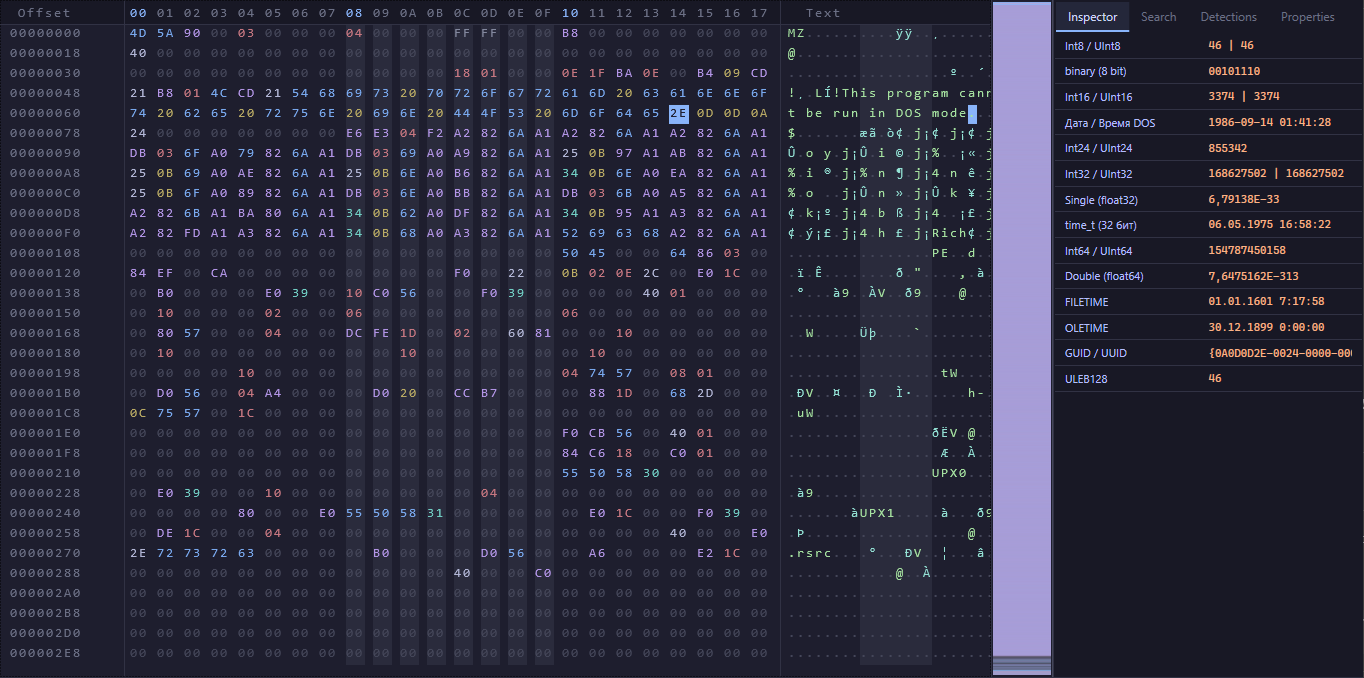
Check out the capabilities of our hex editor, which also includes our DSL for replacing values. This was designed to make it easy to share patches, isn't it? Let's say you're creating something that requires a patch and want to share it with someone else. It's all quite simple: just send them our .euv script, the program applies the patch to the binary file, and you're done no headaches.
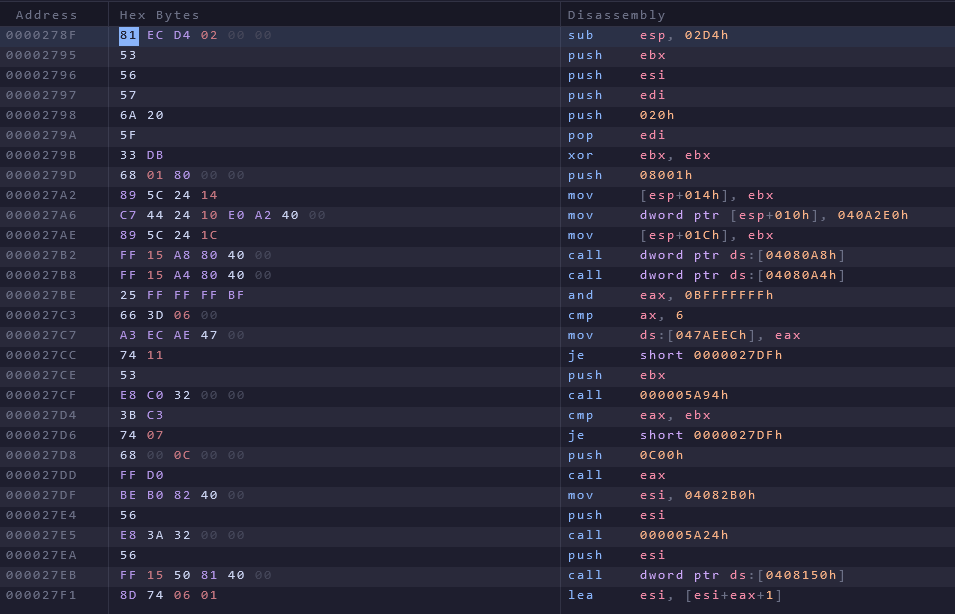
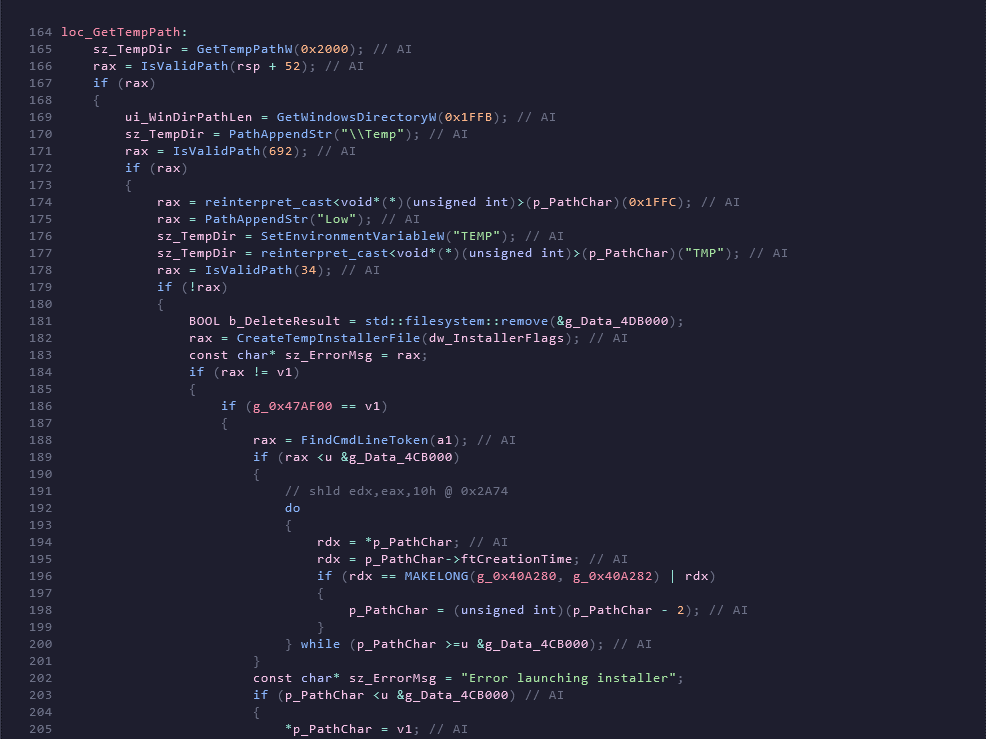
Perhaps one of the most important parts of our work is the decompiler it was designed and is being designed with the goal of conveying the meaning of the program's actions as best as possible. We strive to make it user-friendly, because digging through other decompilers is a pain because they act like translators, and you're searching for some kind of meaning in this madness. With our decompiler, the situation is also not simple, but we lower the entry barrier and try to reconstruct the decompiled code as humanly understandable as possible. Of course, we don't do this blindly, and there are limitations to everything, but it's still much better than reading raw C, which isn't even fully translated yet. This is not always convenient, so we are here to try to apply C++ abstractions to decompiled code and be satisfied with the result.
example output:
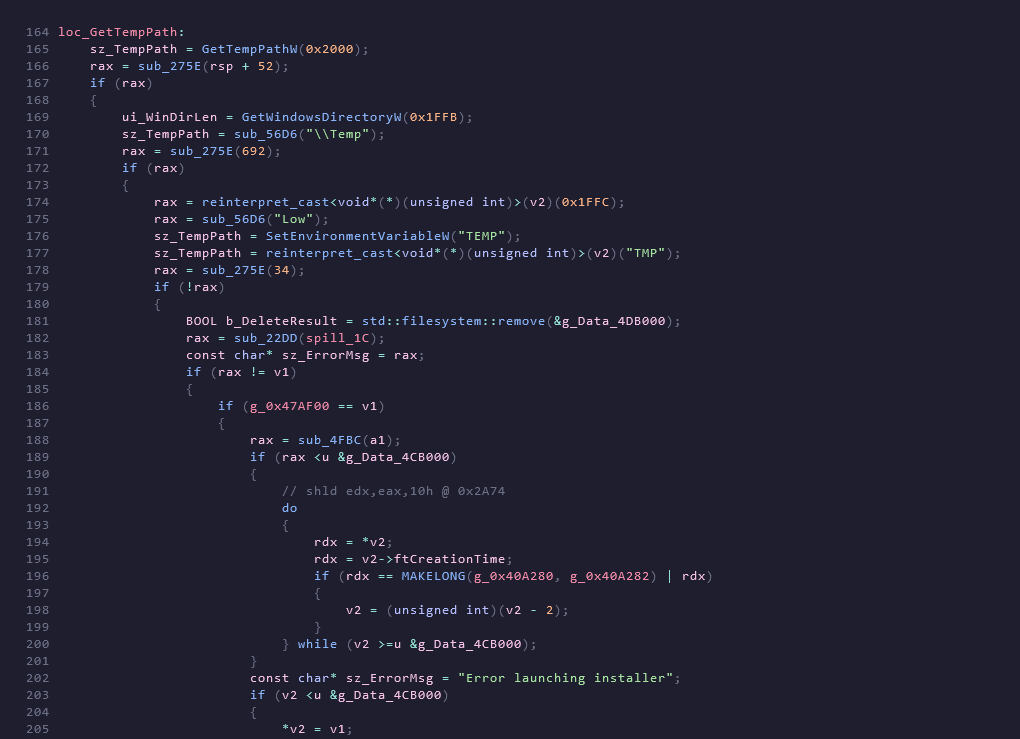
If you are unsure about the decompiler's arguments, please double-check its results by viewing the disassembler.
If we approach this perfectly, we're not just talking about adding a Themida-like protector detection feature, but also about the decompiler itself. Incidentally, it also supports your patches thanks to C# scripts that are compiled dynamically using Roslyn. These can be called plugins for the decompiler, sort of calibrating it to your needs. This also applies to Yara rules. Perhaps it's the Virustotal integration we recently completed? We don't plan to stop there; we'll continue to develop in this area.
So, we have a dual system: a built-in function in the AI refactoring program where you specify your API key. Points must also comply with the OpenAI standard. This is a quick-intervention button if you don't plan to delve deeply into the process or if you need to conduct analysis discreetly, without the cloud, using local AI models. We also have integration with MCP, which is quite convenient because the model has access to everything it needs. It can read decompiled code and modify it according to your wishes, helping you learn and understand. You can get started with any service that supports MCP by simply configuring the required configuration file. MCP is suitable for those who want to delve deeper and are comfortable using the cloud. It's all your choice. I think we'll keep this flexible approach.
[!NOTE] Your Choice, Your Control: The AI Agent is a "Bring Your Own Key" system. It supports Cloud LLMs (OpenAI, Claude, Groq) and Local LLMs (Ollama, LocalAI). Privacy is paramount.
🟢 After AI (Semantic Refactor)
example output:
Ctrl+Z) and full-session rollback (Ctrl+Shift+Z).euv format) with live file-watch executionDownload from the releases or install EUVA via winget
winget use:
winget install Euva-Project.EUVA
Or build the program from the source files using the guide below.
Before building, make sure you have the following installed:
| Requirement | Version | Link |
|---|---|---|
| .NET SDK | 8.0+ | download |
| Windows OS | 10 / 11 | Required (WPF) |
[!NOTE] EUVA is a Windows-only application built on WPF. Linux/macOS are not currently supported.
# 1. Go to the main directory
cd EUVA/EUVA.UI
# 2. Restore dependencies
dotnet restore
# 3. Build in Release mode
dotnet build -c Release
# 4. Run (optional, or launch the compiled binary)
dotnet run -c Release
Ctrl+D to open the Disassembler, Ctrl+E for the DecompilerDive deeper into the theory and mechanics:
You can reassign hotkeys by loading (via the settings in the program menu) and editing the .htk file.
Q: Why use EUVA's built-in AI instead of AI plugins for IDA or Ghidra?
A: In legacy tools AI is just a "bolt-on" crutch that freezes the UI while scripts push text back and forth. In EUVA AI is part of the core. Our pipeline injects semantic-level changes in fast. It’s not a "plugin" it’s a symbiosis: the decompiler provides facts and the AI provides meaning. Zero stutters.
Q: Will my code leak to the cloud?
A: Only if you want it to. EUVA follows a Local First philosophy. Connect Ollama or any local server and work completely offline. Your reverse is your secret.
Q: What if the AI starts hallucinating and lying about the code?
A: Of course, this is not excluded. We work on a "Trust but Verify" basis. The AI cannot invent logic it only suggests names for variables that actually exist in the code. All changes are marked with /* AI */ comments. If you don't like it one click or a hotkey rolls everything back to the raw state.
Q: How flexible is EUVA? Can I customize it for myself?
A: This is the main feature. EUVA is a platform.
Q: Why should I use EUVA if I have IDA Ghidra or Binary Ninja?
A: Because these are heavy monolithic programs
We welcome the street-smart netrunners and corporate-grad researchers alike.
PRs Welcome: Found a bug or optimized a pipeline stage? Submit a PR! 🚀
I will also be grateful for the stars - the stars are the future of the project ⭐.
EUVA is free software released under the GNU General Public License v3.0.
GNU GENERAL PUBLIC LICENSE
Version 3, 29 June 2007
Copyright (C) 2026 EUVA Contributors
This program is free software: you can redistribute it and/or modify
it under the terms of the GNU General Public License as published by
the Free Software Foundation, either version 3 of the License, or
(at your option) any later version.
This program is distributed in the hope that it will be useful,
but WITHOUT ANY WARRANTY; without even the implied warranty of
MERCHANTABILITY or FITNESS FOR A PARTICULAR PURPOSE. See the
GNU General Public License for more details.
You should have received a copy of the GNU General Public License
along with this program. If not, see <https://www.gnu.org/licenses/>.
---
EngineUnpacker Visual Analyzer (EUVA)
Professional PE Static Analysis Tool
Educational tool for reverse engineering research.
Use responsibly and in accordance with applicable laws.
EUVA – built for researchers who read hex for fun.
Built with ❤️ for the Reverse Engineering Community | © 2026 EUVA Project
| Command | Shortcut | Description |
|---|
NavInspector | Alt+1 | Switch to Inspector tab |
NavSearch | Alt+2 | Switch to Search tab |
NavDetections | Alt+3 | Switch to Detections tab |
NavProperties | Alt+4 | Switch to Properties tab |
CopyHex | Ctrl+C | Copy selection as hex string |
CopyCArray | Ctrl+Shift+C | Copy selection as C byte array |
CopyPlainText | Ctrl+Alt+C | Copy selection as Plain text |
Undo | Ctrl+Z | Undo last byte write |
FullUndo | Ctrl+Shift+Z | Revert entire last script run |
View byte | F3 | View the latest bytes changes |
View Yara Matches | Shift+F3 | View matches found by Yara |
View Disassembler | Ctrl+D | View Disassembler |
View Decompiler | Ctrl+E | View Decompiler, use F5 to switch between graphics mode and text mode |
Highlight code | Ctrl+A | Selecting code in text form in a decompiler |
Function table | Ctrl+R | show function table in decompiler |
IAT Import | Ctrl+E | show all IAT imports in the decompiler |
Xrefs To | X | display all variables that are called in the decompiler code |
Xrefs From | X | see where the current instruction refers (Disassembler) |
Parent navigation | P/Enter | view the parent of a disassembler instruction (Disassembler) |