dnSpyEx
dnSpyEx is an unofficial continuation of the dnSpy project which is a debugger and .NET assembly editor. You can use it to edit and debug assemblies even if you don't have any source code available. Main features:
- Debug .NET and Unity assemblies
- Edit .NET and Unity assemblies
- Light and dark themes
See below for more features
Binaries
Latest stable release: https://github.com/dnSpyEx/dnSpy/releases
If you like living on the edge you can use the latest "beta" builds from:

Building
git clone --recursive https://github.com/dnSpyEx/dnSpy.git
cd dnSpy
# or dotnet build
./build.ps1 -NoMsbuild
To debug Unity games, you need this repo too: https://github.com/dnSpyEx/dnSpy-Unity-mono
Debugger
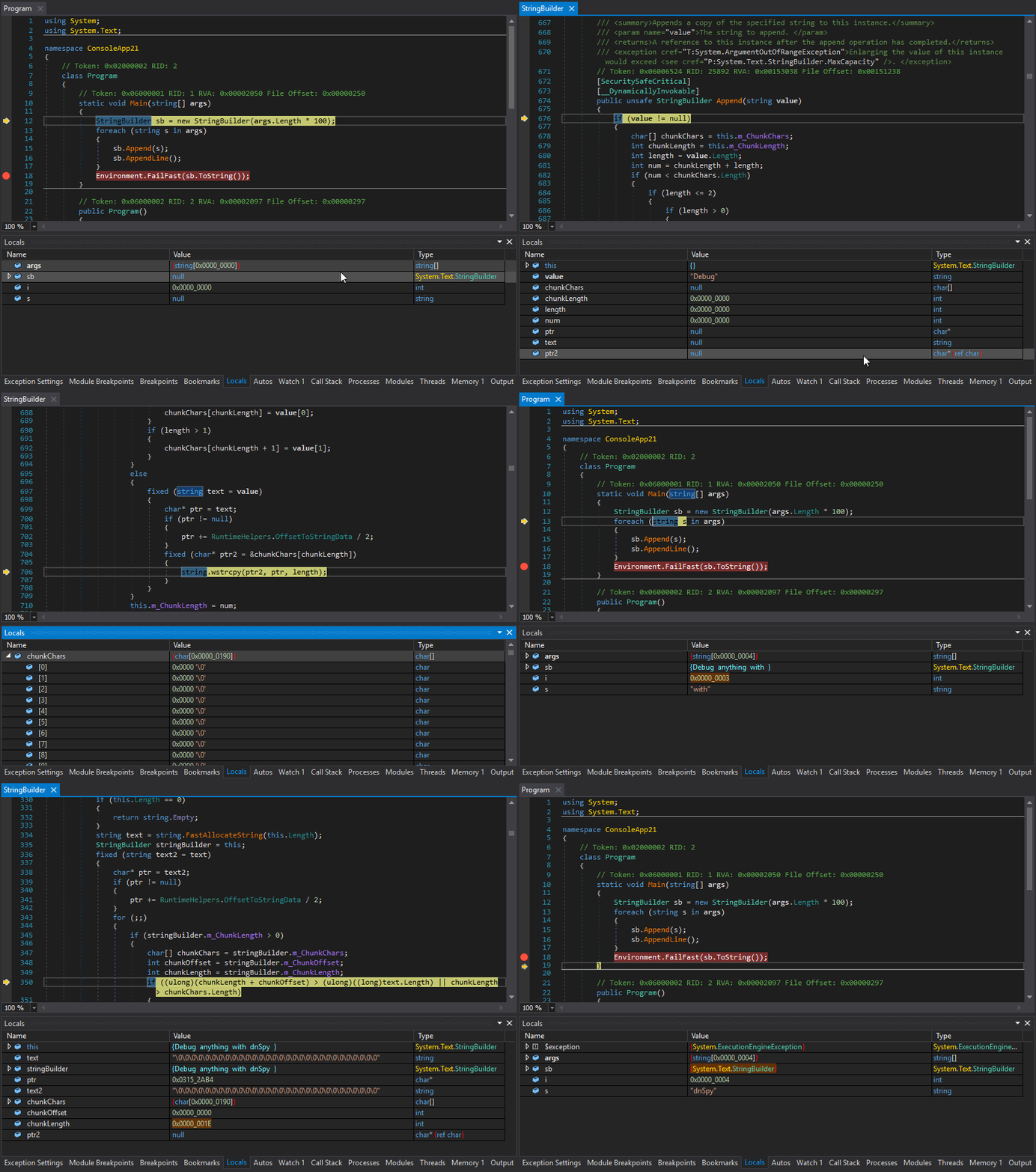
- Debug .NET Framework, .NET and Unity game assemblies, no source code required
- Set breakpoints and step into any assembly
- Locals, watch, autos windows
- Variables windows support saving variables (eg. decrypted byte arrays) to disk or view them in the hex editor (memory window)
- Object IDs
- Multiple processes can be debugged at the same time
- Break on module load
- Tracepoints and conditional breakpoints
- Export/import breakpoints and tracepoints
- Optional Just My Code (JMC) stepping filters for system libraries
- Call stack, threads, modules, processes windows
- Break on thrown exceptions (1st chance)
- Variables windows support evaluating C# / Visual Basic expressions
- Dynamic modules can be debugged (but not dynamic methods due to CLR limitations)
- Output window logs various debugging events, and it shows timestamps by default :)
- Assemblies that decrypt themselves at runtime can be debugged, dnSpy will use the in-memory image. You can also force dnSpy to always use in-memory images instead of disk files.
- Bypasses for common debugger detection techniques
- Public API, you can write an extension or use the C# Interactive window to control the debugger
Assembly Editor
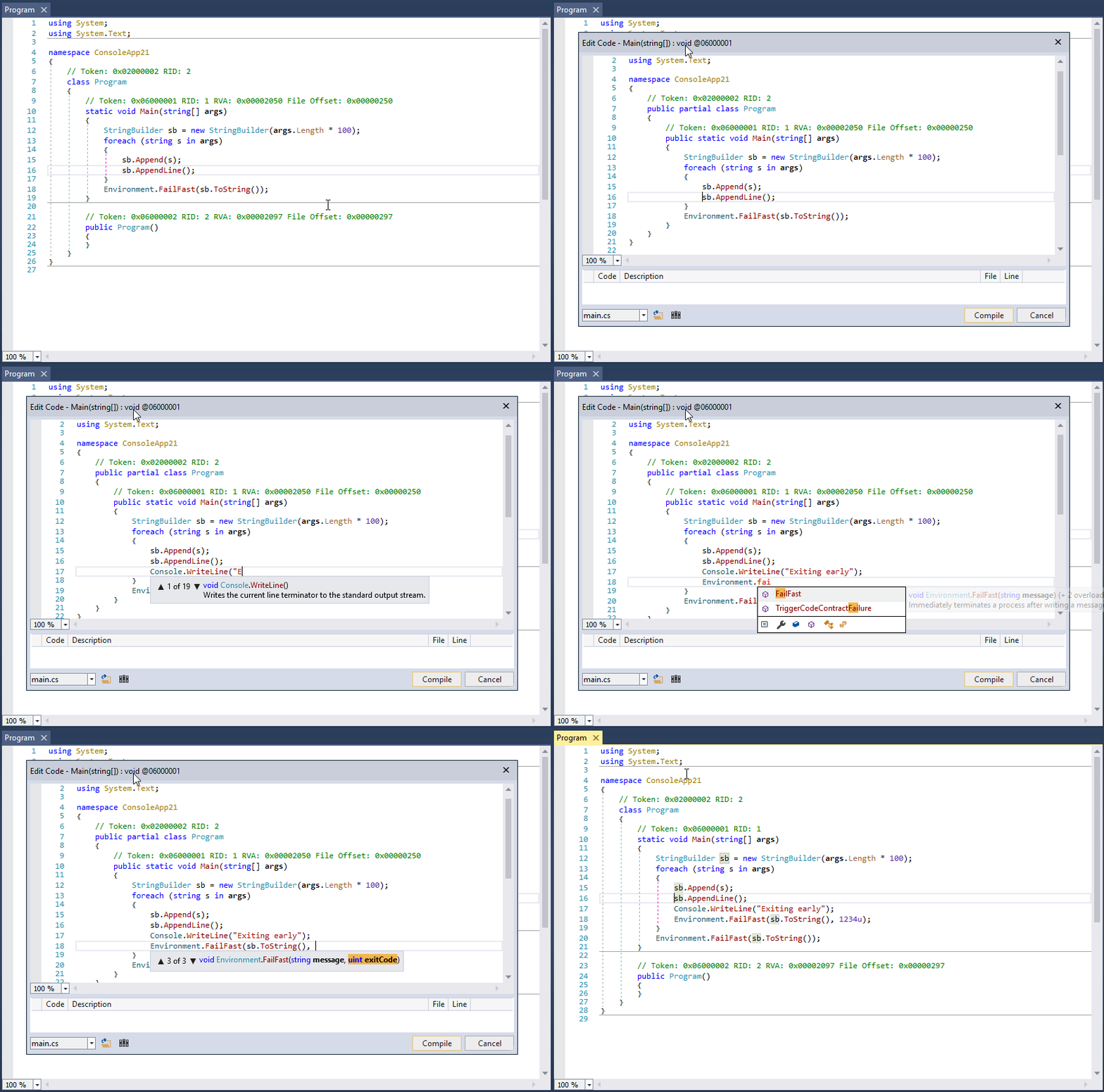
- All metadata can be edited
- Edit methods and classes in C# or Visual Basic with IntelliSense, no source code required
- Add new methods, classes or members in C# or Visual Basic
- IL editor for low-level IL method body editing
- Low-level metadata tables can be edited. This uses the hex editor internally.
Hex Editor
- Click on an address in the decompiled code to go to its IL code in the hex editor
- The reverse of the above, press F12 in an IL body in the hex editor to go to the decompiled code or other high-level representation of the bits. It's great to find out which statement a patch modified.
- Highlights .NET metadata structures and PE structures
- Tooltips show more info about the selected .NET metadata / PE field
- Go to position, file, RVA
- Go to .NET metadata token, method body, #Blob / #Strings / #US heap offset or #GUID heap index
- Follow references (Ctrl+F12)
Other
- BAML decompiler and disassembler
- Blue, light and dark themes (and a dark high contrast theme)
- Bookmarks
- C# Interactive window can be used to script dnSpy
- Search assemblies for classes, methods, strings, etc
- Analyze class and method usage, find callers, etc
- Multiple tabs and tab groups
- References are highlighted, use Tab / Shift+Tab to move to the next reference
- Go to the entry point and module initializer commands
- Go to metadata token or metadata row commands
- Code tooltips (C# and Visual Basic)
- Export to project
List of other open source libraries used by dnSpy
- ILSpy decompiler engine (C# and Visual Basic decompilers)
- Roslyn (C# and Visual Basic compilers)
- dnlib (.NET metadata reader/writer which can also read obfuscated assemblies)
- VS MEF (Faster MEF equals faster startup)
- ClrMD (Access to lower level debugging info not provided by the CorDebug API)
- Iced (x86/x64 disassembler)
- Newtonsoft.Json (JSON serializer & deserializer)
- NuGet.Configuration (NuGet configuration file reader)
Translating dnSpy
Click here if you want to help with translating dnSpy to your native language.
Wiki
See the Wiki for build instructions and other documentation.
License
dnSpy is licensed under GPLv3.
 dnspyex/dnspy