
 cyllex-framework/cyllex-argus
Local AI-assisted threat intelligence pipeline that ingests web, RSS and document sources, extracts quote-verified claims, and maps adversary profiles to MITRE ATT&CK with STIX and Sigma exports.


AI-powered adversary intelligence for purple teams.
Argus investigates a threat across the web, your RSS feeds and documents you supply, extracts quote-backed claims with an LLM, consolidates them into confidence-scored assessments mapped to MITRE ATT&CK, and lets a human review every step. It runs entirely on your own machine.


The pipeline runs once per document, writing atomic claims plus the verbatim quote behind each one and a per-stage audit row. The Validator verifies every quote against the text, resolves entities against the local store and the ATT&CK catalogue, and consolidates claims across sources into the assessments the UI renders. Only Triage, Analyst and the summary writer ever touch a model; the Validator is plain code.
Argus ships its web UI pre-built, so installing needs only Python 3.12+ (no Node, no build step). It runs on Windows and Linux and is not on PyPI yet, so install it from the repository or a release wheel.
# from a clone of the repository
git clone https://github.com/Cyllex-Framework/Cyllex-Argus.git
cd Cyllex-Argus
python3 -m venv .venv
. .venv/bin/activate              # Windows PowerShell: .venv\Scripts\Activate.ps1
pip install .

# ...or straight from GitHub, without cloning
pip install "git+https://github.com/Cyllex-Framework/Cyllex-Argus.git"
Either way puts the argus command on your PATH. Developers who work on Argus itself can use
uv instead (uv sync); see the
Development page.
argus init                                   # creates ~/.cyllex-argus/
argus attack update                          # downloads the MITRE ATT&CK Enterprise bundle
export ANTHROPIC_API_KEY='sk-ant-...'        # or the Claude Code CLI / Ollama; see Choosing a model below
argus investigate "Scattered Spider" --max-docs 10
argus serve                                  # web UI at the printed URL
On first launch argus serve downloads the ATT&CK catalog itself (about a minute) if you skipped
argus attack update; the first investigation waits for it to finish, so you never run one before
ATT&CK is loaded.
The UI opens on http://127.0.0.1:8765 and logs in with admin / Argus123 out of the box.
Change it before exposing Argus on a network (argus set-admin-password '...', or the
ARGUS_ADMIN_PASSWORD environment variable, which never touches disk). Pass argus serve --host 0.0.0.0 to accept clients from your LAN.
Argus's content pipeline (Triage, Analyst, Validator, summaries) runs on one of four providers.
Pick in Settings → LLM provider or edit [llm] in ~/.cyllex-argus/argus.toml:
| Provider | Requires | Model (default) | Web search |
|---|---|---|---|
claude-code-cli | Claude Pro/Max + the claude CLI logged in | subscription-controlled | Yes (built-in) |
anthropic-api | ANTHROPIC_API_KEY (bring-your-own-key) | claude-sonnet-5-5 | No, pair with claude-code-cli as the Search provider |
openai-api | OPENAI_API_KEY | gpt-4o | No |
ollama | Ollama running + a model pulled | qwen2.5:32b-instruct | No |
What has been tested. Development and day-to-day testing ran mostly on Claude (
claude-code-cliandanthropic-api) and local Ollama. The prompts are tuned against Claude; the OpenAI path works and its output is schema-enforced, but it has had less mileage and may extract fewer claims until the prompts are re-tuned.
# Preferred: env wins over anything stored in argus.toml, and never touches disk
export ANTHROPIC_API_KEY='sk-ant-...'
# or:
export OPENAI_API_KEY='sk-...'
argus serve
Alternatively, paste the key in Settings → LLM provider → API key. The UI stores it under
[llm.anthropic] api_key / [llm.openai] api_key and shows it masked (••••••••) on reload so it
is never re-rendered in plaintext. The env var always wins, so rotation by export works without a
file edit.
The provider page lets you override the default model (e.g. gpt-4o-mini for cheaper Triage,
claude-opus-5-5 for deep Analyst runs) and the base_url (useful for OpenAI-compatible proxies
like OpenRouter, LocalAI, LiteLLM; the OpenAI adapter speaks the Chat Completions / Structured
Outputs contract and works against any server that implements it). A model set here overrides each
provider's default for every agent, so the page shows a banner with a one-click Clear when
one is active.
Each API-key provider has a Test connection button that calls GET /v1/models with the
configured credentials and reports what the server lists: it validates the key, the base URL and (if
a model id is entered) whether that model shows up on the account.
Anthropic: an org- or user-scoped key (
sk-ant-usr-...) returns HTTP 400 on/v1/modelsunless it is workspace-scoped. If Test connection 400s with a key you know is valid, re-issue it as a workspace key, that (not a wrong key) is the usual cause.
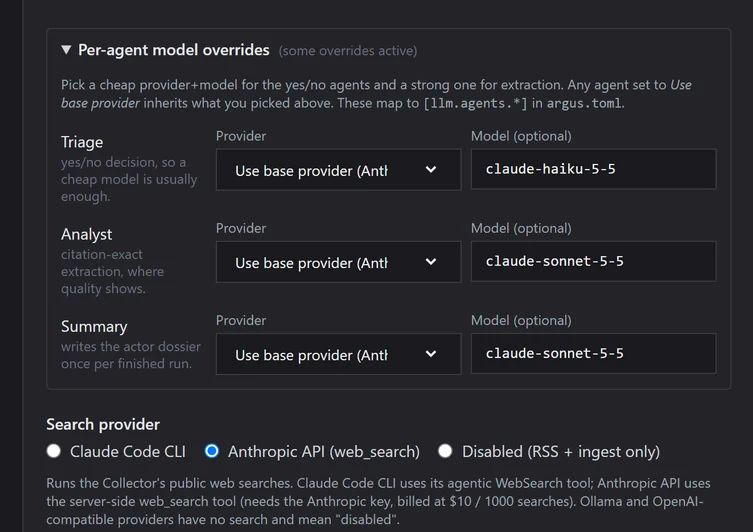
The pipeline runs three LLM-backed agents: pick a cheap model for the yes/no agent and the good one for extraction, from the same provider or from different ones (Settings → LLM provider → Per-agent model overrides):
