

Skip to content
KitploitKITPLOIT
ToolsExploitsBlog
Log in
Submit
ToolsExploitsBlog
Submit

Hacking, PenTest, and Cybersecurity Tools for Your Security Arsenal!

Kitploit is a directory of hacking, cybersecurity, and pentesting tools. Discover the latest project updates to find vulnerabilities, analyze systems, automate testing, and strengthen your security.

FeedsContactPrivacy© 2026 Kitploit

Tool Directory

Categories

View all categories
Loading categories
Cisco-Smart-Exploit — Cisco SmartInstall Exploit [CVE-2018-0171] | Kitploit

Tools/GitHubGitHub/alrikrr/cisco-smart-exploit
Password CrackingReconnaissanceVulnerability AnalysisExploitationConfiguration AuditingNetwork Security
GitHubalrikrr/cisco-smart-exploit

Cisco-Smart-Exploit

Cisco SmartInstall Exploit [CVE-2018-0171]

View Repository
187343 years agoNot yet reviewed
Share

Cisco-Smart-Exploit

Cisco SmartInstall Exploit CVE-2018-0171

Inspired from C. Papathanasiou PoC

This Python 3 script uses port 4786 on a Cisco device running SmartInstall to exploit CVE-2018-0171. With the use of this exploit, an attacker can craft a payload, send it to the Cisco device, and then extract the contents of the running-config file.

The Cisco Smart Exploit script can:
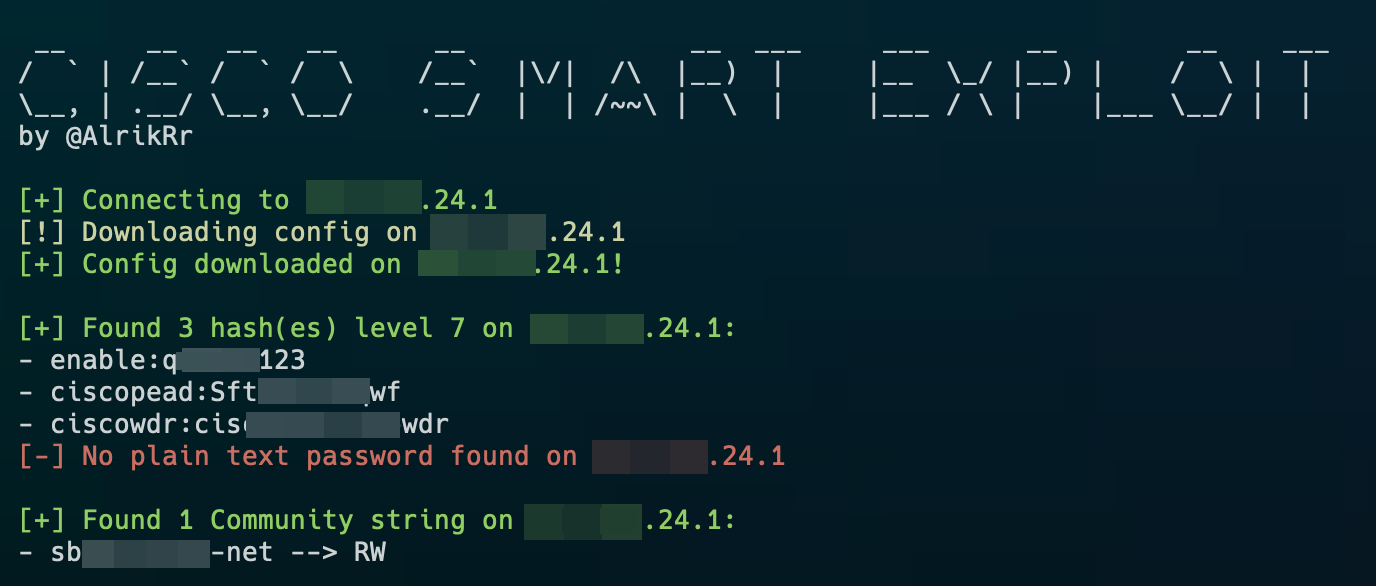
  • Extract the running-config file
  • Parse and decrypt secret 7 hashes
  • Parse plain text passwords
  • Parse all the Community String

Usage Script

Requirements

Here is the list of requirements to use the script:

  • tftpy==0.8.2
  • c7decrypt for secret 7 decryption
    • gem install c7decrypt

Usage

 __     __   __   __      __              __  ___     ___      __        __    ___
/  ` | /__` /  ` /  \    /__`  |\/|  /\  |__)  |     |__  \_/ |__) |    /  \ |  |
\__, | .__/ \__, \__/    .__/  |  | /~~\ |  \  |     |___ / \ |    |___ \__/ |  |
by @AlrikRr

usage: cisco-se.py [-h] (-i IP | -f FILE | -c CONFIG)

optional arguments:
  -h, --help  show this help message and exit
  -i IP       Single IP Address
  -f FILE     File that contains IP list
  -c CONFIG   running-config File standalone

Examples :

python3 cisco-se.py -i 192.168.10.1

python3 cisco-se.py -f ip_list.txt

python3 cisco-se.py -c running-config.txt

Nmap Output IP list

For the -f FILE option, here is an example using nmap:

nmap -p 4786 10.20.30.0/24 --open -Pn -oG - | awk '/Up$/{print $2}' > ip_list.txt

Todo List

  • Handle the timeout error for some ips during client.download()
Download Tool

Most Popular

View all →

Discover the most used tools by our community.

  • 1

    OsintHunter

    letox4/osinthunter

    🎯 The ultimate OSINT toolkit: investigation graph, confidence scoring, alias families, map, timeline and reports. 49 modules, 400+ sites, no API keys required.

    524
  • 2

    ghostlock-app

    yukonga/ghostlock-app

    GhostLock One-Tap Execution App (CVE-2026-43499)

    478
  • 3

    ARTEX

    baarai/artex

    LLM multi-agent autonomous penetration testing platform with planner/worker agents, asset and exploration graphs, MITM traffic recording, and vulnerability retesting.

    357
  • 4

    redforge

    cybersecurity91/redforge

    Browser-side red team toolkit with 102 offline tools for recon, payload generation, credential attacks, crypto, encoding and engagement reporting.

    317
  • 5

    estorides

    grisuno/estorides

    Aggregates 99+ free OSINT sources in parallel, resolves entities into a knowledge graph, and exports STIX 2.1, MISP, or GraphML with LLM-assisted analysis.

    305
  • 6

    opencti

    opencti-platform/opencti

    Open Cyber Threat Intelligence Platform

    275

Explore all tools

Browse our collection of tools

View all tools →






