 aalex954/whisperpair-poc-tool
A security research tool that identifies and demonstrates the CVE-2025-36911: Fast Pair Pairing Mode Bypass vulnerability

A deep dive into CVE-2025-36911 and the security gaps in Google's Fast Pair ecosystem
Google Fast Pair was designed to make Bluetooth pairing seamless: tap a notification and you're connected. But what happens when that seamless experience becomes a security liability? WhisperPair-PoC-Tool is a security research tool that exposes two critical vulnerability classes affecting millions of Bluetooth accessories: unauthorized pairing bypass and Find My Device Network tracking exploitation.
This post details the technical internals of WhisperPair-PoC-Tool, the protocol weaknesses it exploits, and what this means for the Bluetooth accessory ecosystem.
The Google Fast Pair specification explicitly states:
"If the optional Public Key field is present: If the device is not in pairing mode, ignore the write and exit."
This is the critical security gate. Devices should only respond to Key-Based Pairing requests when the user has explicitly put the device into pairing mode (typically by holding a button). This ensures user intent, so you can't pair with someone's earbuds while they're wearing them.
The Problem: Many manufacturers skip this check entirely. They process pairing requests regardless of pairing mode state, enabling:
Google's Find My Device Network (FMDN) allows tracking Bluetooth accessories via the crowd-sourced Android device network. This requires an Account Key, a 16-byte symmetric key linking the device to a Google account.
The Problem: The Account Key characteristic often accepts writes without authentication:
Before diving into the exploitation, let's understand the legitimate Fast Pair flow:
┌─────────────────────────────────────────────────────────────┐
│                    BLE Advertisement                         │
├─────────────────────────────────────────────────────────────┤
│  Service UUID: 0xFE2C (Fast Pair)                           │
│  Service Data:                                               │
│    [Pairing Mode]   → 3 bytes: Model ID only                │
│    [Not Pairing]    → 4+ bytes: 0x00 + Account Key Filter   │
└─────────────────────────────────────────────────────────────┘
The advertisement format reveals pairing state:
Seeker (Phone)                              Provider (Accessory)
      │                                              │
      │───── GATT Connect ──────────────────────────>│
      │                                              │
      │───── Discover Services ─────────────────────>│
      │<──── Service: 0xFE2C ────────────────────────│
      │                                              │
      │───── Enable Notifications (0xFE2C1234) ─────>│
      │                                              │
      │───── Write Key-Based Pairing Request ───────>│
      │      [16-byte encrypted block]               │
      │      [64-byte ECDH Public Key] (optional)    │
      │                                              │
      │      ┌────────────────────────────────────┐  │
      │      │ SECURITY CHECK:                    │  │
      │      │ If Public Key present AND          │  │
      │      │ device NOT in pairing mode:        │  │
      │      │   → IGNORE and EXIT                │  │
      │      │ Else:                              │  │
      │      │   → Process request                │  │
      │      └────────────────────────────────────┘  │
      │                                              │
      │<──── Notification: Encrypted Response ───────│
      │      [Provider's BR/EDR Address]             │
      │                                              │
      │═══════ Bluetooth Classic Pairing ═══════════>│
The vulnerability occurs when devices skip the "SECURITY CHECK" box entirely.
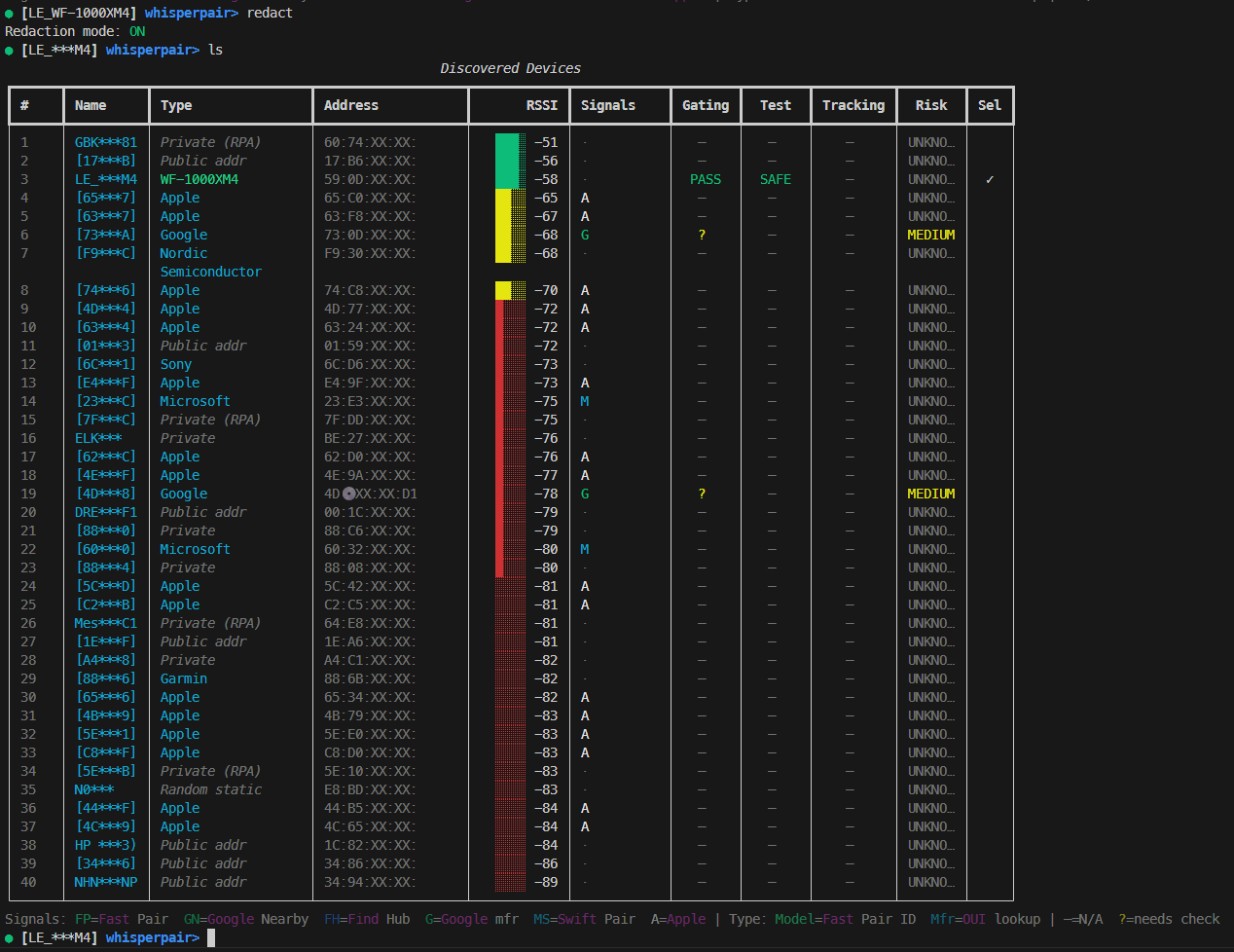
WhisperPair-PoC-Tool is a Python-based security research tool built on top of the Bleak BLE library. It operates in several phases:
┌────────────────────────────────────────────────────────────────┐
│                        WhisperPair-PoC-Tool                          │
├────────────────────────────────────────────────────────────────┤
│  CLI Layer                                                      │
│  ├── Argument parsing (--target-name, --scan-duration)         │
│  ├── TargetPolicy construction                                  │
│  └── REPL initialization                                        │
├────────────────────────────────────────────────────────────────┤
│  Discovery Engine                                               │
│  ├── BLE scanning via Bleak                                    │
│  ├── Advertisement parsing                                      │
│  ├── Protocol detection (Fast Pair, FMDN, Swift Pair)          │
│  └── Device fingerprinting (Model ID, OUI lookup)              │
├────────────────────────────────────────────────────────────────┤
│  Check Engines                                                  │
│  ├── FastPairCheckEngine (passive advertisement analysis)      │
│  ├── FastPairBypass (active CVE-2025-36911 testing)           │
│  ├── FindHubCheckEngine (Account Key status detection)         │
│  └── RiskScorer (composite vulnerability assessment)           │
├────────────────────────────────────────────────────────────────┤
│  Connection Manager                                             │
│  ├── GATT connect with MTU negotiation                         │
│  ├── Service/characteristic discovery                          │
│  ├── Read/Write/Notify operations                              │
│  └── Error handling and retry logic                            │
├────────────────────────────────────────────────────────────────┤
│  Exploitation Modules                                           │
│  ├── ring_device() - Trigger locator sound                     │
│  ├── set_account_key() - Write Account Key                     │
│  └── Response parsing (BR/EDR address extraction)              │
└────────────────────────────────────────────────────────────────┘
discovery.py)The scanner uses Bleak's detection callbacks to capture BLE advertisements:
