
lowkey v0.5.229
Deploy a FullStack Prodo-Typing Agent into your AWS Account (OpenClaw, Kiro-Cli, Pi, Hermes, Claude Code, Codex)
Self-Hosted AI Coding Agents on AWS — OpenClaw, Claude Code, Codex, Kiro, NemoClaw, Hermes
▶️ Watch the full walkthrough on YouTube
📝 Read the blog post: "I Gave My Agent Its Own AWS Account"
TL;DR — deploy Lowkey:
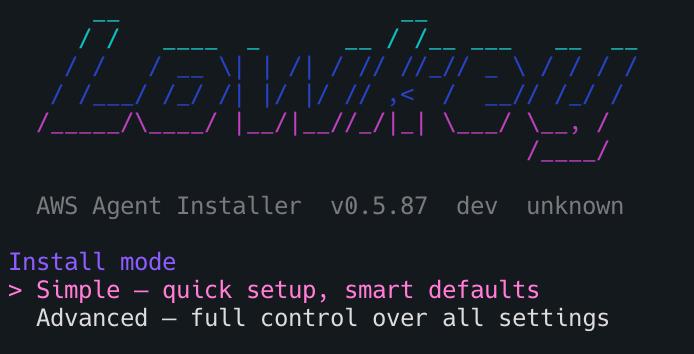
curl -sfL install.lowkey.run | bashWorks in bash, zsh, and AWS CloudShell. The installer walks you through pack, profile, and deploy method interactively.
One-liner examples (non-interactive):
# Full builder agent (can create/modify/delete AWS resources)
curl -sfL install.lowkey.run | bash -s -- -y --pack openclaw --profile builder

# Read-only advisor (can see everything, change nothing)
curl -sfL install.lowkey.run | bash -s -- -y --pack openclaw --profile account_assistant

# Personal assistant (Bedrock only, no AWS access)
curl -sfL install.lowkey.run | bash -s -- -y --pack claude-code --profile personal_assistant

# Sandboxed personal assistant (NemoClaw — isolated in OpenShell sandbox)
curl -sfL install.lowkey.run | bash -s -- -y --pack nemoclaw --profile personal_assistant

# Kiro CLI agent (AWS agentic IDE — requires interactive login after deploy)
curl -sfL install.lowkey.run | bash -s -- -y --pack kiro-cli --profile builder

# Codex CLI agent (OpenAI — builder agent, no Bedrock)
curl -sfL install.lowkey.run | bash -s -- -y --pack codex-cli
# After deploy, SSM into the instance and run: codex login
# (ChatGPT/browser OR API key — your choice)
Requires: AWS CLI + admin access on a dedicated sandbox account.
⚠️ Deploy in a clean account — LLMs make mistakes, a sandbox limits the blast radius.
Uninstall:
curl -sfL uninstall.lowkey.run | bash
Getting Started
Step 1: Install Lowkey
Run curl -sfL install.lowkey.run | bash — the installer walks you through pack, profile, instance size, and deploy method (CloudFormation CLI or Console).
📊 Telemetry opt-out: The installer sends anonymous install telemetry (start/success/failure + OS/arch/duration — no code, credentials, IPs, or hostnames). To opt out before installing:
mkdir -p ~/.lowkey && touch ~/.lowkey/telemetry-offOr set
LOWKEY_TELEMETRY=0when running the installer. Full privacy details →
CLI flags for non-interactive deploys:
| Flag | Description |
|---|---|
--non-interactive | Skip all prompts, use defaults (aliases: --yes, -y) |
--pack <name> | Agent pack: openclaw, claude-code, hermes, nemoclaw, kiro-cli, codex-cli, pi, ironclaw, roundhouse |
--profile <name> | Permission profile: builder, account_assistant, personal_assistant |
--method <method> | Deploy method: cfn (CloudFormation) |
Permission profiles:
| Profile | IAM | Instance | Use case |
|---|---|---|---|
🔴 builder | AdministratorAccess | t4g.xlarge | Build apps, deploy infra, manage pipelines |
🟡 account_assistant | ReadOnlyAccess + Bedrock | t4g.medium | Cost analysis, architecture review, debugging |
🟢 personal_assistant | Bedrock only | t4g.medium | Writing, research, coding help, daily tasks |
Agent packs:
| Pack | Description | Instance | Data Volume |
|---|---|---|---|
| OpenClaw (default) | Stateful AI agent with 24/7 gateway, persistent memory, Telegram/Discord/Slack | t4g.xlarge recommended | 80GB |
| Claude Code | Anthropic's coding agent — native Bedrock support, pinned CLI version, AWS plugins + MCP, full tool access | t4g.large recommended | None needed (set to 0) |
| Hermes (experimental) | NousResearch CLI agent — lighter, terminal-focused, self-improving skills | t4g.medium sufficient | None needed (set to 0) |
| Pi (experimental) | Minimal terminal coding harness — read, write, edit, bash tools | t4g.medium sufficient | None needed (set to 0) |
| IronClaw (experimental) | Rust-based AI agent by NEAR AI — static binary, fast startup | t4g.medium sufficient | None needed (set to 0) |
| NemoClaw (experimental) | OpenClaw in NVIDIA OpenShell sandbox — Landlock + seccomp + netns isolation, Bedrock via bedrockify. personal_assistant profile only. | t4g.xlarge required | 80GB |
| Kiro CLI (experimental) | AWS agentic IDE terminal client with MCP server support. Uses own cloud inference (not Bedrock). Requires interactive SSO login after deploy. | t4g.medium sufficient | None needed (set to 0) |
| Codex CLI (experimental) | OpenAI's Codex coding agent — uses OpenAI API directly (no Bedrock). Configured as builder agent (danger-full-access). After install completes, SSM into the instance and run codex login. | t4g.medium sufficient | None needed (set to 0) |
| Troika (experimental) | Three-harness coding machine — OpenClaw/Hermes + Claude Code + Codex CLI, all via Amazon Bedrock. Pick a daily driver to auto-launch on SSM login; switch with agents driver <name>. Builder-only. Requires Anthropic + Bedrock Mantle model access. | t4g.xlarge required | 80GB |
The installer discovers packs dynamically and asks which to deploy. Experimental packs are clearly marked.
Works from AWS CloudShell! You can run the installer directly from AWS CloudShell — no local setup needed. CloudShell already has AWS credentials configured via your console session.
Manual deploy (alternative)
# Clone
git clone https://github.com/inceptionstack/lowkey.git
cd lowkey/deploy/cloudformation

# Deploy (OpenClaw — default)
aws cloudformation create-stack \
  --stack-name my-loki \
  --template-body file://template.yaml \
  --parameters ParameterKey=EnvironmentName,ParameterValue=my-loki \
  --capabilities CAPABILITY_NAMED_IAM \
  --region us-east-1

# Deploy (Hermes — lighter alternative)
aws cloudformation create-stack \
  --stack-name my-hermes \
  --template-body file://template.yaml \
  --parameters \
    ParameterKey=EnvironmentName,ParameterValue=my-hermes \
    ParameterKey=PackName,ParameterValue=hermes \
    ParameterKey=InstanceType,ParameterValue=t4g.medium \
    ParameterKey=DataVolumeSize,ParameterValue=0 \
  --capabilities CAPABILITY_NAMED_IAM \
  --region us-east-1

# Wait ~10 min, then connect
aws ssm start-session --target <instance-id>

# Talk to your Lowkey
openclaw tui   # or use the alias: loki tui
Full deployment guide: Deploying Lowkey on AWS
Step 2: Run the Essential Bootstraps
Important — these reduce mistakes and improve agent behavior significantly.
After connecting to Lowkey for the first time, run the essential bootstraps. These are located at: bootstraps/essential/
Example prompt — paste this into your Lowkey chat:
"Lowkey please bootstrap yourself based on this url https://github.com/inceptionstack/lowkey/tree/main/bootstraps/essential"
Available essential bootstraps: