
Deploy self-hosted AI coding agents (OpenClaw, Claude Code, Codex) into your AWS account with CloudFormation, IAM profiles, and sandbox isolation for automated full-stack development and infrastructure management.
# Self-Hosted AI Coding Agents on AWS — OpenClaw, Claude Code, Codex, Kiro, NemoClaw, Hermes
[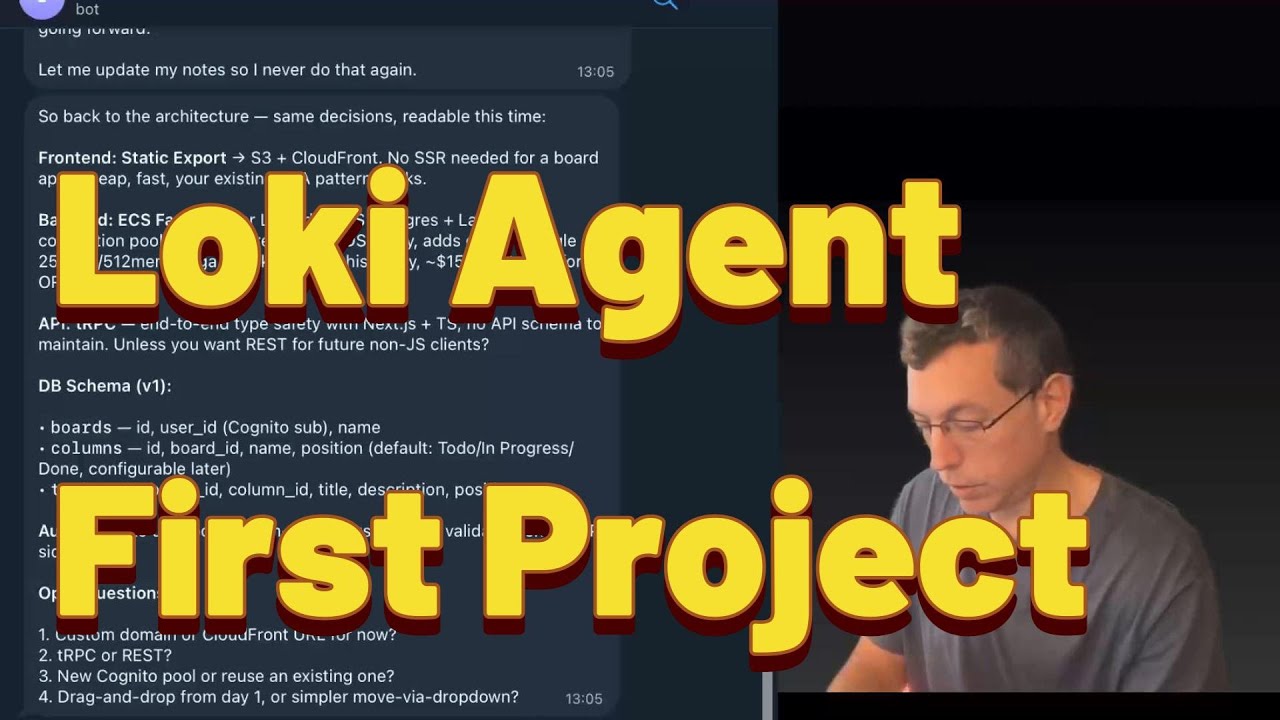](https://www.youtube.com/watch?v=dJSk8DYlHvI)
▶️ [Watch the full walkthrough on YouTube](https://www.youtube.com/watch?v=dJSk8DYlHvI)
📝 [Read the blog post: "I Gave My Agent Its Own AWS Account"](https://robotpaper.ai/i-gave-my-agent-its-own-aws-account-and-now-it-codes-deploys-and-debugs-full-stack-apps/)
> **TL;DR — deploy Lowkey:**
>
> ```sh
> curl -sfL install.lowkey.run | bash
> ```
>
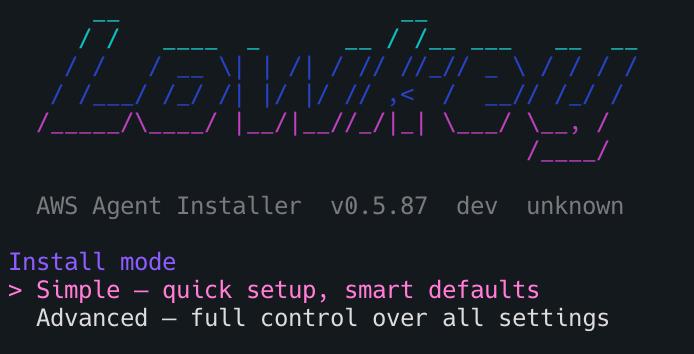
> Works in **bash**, **zsh**, and **AWS CloudShell**. The installer walks you through pack, profile, and deploy method interactively.
>
> 
>
> **One-liner examples (non-interactive):**
> ```sh
> # Full builder agent (can create/modify/delete AWS resources)
> curl -sfL install.lowkey.run | bash -s -- -y --pack openclaw --profile builder
>
> # Read-only advisor (can see everything, change nothing)
> curl -sfL install.lowkey.run | bash -s -- -y --pack openclaw --profile account_assistant
>
> # Personal assistant (Bedrock only, no AWS access)
> curl -sfL install.lowkey.run | bash -s -- -y --pack claude-code --profile personal_assistant
>
> # Sandboxed personal assistant (NemoClaw — isolated in OpenShell sandbox)
> curl -sfL install.lowkey.run | bash -s -- -y --pack nemoclaw --profile personal_assistant
>
> # Kiro CLI agent (AWS agentic IDE — requires interactive login after deploy)
> curl -sfL install.lowkey.run | bash -s -- -y --pack kiro-cli --profile builder
>
> # Codex CLI agent (OpenAI — builder agent, no Bedrock)
> curl -sfL install.lowkey.run | bash -s -- -y --pack codex-cli
> # After deploy, SSM into the instance and run: codex login
> # (ChatGPT/browser OR API key — your choice)
> ```
>
> Requires: AWS CLI + admin access on a **dedicated sandbox account**.
>
> ⚠️ Deploy in a clean account — LLMs make mistakes, a sandbox limits the blast radius.
>
> **Uninstall:** `curl -sfL uninstall.lowkey.run | bash`
---
## Getting Started
### Step 1: Install Lowkey
Run `curl -sfL install.lowkey.run | bash` — the installer walks you through **pack**, **profile**, **instance size**, and **deploy method** (CloudFormation CLI or Console).
> **📊 Telemetry opt-out:** The installer sends anonymous install telemetry (start/success/failure + OS/arch/duration — no code, credentials, IPs, or hostnames). To opt out before installing:
> ```bash
> mkdir -p ~/.lowkey && touch ~/.lowkey/telemetry-off
> ```
> Or set `LOWKEY_TELEMETRY=0` when running the installer. [Full privacy details →](https://docs.lowkey.run/reference/telemetry-privacy)
**CLI flags for non-interactive deploys:**
| Flag | Description |
|------|-------------|
| `--non-interactive` | Skip all prompts, use defaults (aliases: `--yes`, `-y`) |
| `--pack <name>` | Agent pack: `openclaw`, `claude-code`, `hermes`, `nemoclaw`, `kiro-cli`, `codex-cli`, `pi`, `ironclaw`, `roundhouse` |
| `--profile <name>` | Permission profile: `builder`, `account_assistant`, `personal_assistant` |
| `--method <method>` | Deploy method: `cfn` (CloudFormation) |
**Permission profiles:**
| Profile | IAM | Instance | Use case |
|---------|-----|----------|----------|
| 🔴 `builder` | AdministratorAccess | t4g.xlarge | Build apps, deploy infra, manage pipelines |
| 🟡 `account_assistant` | ReadOnlyAccess + Bedrock | t4g.medium | Cost analysis, architecture review, debugging |
| 🟢 `personal_assistant` | Bedrock only | t4g.medium | Writing, research, coding help, daily tasks |
**Agent packs:**
| Pack | Description | Instance | Data Volume |
|------|-------------|----------|-------------|
| **OpenClaw** (default) | Stateful AI agent with 24/7 gateway, persistent memory, Telegram/Discord/Slack | t4g.xlarge recommended | 80GB |
| **Claude Code** | Anthropic's coding agent — native Bedrock support, pinned CLI version, AWS plugins + MCP, full tool access | t4g.large recommended | None needed (set to 0) |
| **Hermes** *(experimental)* | NousResearch CLI agent — lighter, terminal-focused, self-improving skills | t4g.medium sufficient | None needed (set to 0) |
| **Pi** *(experimental)* | Minimal terminal coding harness — read, write, edit, bash tools | t4g.medium sufficient | None needed (set to 0) |
| **IronClaw** *(experimental)* | Rust-based AI agent by NEAR AI — static binary, fast startup | t4g.medium sufficient | None needed (set to 0) |
| **NemoClaw** *(experimental)* | OpenClaw in NVIDIA OpenShell sandbox — Landlock + seccomp + netns isolation, Bedrock via bedrockify. `personal_assistant` profile only. | t4g.xlarge required | 80GB |
| **Kiro CLI** *(experimental)* | AWS agentic IDE terminal client with MCP server support. Uses own cloud inference (not Bedrock). Requires interactive SSO login after deploy. | t4g.medium sufficient | None needed (set to 0) |
| **Codex CLI** *(experimental)* | OpenAI's Codex coding agent — uses OpenAI API directly (no Bedrock). Configured as builder agent (danger-full-access). **After install completes**, SSM into the instance and run `codex login`. | t4g.medium sufficient | None needed (set to 0) |
| **Troika** *(experimental)* | Three-harness coding machine — OpenClaw/Hermes + Claude Code + Codex CLI, all via Amazon Bedrock. Pick a daily driver to auto-launch on SSM login; switch with `agents driver <name>`. Builder-only. Requires Anthropic + Bedrock Mantle model access. | t4g.xlarge required | 80GB |
The installer discovers packs dynamically and asks which to deploy. Experimental packs are clearly marked.
> **Works from AWS CloudShell!** You can run the installer directly from [AWS CloudShell](https://console.aws.amazon.com/cloudshell/) — no local setup needed. CloudShell already has AWS credentials configured via your console session.
<details>
<summary><strong>Manual deploy (alternative)</strong></summary>
```bash
# Clone
git clone https://github.com/inceptionstack/lowkey.git
cd lowkey/deploy/cloudformation
# Deploy (OpenClaw — default)
aws cloudformation create-stack \
--stack-name my-loki \
--template-body file://template.yaml \
--parameters ParameterKey=EnvironmentName,ParameterValue=my-loki \
--capabilities CAPABILITY_NAMED_IAM \
--region us-east-1
# Deploy (Hermes — lighter alternative)
aws cloudformation create-stack \
--stack-name my-hermes \
--template-body file://template.yaml \
--parameters \
ParameterKey=EnvironmentName,ParameterValue=my-hermes \
ParameterKey=PackName,ParameterValue=hermes \
ParameterKey=InstanceType,ParameterValue=t4g.medium \
ParameterKey=DataVolumeSize,ParameterValue=0 \
--capabilities CAPABILITY_NAMED_IAM \
--region us-east-1
# Wait ~10 min, then connect
aws ssm start-session --target <instance-id>
# Talk to your Lowkey
openclaw tui # or use the alias: loki tui
```
Full deployment guide: [Deploying Lowkey on AWS](https://github.com/inceptionstack/lowkey/wiki/Deploying-Lowkey-on-AWS)
</details>
### Step 2: Run the Essential Bootstraps
> **Important — these reduce mistakes and improve agent behavior significantly.**
After connecting to Lowkey for the first time, run the essential bootstraps. These are located at: [`bootstraps/essential/`](https://github.com/inceptionstack/lowkey/tree/main/bootstraps/essential)
**Example prompt** — paste this into your Lowkey chat:
> *"Lowkey please bootstrap yourself based on this url https://github.com/inceptionstack/lowkey/tree/main/bootstraps/essential"*
Available essential bootstraps:
- **BOOTSTRAP-ALARMS** — Configures CloudWatch alarm monitoring
- **BOOTSTRAP-CODING-GUIDELINES** — Sets development standards and coding practices
- **BOOTSTRAP-DAILY-UPDATE** — Configures daily status update procedures
- **BOOTSTRAP-DIAGRAMS** — Enables architecture diagram generation
- **BOOTSTRAP-DISK-SPACE-STRAT** — Sets up disk space management strategy
- **BOOTSTRAP-MCPORTER** — Configures MCPorter for MCP tool management
- **BOOTSTRAP-MEMORY-SEARCH** — Enables persistent memory search functionality
- **BOOTSTRAP-PLAYWRIGHT** — Sets up Playwright browser automation
- **BOOTSTRAP-SECRETS-AWS** — Configures AWS secrets and credential management
- **BOOTSTRAP-SECURITY** — Establishes security protocols and guidelines
### Step 3: Run the Optional Bootstraps
> Nice to have — take a look and pick what fits your workflow.
After running essential bootstraps, run the optional bootstraps of your choice, located at: [`bootstraps/optional/`](https://github.com/inceptionstack/lowkey/tree/main/bootstraps/optional)
Available optional bootstraps:
- **BOOTSTRAP-GITHUBACTION-CODE-REVIEW** — Integrates GitHub Actions with automated code review
- **BOOTSTRAP-PIPELINE-NOTIFICATIONS** — Sets up CI/CD pipeline notifications
- **BOOTSTRAP-SKILLS** — Manual install / recovery for the loki-skills library (auto-installed by the `openclaw` pack)
- **BOOTSTRAP-WEB-UI** — Configures the web user interface
- **OPTIMIZE-TOO-LARGE-CONTEXT** — Optimization strategies for large context windows
### Step 4: Telegram Integration (if needed)
If you want to use Lowkey via Telegram, run the Telegram bootstraps located at: [`bootstraps/telegram/`](https://github.com/inceptionstack/lowkey/tree/main/bootstraps/telegram)
- **BOOTSTRAP-TELEGRAM** — Sets up basic Telegram bot integration
- **BOOTSTRAP-TELEGRAM-GROUP** — Configures Telegram group chat functionality
### Uninstall
Remove one or all Lowkey deployments from your account:
```sh
curl -sfL uninstall.lowkey.run | bash
```
Finds deployments by tag, lets you pick which to remove, deletes CloudFormation stacks (legacy Terraform deploys are still torn down via a pinned legacy ref), and optionally removes state buckets/lock tables.
---
## Pack System
Lowkey uses a **pack-based architecture** for deploying different AI agent runtimes. Each pack is a self-contained module with its own install script, manifest, and resources.
### Available Packs
| Pack | Type | Description |
|------|------|-------------|
| `bedrockify` | Base (auto-installed) | OpenAI-compatible proxy for Amazon Bedrock. Runs as a systemd daemon on port 8090. Most agent packs depend on this. |
| `openclaw` | Agent | Full stateful AI agent with 24/7 gateway, persistent memory, multi-channel support (Telegram, Discord, Slack). Includes Claude Code. |
| `claude-code` | Agent | Anthropic's Claude Code CLI. Native Bedrock support (no bedrockify needed), pinned version (override on the box: `packs/claude-code/install.sh --version latest`), AWS plugins + MCP proxy, full tool permissions. |
| `hermes` | Agent *(experimental)* | NousResearch Hermes CLI agent. Self-improving skills, learning loop, lightweight. Uses bedrockify for model access. |
| `pi` | Agent *(experimental)* | Pi Coding Agent. Minimal terminal coding harness with read, write, edit, bash tools. Pure Node.js. |
| `ironclaw` | Agent *(experimental)* | IronClaw by NEAR AI. Rust-based agent with shell/file tools, MCP support. Single static binary. |
| `nemoclaw` | Agent *(experimental)* | NemoClaw — OpenClaw inside an [NVIDIA OpenShell](https://github.com/NVIDIA/OpenShell) sandbox with Landlock, seccomp, and network namespace isolation. Inference routed through bedrockify on the host (no NVIDIA API key needed). **Only compatible with `personal_assistant` profile** — the sandbox blocks all AWS API access. Requires Docker + t4g.xlarge. |
| `kiro-cli` | Agent *(experimental)* | [Kiro CLI](https://kiro.dev/docs/cli) — AWS agentic IDE terminal client with MCP server support. Uses its own cloud inference (no Bedrock/bedrockify). Pre-installs AWS MCP servers (terraform, ecs, eks, core, docs). **Requires interactive SSO login after deploy:** `kiro-cli login --use-device-flow`. |
| `codex-cli` | Agent *(experimental)* | [Codex CLI](https://github.com/openai/codex) — OpenAI's coding agent. Connects directly to OpenAI's API (no Bedrock/bedrockify). Configured as builder agent (danger-full-access, never prompts). **Post-install step**: SSM into the instance and run `codex login` (interactive) — auth is intentionally deferred until after deploy. |
| `troika` | Agent *(experimental)* | Three-harness coding machine: OpenClaw/Hermes + Claude Code + Codex CLI on one instance, all via Bedrock. Pick a **daily driver** that auto-launches on SSM login; switch anytime with `agents driver <name>`. Builder-only. Requires Anthropic model access + Bedrock Mantle access (`openai.gpt-5.5`). |
| `roundhouse` | Agent | [Roundhouse](https://github.com/inceptionstack/roundhouse) — Pi-based AI coding agent with Telegram channel. Uses native Bedrock SDK (no bedrockify). Requires `TelegramBotTokenSecret` and `TelegramUser` parameters. |
### How It Works
```
install.sh → picks pack → CloudFormation → EC2 instance
└── bootstrap.sh --pack openclaw --region us-east-1 --model ...
├── Phase 1: System setup (SSM, Node.js, volumes)
├── Writes /tmp/loki-pack-config.json (packs read via jq)
├── Phase 2: Install deps (bedrockify) → Install pack (openclaw/hermes)
└── Phase 3: Brain files, Claude Code, Bedrock check
```
Each pack reads only what it needs from the JSON config file. The bootstrap dispatcher resolves dependencies automatically from `packs/registry.yaml`.
### Standalone Pack Usage
Packs can also be run individually (e.g., on an existing EC2 instance):
```bash
# Install bedrockify + hermes manually
git clone https://github.com/inceptionstack/lowkey.git
cd lowkey
# Install bedrockify first (dependency)
bash packs/bedrockify/install.sh --region us-east-1 --port 8090
# Then install your agent pack
bash packs/hermes/install.sh --region us-east-1 --hermes-model anthropic/claude-opus-4.6
# Or for OpenClaw
bash packs/openclaw/install.sh --region us-east-1 --model us.anthropic.claude-opus-4-6-v1 --port 3001
# Or for NemoClaw (sandboxed OpenClaw — needs Docker, personal_assistant only)
bash packs/nemoclaw/install.sh --region us-east-1 --model us.anthropic.claude-sonnet-4-6 --profile personal_assistant
# Or for Kiro CLI (no bedrockify needed, requires interactive login after install)
bash packs/kiro-cli/install.sh --region us-east-1
# Or for Codex CLI (no bedrockify needed, authenticate post-install)
bash packs/codex-cli/install.sh --region us-east-1 --model gpt-5.4
# Then: codex login
```
### Adding New Packs
To add a new agent runtime:
1. Create `packs/<name>/` with `manifest.yaml`, `install.sh`, and `resources/`
2. Add the pack to `packs/registry.yaml` with type, deps, and infra requirements
3. Add to the `PackName` AllowedValues in the CloudFormation template
4. Add to the pack selection menu in `install.sh`
See existing packs for the pattern. Each `install.sh` must be standalone-runnable with `--key value` CLI args and support `--help`.
---
## What's This Experiment About?
What if you gave OpenClaw its own AWS account to manage and control, and ask it to build stuff for you?
## The Problem: Infrastructure Eats Your Time
Building a prototype has never been faster. Tools like Lovable, Base44, and Bolt let any developer go from idea to working demo in minutes. For simple frontend apps with basic CRUD, these platforms deliver genuine speed. The prototype side of the equation is largely solved.
The problem begins the moment a team decides to build something real on AWS. Even experienced engineers who know exactly what they want to build spend days on infrastructure before writing a single line of business logic: provisioning compute, designing IAM policies, configuring networking, setting up CI/CD pipelines, instrumenting monitoring, and establishing security baselines. For a solo founder or a small team without dedicated DevOps resources, this can create huge delays or might mean never get to a shipping product fast enough (or at all).
The alternative is (and what most solo founders and scrappy teams might do) building quickly on a rapid-development platform and migrating to AWS later. That creates a different set of problems. These platforms are "black box", can't access real AWS services except what is prescribed (if at all), and require complete rewrites when teams outgrow them. The technical debt accumulates silently until someone needs a (different, or more complicated) payment integration, a compliance requirement, or a workload the platform simply can't support (special backend APIs or even an API only product, specialized data schemas or graphs, special scale provisions, specialized security options and more). At that point, the team faces a choice between a costly rewrite and staying on a platform that limits what they can build.
**It would be great if developers didn't have to choose between speed and control.**
---
## Why This Is Solvable Now
Three capabilities have converged to make this problem solvable for the first time.
**1. AI agents that actually work.** OpenClaw (and other claw-like tools), the open-source AI agent framework, proved at scale that users (some are developers) will trust an AI agent to execute shell commands, manage files, and interact with APIs — when the agent is capable and the human retains control. It reached 317k GitHub stars in 6 weeks, one of the fastest adoption curves in open-source history.
**2. Infrastructure-as-code is mature.** aws-cli, Terraform, AWS CDK, CloudFormation, SAM and other tooling make resource provisioning fully programmable. An AI agent can generate, modify, and deploy infrastructure using the same tools a human engineer would use — producing output that is auditable, version-controlled, and reversible.
**3. Foundation models can reason about architecture.** Models like Anthropic Claude support the context windows and tool-use reliability required for multi-step infrastructure provisioning. They can reason about full-stack application architecture, generate correct configurations, and maintain context across multi-hour build sessions.
These three capabilities are the building blocks. **Lowkey is what you get when you combine them into a single, deployable package, and then give it its own AWS account to administer 24/7.**
---
## What Lowkey Does
Lowkey is an open-source, deploy-it-yourself AI agent that lives in your AWS account (usually one per account so the agents don't step on each other's toes) and builds real code, infrastructure, deployments and configurations.
Clone the repo, deploy via CloudFormation, and within minutes you have a 24/7 agent running in your account , connected to Amazon Bedrock (by default, you can change that), loaded with AWS infrastructure skills, and ready to build. The agent is accessible via Telegram, Discord, Slack, or a terminal UI, and maintains full memory across sessions so it always knows what it built, what's deployed, and what state everything is in.
Lowkey handles the complete build lifecycle inside your AWS account:
* **Designs and deploys** serverless APIs, container workloads, and data pipelines
* **Writes application code**, pushes to repositories, and triggers CI/CD pipelines
* **Configures IAM policies**, security groups, and logging
* **Sets up CloudWatch monitoring** and can enable AWS security services (GuardDuty, Security Hub, etc.) on request
* **Debugs production issues** — reads CloudTrail logs, identifies root causes, and applies fixes
Everything Lowkey builds can use (but is not limited to) standard AWS services: CloudFormation or CDK or Terraform for infrastructure, CodeCommit or GitHub for code, Lambda or ECS for compute, DynamoDB or RDS for data. There's no proprietary runtime, no abstraction layer, and no migration required when your application grows beyond the prototype stage.
**You own everything.** Disable Lowkey tomorrow and your applications keep running. Every resource is visible in the AWS console, portable to any toolchain, and yours to modify.
### Difference from Cursor, Claude Code, Kiro and others
Unlike **AI coding tools** (Cursor, Kiro, Claude Code) that run on your laptop and stop when the laptop closes, Lowkey is a persistent agent that lives in your AWS account around the clock. Start a build on Tuesday, come back Thursday, and it knows exactly where things stand.
### Difference from Lovable, Bolt, Base44 etc
Unlike **rapid-dev platforms** (Replit, Lovable, Bolt) that abstract away infrastructure and trap your code in proprietary runtimes, Lowkey works *within* AWS. Your infrastructure is real AWS, managed by standard IaC tools, with no outside vendor lock-in (except AWS of course, but you could choose to build fully containerized apps with it so you can easily port them in the future).
### Difference from Standard OpenClaw Assistants
Unlike a **general-purpose AI assistant**, Lowkey ships with AWS infrastructure skills and the IAM permissions to actually provision resources. It's purpose-built for building and operating on AWS. **Instead of being fully locked down into a VM sandbox or docker sandbox, its sandbox is defined by the boundaries of the AWS account it lives in.**
It does not bundle any clawhub skills (huge security risk there), but comes with mostly AWS skills and playwright MCP using mcporter.
---
## Lowkey in Action
Real screenshots from actual usage — building apps, debugging infrastructure, and monitoring AWS resources.
### From prompt to deployed app
Describe what you want in plain English. Lowkey plans the architecture, writes the code, sets up CI/CD, and deploys — all while you watch or go do something else.
<p align="center">
<img src="https://assets.kitploit.com/production/public/readmes/7172/41ba181c2fb93b455731117d1410e51996940b8ae97527335555c19cfe54a901.jpg" alt="Lowkey building a full-stack app from a conversational prompt" width="700" />
</p>
### Architecture planning before writing code
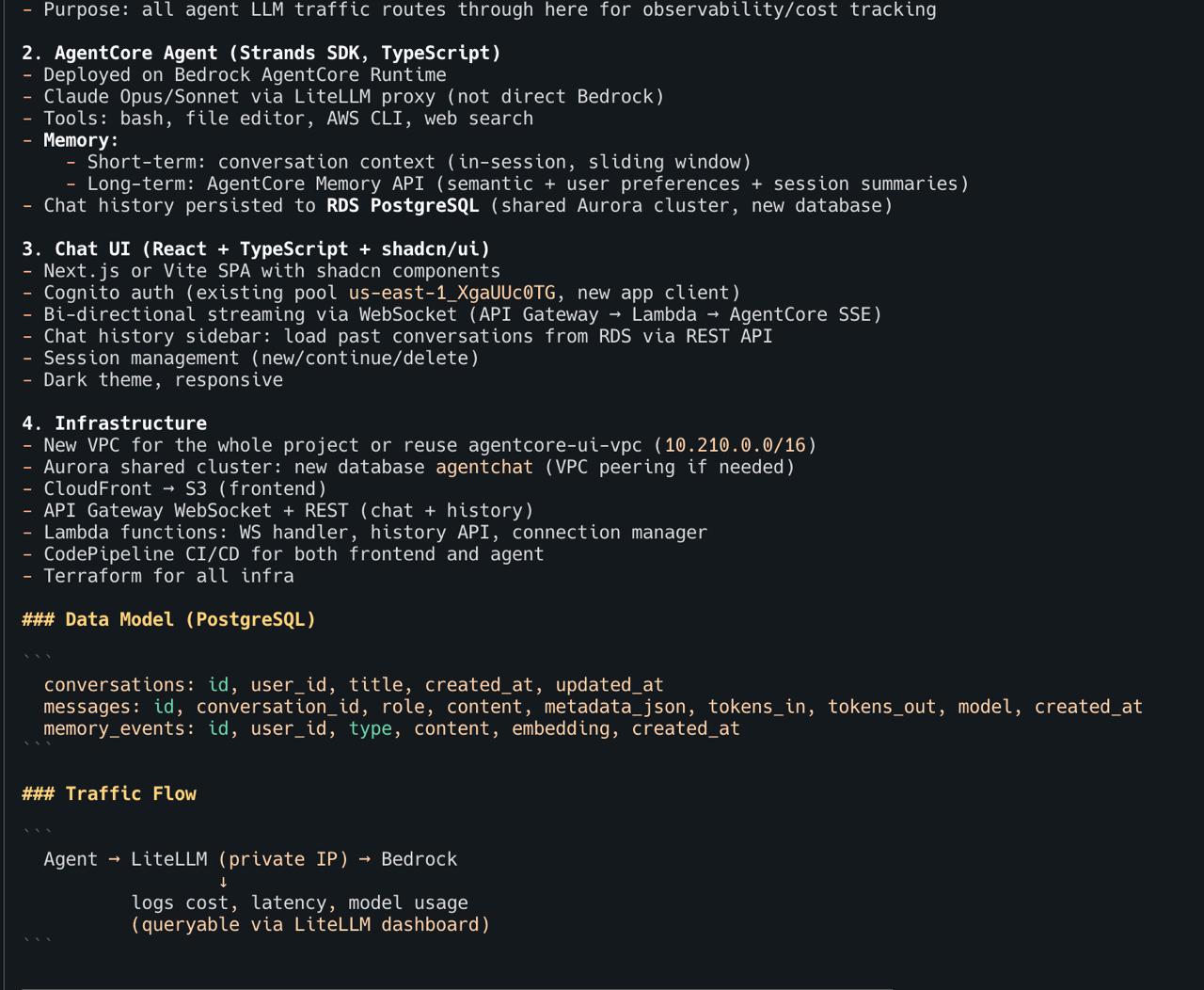
Before touching any code, Lowkey lays out a full architecture plan — data model, traffic flow, infrastructure components, and deployment strategy. You review and adjust before it starts building.
<p align="center">
<img src="https://assets.kitploit.com/production/public/readmes/7172/4617985c9dc355a418816fe096defc59fd676e2e7c73f78b28427f8fa857a8b4.jpg" alt="Lowkey planning full architecture with data model, traffic flow, and infrastructure" width="700" />
</p>
### Work from anywhere — it remembers everything
Pick up where you left off from any device. Lowkey has full memory of every project, every decision, every resource it deployed. No context-switching tax.
<p align="center">
<img src="https://assets.kitploit.com/production/public/readmes/7172/d24deb49c56656d16c728d4ca681c16fc5601eb3c3835f75efe281bd5101f7c5.jpg" alt="Continuing a conversation from a phone — Lowkey remembers the full project context" width="500" />
</p>
### Proactive morning briefing
Lowkey doesn't wait for you to ask. It sends daily reports covering AWS costs, security findings, critical CVEs, and pipeline status — before you open your laptop.
<p align="center">
<img src="https://assets.kitploit.com/production/public/readmes/7172/4daabc8a6ddbbd6e109ca937c9273a8235dc9732f0d14bec226e0dd199397904.jpg" alt="Lowkey morning briefing — AWS costs, security findings, CVEs, pipeline status" width="500" />
</p>
### CVE detection and patching
Lowkey can read from Security Hub, GuardDuty, and Inspector. When it finds CVE reports, it can propose fixes, rebuild container images, and verify the result. **This is a convenience feature, not a security guarantee — always review what it does.**
<p align="center">
<img src="https://assets.kitploit.com/production/public/readmes/7172/48cc47b695c472f403c53e79fd38e6164bd8d59656cdb204725579baac07074b.jpg" alt="Lowkey detecting 1 CRITICAL + 19 HIGH security findings and proposing fixes" width="400" />
<img src="https://assets.kitploit.com/production/public/readmes/7172/f5828748e139807138dba351934c795102f08d72b7a5107d5cd74b5958d28a32.jpg" alt="Lowkey verifying all CVEs eliminated after autonomous fix" width="400" />
</p>
<p align="center"><em>Left: Agent detects CVEs overnight. Right: All CVEs eliminated, app verified working.</em></p>
### Autonomous debugging
When something breaks, Lowkey traces the issue across VPCs, load balancers, route tables, and DNS — then fixes it and tells you what happened.
<p align="center">
<img src="https://assets.kitploit.com/production/public/readmes/7172/f5803f1c309147a23ac1450651ea94b3f821456d1b26d1513bcbd00c6001793e.jpg" alt="Lowkey autonomously finding and fixing VPC routing and ALB listener issues" width="500" />
</p>
---
## A Day with Lowkey
Lowkey isn't a one-shot tool you open when you need something. It's an always-on partner that lives in your AWS account 24/7 — coding, deploying, monitoring, and improving while you focus on what matters.
| | Time | What Happens |
|---|---|---|
| 🌅 | **8:00 AM** | **Morning briefing lands.** Before you open your laptop, Lowkey sends a daily report: security findings summary, overnight spend ($3.20), CVEs flagged in your container images, all pipelines green. |
| ☕ | **9:30 AM** | **You have an idea.** Via SSM terminal: *"Build me a serverless REST API with DynamoDB, Cognito auth, and a React frontend."* By the time you finish your coffee — it's live, with tests, a CI/CD pipeline, and CloudWatch alarms. All IaC. |
| 🛡️ | **11:00 AM** | **Lowkey flags something.** A routine heartbeat check catches an overly permissive security group. Lowkey proposes tightening it, updates the CloudFormation template, and sends you a summary to review. |
| 📱 | **2:15 PM** | **Iterate from anywhere.** Message from your phone: *"Add a WebSocket endpoint to the API I built this morning."* Lowkey remembers the full architecture — no context needed. |
| 📋 | **5:30 PM** | **Wrap-up summary.** *"Summarize everything we built today."* Lowkey recaps: 2 new services deployed, 14 CloudFormation resources created, 3 pipelines configured, all tests passing. Copy-paste to your team. |
| 🌙 | **3:00 AM** | **While you sleep.** Scheduled jobs can audit your infrastructure against AWS best practices. Lowkey finds cost optimizations and flags improvements, logging everything for your morning review. |
---
## How It Works
Lowkey is built on [OpenClaw](https://github.com/openclaw/openclaw), the open-source AI agent framework. The [lowkey](https://github.com/inceptionstack/lowkey) repository packages everything needed to deploy a production-ready Lowkey instance:
**1. One-click deployment.** Deploy the CloudFormation template. It creates an isolated VPC, a T4g.xlarge EC2 instance by default (recommended so it can really do things like build run tests, build code, dockerize things and more, as a real dev machine), IAM roles, security services, and installs Lowkey with a pre-configured workspace. Total deploy time: \~4-10 minutes.
**2. Configurable monitoring.** The deployment includes five individually toggleable AWS security services — Security Hub, GuardDuty, Inspector, Access Analyzer, and AWS Config — all enabled by default. For test/dev environments, disable what you don't need. The EC2 instance uses SSM Session Manager instead of SSH (no open ports), and the Lowkey gateway only listens on localhost (not exposed to the network). **Note:** Enabling these services doesn't make the agent itself secure — it means the agent can surface findings from these tools. You are still responsible for reviewing and acting on them.
**3. Observe → Plan → Act.** Lowkey reads the current state of your AWS account, plans the next actions, and executes them with full admin power. **(remember - with power comes resposibility. this is risky, so use it on a clean AWS account to minize blast radius of agent making mistakes)**
**4. Persistent memory.** Conversation history and agent memory are stored locally on the instance. Lowkey maintains workspace files (SOUL.md, TOOLS.md, MEMORY.md) that give it continuity across sessions and restarts. It knows what it built yesterday.
**5. Your data stays yours.** The only external calls are to Amazon Bedrock for AI inference (processed under the Bedrock data privacy policy — your data is not used to train models). Alternatively, use your own Anthropic API key or a LiteLLM proxy. No code, infrastructure configurations, or application data leaves your account. The installer itself sends **anonymous install telemetry** (install start/success/failure with OS + arch + duration — no code, credentials, IPs, hostnames, or file paths) — [see exactly what's sent and how to turn it off](https://docs.lowkey.run/reference/telemetry-privacy).
---
## Telemetry
The `install.sh` installer sends anonymous, aggregate telemetry to help us fix install failures and understand which platforms people run it on.
- **What's sent:** OS + arch + installer version + install outcome (`started` / `completed` / `failed`) + duration + a one-way SHA-256 hashed machine fingerprint. That's it.
- **What's NOT sent:** no IPs, no hostnames, no AWS account IDs, no credentials, no tokens, no file paths, no code, no prompts, no AI responses, no CloudFormation templates. Nothing after the installer exits.
- **Delivery:** fire-and-forget, 2-second hard timeout, silently ignored on any failure. The installer **cannot fail, hang, or delay** because of telemetry under any condition.
- **Opt out** — any one of:
```bash
export LOWKEY_TELEMETRY=0
export DO_NOT_TRACK=1
touch ~/.lowkey/telemetry-off
```
Full details, wire-level schema, and source references: **[Telemetry & Privacy](https://docs.lowkey.run/reference/telemetry-privacy)** — and the code lives in [`install.sh`](https://github.com/inceptionstack/lowkey/blob/main/install.sh) (search for `_telem_`). Don't trust us — read it.
---
## Who It's For
**Solo founders and pre-seed teams (1–3 people)** frustrated by rapid-dev platform limitations such as no custom backend, no real AWS services, no path to production, who need to iterate quickly without accumulating technical debt.
**Small startup teams (2–10 people)** racing toward product-market fit with limited runway. They need sophisticated backend capabilities like payments, integrations, compliance and can't afford dedicated DevOps resources or have too much work on their hands already.
**Corporate innovation teams** building proofs of concept. They must comply with corporate security standards, can't use external platforms that require data to leave their AWS account, and are measured by speed of validation.
**Any developer** who knows what they want to build on AWS but doesn't want to spend a week on infrastructure before writing business logic to build a POC.
---
---
## Principles
1. **Production-shaped from the start.** Every application Lowkey builds (assuming given the right instructions and system prompt) includes infrastructure as code, CI/CD, monitoring, and scoped IAM . A prototype that can't be promoted to production is a demo, not a prototype.
2. **You own everything.** Lowkey operates inside your AWS account. Every resource it creates is visible in the console, portable to any toolchain, and fully functional if the agent is removed. No abstraction layer, no vendor lock-in, no proprietary runtime.
3. **Speed without shortcuts.** Lowkey collapses code + deploy + infrastructure setup from days to minutes. This can include security configuration, monitoring, and CI/CD.
4. **Transparency over autonomy.** Every action is logged to CloudTrail. You can see exactly what Lowkey built, modified, or deleted at any time. This also allows powerful debugging of failing apps while it happens, with fast corrections.
5. **Meet developers where they are.** Accessible from Telegram, Discord, Slack, or a terminal.
---
## Cost Estimates
| Component | Estimated Monthly Cost |
|-----------|------------------------|
| EC2 t4g.medium (24/7) | \~$25 |
| EC2 t4g.xlarge (24/7) (recommended for complex dev work) | \~$100 |
| EBS volumes (40GB + 80GB) | \~$10 |
| Bedrock (moderate use, sonnet 4.6) (recommended: opus 4.6 for main tasks, sonnet 4.6 for subagents) assuming you're building every day. | $300–$2000 (or much more if you're very active on opus 4.6) |
| Security services | \~$5 (individually toggleable) |
| | |
| | |
---
[Read more](https://github.com/inceptionstack/lowkey)

