
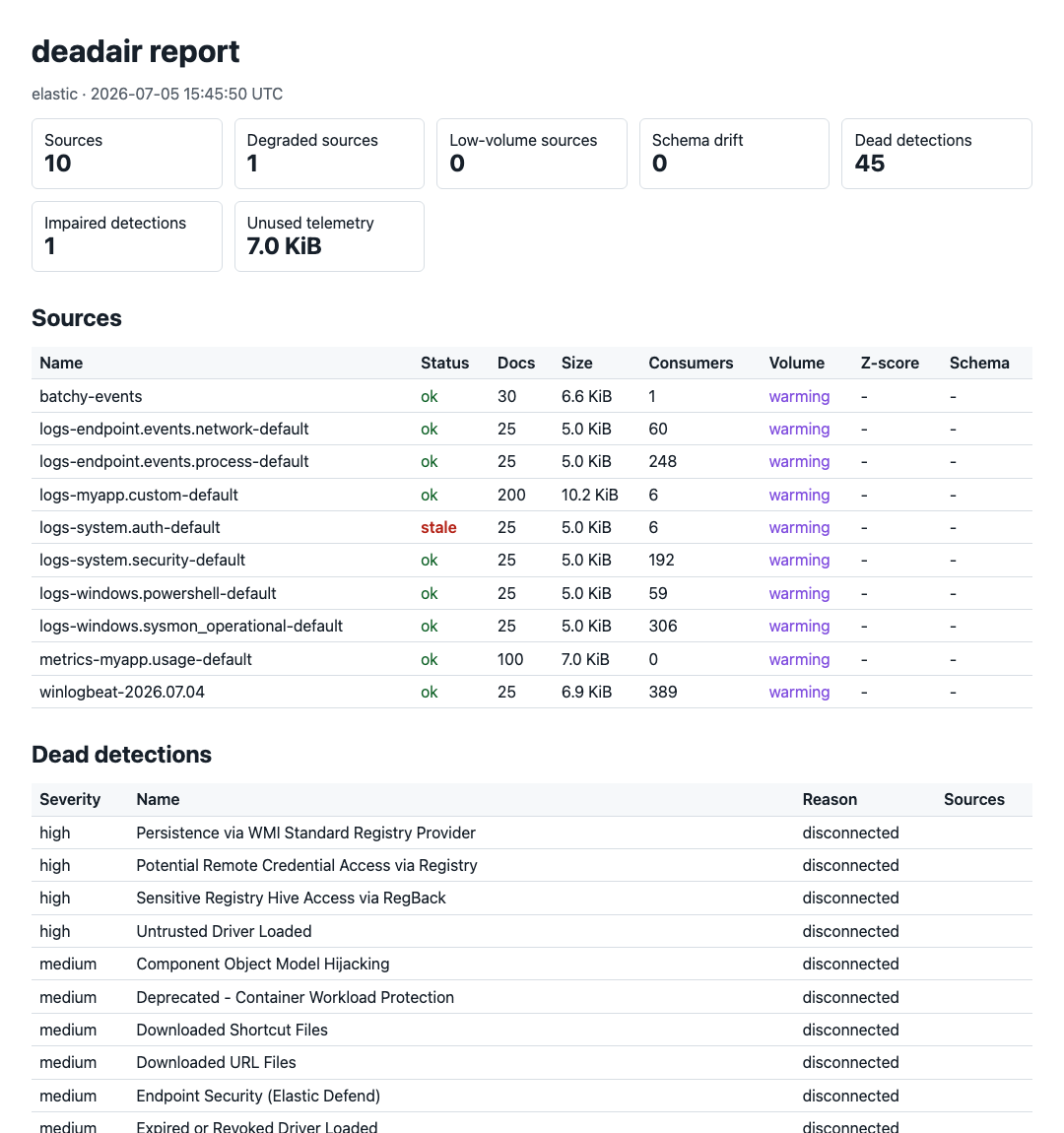
deadair v0.8.0
Finds the detection rules in your SIEM that are running blind




deadair checks whether enabled SIEM detections still have the telemetry they need.
It reports missing or stale data, ingest delays, and schema mismatches.
Runs locally · Read-only · No agent · No telemetry upload
Read the technical write-up · Featured in Detection Engineering Weekly · Featured in tl;dr sec #341
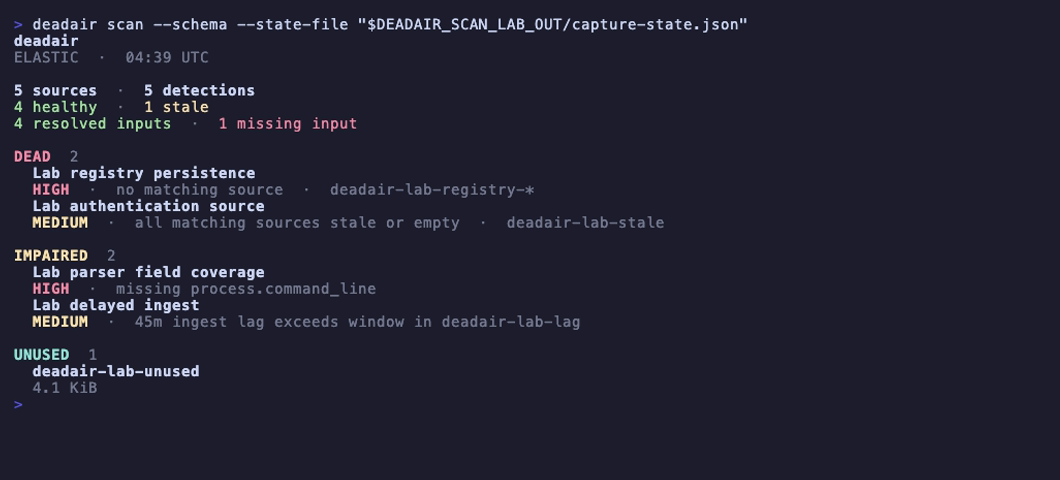
Missing fields and delayed events in a disposable Elastic lab. Open the image for the short recording with playback controls, or reproduce it with make record-scan-lab.
Why deadair
A rule can be enabled, scheduled, and error-free after the data it needs has disappeared. deadair reads the live rule inventory, resolves each rule's inputs using the backend's native semantics, and checks the concrete sources behind them.
It catches:
- rules whose index, alias, or data-stream selectors resolve to nothing;
- mixed-selector rules where one declared input has disappeared while another still resolves;
- rules whose matching sources are all stale or empty;
- on Elastic, rules running with missing declared fields;
- on Elastic and eligible Sentinel Scheduled rules, an ingest-lag blind window;
- on Sentinel, rules whose known sources use an incompatible Basic or Auxiliary table plan;
- on Elastic and OpenSearch, healthy telemetry that no enabled detection reads.
deadair supports Elastic Security, OpenSearch Security Analytics, and Microsoft Sentinel.
Quick start
Download a binary for macOS, Linux, or Windows from GitHub Releases, or install with Go:
go install github.com/alephnull-sh/deadair/cmd/deadair@latest
Print the read-only setup for your SIEM:
deadair setup elastic      # Elastic Security
deadair setup opensearch   # OpenSearch Security Analytics
deadair setup sentinel     # Microsoft Sentinel
Run one setup, then verify and scan:
deadair check   # verify the credential can scan
deadair scan    # assess live rules and telemetry
Exit codes are stable: 0 passes the configured gate, 1 means gated findings, and 2 means the scan failed.
To investigate a source and its consuming detections:
deadair scan --json-out report.json --html-out report.html
deadair inspect --source CommonSecurityLog report.json
Use a source name from your report. The investigation guide also covers individual Sentinel feeds, maintenance, and recovery tracking.
How it works
| Stage | What deadair does |
|---|---|
| Inventory | reads enabled detections and the inputs they declare |
| Resolve | uses native index resolution on Elastic and OpenSearch; on Sentinel, combines KQL analysis with table, watchlist, saved-function, ASIM, and mapped cross-workspace evidence |
| Measure | checks source freshness and timing, plus schema and storage where the backend supports them |
| Report | emits terminal, JSON, HTML, fleet rollups, and Prometheus metrics with the evidence behind each verdict |
Sentinel follows the same rule-to-source model and adds literal watchlists, saved functions, ASIM parsers, mapped workspaces, and summary-table lineage. It also shows when a filtered slice of a shared table has gone quiet or a summary pipeline has fallen behind.
The usage guide describes the evidence rules, and the validation record records the live test coverage.
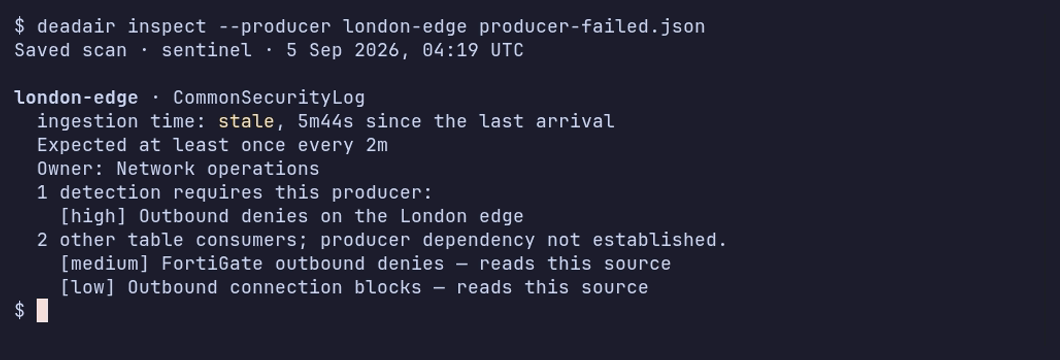
Two firewall feeds share CommonSecurityLog. One stops; the other keeps reporting. The recording shows the saved failure and recovery scans. See the validation record for the lab conditions.
deadair checks whether a detection's telemetry is present and healthy. It does not validate rule logic or prove that a simulated attack will fire an alert. Use static rule validation and end-to-end detection tests for those jobs.
Findings
| Finding | Meaning | First check |
|---|---|---|
| no matching source | none of the rule's inputs resolve to a visible index, data stream, or Sentinel table | pattern changes, missing integrations, and credential scope |
| all sources stale or empty | every resolved source is unusable right now | source cadence and the ingest path |
| missing fields | an Elastic rule-declared field is absent or non-searchable in one or more resolved sources after every source mapping was read | parser, package, and mapping changes |
| lag blind window | paired-event p95 ingest lag exceeds the rule's lookback margin | rule interval, lookback, timestamp override, and pipeline delay |
| partial input coverage | the complete expression resolves, but one positive selector within it resolves empty | migrations, fallback selectors, and expected alternatives; informational unless policy gates it |
| source plan incompatible | a Sentinel rule depends on a Basic or Auxiliary table that is not eligible for the analytics-rule evidence path | table plan and rule type |
| source degradation | a source is stale, empty, low-volume, or schema-drifted | source history and expected maintenance |
| unused telemetry | on Elastic or OpenSearch, data is being stored but no enabled local detection resolves to it | disabled rules and intentional collection |
| expected producer quiet | a configured Sentinel vendor, product, or device feed hasn't reported within its threshold | that feed's sender and collector |
| summary pipeline unhealthy | a relevant Sentinel summary job failed or its last success is overdue | the native execution record and summary query |
Producer and summary-pipeline findings affect exit status when their classes are selected in the policy. A quiet device feed is reported separately from other consumers of its shared table.