 fiddyschmitt/file-tunnel
Tunnel-TCP-Verbindungen durch eine Datei

Tunnel-TCP-Verbindungen über einen Dateiserver.
Eine vollständige Liste der unterstützten Dateisysteme finden Sie hier.
Portable ausführbare Dateien für Windows, Linux und Mac finden Sie im Bereich Releases.
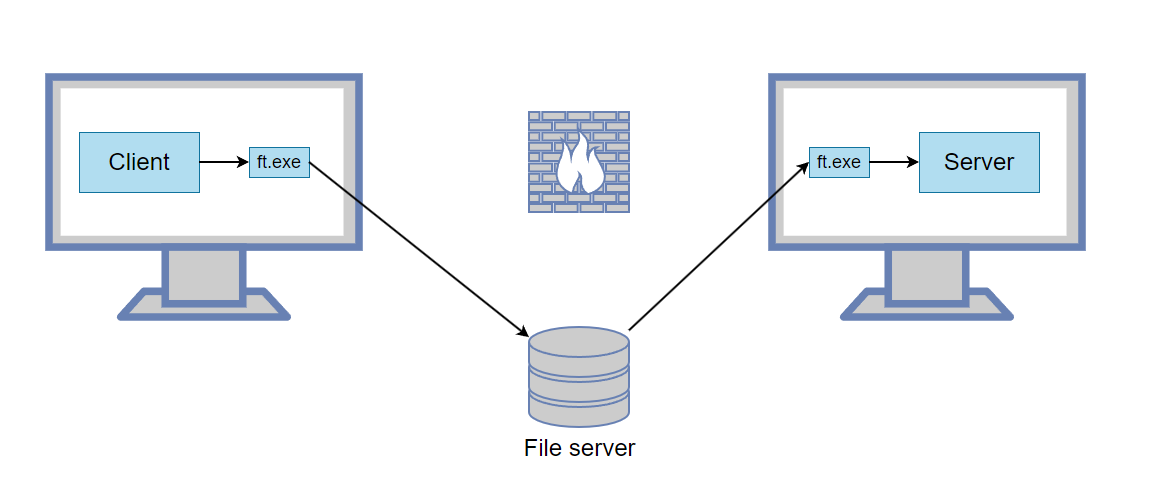
Sie möchten sich von Host A mit Host B verbinden, aber eine Firewall steht im Weg. Beide Hosts haben jedoch Zugriff auf einen freigegebenen Ordner.
ft.exe -L 5000:127.0.0.1:3389 --write "\\server\share\1.dat" --read "\\server\share\2.dat"
Dieser Befehl lauscht auf Verbindungen auf Port 5000. Wenn eine Verbindung empfangen wird, wird sie durch den Dateitunnel und anschließend an 127.0.0.1:3389 weitergeleitet.
ft.exe --read "\\server\share\1.dat" --write "\\server\share\2.dat"
Verbinden Sie nun auf Host A den Client mit 127.0.0.1:5000 und er wird an den entfernten Server weitergeleitet.
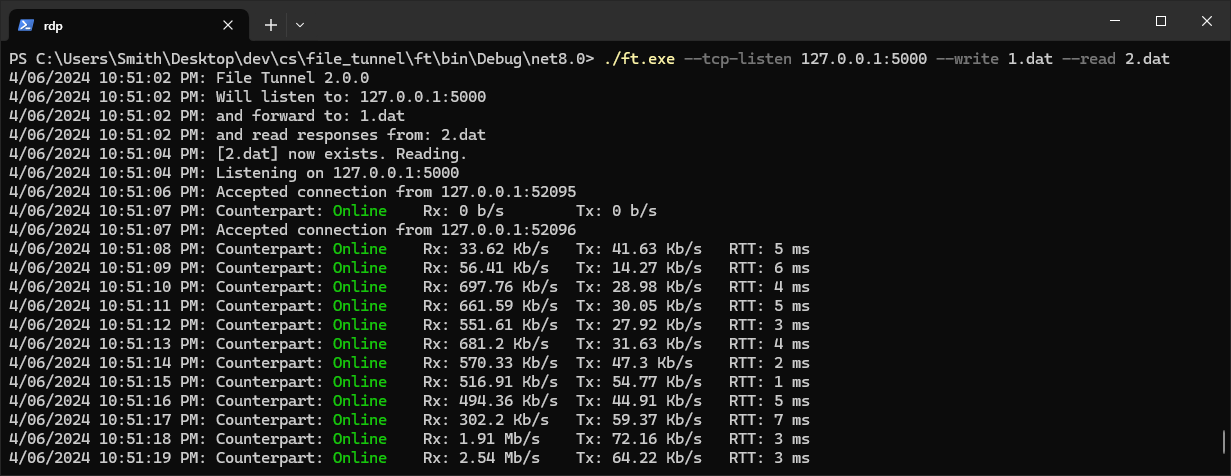
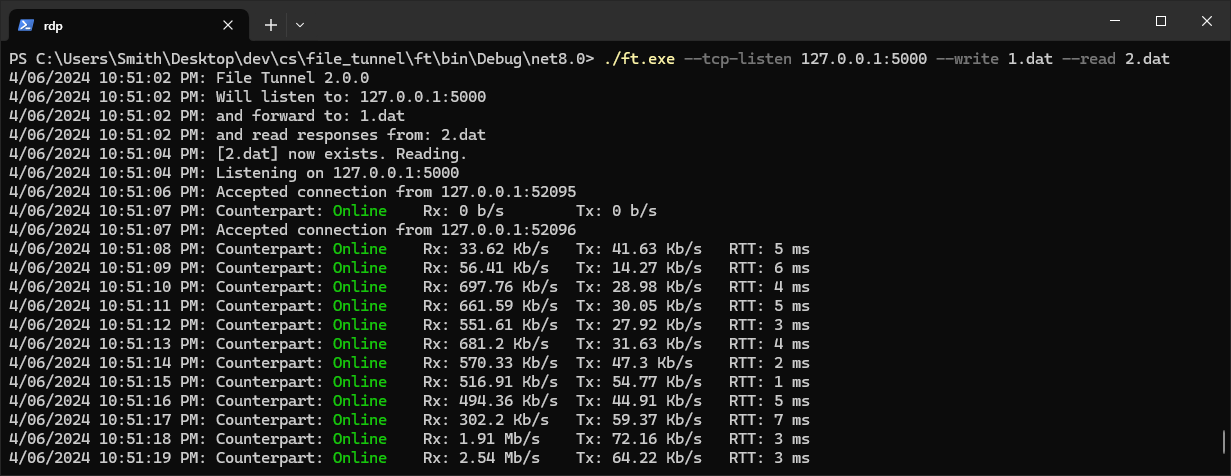
So sieht der File Tunnel im Betrieb aus:
Sie möchten sich mit einem entfernten Dienst verbinden (z. B. 192.168.1.50:8888), haben aber nur über RDP Zugriff auf Host B.
ft.exe -L 5000:192.168.1.50:8888 --write "C:\Temp\1.dat" --read "C:\Temp\2.dat"
Starten Sie einen RDP-Client und stellen Sie sicher, dass lokale Laufwerke wie hier gezeigt freigegeben sind.
RDP zu Host B.
ft.exe --read "\\tsclient\c\Temp\1.dat" --write "\\tsclient\c\Temp\2.dat"
Nun können Sie auf Host A eine Verbindung zu 127.0.0.1:5000 herstellen und diese wird an 192.168.1.50:8888 weitergeleitet.
-L kann mehrfach verwendet werden, um mehrere Ports durch denselben Tunnel weiterzuleiten.
Um anderen Computern die Nutzung des Tunnels zu ermöglichen, geben Sie eine Bindungsadresse von 0.0.0.0 an. Beispiel: -L 0.0.0.0:5000:192.168.1.50:3389 erlaubt jedem Computer im Netzwerk, sich mit dem Tunnel und damit mit 192.168.1.50:3389 zu verbinden.
Verwenden Sie -R für die Weiterleitung aus der Ferne. Beispiel: -R 5000:10.0.0.50:6000 weist die entfernte Seite an, auf Port 5000 zu lauschen, und wenn eine Verbindung empfangen wird, diese durch den Tunnel und dann über die lokale Maschine an 10.0.0.50:6000 weiterzuleiten. So können Sie einen auf Ihrer lokalen Maschine laufenden Server für andere Computer freigeben.
Verwenden Sie -D für dynamische (SOCKS-)Weiterleitung, genau wie bei SSH. Beispiel: -D 1080 startet einen SOCKS4/4a/5-Proxy auf Port 1080; jede Verbindung wird von der entfernten Seite aufgebaut, sodass Anwendungen alles erreichen können, was die entfernte Maschine erreichen kann. Ein nacktes -R 1080 (ohne Ziel) ist die Umkehrung: Es hostet den SOCKS-Proxy auf der entfernten Seite und wählt über Ihre lokale Maschine aus. Unterstützt sowohl TCP (CONNECT) als auch SOCKS5-UDP (ASSOCIATE); keine Authentifizierung.
Verwenden Sie --http-proxy für einen HTTP-Proxy. Beispiel: --http-proxy 8080 startet einen HTTP-CONNECT-Proxy auf Port 8080, der von der entfernten Seite aufgebaut wird (weisen Sie einen Browser oder curl -x http://127.0.0.1:8080 https://example.com darauf hin). Verwenden Sie --remote-http-proxy 8080, um den Proxy stattdessen auf der entfernten Seite zu hosten und über Ihre lokale Maschine auszuwählen. Nur CONNECT-Methode (HTTPS und jeder TCP-Tunnel); keine Authentifizierung.
Sie können die Internetverbindung eines anderen Computers nutzen, indem Sie diesen Anweisungen folgen.
Das Programm startet einen TCP-Listener, und wenn eine Verbindung empfangen wird, schreibt es die TCP-Daten in eine Datei. Diese Datei wird vom Gegenprogramm gelesen, das eine TCP-Verbindung aufbaut und die TCP-Daten weiterleitet. Um zu verhindern, dass die freigegebene Datei unbegrenzt wächst, wird sie immer dann bereinigt, wenn sie größer als 10 MB wird.
