Python GUI to run capemon in standalone VM. Provides a subset of CAPE (Configuration And Payload Extraction) processing and results.
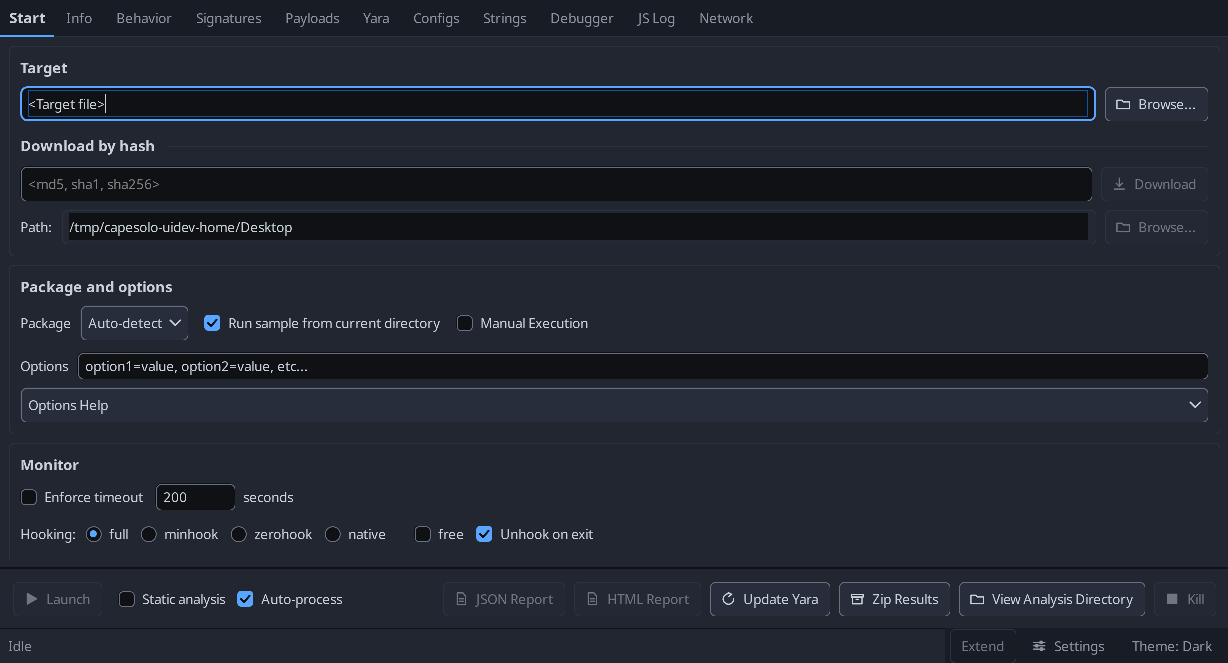
The Interface
- Tabs across the top: Start, then one per result view (Info, Behavior, Signatures, Payloads,
Yara, Configs, Strings, Debugger, JS Log, Network).
- The Start tab groups target selection, package options, monitor and logging flags into
cards; the actions (Launch, Kill, reports, Zip Results) stay pinned at the bottom of the
window, so they do not scroll away.
- Dark and light themes, switched from the status bar at the bottom right or from Settings.
The choice is written to
cfg.ini and restored on the next run.
- Process Payloads and Configs before Signatures. A signature only sees what is in
the results when it runs, and several read the payload, config and yara data - running the
pass first would quietly under-report rather than fail. The Signatures button stays disabled
until those tabs have run and its tooltip says which are outstanding.
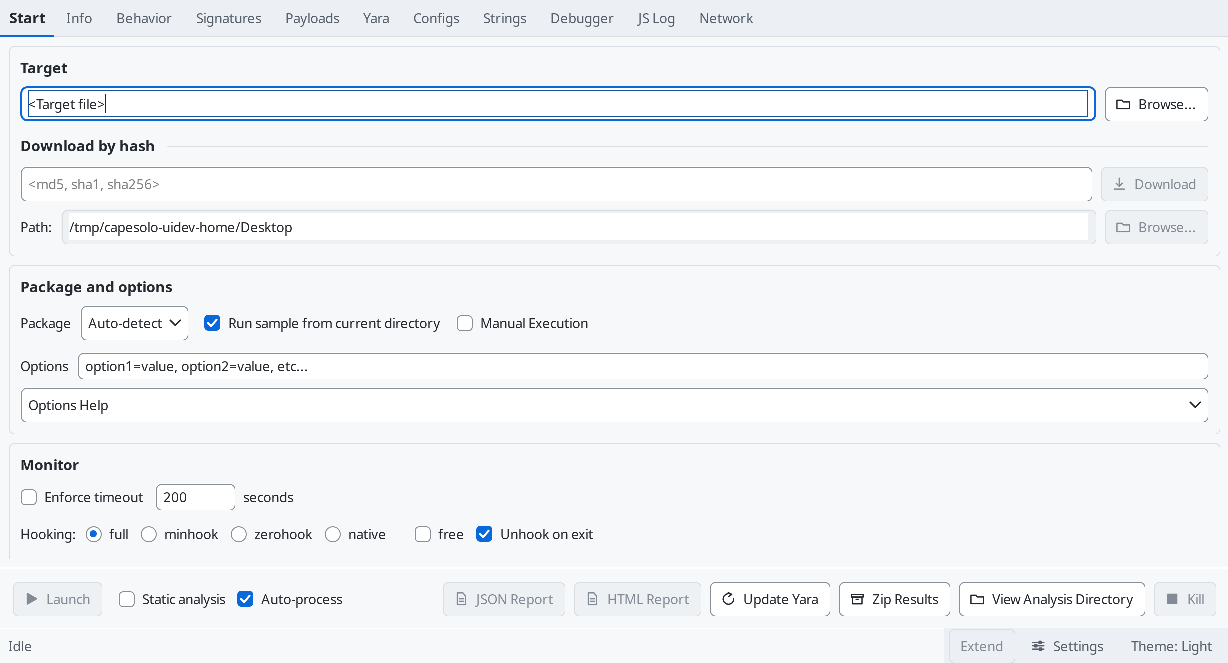
Working on the UI
-
tools/uidev/ builds the real panels off screen and writes them to PNGs, so a layout
change can be smoke-tested and screenshotted without launching an analysis. See
tools/uidev/README.md.
-
The same scripts run in CI on every pull request, on a Windows runner, and upload the
renders as an artifact.
-
Create a Windows 10 VM that's suitable for running malware.
-
Install Python in VM, tested on 64-bit Python versions 3.11, 3.12, and 3.12. Add Python to path.
-
Download and install both Microsoft Visual C++ Redistributables:
-
Install CAPEsolo.
-
Snapshot your VM.
Quick Start
- Open an administrator command window.
- Type capesolo to run.
Alternatively, create a shortcut to CAPEsolo.exe,
which will be in the Scripts subdirectory of same location as your python.exe file.
- Under Advanced, check 'Run as administrator'
- An icon file is available in the CAPEsolo install folder under site-packages.
Analysis results are found in C:\Users\Public\CAPEsolo\analysis.
- Can be configured in C:\Users\Public\CAPEsolo\cfg.ini
- Settings there override the packaged defaults in python-path\site-packages\CAPEsolo\cfg.ini,
and survive
pip install --upgrade CAPEsolo, which overwrites the packaged copy.
- Only include the keys you want to change; the rest fall back to the packaged defaults.
Community signatures
- CAPEsolo ships only its own signatures. CAPEv2 / CAPESandbox community signatures go in
C:\Users\Public\CAPEsolo\signatures (beside cfg.ini), unmodified. Update (below) can fill
its
community subfolder from https://github.com/CAPESandbox/community, or copy files there
yourself.
- Subfolders are scanned;
deprecated and linux are skipped. Files added or edited are picked
up on the next signature pass, with no restart.
- A signature there replaces a shipped one with the same name. One of your own, outside
community, also beats a same-named one inside it.
- A signature that needs a CAPEv2 module CAPEsolo does not have is skipped, and the analysis log
names the missing module. One that reads a results section CAPEsolo does not produce (Suricata,
for example) loads but never matches.
- Optional data files those signatures look for under CAPEv2's root (
extra/msft-public-ips.csv,
data/dga.bloom) are read from C:\Users\Public\CAPEsolo.
YARA rules
- CAPEsolo ships its CAPE rules. Your own rules go in C:\Users\Public\CAPEsolo\yara, and
community rules go in its
community subfolder. Both are scanned alongside the CAPE rules.
Where two files share a name: Desktop\custom wins, then your folder, then community, then
the packaged rules.
pip install --upgrade CAPEsolo puts back the packaged rules.
Update (Start tab)
- Asks what to download:
- YARA rules - CAPEsolo (ticked by default) and CAPEv2 rebuild the packaged rules (the
CAPE rules and the monitor rules capemon uses in the guest) from whichever are ticked. Where
both have a file, CAPEsolo's is used.
- YARA rules - Community replaces
yara\community with CAPESandbox/community's
data/yara/CAPE.
- Signatures - Community replaces
signatures\community with CAPESandbox/community's
modules/signatures/windows and all.
- Your own files, and the Debugger tab's saved rule, are never touched. Everything is downloaded
before anything is replaced, so a failed update keeps what was there.
- The same choices are available as
capesolo --update_yara capesolo,capev2,community (no value
means capesolo), capesolo --update_signatures, and the MCP tool capesolo_update_yara.
Reports (Start tab)
- Reports builds the JSON and/or HTML report (both ticked by default) from one pass over the
analysis. Each is written to the Desktop and into the analysis directory.
Revert the VM after each analysis.
View a JSON Report (standalone)
tools/report_viewer.py is a self-contained triage viewer for a CAPEsolo report.json that
runs on any host with just Python - no CAPEsolo install and no pip dependencies (stdlib tkinter).
python tools/report_viewer.py [path\to\report.json | path\to\bundle.zip]- A results bundle from Zip Results opens as-is: the report is read out of the zip in place, so
a full bundle's payload bytes are never written to the machine doing the triage.
- With no argument it opens
%USERPROFILE%\Desktop\report.json (where CAPEsolo writes it);
use File > Open to pick another report or bundle.
- Triage tabs: Overview (verdict card - file hashes, detections, top signatures, config, counts,
and whether anything was lost in capture), Capture (what the run stored and what it did not),
Signatures (severity-sorted, colored, with per-process evidence), Processes (the process tree
with per-process metadata), Network (DNS/HTTP/Hosts/Domains/Flows), Payloads (with yara hits
and strings), Yara (every rule hit across every scanned file, with metadata, matched strings
and offsets), and IOCs (aggregated, with Copy / Export CSV / Export text).
- The Search box (top bar) finds a value across signatures, network, payloads, configs, IOCs and
strings, and jumps to the owning tab.
- A Raw JSON tab keeps the full tree for anything the triage tabs do not surface.
- Handles large reports: the file is read with a progress bar, the raw tree loads lazily
(children on expand), and the detail panes are bounded, so it stays responsive on
hundred-MB/GB reports. (A GB report still needs several GB of RAM to parse - inherent to
Python's JSON.)
- Dark and light themes, matching the CAPEsolo GUI's palette. It follows the Windows
"app mode" setting by default (dark elsewhere); the button at the top right flips it for the
session, and
--theme dark|light forces one. The menu bar and the native Open/error dialogs
are drawn by Windows and stay light - tkinter cannot theme those.
- Needs tkinter - bundled with the standard Windows/macOS Python; on Linux install
python3-tk.